
- Forums
- Product Forums
- General Purpose MicrocontrollersGeneral Purpose Microcontrollers
- i.MX Forumsi.MX Forums
- QorIQ Processing PlatformsQorIQ Processing Platforms
- Identification and SecurityIdentification and Security
- Power ManagementPower Management
- Wireless ConnectivityWireless Connectivity
- RFID / NFCRFID / NFC
- Advanced AnalogAdvanced Analog
- Neural Processing UnitsNeural Processing Units
- MCX Microcontrollers
- S32G
- S32K
- S32V
- MPC5xxx
- Other NXP Products
- S12 / MagniV Microcontrollers
- Powertrain and Electrification Analog Drivers
- Sensors
- Vybrid Processors
- Digital Signal Controllers
- 8-bit Microcontrollers
- ColdFire/68K Microcontrollers and Processors
- PowerQUICC Processors
- OSBDM and TBDML
- S32M
- S32Z/E
-
- Solution Forums
- Software Forums
- MCUXpresso Software and ToolsMCUXpresso Software and Tools
- CodeWarriorCodeWarrior
- MQX Software SolutionsMQX Software Solutions
- Model-Based Design Toolbox (MBDT)Model-Based Design Toolbox (MBDT)
- FreeMASTER
- eIQ Machine Learning Software
- Embedded Software and Tools Clinic
- S32 SDK
- S32 Design Studio
- GUI Guider
- Zephyr Project
- Voice Technology
- Application Software Packs
- Secure Provisioning SDK (SPSDK)
- Processor Expert Software
- Generative AI & LLMs
-
- Topics
- Mobile Robotics - Drones and RoversMobile Robotics - Drones and Rovers
- NXP Training ContentNXP Training Content
- University ProgramsUniversity Programs
- Rapid IoT
- NXP Designs
- SafeAssure-Community
- OSS Security & Maintenance
- Using Our Community
-
- Cloud Lab Forums
-
- Knowledge Bases
- ARM Microcontrollers
- i.MX Processors
- Identification and Security
- Model-Based Design Toolbox (MBDT)
- QorIQ Processing Platforms
- S32 Automotive Processing Platform
- Wireless Connectivity
- CodeWarrior
- MCUXpresso Suite of Software and Tools
- MQX Software Solutions
- RFID / NFC
- Advanced Analog
- Neural Processing Units
-
- NXP Tech Blogs
- Home
- :
- ソフトウェア・フォーラム
- :
- S32 デザインスタジオ
- :
- Re: problem while install IAR plugin into S32DS ARM
problem while install IAR plugin into S32DS ARM
- RSS フィードを購読する
- トピックを新着としてマーク
- トピックを既読としてマーク
- このトピックを現在のユーザーにフロートします
- ブックマーク
- 購読
- ミュート
- 印刷用ページ

- 新着としてマーク
- ブックマーク
- 購読
- ミュート
- RSS フィードを購読する
- ハイライト
- 印刷
- 不適切なコンテンツを報告
i tried to install IAR plugin into S32DS but get the following errors ,
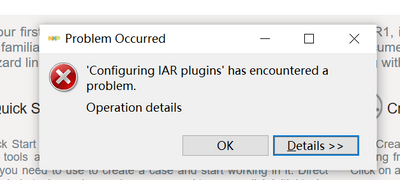
Operation details
Cannot complete the install because one or more required items could not be found.
Software being installed: IAR Common Components 3.0.0.202011101213 (com.iar.common.feature.feature.group 3.0.0.202011101213)
Missing requirement: EMF Ecore 2.13.0.v20170609-0707 (org.eclipse.emf.ecore 2.13.0.v20170609-0707) requires 'bundle org.eclipse.emf.common [2.13.0,3.0.0)' but it could not be found
Cannot satisfy dependency:
From: IAR Common Components 3.0.0.202011101213 (com.iar.common.feature.feature.group 3.0.0.202011101213)
To: org.eclipse.emf.ecore.feature.group [2.13.0,3.0.0)
Cannot satisfy dependency:
From: EMF - Eclipse Modeling Framework Core Runtime 2.13.0.v20170609-0707 (org.eclipse.emf.ecore.feature.group 2.13.0.v20170609-0707)
To: org.eclipse.emf.ecore [2.13.0.v20170609-0707
解決済! 解決策の投稿を見る。

- 新着としてマーク
- ブックマーク
- 購読
- ミュート
- RSS フィードを購読する
- ハイライト
- 印刷
- 不適切なコンテンツを報告
I don't know if it solved the problem, but there is no answer, so I answer.
In my opinion, what I used to do in the past seems to have changed some dependencies.
After seeing the missing EMF message, I accessed the Eclipse site and received the version of the emf package that caused the problem and installed it directly from S32DS.
Get the EMF-Updates-2.13 file from http://download.eclipse.org/modeling/emf/emf/builds/release/2.13/index.html
Select the compressed file downloaded from Install New Software -> Add -> Archive and install all EMF related files. So I solved this problem.
I hope you have good results too.
- 新着としてマーク
- ブックマーク
- 購読
- ミュート
- RSS フィードを購読する
- ハイライト
- 印刷
- 不適切なコンテンツを報告
I don't know if it solved the problem, but there is no answer, so I answer.
In my opinion, what I used to do in the past seems to have changed some dependencies.
After seeing the missing EMF message, I accessed the Eclipse site and received the version of the emf package that caused the problem and installed it directly from S32DS.
Get the EMF-Updates-2.13 file from http://download.eclipse.org/modeling/emf/emf/builds/release/2.13/index.html
Select the compressed file downloaded from Install New Software -> Add -> Archive and install all EMF related files. So I solved this problem.
I hope you have good results too.
- 新着としてマーク
- ブックマーク
- 購読
- ミュート
- RSS フィードを購読する
- ハイライト
- 印刷
- 不適切なコンテンツを報告
- 新着としてマーク
- ブックマーク
- 購読
- ミュート
- RSS フィードを購読する
- ハイライト
- 印刷
- 不適切なコンテンツを報告
I
- 新着としてマーク
- ブックマーク
- 購読
- ミュート
- RSS フィードを購読する
- ハイライト
- 印刷
- 不適切なコンテンツを報告
I have the same issue. Is this a fixed?
- 新着としてマーク
- ブックマーク
- 購読
- ミュート
- RSS フィードを購読する
- ハイライト
- 印刷
- 不適切なコンテンツを報告
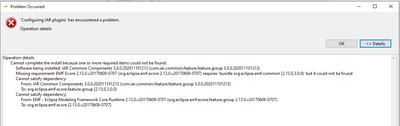
Was there ever a solution to this? I am facing the same issue while trying to install S32DS Version 2018.R1 and IAR Embedded Workbench 8.30.1. They worked great together on my previous laptop, but installing them on my new one using the same installers is producing the issue described above... (and shown below in the snapshot.)
- 新着としてマーク
- ブックマーク
- 購読
- ミュート
- RSS フィードを購読する
- ハイライト
- 印刷
- 不適切なコンテンツを報告
S32DS for ARM 2018.R1

 jiri_kral
- 新着としてマーク
- ブックマーク
- 購読
- ミュート
- RSS フィードを購読する
- ハイライト
- 印刷
- 不適切なコンテンツを報告
Hi,
you are probably trying install unsupported IAR version - https://community.nxp.com/t5/S32-Design-Studio/IAR-Plugin-Issue-for-S32K-Design-Studio/m-p/1190948#M...
Jiri
- 新着としてマーク
- ブックマーク
- 購読
- ミュート
- RSS フィードを購読する
- ハイライト
- 印刷
- 不適切なコンテンツを報告
I tried the S32DS 2.2 get the same error.
jiri_kral
- 新着としてマーク
- ブックマーク
- 購読
- ミュート
- RSS フィードを購読する
- ハイライト
- 印刷
- 不適切なコンテンツを報告
Hi,
here is step by step guide how to install lAR plugin - https://community.nxp.com/t5/S32-Design-Studio-Knowledge-Base/HOWTO-Install-IAR-Eclipse-plug-in-into...
Hope it helps.
Jiri
jiri_kral
- 新着としてマーク
- ブックマーク
- 購読
- ミュート
- RSS フィードを購読する
- ハイライト
- 印刷
- 不適切なコンテンツを報告
Hi,
same question as on the other IAR thread - what is your S3DS Version?
BR,
Jiri
- 新着としてマーク
- ブックマーク
- 購読
- ミュート
- RSS フィードを購読する
- ハイライト
- 印刷
- 不適切なコンテンツを報告
it‘s S32DS FOR ARM 2018.R1.
