
- Forums
- Product Forums
- General Purpose MicrocontrollersGeneral Purpose Microcontrollers
- i.MX Forumsi.MX Forums
- QorIQ Processing PlatformsQorIQ Processing Platforms
- Identification and SecurityIdentification and Security
- Power ManagementPower Management
- Wireless ConnectivityWireless Connectivity
- RFID / NFCRFID / NFC
- Advanced AnalogAdvanced Analog
- Neural Processing UnitsNeural Processing Units
- MCX Microcontrollers
- S32G
- S32K
- S32V
- MPC5xxx
- Other NXP Products
- S12 / MagniV Microcontrollers
- Powertrain and Electrification Analog Drivers
- Sensors
- Vybrid Processors
- Digital Signal Controllers
- 8-bit Microcontrollers
- ColdFire/68K Microcontrollers and Processors
- PowerQUICC Processors
- OSBDM and TBDML
- S32M
- S32Z/E
-
- Solution Forums
- Software Forums
- MCUXpresso Software and ToolsMCUXpresso Software and Tools
- CodeWarriorCodeWarrior
- MQX Software SolutionsMQX Software Solutions
- Model-Based Design Toolbox (MBDT)Model-Based Design Toolbox (MBDT)
- FreeMASTER
- eIQ Machine Learning Software
- Embedded Software and Tools Clinic
- S32 SDK
- S32 Design Studio
- GUI Guider
- Zephyr Project
- Voice Technology
- Application Software Packs
- Secure Provisioning SDK (SPSDK)
- Processor Expert Software
- Generative AI & LLMs
-
- Topics
- Mobile Robotics - Drones and RoversMobile Robotics - Drones and Rovers
- NXP Training ContentNXP Training Content
- University ProgramsUniversity Programs
- Rapid IoT
- NXP Designs
- SafeAssure-Community
- OSS Security & Maintenance
- Using Our Community
-
- Cloud Lab Forums
-
- Knowledge Bases
- ARM Microcontrollers
- i.MX Processors
- Identification and Security
- Model-Based Design Toolbox (MBDT)
- QorIQ Processing Platforms
- S32 Automotive Processing Platform
- Wireless Connectivity
- CodeWarrior
- MCUXpresso Suite of Software and Tools
- MQX Software Solutions
- RFID / NFC
- Advanced Analog
- Neural Processing Units
-
- NXP Tech Blogs
- Home
- :
- Software Forums
- :
- S32 Design Studio
- :
- Re: S32DS for ARM v2.2 activation error
S32DS for ARM v2.2 activation error
- Subscribe to RSS Feed
- Mark Topic as New
- Mark Topic as Read
- Float this Topic for Current User
- Bookmark
- Subscribe
- Mute
- Printer Friendly Page

- Mark as New
- Bookmark
- Subscribe
- Mute
- Subscribe to RSS Feed
- Permalink
- Report Inappropriate Content
I install S32DS for ARM v2.2 on my laptop, it's activatation error. My laptop information include:
CPU: AMD Ryzen 7 PRO 6850HS
OS: Windows 11 Home Basic 22H2
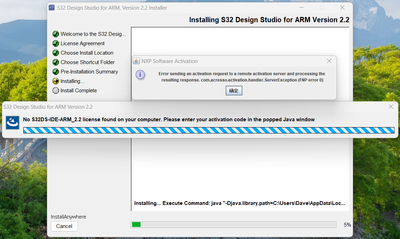
Please help!
Solved! Go to Solution.

 mikedoidge
- Mark as New
- Bookmark
- Subscribe
- Mute
- Subscribe to RSS Feed
- Permalink
- Report Inappropriate Content
Hello,
I'm sorry for all of the difficulties.
Please try these commands:
1) java -Djava.library.path=D:\NXP\CLL_FNP.11.18.0.2\lib\ -jar com.nxp.s32ds.rcp.license.core.jar install -prod S32DS-IDE-ARM_2.2
2) java -Djava.library.path=D:\NXP\CLL_FNP.11.18.0.2\lib\ -jar com.nxp.s32ds.rcp.license.core.jar activate -actid 8AF8-2BC1-1919-26A8
3) java -Djava.library.path=D:\NXP\CLL_FNP.11.18.0.2\lib\ -jar com.nxp.s32ds.rcp.license.core.jar list
It seems we need to get this installed BEFORE you try the command:
D:/NXP/S32DS_ARM_V2.2/jre/bin/java -Djava.library.path=D:/NXP/Activation/cll/i86 -jar D:/NXP/Activation/license.jar" activateUI
However, if you use the second command above, and it works, then you won't need to perform the activateUI command.
Best Regards,
Mike
mikedoidge
- Mark as New
- Bookmark
- Subscribe
- Mute
- Subscribe to RSS Feed
- Permalink
- Report Inappropriate Content
Hello @LatromPu,
There are 2 possible causes for this issue.
1) It could be that your firewall is blocking access to the activation server. If this is the case, it can be resolved by either activating from another network or device outside of your current network or by using the offline activation method.
2) It could be the issue described under error 2 in the troubleshooting article:
Troubleshooting: Activation fails with error messa... - NXP Community
Best Regards,
Mike
- Mark as New
- Bookmark
- Subscribe
- Mute
- Subscribe to RSS Feed
- Permalink
- Report Inappropriate Content
Hi @mikedoidge ,
I try to use 5G net to activation the s32ds, and download the CLL_FNP file. it show can't find dependent libraries, whether should i download other libraries?
 mikedoidge
- Mark as New
- Bookmark
- Subscribe
- Mute
- Subscribe to RSS Feed
- Permalink
- Report Inappropriate Content
Hi @LatromPu,
Did you try the offline activation method? it is described in the installation guide and here:
HOWTO: Activate S32 Design Studio
Could you please execute the command: java -version
It could be the wrong version of java is used. S32DS install includes the correct version, but since your install is not completing, it may not be available when you use the CLL_FNP activation method.
If you try to install to C:\ instead of D:\, is the issue the same?
Best Regards,
Mike
- Mark as New
- Bookmark
- Subscribe
- Mute
- Subscribe to RSS Feed
- Permalink
- Report Inappropriate Content

 mikedoidge
- Mark as New
- Bookmark
- Subscribe
- Mute
- Subscribe to RSS Feed
- Permalink
- Report Inappropriate Content
Hello,
There is another possible solution to this issue:
Use the attached archive.
Enter the following command replacing the paths as noted. It should be possible to execute from CMD window located at any path. Make sure to use the ‘/’ instead of ‘\’ and if you have any paths with spaces, then enclose the full path with “.
C:/NXP/S32DS.3.5/jre/bin/java -Djava.library.path="{path to where you extracted the activation.zip}/Activation/cll/x64" -jar "{path to where you extracted the activation.zip}/Activation/license.jar" activateUI
Please try this and let us know if the issue is solved.
Best Regards,
Mike
- Mark as New
- Bookmark
- Subscribe
- Mute
- Subscribe to RSS Feed
- Permalink
- Report Inappropriate Content

 mikedoidge
- Mark as New
- Bookmark
- Subscribe
- Mute
- Subscribe to RSS Feed
- Permalink
- Report Inappropriate Content
Hi,
My apologies, I copied the instructions from my notes. I see you used the x64 version of the CLL libraries, since your machine has 32-bit, you should use the 'i86' CLL libraries for the 32-bit version. Please try the steps again.
Best Regards,
Mike
- Mark as New
- Bookmark
- Subscribe
- Mute
- Subscribe to RSS Feed
- Permalink
- Report Inappropriate Content
 mikedoidge
- Mark as New
- Bookmark
- Subscribe
- Mute
- Subscribe to RSS Feed
- Permalink
- Report Inappropriate Content
Hello,
I'm sorry for all of the difficulties.
Please try these commands:
1) java -Djava.library.path=D:\NXP\CLL_FNP.11.18.0.2\lib\ -jar com.nxp.s32ds.rcp.license.core.jar install -prod S32DS-IDE-ARM_2.2
2) java -Djava.library.path=D:\NXP\CLL_FNP.11.18.0.2\lib\ -jar com.nxp.s32ds.rcp.license.core.jar activate -actid 8AF8-2BC1-1919-26A8
3) java -Djava.library.path=D:\NXP\CLL_FNP.11.18.0.2\lib\ -jar com.nxp.s32ds.rcp.license.core.jar list
It seems we need to get this installed BEFORE you try the command:
D:/NXP/S32DS_ARM_V2.2/jre/bin/java -Djava.library.path=D:/NXP/Activation/cll/i86 -jar D:/NXP/Activation/license.jar" activateUI
However, if you use the second command above, and it works, then you won't need to perform the activateUI command.
Best Regards,
Mike
- Mark as New
- Bookmark
- Subscribe
- Mute
- Subscribe to RSS Feed
- Permalink
- Report Inappropriate Content
Dear @mikedoidge ,
This problem solved, thank you very much.
 VaneB
VaneB
- Mark as New
- Bookmark
- Subscribe
- Mute
- Subscribe to RSS Feed
- Permalink
- Report Inappropriate Content
Hi @LatromPu
For S32 Design Studio for Arm it's supported host operating systems (OS):
- Microsoft Windows® 7/8/10 (32- and 64-bit)
- Ubuntu 16.04 (64-bit)
- Debian 8 (64-bit)
- CentOS 7 (64-bit)
B.R.
VaneB
- Mark as New
- Bookmark
- Subscribe
- Mute
- Subscribe to RSS Feed
- Permalink
- Report Inappropriate Content
Hi, @VaneB ,
Do you mean it can't work on Windows 11(64-bit)?
VaneB
- Mark as New
- Bookmark
- Subscribe
- Mute
- Subscribe to RSS Feed
- Permalink
- Report Inappropriate Content
Hi @LatromPu
This IDE was not tested on Windows 11, so the OS versions for which the product was not tested are not usually supported.
