How to Change MCU with MCUXpresso

cancel
Showing results for 
Show  only  | Search instead for 
Did you mean: 

How to Change MCU with MCUXpresso

How to Change MCU with MCUXpresso

Recently I found some customers have a bit of problem when porting project from one MCU to another, so this article using simple steps demonstrates how to change MCU with MCUXpresso. There is also a video demonstrated the detail steps in attachment.

Pay attention, as MCUXpresso User Guide says: All projects are associated with a particular MCU at creation time. The target MCU determines the project memory layout, startup code, LinkServer flash driver, libraries, supporting sources,launch configuration options etc. etc. so changing a project’s associated MCU should not be undertaken unless you have a total grasp of the consequence of this change. Therefore rather than changing a project’s associated MCU, it is strongly recommended that instead a new project is generated for the desired MCU and this new project is edited as required.

However, on occasion it may be expedient to reset a project’s MCU (and associated SDK) and this can be achieved as follows. For example, changing lpc55s69 to lpc55s06, we need install SDKs for lpc55s69 and lpc55s06 before all the below steps.

1 - Change MCU & Package

1.1 – Change MCU

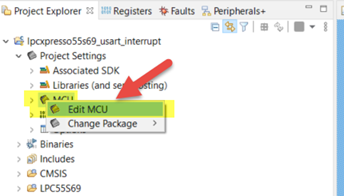
Right click “MCU” under Project tree, choose “Edit MCU”
Alice_Yang_0-1627442238840.png

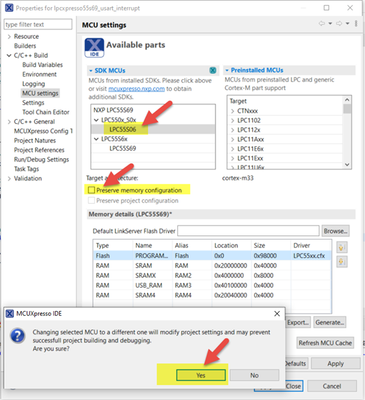
Uncheck ”Preserve memory configuration”(it is checked by default)->choose LPC55S06->there is a warning, choose Yes.
Alice_Yang_1-1627442319505.png

We can see the Memory details changed to lpc55s06, then click ”Apply and close”.

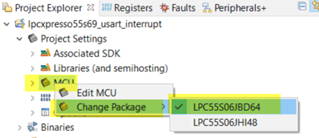
1.2 – Change Package
Alice_Yang_2-1627442363050.png

2 - Change Compiler Definitions

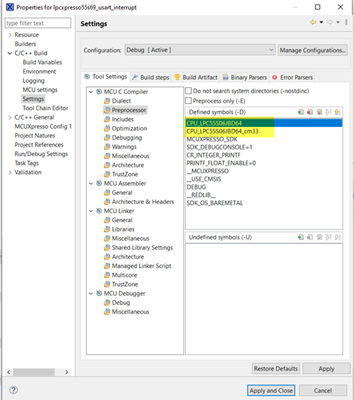
In Properties view->Settings->MCU Compiler ->Preprocessor, change the definition for CPU from LPC55S69JBD100 to LPC55S06JBD64 as below:
Alice_Yang_3-1627442471807.png

3 – Change/add SDK driver for LPC55s06

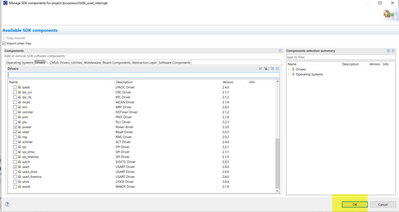
Selected project, then click ”Manage SDK components”, choose the drivers our application used, for example, clock, power, usart.

Alice_Yang_4-1627442521094.png

Alice_Yang_6-1627442556603.png

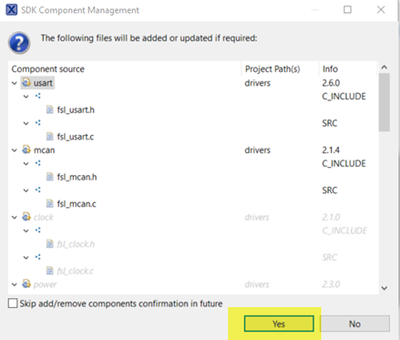
Click “OK”, then click “Yes” to update.
Alice_Yang_7-1627442569628.png

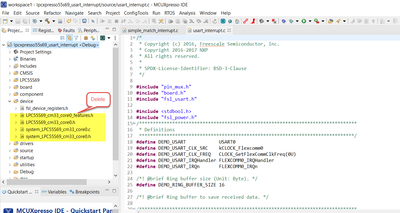
Delete LPC55S69 device related files:
Alice_Yang_0-1636704852972.png

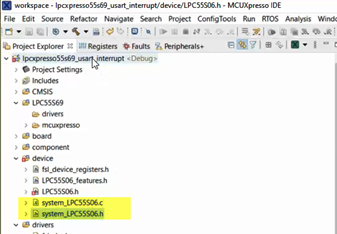
Add “system_LPC55S06.c” and “system_LPC55S06.h” files:
Alice_Yang_9-1627442604431.png

4 - Change startup file.

Delete LPC55s69 startup files, add “startup_lpc55s06.c”, we can find the startup file in any SDK demo.

Alice_Yang_10-1627442631217.png

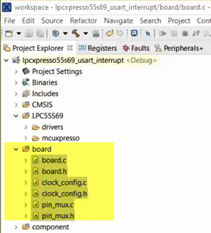
5 - Change board related files.

Refer to our own new board, change files under “board” folder, for example pins, uart number, here directly copy from SDK demo for LPCxpresso55s06 board.
Alice_Yang_12-1627442675241.png

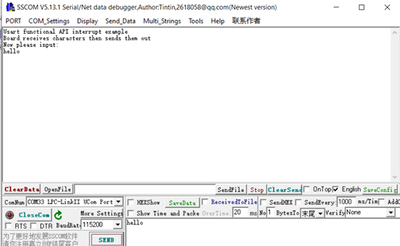
6 - Test the project  function with new board

Build project until no compile error, download and run it, result as below.
Alice_Yang_11-1627442661014.png


Attachments
Comments

Thanks for providing these instructions.

I my opinion: at least for switching the MCU to a compatible model within an mcu family (e.g., same device but with more memory), this process should be made a lot easier.

Also, whenever possible, keep the selected SDK components, see the "SDK components" issue here: also: https://community.nxp.com/t5/MCUXpresso-IDE/quot-Manage-SDK-Components-quot-stops-working-after-swit...

%3CLINGO-SUB%20id%3D%22lingo-sub-1314209%22%20slang%3D%22en-US%22%20mode%3D%22CREATE%22%3EHow%20to%20Change%20MCU%20with%20MCUXpresso%3C%2FLINGO-SUB%3E%3CLINGO-BODY%20id%3D%22lingo-body-1314209%22%20slang%3D%22en-US%22%20mode%3D%22CREATE%22%3E%3CP%20class%3D%22lia-align-justify%22%20style%3D%22text-align%20%3A%20justify%3B%22%20style%3D%22text-align%20%3A%20justify%3B%22%3ERecently%20I%20found%20some%20customers%20have%20a%20bit%20of%20problem%20when%20porting%20project%20from%20one%20MCU%20to%20another%2C%20so%20this%20article%20using%20simple%20steps%20demonstrates%20how%20to%20change%20MCU%20with%20MCUXpresso.%20There%20is%20also%20a%20video%20demonstrated%20the%20detail%20steps%20in%20attachment.%3C%2FP%3E%0A%3CP%20class%3D%22lia-align-justify%22%20style%3D%22text-align%20%3A%20justify%3B%22%20style%3D%22text-align%20%3A%20justify%3B%22%3E%3CSTRONG%3EPay%20attention%3C%2FSTRONG%3E%2C%20as%20MCUXpresso%20User%20Guide%20says%3A%20All%20projects%20are%20associated%20with%20a%20particular%20MCU%20at%20creation%20time.%20The%20target%20MCU%20determines%20the%20project%20memory%20layout%2C%20startup%20code%2C%20LinkServer%20flash%20driver%2C%20libraries%2C%20supporting%20sources%2Claunch%20configuration%20options%20etc.%20etc.%20so%20changing%20a%20project%E2%80%99s%20associated%20MCU%20should%20not%20be%20undertaken%20unless%20you%20have%20a%20total%20grasp%20of%20the%20consequence%20of%20this%20change.%20Therefore%20rather%20than%20changing%20a%20project%E2%80%99s%20associated%20MCU%2C%20it%20is%20strongly%20recommended%20that%20instead%20a%20new%20project%20is%20generated%20for%20the%20desired%20MCU%20and%20this%20new%20project%20is%20edited%20as%20required.%3C%2FP%3E%0A%3CP%20class%3D%22lia-align-justify%22%20style%3D%22text-align%20%3A%20justify%3B%22%20style%3D%22text-align%20%3A%20justify%3B%22%3EHowever%2C%20on%20occasion%20it%20may%20be%20expedient%20to%20reset%20a%20project%E2%80%99s%20MCU%20(and%20associated%20SDK)%20and%20this%20can%20be%20achieved%20as%20follows.%20For%20example%2C%20changing%20lpc55s69%20to%20lpc55s06%2C%20we%20need%20install%20SDKs%20for%20lpc55s69%20and%20lpc55s06%20before%20all%20the%20below%20steps.%3C%2FP%3E%0A%3CP%3E%3CSTRONG%3E1%20-%20Change%20MCU%20%26amp%3B%20Package%3C%2FSTRONG%3E%3C%2FP%3E%0A%3CP%3E1.1%20%E2%80%93%20Change%20MCU%3C%2FP%3E%0A%3CP%20class%3D%22lia-align-justify%22%20style%3D%22text-align%20%3A%20justify%3B%22%20style%3D%22text-align%20%3A%20justify%3B%22%3ERight%20click%20%E2%80%9CMCU%E2%80%9D%20under%20Project%20tree%2C%20choose%20%E2%80%9CEdit%20MCU%E2%80%9D%3C%2FP%3E%0A%3CP%3E%3CSPAN%20class%3D%22lia-inline-image-display-wrapper%20lia-image-align-inline%22%20image-alt%3D%22Alice_Yang_0-1627442238840.png%22%20style%3D%22width%3A%20400px%3B%22%3E%3Cspan%20class%3D%22lia-inline-image-display-wrapper%22%20image-alt%3D%22Alice_Yang_0-1627442238840.png%22%20style%3D%22width%3A%20344px%3B%22%3E%3Cimg%20src%3D%22https%3A%2F%2Fcommunity.nxp.com%2Ft5%2Fimage%2Fserverpage%2Fimage-id%2F151035i9C63FC9D0CEC815E%2Fimage-size%2Fmedium%3Fv%3Dv2%26amp%3Bpx%3D400%22%20role%3D%22button%22%20title%3D%22Alice_Yang_0-1627442238840.png%22%20alt%3D%22Alice_Yang_0-1627442238840.png%22%20%2F%3E%3C%2Fspan%3E%3C%2FSPAN%3E%3C%2FP%3E%0A%3CP%3E%3CSTRONG%3EUncheck%20%E2%80%9DPreserve%20memory%20configuration%E2%80%9D%3C%2FSTRONG%3E(it%20is%20checked%20by%20default)-%26gt%3Bchoose%20LPC55S06-%26gt%3Bthere%20is%20a%20warning%2C%20choose%20Yes.%3C%2FP%3E%0A%3CP%3E%3CSPAN%20class%3D%22lia-inline-image-display-wrapper%20lia-image-align-inline%22%20image-alt%3D%22Alice_Yang_1-1627442319505.png%22%20style%3D%22width%3A%20400px%3B%22%3E%3Cspan%20class%3D%22lia-inline-image-display-wrapper%22%20image-alt%3D%22Alice_Yang_1-1627442319505.png%22%20style%3D%22width%3A%20365px%3B%22%3E%3Cimg%20src%3D%22https%3A%2F%2Fcommunity.nxp.com%2Ft5%2Fimage%2Fserverpage%2Fimage-id%2F151036i4316DCD6BA02B7F9%2Fimage-size%2Fmedium%3Fv%3Dv2%26amp%3Bpx%3D400%22%20role%3D%22button%22%20title%3D%22Alice_Yang_1-1627442319505.png%22%20alt%3D%22Alice_Yang_1-1627442319505.png%22%20%2F%3E%3C%2Fspan%3E%3C%2FSPAN%3E%3C%2FP%3E%0A%3CP%3EWe%20can%20see%20the%20Memory%20details%20changed%20to%20lpc55s06%2C%20then%20click%20%E2%80%9DApply%20and%20close%E2%80%9D.%3C%2FP%3E%0A%3CP%3E1.2%20%E2%80%93%20Change%20Package%3C%2FP%3E%0A%3CP%3E%3CSPAN%20class%3D%22lia-inline-image-display-wrapper%20lia-image-align-inline%22%20image-alt%3D%22Alice_Yang_2-1627442363050.png%22%20style%3D%22width%3A%20400px%3B%22%3E%3Cspan%20class%3D%22lia-inline-image-display-wrapper%22%20image-alt%3D%22Alice_Yang_2-1627442363050.png%22%20style%3D%22width%3A%20319px%3B%22%3E%3Cimg%20src%3D%22https%3A%2F%2Fcommunity.nxp.com%2Ft5%2Fimage%2Fserverpage%2Fimage-id%2F151037i16FE49EA56D2E08A%2Fimage-size%2Fmedium%3Fv%3Dv2%26amp%3Bpx%3D400%22%20role%3D%22button%22%20title%3D%22Alice_Yang_2-1627442363050.png%22%20alt%3D%22Alice_Yang_2-1627442363050.png%22%20%2F%3E%3C%2Fspan%3E%3C%2FSPAN%3E%3C%2FP%3E%0A%3CP%3E%3CSTRONG%3E2%20-%20Change%20Compiler%20Definitions%3C%2FSTRONG%3E%3C%2FP%3E%0A%3CP%3EIn%20Properties%20view-%26gt%3BSettings-%26gt%3BMCU%20Compiler%20-%26gt%3BPreprocessor%2C%20change%20the%20definition%20for%20CPU%20from%20LPC55S69JBD100%20to%20LPC55S06JBD64%20as%20below%3A%3C%2FP%3E%0A%3CP%3E%3CSPAN%20class%3D%22lia-inline-image-display-wrapper%20lia-image-align-inline%22%20image-alt%3D%22Alice_Yang_3-1627442471807.png%22%20style%3D%22width%3A%20400px%3B%22%3E%3Cspan%20class%3D%22lia-inline-image-display-wrapper%22%20image-alt%3D%22Alice_Yang_3-1627442471807.png%22%20style%3D%22width%3A%20354px%3B%22%3E%3Cimg%20src%3D%22https%3A%2F%2Fcommunity.nxp.com%2Ft5%2Fimage%2Fserverpage%2Fimage-id%2F151038iA784FFFF14FB171C%2Fimage-size%2Fmedium%3Fv%3Dv2%26amp%3Bpx%3D400%22%20role%3D%22button%22%20title%3D%22Alice_Yang_3-1627442471807.png%22%20alt%3D%22Alice_Yang_3-1627442471807.png%22%20%2F%3E%3C%2Fspan%3E%3C%2FSPAN%3E%3C%2FP%3E%0A%3CP%3E%3CSTRONG%3E3%20%E2%80%93%20Change%2Fadd%20SDK%20driver%20for%20LPC55s06%3C%2FSTRONG%3E%3C%2FP%3E%0A%3CP%3ESelected%20project%2C%20then%20click%20%E2%80%9DManage%20SDK%20components%E2%80%9D%2C%20choose%20the%20drivers%20our%20application%20used%2C%20for%20example%2C%20clock%2C%20power%2C%20usart.%3C%2FP%3E%0A%3CP%3E%3CSPAN%20class%3D%22lia-inline-image-display-wrapper%20lia-image-align-inline%22%20image-alt%3D%22Alice_Yang_4-1627442521094.png%22%20style%3D%22width%3A%20400px%3B%22%3E%3Cspan%20class%3D%22lia-inline-image-display-wrapper%22%20image-alt%3D%22Alice_Yang_4-1627442521094.png%22%20style%3D%22width%3A%20284px%3B%22%3E%3Cimg%20src%3D%22https%3A%2F%2Fcommunity.nxp.com%2Ft5%2Fimage%2Fserverpage%2Fimage-id%2F151039i936DC0951B8C8A88%2Fimage-size%2Fmedium%3Fv%3Dv2%26amp%3Bpx%3D400%22%20role%3D%22button%22%20title%3D%22Alice_Yang_4-1627442521094.png%22%20alt%3D%22Alice_Yang_4-1627442521094.png%22%20%2F%3E%3C%2Fspan%3E%3C%2FSPAN%3E%3C%2FP%3E%0A%3CP%3E%3CSPAN%20class%3D%22lia-inline-image-display-wrapper%20lia-image-align-inline%22%20image-alt%3D%22Alice_Yang_6-1627442556603.png%22%20style%3D%22width%3A%20400px%3B%22%3E%3Cspan%20class%3D%22lia-inline-image-display-wrapper%22%20image-alt%3D%22Alice_Yang_6-1627442556603.png%22%20style%3D%22width%3A%20400px%3B%22%3E%3Cimg%20src%3D%22https%3A%2F%2Fcommunity.nxp.com%2Ft5%2Fimage%2Fserverpage%2Fimage-id%2F151041iB1608B44ABF6CDBA%2Fimage-size%2Fmedium%3Fv%3Dv2%26amp%3Bpx%3D400%22%20role%3D%22button%22%20title%3D%22Alice_Yang_6-1627442556603.png%22%20alt%3D%22Alice_Yang_6-1627442556603.png%22%20%2F%3E%3C%2Fspan%3E%3C%2FSPAN%3E%3C%2FP%3E%0A%3CP%3EClick%20%E2%80%9COK%E2%80%9D%2C%20then%20click%20%E2%80%9CYes%E2%80%9D%20to%20update.%3C%2FP%3E%0A%3CP%3E%3CSPAN%20class%3D%22lia-inline-image-display-wrapper%20lia-image-align-inline%22%20image-alt%3D%22Alice_Yang_7-1627442569628.png%22%20style%3D%22width%3A%20400px%3B%22%3E%3Cspan%20class%3D%22lia-inline-image-display-wrapper%22%20image-alt%3D%22Alice_Yang_7-1627442569628.png%22%20style%3D%22width%3A%20400px%3B%22%3E%3Cimg%20src%3D%22https%3A%2F%2Fcommunity.nxp.com%2Ft5%2Fimage%2Fserverpage%2Fimage-id%2F151042i841D34AAC578BFD7%2Fimage-size%2Fmedium%3Fv%3Dv2%26amp%3Bpx%3D400%22%20role%3D%22button%22%20title%3D%22Alice_Yang_7-1627442569628.png%22%20alt%3D%22Alice_Yang_7-1627442569628.png%22%20%2F%3E%3C%2Fspan%3E%3C%2FSPAN%3E%3C%2FP%3E%0A%3CP%3EDelete%20LPC55S69%20device%20related%20files%3A%3C%2FP%3E%0A%3CP%3E%3CSPAN%20class%3D%22lia-inline-image-display-wrapper%20lia-image-align-inline%22%20image-alt%3D%22Alice_Yang_0-1636704852972.png%22%20style%3D%22width%3A%20400px%3B%22%3E%3Cspan%20class%3D%22lia-inline-image-display-wrapper%22%20image-alt%3D%22Alice_Yang_0-1636704852972.png%22%20style%3D%22width%3A%20400px%3B%22%3E%3Cimg%20src%3D%22https%3A%2F%2Fcommunity.nxp.com%2Ft5%2Fimage%2Fserverpage%2Fimage-id%2F162031i5368E398D3CA9021%2Fimage-size%2Fmedium%3Fv%3Dv2%26amp%3Bpx%3D400%22%20role%3D%22button%22%20title%3D%22Alice_Yang_0-1636704852972.png%22%20alt%3D%22Alice_Yang_0-1636704852972.png%22%20%2F%3E%3C%2Fspan%3E%3C%2FSPAN%3E%3C%2FP%3E%0A%3CP%3EAdd%20%E2%80%9Csystem_LPC55S06.c%E2%80%9D%20and%20%E2%80%9Csystem_LPC55S06.h%E2%80%9D%20files%3A%3C%2FP%3E%0A%3CP%3E%3CSPAN%20class%3D%22lia-inline-image-display-wrapper%20lia-image-align-inline%22%20image-alt%3D%22Alice_Yang_9-1627442604431.png%22%20style%3D%22width%3A%20400px%3B%22%3E%3Cspan%20class%3D%22lia-inline-image-display-wrapper%22%20image-alt%3D%22Alice_Yang_9-1627442604431.png%22%20style%3D%22width%3A%20337px%3B%22%3E%3Cimg%20src%3D%22https%3A%2F%2Fcommunity.nxp.com%2Ft5%2Fimage%2Fserverpage%2Fimage-id%2F151044i16CCA1DBD4F9BDA8%2Fimage-size%2Fmedium%3Fv%3Dv2%26amp%3Bpx%3D400%22%20role%3D%22button%22%20title%3D%22Alice_Yang_9-1627442604431.png%22%20alt%3D%22Alice_Yang_9-1627442604431.png%22%20%2F%3E%3C%2Fspan%3E%3C%2FSPAN%3E%3C%2FP%3E%0A%3CP%3E%3CSTRONG%3E4%20-%20Change%20startup%20file.%3C%2FSTRONG%3E%3C%2FP%3E%0A%3CP%3EDelete%20LPC55s69%20startup%20files%2C%20add%20%E2%80%9Cstartup_lpc55s06.c%E2%80%9D%2C%20we%20can%20find%20the%20startup%20file%20in%20any%20SDK%20demo.%3C%2FP%3E%0A%3CP%3E%3CSPAN%20class%3D%22lia-inline-image-display-wrapper%20lia-image-align-inline%22%20image-alt%3D%22Alice_Yang_10-1627442631217.png%22%20style%3D%22width%3A%20400px%3B%22%3E%3Cspan%20class%3D%22lia-inline-image-display-wrapper%22%20image-alt%3D%22Alice_Yang_10-1627442631217.png%22%20style%3D%22width%3A%20334px%3B%22%3E%3Cimg%20src%3D%22https%3A%2F%2Fcommunity.nxp.com%2Ft5%2Fimage%2Fserverpage%2Fimage-id%2F151045iD54FC5379916B0F7%2Fimage-size%2Fmedium%3Fv%3Dv2%26amp%3Bpx%3D400%22%20role%3D%22button%22%20title%3D%22Alice_Yang_10-1627442631217.png%22%20alt%3D%22Alice_Yang_10-1627442631217.png%22%20%2F%3E%3C%2Fspan%3E%3C%2FSPAN%3E%3C%2FP%3E%0A%3CP%3E%3CSTRONG%3E5%20-%20Change%20board%20related%20files.%3C%2FSTRONG%3E%3C%2FP%3E%0A%3CP%3ERefer%20to%20our%20own%20new%20board%2C%20change%20files%20under%20%E2%80%9Cboard%E2%80%9D%20folder%2C%20for%20example%20pins%2C%20uart%20number%2C%20here%20directly%20copy%20from%20SDK%20demo%20for%20LPCxpresso55s06%20board.%3C%2FP%3E%0A%3CP%3E%3CSPAN%20class%3D%22lia-inline-image-display-wrapper%20lia-image-align-inline%22%20image-alt%3D%22Alice_Yang_12-1627442675241.png%22%20style%3D%22width%3A%20400px%3B%22%3E%3Cspan%20class%3D%22lia-inline-image-display-wrapper%22%20image-alt%3D%22Alice_Yang_12-1627442675241.png%22%20style%3D%22width%3A%20211px%3B%22%3E%3Cimg%20src%3D%22https%3A%2F%2Fcommunity.nxp.com%2Ft5%2Fimage%2Fserverpage%2Fimage-id%2F151047i2BA381D359569A4A%2Fimage-size%2Fmedium%3Fv%3Dv2%26amp%3Bpx%3D400%22%20role%3D%22button%22%20title%3D%22Alice_Yang_12-1627442675241.png%22%20alt%3D%22Alice_Yang_12-1627442675241.png%22%20%2F%3E%3C%2Fspan%3E%3C%2FSPAN%3E%3C%2FP%3E%0A%3CP%3E%3CSTRONG%3E6%20-%20Test%20the%20project%26nbsp%3B%20function%20with%20new%20board%3C%2FSTRONG%3E%3C%2FP%3E%0A%3CP%3EBuild%20project%20until%20no%20compile%20error%2C%20download%20and%20run%20it%2C%20result%20as%20below.%3CBR%20%2F%3E%3C%2FP%3E%0A%3CP%3E%3CSPAN%20class%3D%22lia-inline-image-display-wrapper%20lia-image-align-inline%22%20image-alt%3D%22Alice_Yang_11-1627442661014.png%22%20style%3D%22width%3A%20400px%3B%22%3E%3Cspan%20class%3D%22lia-inline-image-display-wrapper%22%20image-alt%3D%22Alice_Yang_11-1627442661014.png%22%20style%3D%22width%3A%20400px%3B%22%3E%3Cimg%20src%3D%22https%3A%2F%2Fcommunity.nxp.com%2Ft5%2Fimage%2Fserverpage%2Fimage-id%2F151046i5306BF9F79519D01%2Fimage-size%2Fmedium%3Fv%3Dv2%26amp%3Bpx%3D400%22%20role%3D%22button%22%20title%3D%22Alice_Yang_11-1627442661014.png%22%20alt%3D%22Alice_Yang_11-1627442661014.png%22%20%2F%3E%3C%2Fspan%3E%3C%2FSPAN%3E%3C%2FP%3E%0A%3CBR%20%2F%3E%0A%3CBR%20%2F%3E%0A%3CBR%20%2F%3E%0A%3CBR%20%2F%3E%3C%2FLINGO-BODY%3E%3CLINGO-LABS%20id%3D%22lingo-labs-1314209%22%20slang%3D%22en-US%22%20mode%3D%22CREATE%22%3E%3CLINGO-LABEL%3EGeneral%3C%2FLINGO-LABEL%3E%3CLINGO-LABEL%3ELPC51Uxx%3C%2FLINGO-LABEL%3E%3CLINGO-LABEL%3ELPC546xx%3C%2FLINGO-LABEL%3E%3CLINGO-LABEL%3ELPC54xxx%3C%2FLINGO-LABEL%3E%3CLINGO-LABEL%3ELPC55xx%3C%2FLINGO-LABEL%3E%3C%2FLINGO-LABS%3E%3CLINGO-SUB%20id%3D%22lingo-sub-1674460%22%20slang%3D%22en-US%22%20mode%3D%22CREATE%22%3ERe%3A%20How%20to%20Change%20MCU%20with%20MCUXpresso%3C%2FLINGO-SUB%3E%3CLINGO-BODY%20id%3D%22lingo-body-1674460%22%20slang%3D%22en-US%22%20mode%3D%22CREATE%22%3E%3CP%3EThanks%20for%20providing%20these%20instructions.%3C%2FP%3E%3CP%3EI%20my%20opinion%3A%20at%20least%20for%20switching%20the%20MCU%20to%20a%20compatible%20model%20within%20an%20mcu%20family%20(e.g.%2C%20same%20device%20but%20with%20more%20memory)%2C%20this%20process%20should%20be%20made%20a%20lot%20easier.%3C%2FP%3E%3CP%3EAlso%2C%20whenever%20possible%2C%20keep%20the%20selected%20SDK%20components%2C%20see%26nbsp%3Bthe%20%22SDK%20components%22%20issue%20here%3A%20also%3A%26nbsp%3B%3CA%20href%3D%22https%3A%2F%2Fcommunity.nxp.com%2Ft5%2FMCUXpresso-IDE%2Fquot-Manage-SDK-Components-quot-stops-working-after-switching%2Fm-p%2F1401777%22%20target%3D%22_blank%22%3Ehttps%3A%2F%2Fcommunity.nxp.com%2Ft5%2FMCUXpresso-IDE%2Fquot-Manage-SDK-Components-quot-stops-working-after-switching%2Fm-p%2F1401777%3C%2FA%3E%3C%2FP%3E%3C%2FLINGO-BODY%3E
100% helpful (2/2)
Version history
Last update:
‎11-12-2021 01:17 AM
Updated by: