
- Forums
- Product Forums
- General Purpose MicrocontrollersGeneral Purpose Microcontrollers
- i.MX Forumsi.MX Forums
- QorIQ Processing PlatformsQorIQ Processing Platforms
- Identification and SecurityIdentification and Security
- Power ManagementPower Management
- Wireless ConnectivityWireless Connectivity
- RFID / NFCRFID / NFC
- Advanced AnalogAdvanced Analog
- MCX Microcontrollers
- S32G
- S32K
- S32V
- MPC5xxx
- Other NXP Products
- S12 / MagniV Microcontrollers
- Powertrain and Electrification Analog Drivers
- Sensors
- Vybrid Processors
- Digital Signal Controllers
- 8-bit Microcontrollers
- ColdFire/68K Microcontrollers and Processors
- PowerQUICC Processors
- OSBDM and TBDML
- S32M
- S32Z/E
-
- Solution Forums
- Software Forums
- MCUXpresso Software and ToolsMCUXpresso Software and Tools
- CodeWarriorCodeWarrior
- MQX Software SolutionsMQX Software Solutions
- Model-Based Design Toolbox (MBDT)Model-Based Design Toolbox (MBDT)
- FreeMASTER
- eIQ Machine Learning Software
- Embedded Software and Tools Clinic
- S32 SDK
- S32 Design Studio
- GUI Guider
- Zephyr Project
- Voice Technology
- Application Software Packs
- Secure Provisioning SDK (SPSDK)
- Processor Expert Software
- Generative AI & LLMs
-
- Topics
- Mobile Robotics - Drones and RoversMobile Robotics - Drones and Rovers
- NXP Training ContentNXP Training Content
- University ProgramsUniversity Programs
- Rapid IoT
- NXP Designs
- SafeAssure-Community
- OSS Security & Maintenance
- Using Our Community
-
- Cloud Lab Forums
-
- Knowledge Bases
- ARM Microcontrollers
- i.MX Processors
- Identification and Security
- Model-Based Design Toolbox (MBDT)
- QorIQ Processing Platforms
- S32 Automotive Processing Platform
- Wireless Connectivity
- CodeWarrior
- MCUXpresso Suite of Software and Tools
- MQX Software Solutions
- RFID / NFC
- Advanced Analog
-
- NXP Tech Blogs
- Home
- :
- i.MX フォーラム
- :
- i.MX RT クロスオーバーMCU
- :
- How do you store and use a const variable in flash in RT1021
How do you store and use a const variable in flash in RT1021
- RSS フィードを購読する
- トピックを新着としてマーク
- トピックを既読としてマーク
- このトピックを現在のユーザーにフロートします
- ブックマーク
- 購読
- ミュート
- 印刷用ページ

- 新着としてマーク
- ブックマーク
- 購読
- ミュート
- RSS フィードを購読する
- ハイライト
- 印刷
- 不適切なコンテンツを報告
What do you have to do if you want to split off part of the QSPI FLASH to be for read only data storage and how do you declare and use that constant variable in your source code?
I am using MCUxpresso and a RT1021 processor. What do you have to set in the IDE to do this?
Thanks in advance !
解決済! 解決策の投稿を見る。

 diego_charles
- 新着としてマーク
- ブックマーク
- 購読
- ミュート
- RSS フィードを購読する
- ハイライト
- 印刷
- 不適切なコンテンツを報告
Hello @DaveG1
Let me show the steps that I tipically do. This is my way to purposely place variables on a desired section of the flash.
1 Split the flash. You can modify the size and adress to your desired preference, I only made a simple spit.
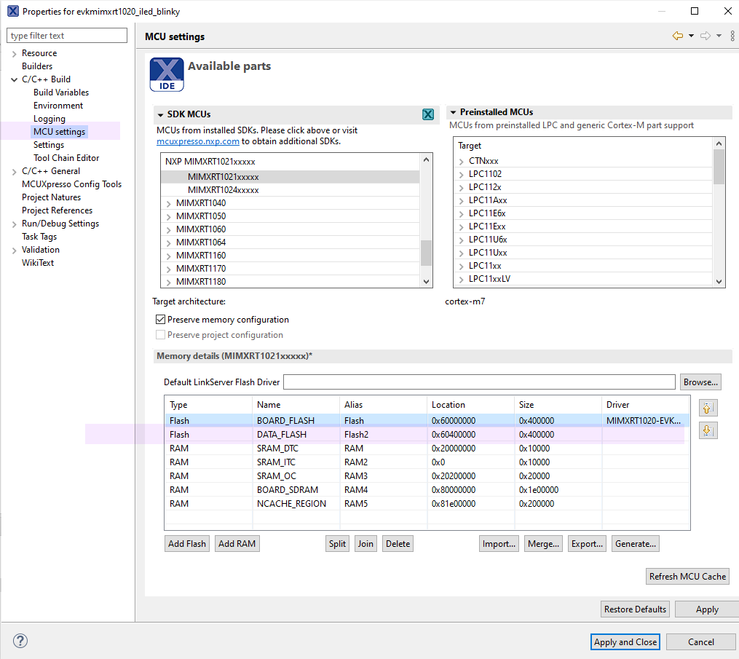
2 Provide a meaningfull name to the flash area, I used DATA_FLASH.
3 Create an extra linker section. I created CustomSection in the DATA_FLASH area I created earlier. The type is rodata, as I will place a constant array there.

4 Use a macro to place this variable.
__attribute__((section("CustomSection"))) uint8_t array_4_davie[1024] ={1,2,3,4,5,6 };5 Re-compile and verify that the macro does works.

As you can see in the debug output the array_4_davie is placed in Custom section, which belongs to DATA_FLASH section.
The IDE does this whevener you want to place a variable in NON_CACHE area.
AT_NONCACHEABLE_SECTION_ALIGN(static USHORT frame_buffer[2][FRAME_BUFFER_PIXELS], FRAME_BUFFER_ALIGN);But there are more methods, like using cr section macros library ( we have some posts for this already in the NXP community )
Diego.
diego_charles
- 新着としてマーク
- ブックマーク
- 購読
- ミュート
- RSS フィードを購読する
- ハイライト
- 印刷
- 不適切なコンテンツを報告
Hello @DaveG1
Let me show the steps that I tipically do. This is my way to purposely place variables on a desired section of the flash.
1 Split the flash. You can modify the size and adress to your desired preference, I only made a simple spit.
2 Provide a meaningfull name to the flash area, I used DATA_FLASH.
3 Create an extra linker section. I created CustomSection in the DATA_FLASH area I created earlier. The type is rodata, as I will place a constant array there.
4 Use a macro to place this variable.
__attribute__((section("CustomSection"))) uint8_t array_4_davie[1024] ={1,2,3,4,5,6 };5 Re-compile and verify that the macro does works.
As you can see in the debug output the array_4_davie is placed in Custom section, which belongs to DATA_FLASH section.
The IDE does this whevener you want to place a variable in NON_CACHE area.
AT_NONCACHEABLE_SECTION_ALIGN(static USHORT frame_buffer[2][FRAME_BUFFER_PIXELS], FRAME_BUFFER_ALIGN);But there are more methods, like using cr section macros library ( we have some posts for this already in the NXP community )
Diego.
- 新着としてマーク
- ブックマーク
- 購読
- ミュート
- RSS フィードを購読する
- ハイライト
- 印刷
- 不適切なコンテンツを報告
Thank you! That did the trick.
