
- Forums
- Product Forums
- General Purpose MicrocontrollersGeneral Purpose Microcontrollers
- i.MX Forumsi.MX Forums
- QorIQ Processing PlatformsQorIQ Processing Platforms
- Identification and SecurityIdentification and Security
- Power ManagementPower Management
- Wireless ConnectivityWireless Connectivity
- RFID / NFCRFID / NFC
- Advanced AnalogAdvanced Analog
- MCX Microcontrollers
- S32G
- S32K
- S32V
- MPC5xxx
- Other NXP Products
- S12 / MagniV Microcontrollers
- Powertrain and Electrification Analog Drivers
- Sensors
- Vybrid Processors
- Digital Signal Controllers
- 8-bit Microcontrollers
- ColdFire/68K Microcontrollers and Processors
- PowerQUICC Processors
- OSBDM and TBDML
- S32M
- S32Z/E
-
- Solution Forums
- Software Forums
- MCUXpresso Software and ToolsMCUXpresso Software and Tools
- CodeWarriorCodeWarrior
- MQX Software SolutionsMQX Software Solutions
- Model-Based Design Toolbox (MBDT)Model-Based Design Toolbox (MBDT)
- FreeMASTER
- eIQ Machine Learning Software
- Embedded Software and Tools Clinic
- S32 SDK
- S32 Design Studio
- GUI Guider
- Zephyr Project
- Voice Technology
- Application Software Packs
- Secure Provisioning SDK (SPSDK)
- Processor Expert Software
- Generative AI & LLMs
-
- Topics
- Mobile Robotics - Drones and RoversMobile Robotics - Drones and Rovers
- NXP Training ContentNXP Training Content
- University ProgramsUniversity Programs
- Rapid IoT
- NXP Designs
- SafeAssure-Community
- OSS Security & Maintenance
- Using Our Community
-
- Cloud Lab Forums
-
- Knowledge Bases
- ARM Microcontrollers
- i.MX Processors
- Identification and Security
- Model-Based Design Toolbox (MBDT)
- QorIQ Processing Platforms
- S32 Automotive Processing Platform
- Wireless Connectivity
- CodeWarrior
- MCUXpresso Suite of Software and Tools
- MQX Software Solutions
- RFID / NFC
- Advanced Analog
-
- NXP Tech Blogs
- Home
- :
- i.MX Forums
- :
- i.MX Processors
- :
- Re: MCIMX8M-EVKB: need help getting started with Linux
MCIMX8M-EVKB: need help getting started with Linux
- Subscribe to RSS Feed
- Mark Topic as New
- Mark Topic as Read
- Float this Topic for Current User
- Bookmark
- Subscribe
- Mute
- Printer Friendly Page

- Mark as New
- Bookmark
- Subscribe
- Mute
- Subscribe to RSS Feed
- Permalink
- Report Inappropriate Content
I'm trying to use the MCIMX8M-EVKB for the first time and I can't get it to boot Linux from an SD card.
The Quick Start Guide says to check www.nxp.com/imx8mquadevkB for software and info, but that URL gets a Page Not Found error. Removing the trailing B leads to the main MCIMX8M-EVK page, where I find a link to Get Started with the MCIMX8M-EVK. This contains a Linux chapter which explains using a .sdcard file to create a bootable SD card, and suggests using the Linux download page, which is nothing but a .tar.gz file. This archive contains only one file with "sdcard" in its name - fsl-image-qt5-validation-imx-xwayland-imx8mqevk.sdcard.bz2. I assumed that I should pipe this through bunzip2 and onto an SD card, which I did, and this resulted in the SD card with valid-looking boot and root partitions, which I can read on my Linux development machine. But nothing happens when I boot the EVK with this SD card inserted.
I have the serial cable working - I can boot and interact with the Android image on the eMMC. But when I change SW801 to 1100 and power on (with the SD card inserted) there is no activity on the serial port nor the HDMI output. The red power LED lights but that's the only sign of life.
How do I get a Linux image on an SD card and boot it? I would prefer to use the serial console and not use a monitor.
Thanks,
Mike
Solved! Go to Solution.
- Mark as New
- Bookmark
- Subscribe
- Mute
- Subscribe to RSS Feed
- Permalink
- Report Inappropriate Content
I found an sdcard image in the L5.4.70_2.3.0_MX8MND3L BSP download, and it just works, no trouble at all. I downloaded it from here:
https://www.nxp.com/design/software/embedded-software/i-mx-software/embedded-linux-for-i-mx-applicat...
The command to write it to an SD card:
dd if=imx-image-full-imx8mqevk.wic of=/dev/sda bs=1048576
I don't know what is wrong with the sdcard image in the "Get Started" and "Linux download" pages, but the one in the BSP package (".wic" file instead of ".sdcard") works fine for me and my problem is solved.
Cheers,
Mike
- Mark as New
- Bookmark
- Subscribe
- Mute
- Subscribe to RSS Feed
- Permalink
- Report Inappropriate Content
I found an sdcard image in the L5.4.70_2.3.0_MX8MND3L BSP download, and it just works, no trouble at all. I downloaded it from here:
https://www.nxp.com/design/software/embedded-software/i-mx-software/embedded-linux-for-i-mx-applicat...
The command to write it to an SD card:
dd if=imx-image-full-imx8mqevk.wic of=/dev/sda bs=1048576
I don't know what is wrong with the sdcard image in the "Get Started" and "Linux download" pages, but the one in the BSP package (".wic" file instead of ".sdcard") works fine for me and my problem is solved.
Cheers,
Mike

 nxf63675
- Mark as New
- Bookmark
- Subscribe
- Mute
- Subscribe to RSS Feed
- Permalink
- Report Inappropriate Content
Hi mditto1,
The quick start guide is a good way to start but it has some missing points, please review the Linux guide that comes with the BSP, chapter 4.3 preparing an SD/MMC card to boot.
https://www.nxp.com/docs/en/user-guide/IMX_LINUX_USERS_GUIDE.pdf
Regards,
Israel H.
- Mark as New
- Bookmark
- Subscribe
- Mute
- Subscribe to RSS Feed
- Permalink
- Report Inappropriate Content
I had seen that document and tried to find some clues there, but I don't see why those steps wouldn't have already been done to the prepared .sdcard image on the NXP download page. My best guess is that the wrong version/build of U-Boot has been included in the .sdcard image, so I did try the command in 4.3.4 with what seemed like the right U-Boot image, but it didn't help. The image I copied was imx-boot-imx8mqddr4arm2-sd.bin-flash_ddr4_arm2 , should that have worked? Is there anything else needed to get the board to load U-Boot from the SD card, perhaps a boot sector or something?
nxf63675
- Mark as New
- Bookmark
- Subscribe
- Mute
- Subscribe to RSS Feed
- Permalink
- Report Inappropriate Content
Hi mditto1,
Could you review the ROM configures the boot media and attempts to read the image from a predefined address in the boot device, probably the boot media is trying to start from a different address, all of this comes on the reference manual but see the table below:
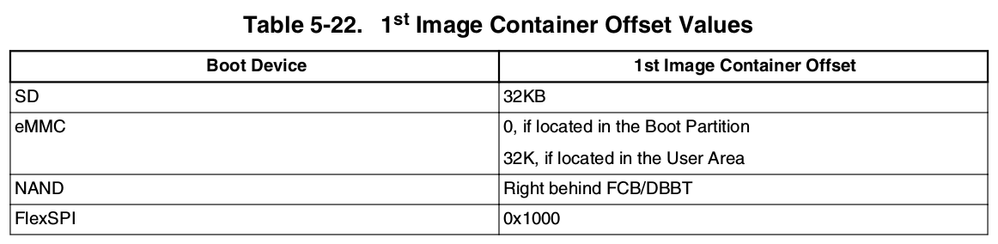
Also please take a look into the next post, hope this help you:
Regards,
Israel H.
- Mark as New
- Bookmark
- Subscribe
- Mute
- Subscribe to RSS Feed
- Permalink
- Report Inappropriate Content
Hi, Israel, thanks for the information.
i.MX Linux® User's Guide section 4.3.4 says boot offset is 33 k for i.MX 8M Quad.
i.MX8 Boot process and creating a bootable image table 5-22 says boot offset is 32 k.
The .sdcard image on the download page has a bootloader image at 33 k.
I've tried both locations, still no signs of life. Can you confirm I am using the right U-Boot image?
imx-boot-imx8mqddr4arm2-sd.bin-flash_ddr4_arm2
i.MX8 Boot process and creating a bootable image table 5-8 says boot switches should be 0011, I'm assuming that means ON-ON-OFF-OFF as described elsewhere.
Mike
nxf63675
- Mark as New
- Bookmark
- Subscribe
- Mute
- Subscribe to RSS Feed
- Permalink
- Report Inappropriate Content
Hi Mike,
No, that U-boot file is one we usually use to validate our DDR4 boards, please use the imx-boot-imx8mqevk-sd.bin-flash_evk, a tell me if this works for you, follow the same as Linux user's guide 4.3.4 to flash the SD card.
Also, you can use Yocto to create and compile the image for your device, just to discard problems that may come with your image. Please follow the documentation that comes with the BSP.
Hope this helps you.
Regards,
Israel H.
- Mark as New
- Bookmark
- Subscribe
- Mute
- Subscribe to RSS Feed
- Permalink
- Report Inappropriate Content
No, no difference.
I wonder if it's because I'm using an SDHC card. Maybe the boot ROM doesn't support SDHC but U-Boot does (thus it works when I load U-Boot from eMMC)?

- Mark as New
- Bookmark
- Subscribe
- Mute
- Subscribe to RSS Feed
- Permalink
- Report Inappropriate Content
.
- Mark as New
- Bookmark
- Subscribe
- Mute
- Subscribe to RSS Feed
- Permalink
- Report Inappropriate Content
Update: I am able to boot U-boot from eMMC, interrupt to prevent booting of Android, and use these commands to boot Linux from the SD card:
fatload mmc 1:1 0x40480000 Image
fatload mmc 1:1 0x40470000 fsl-imx8mq-evk.dtb
setenv bootargs root=/dev/mmcblk1p2
booti 0x40480000 - 0x40470000
I don't know why the SD card cant be booted directly.
