
- Forums
- Product Forums
- General Purpose MicrocontrollersGeneral Purpose Microcontrollers
- i.MX Forumsi.MX Forums
- QorIQ Processing PlatformsQorIQ Processing Platforms
- Identification and SecurityIdentification and Security
- Power ManagementPower Management
- Wireless ConnectivityWireless Connectivity
- RFID / NFCRFID / NFC
- Advanced AnalogAdvanced Analog
- Neural Processing UnitsNeural Processing Units
- MCX Microcontrollers
- S32G
- S32K
- S32V
- MPC5xxx
- Other NXP Products
- S12 / MagniV Microcontrollers
- Powertrain and Electrification Analog Drivers
- Sensors
- Vybrid Processors
- Digital Signal Controllers
- 8-bit Microcontrollers
- ColdFire/68K Microcontrollers and Processors
- PowerQUICC Processors
- OSBDM and TBDML
- S32M
- S32Z/E
-
- Solution Forums
- Software Forums
- MCUXpresso Software and ToolsMCUXpresso Software and Tools
- CodeWarriorCodeWarrior
- MQX Software SolutionsMQX Software Solutions
- Model-Based Design Toolbox (MBDT)Model-Based Design Toolbox (MBDT)
- FreeMASTER
- eIQ Machine Learning Software
- Embedded Software and Tools Clinic
- S32 SDK
- S32 Design Studio
- GUI Guider
- Zephyr Project
- Voice Technology
- Application Software Packs
- Secure Provisioning SDK (SPSDK)
- Processor Expert Software
- Generative AI & LLMs
-
- Topics
- Mobile Robotics - Drones and RoversMobile Robotics - Drones and Rovers
- NXP Training ContentNXP Training Content
- University ProgramsUniversity Programs
- Rapid IoT
- NXP Designs
- SafeAssure-Community
- OSS Security & Maintenance
- Using Our Community
-
- Cloud Lab Forums
-
- Knowledge Bases
- ARM Microcontrollers
- i.MX Processors
- Identification and Security
- Model-Based Design Toolbox (MBDT)
- QorIQ Processing Platforms
- S32 Automotive Processing Platform
- Wireless Connectivity
- CodeWarrior
- MCUXpresso Suite of Software and Tools
- MQX Software Solutions
- RFID / NFC
- Advanced Analog
- Neural Processing Units
-
- NXP Tech Blogs
- Home
- :
- i.MX フォーラム
- :
- i.MXプロセッサ
- :
- Re: Lose static IP address
Lose static IP address
- RSS フィードを購読する
- トピックを新着としてマーク
- トピックを既読としてマーク
- このトピックを現在のユーザーにフロートします
- ブックマーク
- 購読
- ミュート
- 印刷用ページ

- 新着としてマーク
- ブックマーク
- 購読
- ミュート
- RSS フィードを購読する
- ハイライト
- 印刷
- 不適切なコンテンツを報告
Hello
My environment is i.MX6Q sabreSD ,AR8031 phy,and OS is android 4.4.2.We use local network and we don't use wifi.We use RJ45 to connect a router.
When power on ,we give a static IP address to our board,.
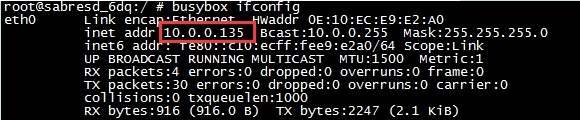
but after several times of pluging/unpluging RJ45,the static IP address is changed to another.
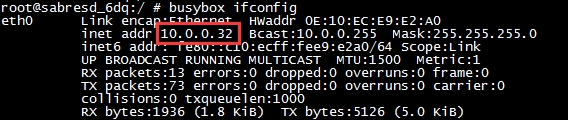
Then we continue to plug/unplug sereral times,the IP address lost.
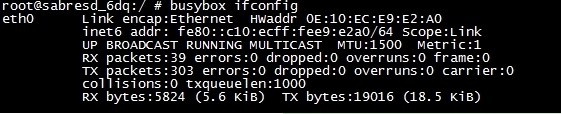
And I got this log from Android.
01-01 11:26:28.440: D/Ethernet(2614): Interface eth0 link up
01-01 11:26:30.840: D/ConnectivityService(2614): ConnectivityChange for ETHERNET: CONNECTED/CONNECTED
01-01 11:26:30.850: E/ConnectivityService(2614): Unexpected mtu value: android.net.EthernetDataTracker@41ccbbc0
01-01 11:26:30.860: D/Nat464Xlat(2614): requiresClat: netType=9, hasIPv4Address=true
01-01 11:26:33.870: D/Tethering(2614): MasterInitialState.processMessage what=3
01-01 11:26:33.870: D/CaptivePortalTracker(2614): NoActiveNetworkState{ when=0 what=1 obj=NetworkInfo: type: ETHERNET[], state: CONNECTED/CONNECTED, reason: (unspecified), extra: 12:25:30:3a:85:ae, roaming: false, failover: false, isAvailable: true, isConnectedToProvisioningNetwork: false target=com.android.internal.util.StateMachine$SmHandler }
01-01 11:26:33.870: D/CaptivePortalTracker(2614): NoActiveNetworkState not a wifi connectivity change, ignore
01-01 11:27:00.440: D/Ethernet(2614): Interface eth0 link down
01-01 11:27:00.640: D/CommandListener(2232): Clearing all IP addresses on eth0
01-01 11:27:00.650: D/Nat464Xlat(2614): requiresClat: netType=9, hasIPv4Address=false
01-01 11:27:00.650: D/ConnectivityService(2614): ConnectivityChange for ETHERNET: DISCONNECTED/DISCONNECTED
01-01 11:27:00.650: D/ConnectivityService(2614): tryFailover: set mActiveDefaultNetwork=-1, prevNetType=9
01-01 11:27:00.660: D/ConnectivityService(2614): Attempting to switch to mobile
01-01 11:27:00.660: D/ConnectivityService(2614): Attempting to switch to wifi
01-01 11:27:00.660: D/ConnectivityService(2614): Attempting to switch to BLUETOOTH_TETHER
01-01 11:27:00.660: D/Nat464Xlat(2614): requiresClat: netType=9, hasIPv4Address=false
01-01 11:27:03.670: D/Tethering(2614): MasterInitialState.processMessage what=3
01-01 11:27:03.670: D/CaptivePortalTracker(2614): NoActiveNetworkState{ when=0 what=1 obj=NetworkInfo: type: ETHERNET[], state: DISCONNECTED/DISCONNECTED, reason: (unspecified), extra: 12:25:30:3a:85:ae, roaming: false, failover: false, isAvailable: false, isConnectedToProvisioningNetwork: false target=com.android.internal.util.StateMachine$SmHandler }
01-01 11:27:03.670: D/CaptivePortalTracker(2614): NoActiveNetworkState not a wifi connectivity change, ignore
01-01 11:27:04.440: D/Ethernet(2614): Interface eth0 link up
01-01 11:27:06.840: D/ConnectivityService(2614): ConnectivityChange for ETHERNET: CONNECTED/CONNECTED
01-01 11:27:06.850: E/ConnectivityService(2614): Unexpected mtu value: android.net.EthernetDataTracker@41ccbbc0
01-01 11:27:06.860: D/Nat464Xlat(2614): requiresClat: netType=9, hasIPv4Address=true
01-01 11:27:09.870: D/CaptivePortalTracker(2614): NoActiveNetworkState{ when=0 what=1 obj=NetworkInfo: type: ETHERNET[], state: CONNECTED/CONNECTED, reason: (unspecified), extra: 12:25:30:3a:85:ae, roaming: false, failover: false, isAvailable: true, isConnectedToProvisioningNetwork: false target=com.android.internal.util.StateMachine$SmHandler }
01-01 11:27:09.870: D/CaptivePortalTracker(2614): NoActiveNetworkState not a wifi connectivity change, ignore
01-01 11:27:09.870: D/Tethering(2614): MasterInitialState.processMessage what=3
01-01 11:27:15.290: D/dalvikvm(3120): GC_FOR_ALLOC freed 512K, 18% free 2780K/3372K, paused 12ms, total 12ms
解決済! 解決策の投稿を見る。
- 新着としてマーク
- ブックマーク
- 購読
- ミュート
- RSS フィードを購読する
- ハイライト
- 印刷
- 不適切なコンテンツを報告
use dhcpcd like below can solve this problem
dhcpcd -S ip_address=10.0.0.135 -S rounters=10.0.0.1 -S subnet_mask=255.255.255 eth0
- 新着としてマーク
- ブックマーク
- 購読
- ミュート
- RSS フィードを購読する
- ハイライト
- 印刷
- 不適切なコンテンツを報告
use dhcpcd like below can solve this problem
dhcpcd -S ip_address=10.0.0.135 -S rounters=10.0.0.1 -S subnet_mask=255.255.255 eth0

 igorpadykov
- 新着としてマーク
- ブックマーク
- 購読
- ミュート
- RSS フィードを購読する
- ハイライト
- 印刷
- 不適切なコンテンツを報告
Hi lkl
one can look at uboot parameters
http://www.denx.de/wiki/view/DULG/LinuxKernelArgs
Best regards
igor
-----------------------------------------------------------------------------------------------------------------------
Note: If this post answers your question, please click the Correct Answer button. Thank you!
-----------------------------------------------------------------------------------------------------------------------
- 新着としてマーク
- ブックマーク
- 購読
- ミュート
- RSS フィードを購読する
- ハイライト
- 印刷
- 不適切なコンテンツを報告
Hi igor
Thanks for your reply.
My problem is no relation to uboot.No matter what IP address setted in uboot,I will change IP address in kernel, and this is my command:
ifconfig eth0 10.0.0.135 netmask 255.255.255.0
But after I plug and unplug RJ45 many times,My static IP address auto change to 10.0.0.32,then I continue to plug and unplug RJ45 many times,the IP address is gone.
During this test,I didn't reboot board or reset IP address,and didn't run any APP.
