
- Forums
- Product Forums
- General Purpose MicrocontrollersGeneral Purpose Microcontrollers
- i.MX Forumsi.MX Forums
- QorIQ Processing PlatformsQorIQ Processing Platforms
- Identification and SecurityIdentification and Security
- Power ManagementPower Management
- Wireless ConnectivityWireless Connectivity
- RFID / NFCRFID / NFC
- Advanced AnalogAdvanced Analog
- Neural Processing UnitsNeural Processing Units
- MCX Microcontrollers
- S32G
- S32K
- S32V
- MPC5xxx
- Other NXP Products
- S12 / MagniV Microcontrollers
- Powertrain and Electrification Analog Drivers
- Sensors
- Vybrid Processors
- Digital Signal Controllers
- 8-bit Microcontrollers
- ColdFire/68K Microcontrollers and Processors
- PowerQUICC Processors
- OSBDM and TBDML
- S32M
- S32Z/E
-
- Solution Forums
- Software Forums
- MCUXpresso Software and ToolsMCUXpresso Software and Tools
- CodeWarriorCodeWarrior
- MQX Software SolutionsMQX Software Solutions
- Model-Based Design Toolbox (MBDT)Model-Based Design Toolbox (MBDT)
- FreeMASTER
- eIQ Machine Learning Software
- Embedded Software and Tools Clinic
- S32 SDK
- S32 Design Studio
- GUI Guider
- Zephyr Project
- Voice Technology
- Application Software Packs
- Secure Provisioning SDK (SPSDK)
- Processor Expert Software
- Generative AI & LLMs
-
- Topics
- Mobile Robotics - Drones and RoversMobile Robotics - Drones and Rovers
- NXP Training ContentNXP Training Content
- University ProgramsUniversity Programs
- Rapid IoT
- NXP Designs
- SafeAssure-Community
- OSS Security & Maintenance
- Using Our Community
-
- Cloud Lab Forums
-
- Knowledge Bases
- ARM Microcontrollers
- i.MX Processors
- Identification and Security
- Model-Based Design Toolbox (MBDT)
- QorIQ Processing Platforms
- S32 Automotive Processing Platform
- Wireless Connectivity
- CodeWarrior
- MCUXpresso Suite of Software and Tools
- MQX Software Solutions
- RFID / NFC
- Advanced Analog
- Neural Processing Units
-
- NXP Tech Blogs
- Home
- :
- i.MX Processors
- :
- i.MX Processors Knowledge Base
- :
- i.MX6Q PCIe EP/RC Validation System
i.MX6Q PCIe EP/RC Validation System
- Subscribe to RSS Feed
- Mark as New
- Mark as Read
- Bookmark
- Subscribe
- Printer Friendly Page
- Report Inappropriate Content
i.MX6Q PCIe EP/RC Validation System
i.MX6Q PCIe EP/RC Validation System
i.MX6Q PCIe EP/RC Validation and Throughput
Hardware setup
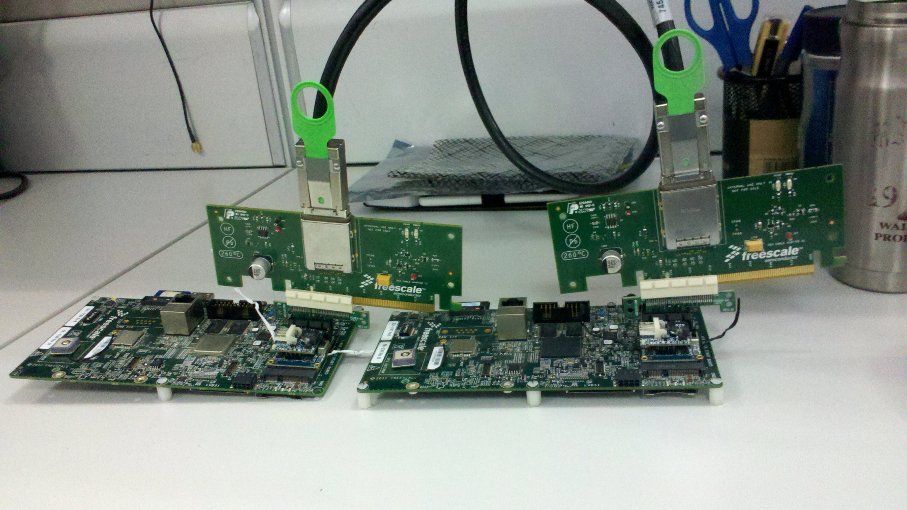
* Two i.MX6Q SD boards, one is used as PCIe RC; the other one is used as PCIe EP. Connected by 2*mini_PCIe to standard_PCIe adaptors, 2*PEX cable adaptors, and one PCIe cable.
Software configurations
* When building RC image, make sure that
CONFIG_IMX_PCIE=y
# CONFIG_IMX_PCIE_EP_MODE_IN_EP_RC_SYS is not set
CONFIG_IMX_PCIE_RC_MODE_IN_EP_RC_SYS=y
* When build EP image, make sure that
CONFIG_IMX_PCIE=y
CONFIG_IMX_PCIE_EP_MODE_IN_EP_RC_SYS=y
# CONFIG_IMX_PCIE_RC_MODE_IN_EP_RC_SYS is not set
Features
* Set-up link between RC and EP by their stand-alone 125MHz running internally.
* In EP's system, EP can access the reserved ddr memory (default address:0x40000000) of PCIe RC's system, by the interconnection between PCIe EP and PCIe RC.
NOTE: The layout of the 1G DDR memory on SD boards is 0x1000_0000 ~ 0x4FFF_FFFF)
Use mem=768M in the kernel command line to reserve the 0x4000_0000 ~ 0x4FFF_FFFF DDR memory space used to do the EP access tests.
(The example of the RC’s cmd-line: Kernel command line: noinitrd console=ttymxc0,115200 mem=768M root=/dev/nfs nfsroot=10.192.225.216:/home/r65037/nfs/rootfs_mx5x_10.11,v3,tcp ip=dhcp rw)
Throughput results
| ARM core used as the bus master, and cache is disabled | ARM core used as the bus master, and cache is enabled | IPU used as the bus master(DMA) | |
| Data size in one write tlp | 8 bytes | 32 bytes | 64 bytes |
| Write speed | ~109MB/s | ~298MB/s | ~344MB/s |
| Data size in one read tlp | 32 bytes | 64 bytes | 64 bytes |
| Read speed | ~29MB/s | ~100MB/s | ~211MB/s |
IPU used as the bus master(DMA)
Here is the summary of the PCIe throughput results tested by IPU.
Write speed is about 344 MB/s.
Read speed is about 211MB/s
ARM core used as the bus master (define EP_SELF_IO_TEST in pcie.c driver)
write speed ~300MB/s.
read speed ~100MB/s.
Cache is enabled.
PCIe EP: Starting data transfer...
PCIe EP: Data transfer is successful, tv_count1 54840us, tv_count2 162814us.
PCIe EP: Data write speed is 298MB/s.
PCIe EP: Data read speed is 100MB/s.
Regarding to the log, the data size of each TLP when cache is enabled, is about 4 times of the data size in write, and 2 times of the data size in read, when the cache is not enabled.
| Cache is disabled | Cache is enabled | |
| Data size in one write tlp | 8 bytes | 32 bytes |
| Write speed | ~109MB/s | ~298MB/s |
| Data size in one read tlp | 32 bytes | 64 bytes |
| Read speed | ~29MB/s | ~100MB/s |
Cache is not enabled
PCIe EP: Starting data transfer...
PCIe EP: Data transfer is successful, tv_count1 149616us, tv_count2 552099us.
PCIe EP: Data write speed is 109MB/s.
PCIe EP: Data read speed is 29MB/s.
One simple method used to connect the imx6 pcie ep and rc
View of the whole solution:
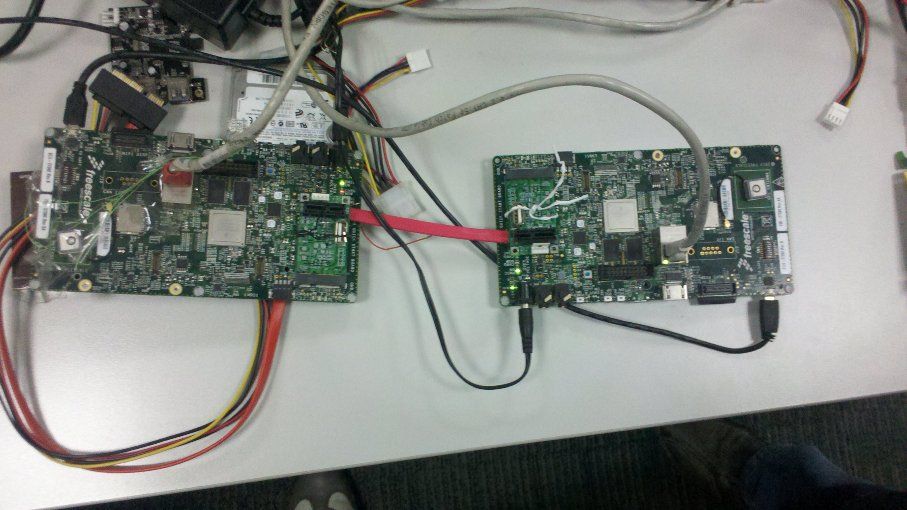
HW materials:
2* iMX6Q SD boards, 2* Mini PCIe to STD PCIe adaptors, one SATA2 data cable.
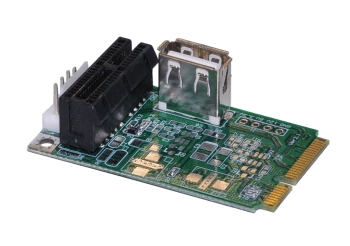
the mini-pcie to standard pcie exchange adaptor.
Here is the URL:
http://www.bplus.com.tw/Adapter/PM2C.html
How to make it.
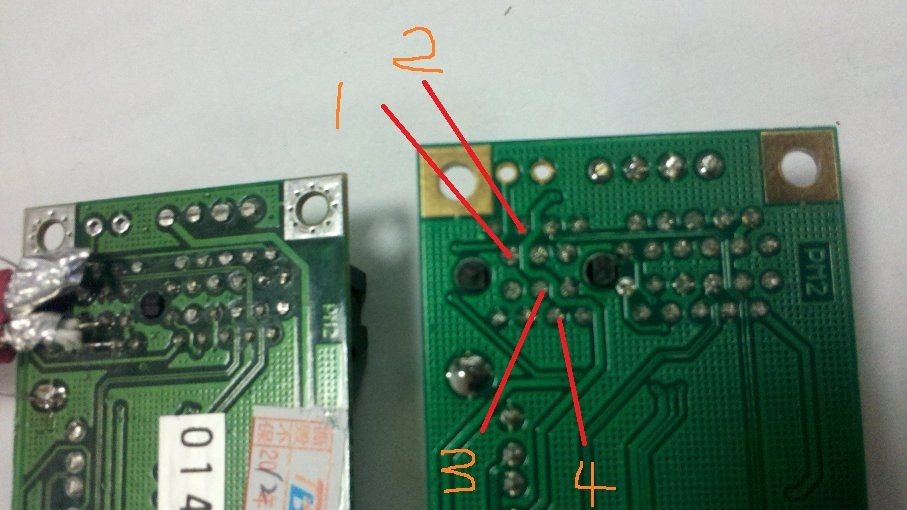
signals connections
Two adaptors, one is named as A, the other one is named as B.
A B
TXM <----> RXM
TXN <----> RXN
RXM <----> TXM
RXN <----> TXN
A1 connected to B3
A2 connected to B4
A3 connected to B1
A4 connected to B2
Connect the cable to the adaptor.
Connect the SATA2 data cable to Mini PCIe to STD PCIe adaptor (A)
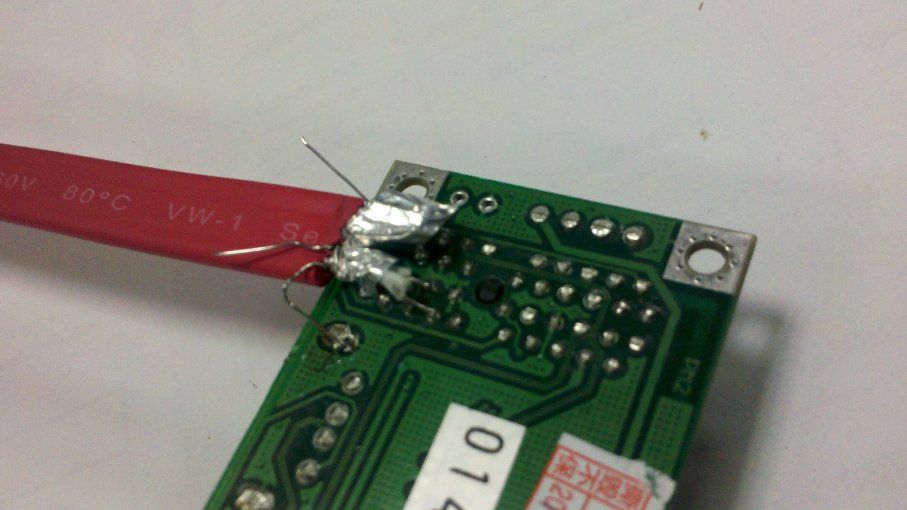
Connect the SATA2 data cable to Mini PCIe to STD PCIe adaptor (B)

NOTE:
* Please keep length of Cable as short as possible. Our cable is about 12cm.
* Please connect shield wire in SATA2 Cable to GND at both board.
* Please boot up PCIe EP system before booting PCIe RC system.
Base one imx_3.0.35 mainline, the patch, and the IPU test tools had been attached.
NOTE:
* IPU tests usage howto.
Unzip the xxx.zip, and run xxx_r.sh to do read tests, run xxx_w.sh to do the write tests.
Tests log:
EP:
root@freescale ~/pcie_ep_io_test$ ./pcie-r.sh
pass cmdline 14, ./pcie_ipudev_test.out
new option : c
frame count set 1
new option : l
loop count set 1
new option : i
input w=1024,h=1024,fucc=RGB4,cpx=0,cpy=0,cpw=0,cph=0,de=0,dm=0
new option : O
640,480,RGB4,0,0,0,0,0
new option : s
show to fb 0
new option : f
output file name ipu1-1st-ovfb
new option : ÿ
show_to_buf:0, input_paddr:0x1000000, output.paddr0x18800000
====== ipu task ======
input:
foramt: 0x34424752
width: 1024
height: 1024
crop.w = 1024
crop.h = 1024
crop.pos.x = 0
crop.pos.y = 0
output:
foramt: 0x34424752
width: 640
height: 480
roate: 0
crop.w = 640
crop.h = 480
crop.pos.x = 0
crop.pos.y = 0
total frame count 1 avg frame time 19019 us, fps 52.579000
root@freescale ~/pcie_ep_io_test$ ./pcie-w.sh
pass cmdline 14, ./pcie_ipudev_test.out
new option : c
frame count set 1
new option : l
loop count set 1
new option : i
input w=640,h=480,fucc=RGB4,cpx=0,cpy=0,cpw=0,cph=0,de=0,dm=0
new option : O
1024,1024,RGB4,0,0,0,0,0
new option : s
show to fb 1
new option : f
output file name ipu1-1st-ovfb
new option : ÿ
show_to_buf:1, input_paddr:0x18a00000, output.paddr0x1000000
====== ipu task ======
input:
foramt: 0x34424752
width: 640
height: 480
crop.w = 640
crop.h = 480
crop.pos.x = 0
crop.pos.y = 0
output:
foramt: 0x34424752
width: 1024
height: 1024
roate: 0
crop.w = 1024
crop.h = 1024
crop.pos.x = 0
crop.pos.y = 0
total frame count 1 avg frame time 11751 us, fps 85.099140
root@freescale ~$ ./memtool -32 01000000=deadbeaf
Writing 32-bit value 0xDEADBEAF to address 0x01000000
RC:
Before run "./memtool -32 01000000=deadbeaf" at EP.
root@freescale ~$ ./memtool -32 40000000 10
Reading 0x10 count starting at address 0x40000000
0x40000000: 00000000 00000000 00000000 00000000
0x40000010: 00000000 00000000 00000000 00000000
0x40000020: 00000000 00000000 00000000 00000000
0x40000030: 00000000 00000000 00000000 00000000
After run "./memtool -32 01000000=deadbeaf" at EP.
root@freescale ~$ ./memtool -32 40000000 10
Reading 0x10 count starting at address 0x40000000
0x40000000: DEADBEAF 00000000 00000000 00000000
0x40000010: 00000000 00000000 00000000 00000000
0x40000020: 00000000 00000000 00000000 00000000
0x40000030: 00000000 00000000 00000000 00000000

- Mark as Read
- Mark as New
- Bookmark
- Permalink
- Report Inappropriate Content
Can you re-try it after remove "
PCI Express support | x x |
” in kernel configuration?
Richard
- Mark as Read
- Mark as New
- Bookmark
- Permalink
- Report Inappropriate Content
Regarding to the following dump,
"Code: e59f0010 e1a01003 eb133c07 e3a03000 (e5833000)
clk_enable cannot be called in an interrupt context
[<80049e34>] (unwind_backtrace+0x0/0xf8) from [<8006563c>] (clk_enable+0x88/0xa0)
”
It's strange that why there is the IPU related kernel dump when do RTL8111e operations.
Richard

- Mark as Read
- Mark as New
- Bookmark
- Permalink
- Report Inappropriate Content
Richard:
I have been re-configure the kernel configure, and compile the kernel again. but the result is same.
the kernel configure is:
*** MX6 Options: ***
x x [*] PCI Express support
x x [ ] PCI Express EP mode in the IMX6 RC/EP interconnection system
x x [ ] PCI Express RC mode in the IMX6 RC/EP interconnection system
and for another question of IPU related, I have don't run any other command, just load driver modules, and configure eth1, then run PING command.
By the way, RTL8111E is a PCIE nic, and I used a mini-PCIE to PCIE adapter , connect the RTL8111E nic and i.MX6-SebraSDP board.
- Mark as Read
- Mark as New
- Bookmark
- Permalink
- Report Inappropriate Content
HI Hongxing Zhu:
I have tested the imx6 platform sdk "pcie_test" in RC mode,is there any EP mode test sample code in imx6 platform sdk,thank you!
- Mark as Read
- Mark as New
- Bookmark
- Permalink
- Report Inappropriate Content
Dear Zhu,
I have carefully read this topic, but I need your help because my system is not working.
First of all, let me explain my situation :
I have a video processing card connected to the iMX6 thanks to the PCIe slot. The video processing card takes physical address to write pictures into DDR of the iMX6. Such as you did I reduce the memory of the iMX6 (MEM=768M). Then, my driver uses address from 0x4000_0000 to write pictures. This works fine but my problem is that the maximum write speed is around 50MB/s. Can I use IPU as bus master to reach the speed of 344MB/s ? What do I have to do exactly ?
Best regards,
Yann Tinauus
- Mark as Read
- Mark as New
- Bookmark
- Permalink
- Report Inappropriate Content
Yes, there is ep mode test, you can refer to the fsl linux bsp release.
Richard.
- Mark as Read
- Mark as New
- Bookmark
- Permalink
- Report Inappropriate Content
Unfortunately, as I know that you can't use IPU DMA engine in your implementation, because that IPU DMA engine is dedicated design for IPU usage, and can't be used as genera DMA engine.
I'm curious that why the throughput of the data transfer at your side is such poor, can you make sure the quality of the connections
between imx6 pcie interface and your video process card?
There may be a lot of CRC and re-try operations if there are not a GOOD enough quality connection.
Good luck.
Richard.
- Mark as Read
- Mark as New
- Bookmark
- Permalink
- Report Inappropriate Content
Dear Zhu,
I don't really understand then what the IPU patch of this topic is for. I thought the IPU patch provided aimed to reconfigure IPU and use IPU DMA without image processing ?
And what if I do image processing in IPU, then I could use IPU DMA afterwards ? I mean, that I use the IPU for a tiny process that almost don't change picture (cropping 1 line for example) to access to the DMA and store picture at high rate (344MB/s) in DDR. Is that possible ?
I have a PHYFLEX carrier-board 1364.3 (development board) in between the iMX6 and my video processing card. It may be the reason of low data transfer... I will check connections to make sure everything is fine.
Thanks for your help.
Best regards.
- Mark as Read
- Mark as New
- Bookmark
- Permalink
- Report Inappropriate Content
Hi, Richard:
There is a new problem that we have meet, on my board, rtl8111e nic can not excuted ping operation when ping packets >= 469bytes, In addition, when we download ubuntu 's rootfs, we can't login by ssh, this operation also will cause the rtl8111e's driver abnormal.
On the other topic: mx6 + rtl8111e driver it seems that Carmili Li and Pavel have meet the same problem with me. Alexander have refered to a patch: [PATCH - v4] PCI: keystone: add a pci quirk to limit mrrs -- Linux PCI, but in my kernel source, we don't have this file, "/drivers/pci/host/pci-keystone.c"
kernel ver: Linux version 3.0.35-2666-gbdde708
rtl8111e driver info:
r8168: Realtek PCIe GBE Family Controller mcfg = 0014
r8168 0000:01:00.0: no MSI. Back to INTx.
r8168: This product is covered by one or more of the following patents: US6,570,884, US6,115,776, and US6,327,625.
r8168 Copyright (C) 2014 Realtek NIC software team <[email protected]>
This program comes with ABSOLUTELY NO WARRANTY; for details, please see <http://www.gnu.org/licenses/>.
This is free software, and you are welcome to redistribute it under certain conditions; see <http://www.gnu.org/licenses/>.
ping operation:
root@freescale ~$ ping 192.168.1.5 -s 465
PING 192.168.1.5 (192.168.1.5): 465 data bytes
473 bytes from 192.168.1.5: seq=0 ttl=64 time=0.435 ms
473 bytes from 192.168.1.5: seq=1 ttl=64 time=0.518 ms
--- 192.168.1.5 ping statistics ---
2 packets transmitted, 2 packets received, 0% packet loss
round-trip min/avg/max = 0.435/0.476/0.518 ms
root@freescale ~$ ping 192.168.1.5 -s 468
PING 192.168.1.5 (192.168.1.5): 468 data bytes
476 bytes from 192.168.1.5: seq=0 ttl=64 time=0.440 ms
476 bytes from 192.168.1.5: seq=1 ttl=64 time=0.503 ms
--- 192.168.1.5 ping statistics ---
2 packets transmitted, 2 packets received, 0% packet loss
round-trip min/avg/max = 0.440/0.471/0.503 ms
root@freescale ~$ ping 192.168.1.5 -s 469
PING 192.168.1.5 (192.168.1.5): 469 data bytes
--- 192.168.1.5 ping statistics ---
34 packets transmitted, 0 packets received, 100% packet loss
root@freescale ~$
- Mark as Read
- Mark as New
- Bookmark
- Permalink
- Report Inappropriate Content
As I remember that more than 1000 bytes packets transmission is verified on INTEL e1000e NIC card before.
Can you make a double check on your NIC device/driver?
Here is just a reference log, FYI.
root@imx6sxsabresd:~# ping 192.168.1.253 -s 469
PING 192.168.1.253 (192.168.1.253): 469 data bytes
477 bytes from 192.168.1.253: seq=0 ttl=64 time=0.595 ms
477 bytes from 192.168.1.253: seq=1 ttl=64 time=0.482 ms
477 bytes from 192.168.1.253: seq=2 ttl=64 time=0.457 ms
477 bytes from 192.168.1.253: seq=3 ttl=64 time=0.450 ms
^C
--- 192.168.1.253 ping statistics ---
4 packets transmitted, 4 packets received, 0% packet loss
round-trip min/avg/max = 0.450/0.496/0.595 ms
root@imx6sxsabresd:~# lspci
00:00.0 PCI bridge: Device 16c3:abcd (rev 01)
01:00.0 Ethernet controller: Intel Corporation 82574L Gigabit Network Connection
root@imx6sxsabresd:~# ping 192.168.1.253 -s 1000
PING 192.168.1.253 (192.168.1.253): 1000 data bytes
1008 bytes from 192.168.1.253: seq=0 ttl=64 time=0.559 ms
1008 bytes from 192.168.1.253: seq=1 ttl=64 time=0.485 ms
1008 bytes from 192.168.1.253: seq=2 ttl=64 time=0.472 ms
^C
--- 192.168.1.253 ping statistics ---
3 packets transmitted, 3 packets received, 0% packet loss
round-trip min/avg/max = 0.472/0.505/0.559 ms
root@imx6sxsabresd:~# lspci
00:00.0 PCI bridge: Device 16c3:abcd (rev 01)
01:00.0 Ethernet controller: Intel Corporation 82574L Gigabit Network Connection
root@imx6sxsabresd:~#
- Mark as Read
- Mark as New
- Bookmark
- Permalink
- Report Inappropriate Content
hi, Richard:
Thanks for you reply, We have checked our driver code, and it seems ok, and We did an experiment, driver the nic with r8169 what is the fsl‘s original code in linux bsp project, not r8168-8.039.00.
---------------------------------------------------------------
x x < > Packet Engines Hamachi GNIC-II support x x
x x < > Packet Engines Yellowfin Gigabit-NIC support (EXPERIMENTAL) x x
x x <*> Realtek 8169 gigabit ethernet support x x
x x < > Realtek 8111E gigabit ethernet support
-------------------------------------------------------------------
and the problem is still the same.
- Mark as Read
- Mark as New
- Bookmark
- Permalink
- Report Inappropriate Content
Dear Richard,
I'm currently trying to transmit data from a iMX6 board to a Xilinx FPGA board through a pcie link x1, using the IPU DMA to have reasonable performance, given the PCIe RC in iMX6 doesn't have DMA.
To ahieve this I adapted your demo to my specific scenario. I didn't have any major problems in the adaptation process. The writing operations from the iMX6 to the FPGA seem to work fine but, in the same way as for Yann (although our scenarios are different), instead of reaching the 344 MB/s stated in the link of the demo, with TLP data size 64 bytes, I only get about 54MB/s due to the fact that the data size of the TLPs I receive in the FPGA side is only 16 bytes. The connector I'm using between the two boards is a mini pcie to pcie

Which configuration parameters should i touch in the iMX6 side in order to increase the size of the TLPs transmitted?
Thanks very much in advance for your answer.
Best Regards,
Eduardo.

- Mark as Read
- Mark as New
- Bookmark
- Permalink
- Report Inappropriate Content
Hi,
I'm having trouble getting the PCIE up on the i.MAX6 Quad Sabre Lite Development board (https://boundarydevices.com/product/sabre-lite-imx6-sbc/ ) and interfacing with TW6865 Intersil video chip and I couldn't find the sufficient details on how to connect REFCLK- and REFCLK+ of TW6865 with PCIE port of the i.MAX6Q Sabre Lite as it just have following pin connections.
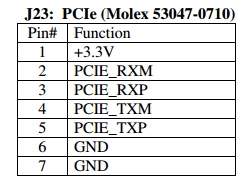
Can you guide me to interface TW6865 with PCIE of Sabre Lite ? (Presently I'm working 3.14.52 kernel based system)
Thank You,
Peter.
i.max#i.mx6q pcie
- Mark as Read
- Mark as New
- Bookmark
- Permalink
- Report Inappropriate Content
Hi Eduardo,
Did you ever resolve this?
Thanks,
Brian
- Mark as Read
- Mark as New
- Bookmark
- Permalink
- Report Inappropriate Content
The attachments are no longer available.
Also what I didn't understand from reading the article is how to actually enable the caching/data size in one tlp.
Thanks,
Christoph
- Mark as Read
- Mark as New
- Bookmark
- Permalink
- Report Inappropriate Content
Hi,
I am not able to access the mentioned files.

Can you please provide access for the same?
- « Previous
-
- 1
- 2
- Next »
