
- Forums
- Product Forums
- General Purpose MicrocontrollersGeneral Purpose Microcontrollers
- i.MX Forumsi.MX Forums
- QorIQ Processing PlatformsQorIQ Processing Platforms
- Identification and SecurityIdentification and Security
- Power ManagementPower Management
- Wireless ConnectivityWireless Connectivity
- RFID / NFCRFID / NFC
- Advanced AnalogAdvanced Analog
- MCX Microcontrollers
- S32G
- S32K
- S32V
- MPC5xxx
- Other NXP Products
- S12 / MagniV Microcontrollers
- Powertrain and Electrification Analog Drivers
- Sensors
- Vybrid Processors
- Digital Signal Controllers
- 8-bit Microcontrollers
- ColdFire/68K Microcontrollers and Processors
- PowerQUICC Processors
- OSBDM and TBDML
- S32M
- S32Z/E
-
- Solution Forums
- Software Forums
- MCUXpresso Software and ToolsMCUXpresso Software and Tools
- CodeWarriorCodeWarrior
- MQX Software SolutionsMQX Software Solutions
- Model-Based Design Toolbox (MBDT)Model-Based Design Toolbox (MBDT)
- FreeMASTER
- eIQ Machine Learning Software
- Embedded Software and Tools Clinic
- S32 SDK
- S32 Design Studio
- GUI Guider
- Zephyr Project
- Voice Technology
- Application Software Packs
- Secure Provisioning SDK (SPSDK)
- Processor Expert Software
- Generative AI & LLMs
-
- Topics
- Mobile Robotics - Drones and RoversMobile Robotics - Drones and Rovers
- NXP Training ContentNXP Training Content
- University ProgramsUniversity Programs
- Rapid IoT
- NXP Designs
- SafeAssure-Community
- OSS Security & Maintenance
- Using Our Community
-
- Cloud Lab Forums
-
- Knowledge Bases
- ARM Microcontrollers
- i.MX Processors
- Identification and Security
- Model-Based Design Toolbox (MBDT)
- QorIQ Processing Platforms
- S32 Automotive Processing Platform
- Wireless Connectivity
- CodeWarrior
- MCUXpresso Suite of Software and Tools
- MQX Software Solutions
- RFID / NFC
- Advanced Analog
-
- NXP Tech Blogs
- Home
- :
- Product Forums
- :
- S32G
- :
- Re: EB tresos Studio license activation failed
EB tresos Studio license activation failed
- Subscribe to RSS Feed
- Mark Topic as New
- Mark Topic as Read
- Float this Topic for Current User
- Bookmark
- Subscribe
- Mute
- Printer Friendly Page

- Mark as New
- Bookmark
- Subscribe
- Mute
- Subscribe to RSS Feed
- Permalink
- Report Inappropriate Content
I tried to activate an EB tresos license using ClientLicenseAdministrator.exe.
But, activation is failed.
I would appreciate it if you could tell me the solution.
Below is the error log.
Activating NodeLocked License 1936-7EBC-324C-4240, Number Of Licenses: 1
Status: 4, Creating request
Status: 5, Request created
Status: 6, Context created
Status: 7, Connected to remote server
Status: 8, Request Sent
Status: 9, Polling for response
Status: 10, Waiting for response
Status: 9, Polling for response
Status: 10, Waiting for response
Status: 9, Polling for response
Status: 10, Waiting for response
Status: 9, Polling for response
Status: 10, Waiting for response
Status: 9, Polling for response
Status: 10, Waiting for response
Status: 9, Polling for response
Status: 10, Waiting for response
Status: 9, Polling for response
Status: 10, Waiting for response
Status: 9, Polling for response
Status: 10, Waiting for response
Status: 9, Polling for response
Status: 10, Waiting for response
Status: 9, Polling for response
Status: 10, Waiting for response
Status: 9, Polling for response
Status: 10, Waiting for response
Status: 9, Polling for response
Status: 10, Waiting for response
Status: 9, Polling for response
Status: 10, Waiting for response
Status: 9, Polling for response
Status: 10, Waiting for response
Status: 9, Polling for response
Status: 10, Waiting for response
Status: 9, Polling for response
Status: 10, Waiting for response
Status: 9, Polling for response
Status: 10, Waiting for response
Status: 9, Polling for response
Status: 10, Waiting for response
Status: 9, Polling for response
Status: 10, Waiting for response
Status: 9, Polling for response
Status: 10, Waiting for response
Status: 9, Polling for response
Status: 10, Waiting for response
Status: 9, Polling for response
Status: 10, Waiting for response
Status: 9, Polling for response
Status: 10, Waiting for response
Status: 9, Polling for response
Status: 10, Waiting for response
Status: 9, Polling for response
Status: 10, Waiting for response
Status: 9, Polling for response
Status: 10, Waiting for response
Status: 9, Polling for response
Status: 11, Done
ERROR: flxActAppActivationSend (50040,41147,10248)
The quantity specified exceeds maximum quantity allowed (0).
Connection to FlexNet Operations Server failed.
Solved! Go to Solution.
 NamLee
- Mark as New
- Bookmark
- Subscribe
- Mute
- Subscribe to RSS Feed
- Permalink
- Report Inappropriate Content
Hi joonhyung yi,
Updated from NXP: Please help us to use the new code of EB 4196-14E0-C330-9292.
- Mark as New
- Bookmark
- Subscribe
- Mute
- Subscribe to RSS Feed
- Permalink
- Report Inappropriate Content
Hi,
Encountered the same problem. How can we to solve it? or Can you share EB Global support team website or email.
ERROR: flxActAppActivationSend (50040,41147,10248)
The quantity specified exceeds maximum quantity allowed (0).
Connection to FlexNet Operations Server failed.
NamLee
- Mark as New
- Bookmark
- Subscribe
- Mute
- Subscribe to RSS Feed
- Permalink
- Report Inappropriate Content
Hi paul_shang,
Did you try new code of EB license? The code will be expired after 3 months. Please visit NXP download page of EB tresos for the code.
Design : Product Download : Files (flexnetoperations.com)
Thank you,
Nam.
- Mark as New
- Bookmark
- Subscribe
- Mute
- Subscribe to RSS Feed
- Permalink
- Report Inappropriate Content
Dear Nam,
The activation code 20EA-CB05-14E2-FC19 is now expired. Could you please help to share the new one.
One more point, I tried to access the link Design : Product Download : Files (flexnetoperations.com) but it navigates me to the Profile page, seem to be I have no right to access to get the new activation code. What need to be done to have the access to EB Tresos product download? could you please give me a guideline step.
Thank you,
HuyLe
NamLee
- Mark as New
- Bookmark
- Subscribe
- Mute
- Subscribe to RSS Feed
- Permalink
- Report Inappropriate Content
Hi ,
You can use the code 91F7-FFEF-9986-7233
The link is still working for me, so you just need to login NXP.com with the NXP employee ID.
From NXP, try to download any of NXP release for example RTD S32K1, and you can see the EB Tresos inside the flexera download page
Design : Product Information : Automotive SW - S32K1 - Real-Time Drivers (flexnetoperations.com)

You can search S32K1 in NXP to find the product
Real-Time Drivers (RTD) | NXP Semiconductors
Also the link to S32K1 https://www.nxp.com/webapp/swlicensing/sso/downloadSoftware.sp?catid=SW32K1-RTD44-D

Please help me to try this.
Thank you,
Nam.
- Mark as New
- Bookmark
- Subscribe
- Mute
- Subscribe to RSS Feed
- Permalink
- Report Inappropriate Content
Hi a Nam,
I tried and I can access to the code now.
Thank you very much for your quick support.
Best regards,
HuyLe
NamLee
- Mark as New
- Bookmark
- Subscribe
- Mute
- Subscribe to RSS Feed
- Permalink
- Report Inappropriate Content
- Mark as New
- Bookmark
- Subscribe
- Mute
- Subscribe to RSS Feed
- Permalink
- Report Inappropriate Content
Hi Nam
The error occurs after update the license,
In the past, the EB license was normal, but when it expired, we update use the new code of EB license, but failed. This time,Activation failed.
NamLee
- Mark as New
- Bookmark
- Subscribe
- Mute
- Subscribe to RSS Feed
- Permalink
- Report Inappropriate Content
Hi paul_shang,
Which code that you're using now?
In our side, we can use the newest code normally.
Thank you,
Nam.
- Mark as New
- Bookmark
- Subscribe
- Mute
- Subscribe to RSS Feed
- Permalink
- Report Inappropriate Content
Hi ,

The active code is 3579-2DFD-4636-64B2
NamLee
- Mark as New
- Bookmark
- Subscribe
- Mute
- Subscribe to RSS Feed
- Permalink
- Report Inappropriate Content
Hi paul_shang,
That's a old one, already full slots.
The new one is 20EA-CB05-14E2-FC19, i see it visible in my side
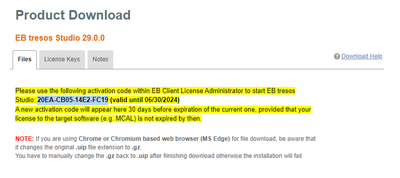
Thank you,
Nam.
NamLee
- Mark as New
- Bookmark
- Subscribe
- Mute
- Subscribe to RSS Feed
- Permalink
- Report Inappropriate Content
Hi joonhyung yi,
Updated from NXP: Please help us to use the new code of EB 4196-14E0-C330-9292.
- Mark as New
- Bookmark
- Subscribe
- Mute
- Subscribe to RSS Feed
- Permalink
- Report Inappropriate Content
I solved the problem. Thank you.
NamLee
- Mark as New
- Bookmark
- Subscribe
- Mute
- Subscribe to RSS Feed
- Permalink
- Report Inappropriate Content
- Mark as New
- Bookmark
- Subscribe
- Mute
- Subscribe to RSS Feed
- Permalink
- Report Inappropriate Content
The problem was resolved by contacting a FA engineer.
Thank you.
NamLee
- Mark as New
- Bookmark
- Subscribe
- Mute
- Subscribe to RSS Feed
- Permalink
- Report Inappropriate Content
- Mark as New
- Bookmark
- Subscribe
- Mute
- Subscribe to RSS Feed
- Permalink
- Report Inappropriate Content
I also have the same issue, so far I have not been able to activate successfully
NamLee
- Mark as New
- Bookmark
- Subscribe
- Mute
- Subscribe to RSS Feed
- Permalink
- Report Inappropriate Content
Hi RoseRice,
I already contacted to Elektrobit support man and got informed that "Customers should directly contact to EB Global support not through the NXP support queue."
The code will be expired after 3 months. Please visit NXP download page of EB tresos for the code.
