
- Forums
- Product Forums
- General Purpose MicrocontrollersGeneral Purpose Microcontrollers
- i.MX Forumsi.MX Forums
- QorIQ Processing PlatformsQorIQ Processing Platforms
- Identification and SecurityIdentification and Security
- Power ManagementPower Management
- Wireless ConnectivityWireless Connectivity
- RFID / NFCRFID / NFC
- Advanced AnalogAdvanced Analog
- Neural Processing UnitsNeural Processing Units
- MCX Microcontrollers
- S32G
- S32K
- S32V
- MPC5xxx
- Other NXP Products
- S12 / MagniV Microcontrollers
- Powertrain and Electrification Analog Drivers
- Sensors
- Vybrid Processors
- Digital Signal Controllers
- 8-bit Microcontrollers
- ColdFire/68K Microcontrollers and Processors
- PowerQUICC Processors
- OSBDM and TBDML
- S32M
- S32Z/E
-
- Solution Forums
- Software Forums
- MCUXpresso Software and ToolsMCUXpresso Software and Tools
- CodeWarriorCodeWarrior
- MQX Software SolutionsMQX Software Solutions
- Model-Based Design Toolbox (MBDT)Model-Based Design Toolbox (MBDT)
- FreeMASTER
- eIQ Machine Learning Software
- Embedded Software and Tools Clinic
- S32 SDK
- S32 Design Studio
- GUI Guider
- Zephyr Project
- Voice Technology
- Application Software Packs
- Secure Provisioning SDK (SPSDK)
- Processor Expert Software
- Generative AI & LLMs
-
- Topics
- Mobile Robotics - Drones and RoversMobile Robotics - Drones and Rovers
- NXP Training ContentNXP Training Content
- University ProgramsUniversity Programs
- Rapid IoT
- NXP Designs
- SafeAssure-Community
- OSS Security & Maintenance
- Using Our Community
-
- Cloud Lab Forums
-
- Knowledge Bases
- ARM Microcontrollers
- i.MX Processors
- Identification and Security
- Model-Based Design Toolbox (MBDT)
- QorIQ Processing Platforms
- S32 Automotive Processing Platform
- Wireless Connectivity
- CodeWarrior
- MCUXpresso Suite of Software and Tools
- MQX Software Solutions
- RFID / NFC
- Advanced Analog
- Neural Processing Units
-
- NXP Tech Blogs
- Home
- :
- ソフトウェア・フォーラム
- :
- S32 デザインスタジオ
- :
- Re: S32 Design Studio for S32 Platform Error Selecting Project
S32 Design Studio for S32 Platform Error Selecting Project
- RSS フィードを購読する
- トピックを新着としてマーク
- トピックを既読としてマーク
- このトピックを現在のユーザーにフロートします
- ブックマーク
- 購読
- ミュート
- 印刷用ページ
S32 Design Studio for S32 Platform Error Selecting Project

- 新着としてマーク
- ブックマーク
- 購読
- ミュート
- RSS フィードを購読する
- ハイライト
- 印刷
- 不適切なコンテンツを報告
I've somehow managed to mess up S32 Design Studio for S32 Platform and am no longer able to select/view my project. Here's how I got to where I'm at:
- Opened/imported the S32K142_CAN_bootloader project from the Unified Bootloader Framework installation package
- Made a few minor code edits, have it building successfully
- Opened the ConfigTools => Pins menus selection to try to view pin mapping/configuration
- Found that there was nothing in this view...apparently this GUI tool hadn't been used to generate the pin configuration code (although the C files for pin configuration were in the "generated code" folder structure - so what was used to generate them?). When I go to "Config Tools Overview" I get a popup telling me that there is no configuration created yet.
- After opening the Pins view, I get a red error in the toolbar telling me "MCU is not selected"
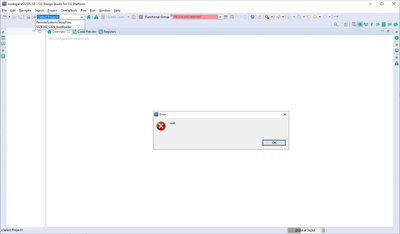
- When I try to open my project using the toolbar I get an error popup that simply says "null" (see below)
- The project still appears to build but for the life of me I can't figure out how to get back to the "original" GUI layout with the project structure window, etc. I appear to be stuck in the ConfigTools screens and can't get out of them.
I've got to be missing something really simple here but can't figure it out. Any advice is appreciated.
Thanks,
Andy

 mikedoidge
- 新着としてマーク
- ブックマーク
- 購読
- ミュート
- RSS フィードを購読する
- ハイライト
- 印刷
- 不適切なコンテンツを報告
Hi Andy,
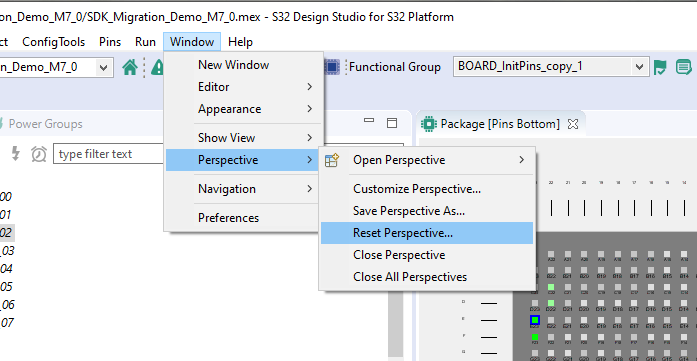
If your main goal is just to get the screens back the way they were, then use the menu command 'Reset Perspective':
As for the migration of the project, I'm afraid @jiri_kral is correct. It was created for ProcessorExpert so there may be some work involved to reproduce the same settings within S32 Configuration Tools.
Hope it helps,
Mike
mikedoidge
- 新着としてマーク
- ブックマーク
- 購読
- ミュート
- RSS フィードを購読する
- ハイライト
- 印刷
- 不適切なコンテンツを報告
Hi Andy,
You might try converting the project as shown in the video:
Migrating S32K1 projects from S32DS for ARM and SD... - NXP Community
Best Regards,
Mike
- 新着としてマーク
- ブックマーク
- 購読
- ミュート
- RSS フィードを購読する
- ハイライト
- 印刷
- 不適切なコンテンツを報告
Thanks Mike. I did the migration but am getting build errors. It seems like some of the files from the original project aren't being found. Any ideas?
17:05:03 **** Incremental Build of configuration Debug for project S32K142_CAN_bootloader ****
make -j12 all
Building file: ../src/driver/flash/src/flash.c
Building file: ../src/driver/flash/src/flash_cfg.c
Building file: ../src/main.c
Invoking: Standard S32DS C Compiler
Invoking: Standard S32DS C Compiler
arm-none-eabi-gcc "@src/driver/flash/src/flash.args" -MMD -MP -MF"src/driver/flash/src/flash.d" -MT"src/driver/flash/src/flash.o" -o "src/driver/flash/src/flash.o" "../src/driver/flash/src/flash.c"
arm-none-eabi-gcc "@src/main.args" -MMD -MP -MF"src/main.d" -MT"src/main.o" -o "src/main.o" "../src/main.c"
Invoking: Standard S32DS C Compiler
Building file: ../SDK/rtos/osif/osif_baremetal.c
arm-none-eabi-gcc "@src/driver/flash/src/flash.args" -MMD -MP -MF"src/driver/flash/src/flash_cfg.d" -MT"src/driver/flash/src/flash_cfg.o" -o "src/driver/flash/src/flash_cfg.o" "../src/driver/flash/src/flash_cfg.c"
Building file: ../SDK/platform/pal/src/can/can_pal.c
Invoking: Standard S32DS C Compiler
arm-none-eabi-gcc "@SDK/rtos/osif/osif_baremetal.args" -MMD -MP -MF"SDK/rtos/osif/osif_baremetal.d" -MT"SDK/rtos/osif/osif_baremetal.o" -o "SDK/rtos/osif/osif_baremetal.o" "../SDK/rtos/osif/osif_baremetal.c"
Invoking: Standard S32DS C Compiler
arm-none-eabi-gcc "@SDK/platform/pal/src/can/can_pal.args" -MMD -MP -MF"SDK/platform/pal/src/can/can_pal.d" -MT"SDK/platform/pal/src/can/can_pal.o" -o "SDK/platform/pal/src/can/can_pal.o" "../SDK/platform/pal/src/can/can_pal.c"
Building file: ../SDK/platform/drivers/src/wdog/wdog_hw_access.c
Building file: ../SDK/platform/drivers/src/power/S32K1xx/power_manager_S32K1xx.c
Building file: ../SDK/platform/drivers/src/wdog/wdog_driver.c
Building file: ../SDK/platform/drivers/src/power/S32K1xx/power_smc_hw_access.c
Invoking: Standard S32DS C Compiler
arm-none-eabi-gcc "@SDK/platform/drivers/src/power/S32K1xx/power_manager_S32K1xx.args" -MMD -MP -MF"SDK/platform/drivers/src/power/S32K1xx/power_manager_S32K1xx.d" -MT"SDK/platform/drivers/src/power/S32K1xx/power_manager_S32K1xx.o" -o "SDK/platform/drivers/src/power/S32K1xx/power_manager_S32K1xx.o" "../SDK/platform/drivers/src/power/S32K1xx/power_manager_S32K1xx.c"
Invoking: Standard S32DS C Compiler
Invoking: Standard S32DS C Compiler
arm-none-eabi-gcc "@SDK/platform/drivers/src/wdog/wdog_driver.args" -MMD -MP -MF"SDK/platform/drivers/src/wdog/wdog_driver.d" -MT"SDK/platform/drivers/src/wdog/wdog_driver.o" -o "SDK/platform/drivers/src/wdog/wdog_driver.o" "../SDK/platform/drivers/src/wdog/wdog_driver.c"
arm-none-eabi-gcc "@SDK/platform/drivers/src/power/S32K1xx/power_manager_S32K1xx.args" -MMD -MP -MF"SDK/platform/drivers/src/power/S32K1xx/power_smc_hw_access.d" -MT"SDK/platform/drivers/src/power/S32K1xx/power_smc_hw_access.o" -o "SDK/platform/drivers/src/power/S32K1xx/power_smc_hw_access.o" "../SDK/platform/drivers/src/power/S32K1xx/power_smc_hw_access.c"
../src/driver/flash/src/flash.c:2:27: fatal error: flash_hal_Cfg.h: No such file or directory
#include "flash_hal_Cfg.h"
^
compilation terminated.
Invoking: Standard S32DS C Compiler
arm-none-eabi-gcc "@SDK/platform/drivers/src/wdog/wdog_driver.args" -MMD -MP -MF"SDK/platform/drivers/src/wdog/wdog_hw_access.d" -MT"SDK/platform/drivers/src/wdog/wdog_hw_access.o" -o "SDK/platform/drivers/src/wdog/wdog_hw_access.o" "../SDK/platform/drivers/src/wdog/wdog_hw_access.c"
Building file: ../SDK/platform/drivers/src/power/power_manager.c
make: *** [src/driver/flash/src/subdir.mk:23: src/driver/flash/src/flash.o] Error 1
make: *** Waiting for unfinished jobs....
../src/main.c:28:29: fatal error: bootloader_main.h: No such file or directory
#include "bootloader_main.h"
^
compilation terminated.
Invoking: Standard S32DS C Compiler
Finished building: ../src/driver/flash/src/flash_cfg.c
arm-none-eabi-gcc "@SDK/platform/drivers/src/power/power_manager.args" -MMD -MP -MF"SDK/platform/drivers/src/power/power_manager.d" -MT"SDK/platform/drivers/src/power/power_manager.o" -o "SDK/platform/drivers/src/power/power_manager.o" "../SDK/platform/drivers/src/power/power_manager.c"
make: *** [src/subdir.mk:20: src/main.o] Error 1
Finished building: ../SDK/rtos/osif/osif_baremetal.c
Finished building: ../SDK/platform/pal/src/can/can_pal.c
Finished building: ../SDK/platform/drivers/src/power/S32K1xx/power_manager_S32K1xx.c
Finished building: ../SDK/platform/drivers/src/wdog/wdog_driver.c
Finished building: ../SDK/platform/drivers/src/power/S32K1xx/power_smc_hw_access.c
Finished building: ../SDK/platform/drivers/src/wdog/wdog_hw_access.c
Finished building: ../SDK/platform/drivers/src/power/power_manager.c
"make -j12 all" terminated with exit code 2. Build might be incomplete.17:05:05 Build Failed. 5 errors, 0 warnings. (took 2s.504ms)
- 新着としてマーク
- ブックマーク
- 購読
- ミュート
- RSS フィードを購読する
- ハイライト
- 印刷
- 不適切なコンテンツを報告
Thanks Mike. I tried this but the build fails after the migration, it seems like it can't find some .h files from the original project.
17:05:03 **** Incremental Build of configuration Debug for project S32K142_CAN_bootloader ****
make -j12 all
Building file: ../src/driver/flash/src/flash.c
Building file: ../src/driver/flash/src/flash_cfg.c
Building file: ../src/main.c
Invoking: Standard S32DS C Compiler
Invoking: Standard S32DS C Compiler
arm-none-eabi-gcc "@src/driver/flash/src/flash.args" -MMD -MP -MF"src/driver/flash/src/flash.d" -MT"src/driver/flash/src/flash.o" -o "src/driver/flash/src/flash.o" "../src/driver/flash/src/flash.c"
arm-none-eabi-gcc "@src/main.args" -MMD -MP -MF"src/main.d" -MT"src/main.o" -o "src/main.o" "../src/main.c"
Invoking: Standard S32DS C Compiler
Building file: ../SDK/rtos/osif/osif_baremetal.c
arm-none-eabi-gcc "@src/driver/flash/src/flash.args" -MMD -MP -MF"src/driver/flash/src/flash_cfg.d" -MT"src/driver/flash/src/flash_cfg.o" -o "src/driver/flash/src/flash_cfg.o" "../src/driver/flash/src/flash_cfg.c"
Building file: ../SDK/platform/pal/src/can/can_pal.c
Invoking: Standard S32DS C Compiler
arm-none-eabi-gcc "@SDK/rtos/osif/osif_baremetal.args" -MMD -MP -MF"SDK/rtos/osif/osif_baremetal.d" -MT"SDK/rtos/osif/osif_baremetal.o" -o "SDK/rtos/osif/osif_baremetal.o" "../SDK/rtos/osif/osif_baremetal.c"
Invoking: Standard S32DS C Compiler
arm-none-eabi-gcc "@SDK/platform/pal/src/can/can_pal.args" -MMD -MP -MF"SDK/platform/pal/src/can/can_pal.d" -MT"SDK/platform/pal/src/can/can_pal.o" -o "SDK/platform/pal/src/can/can_pal.o" "../SDK/platform/pal/src/can/can_pal.c"
Building file: ../SDK/platform/drivers/src/wdog/wdog_hw_access.c
Building file: ../SDK/platform/drivers/src/power/S32K1xx/power_manager_S32K1xx.c
Building file: ../SDK/platform/drivers/src/wdog/wdog_driver.c
Building file: ../SDK/platform/drivers/src/power/S32K1xx/power_smc_hw_access.c
Invoking: Standard S32DS C Compiler
arm-none-eabi-gcc "@SDK/platform/drivers/src/power/S32K1xx/power_manager_S32K1xx.args" -MMD -MP -MF"SDK/platform/drivers/src/power/S32K1xx/power_manager_S32K1xx.d" -MT"SDK/platform/drivers/src/power/S32K1xx/power_manager_S32K1xx.o" -o "SDK/platform/drivers/src/power/S32K1xx/power_manager_S32K1xx.o" "../SDK/platform/drivers/src/power/S32K1xx/power_manager_S32K1xx.c"
Invoking: Standard S32DS C Compiler
Invoking: Standard S32DS C Compiler
arm-none-eabi-gcc "@SDK/platform/drivers/src/wdog/wdog_driver.args" -MMD -MP -MF"SDK/platform/drivers/src/wdog/wdog_driver.d" -MT"SDK/platform/drivers/src/wdog/wdog_driver.o" -o "SDK/platform/drivers/src/wdog/wdog_driver.o" "../SDK/platform/drivers/src/wdog/wdog_driver.c"
arm-none-eabi-gcc "@SDK/platform/drivers/src/power/S32K1xx/power_manager_S32K1xx.args" -MMD -MP -MF"SDK/platform/drivers/src/power/S32K1xx/power_smc_hw_access.d" -MT"SDK/platform/drivers/src/power/S32K1xx/power_smc_hw_access.o" -o "SDK/platform/drivers/src/power/S32K1xx/power_smc_hw_access.o" "../SDK/platform/drivers/src/power/S32K1xx/power_smc_hw_access.c"
../src/driver/flash/src/flash.c:2:27: fatal error: flash_hal_Cfg.h: No such file or directory
#include "flash_hal_Cfg.h"
^
compilation terminated.
Invoking: Standard S32DS C Compiler
arm-none-eabi-gcc "@SDK/platform/drivers/src/wdog/wdog_driver.args" -MMD -MP -MF"SDK/platform/drivers/src/wdog/wdog_hw_access.d" -MT"SDK/platform/drivers/src/wdog/wdog_hw_access.o" -o "SDK/platform/drivers/src/wdog/wdog_hw_access.o" "../SDK/platform/drivers/src/wdog/wdog_hw_access.c"
Building file: ../SDK/platform/drivers/src/power/power_manager.c
make: *** [src/driver/flash/src/subdir.mk:23: src/driver/flash/src/flash.o] Error 1
make: *** Waiting for unfinished jobs....
../src/main.c:28:29: fatal error: bootloader_main.h: No such file or directory
#include "bootloader_main.h"
^
compilation terminated.
Invoking: Standard S32DS C Compiler
Finished building: ../src/driver/flash/src/flash_cfg.c
arm-none-eabi-gcc "@SDK/platform/drivers/src/power/power_manager.args" -MMD -MP -MF"SDK/platform/drivers/src/power/power_manager.d" -MT"SDK/platform/drivers/src/power/power_manager.o" -o "SDK/platform/drivers/src/power/power_manager.o" "../SDK/platform/drivers/src/power/power_manager.c"
make: *** [src/subdir.mk:20: src/main.o] Error 1
Finished building: ../SDK/rtos/osif/osif_baremetal.c
Finished building: ../SDK/platform/pal/src/can/can_pal.c
Finished building: ../SDK/platform/drivers/src/power/S32K1xx/power_manager_S32K1xx.c
Finished building: ../SDK/platform/drivers/src/wdog/wdog_driver.c
Finished building: ../SDK/platform/drivers/src/power/S32K1xx/power_smc_hw_access.c
Finished building: ../SDK/platform/drivers/src/wdog/wdog_hw_access.c
Finished building: ../SDK/platform/drivers/src/power/power_manager.c
"make -j12 all" terminated with exit code 2. Build might be incomplete.17:05:05 Build Failed. 5 errors, 0 warnings. (took 2s.504ms)
 jiri_kral
- 新着としてマーク
- ブックマーク
- 購読
- ミュート
- RSS フィードを購読する
- ハイライト
- 印刷
- 不適切なコンテンツを報告
Hi,
The project is for Older S32 Design Studio for ARM v2018.R1 and is not compatible with S32DS v 3.4. Please download older S32DS.
Jiri
- 新着としてマーク
- ブックマーク
- 購読
- ミュート
- RSS フィードを購読する
- ハイライト
- 印刷
- 不適切なコンテンツを報告
Thanks Jiri. Unfortunately the older versions will not install on my laptop for some unknownreason. I had been working with NXP support on that installation issue and they advised to use S32 Design Studio for S32 Platform since it's the latest product.
