
- Forums
- Product Forums
- General Purpose MicrocontrollersGeneral Purpose Microcontrollers
- i.MX Forumsi.MX Forums
- QorIQ Processing PlatformsQorIQ Processing Platforms
- Identification and SecurityIdentification and Security
- Power ManagementPower Management
- Wireless ConnectivityWireless Connectivity
- RFID / NFCRFID / NFC
- Advanced AnalogAdvanced Analog
- MCX Microcontrollers
- S32G
- S32K
- S32V
- MPC5xxx
- Other NXP Products
- S12 / MagniV Microcontrollers
- Powertrain and Electrification Analog Drivers
- Sensors
- Vybrid Processors
- Digital Signal Controllers
- 8-bit Microcontrollers
- ColdFire/68K Microcontrollers and Processors
- PowerQUICC Processors
- OSBDM and TBDML
- S32M
- S32Z/E
-
- Solution Forums
- Software Forums
- MCUXpresso Software and ToolsMCUXpresso Software and Tools
- CodeWarriorCodeWarrior
- MQX Software SolutionsMQX Software Solutions
- Model-Based Design Toolbox (MBDT)Model-Based Design Toolbox (MBDT)
- FreeMASTER
- eIQ Machine Learning Software
- Embedded Software and Tools Clinic
- S32 SDK
- S32 Design Studio
- GUI Guider
- Zephyr Project
- Voice Technology
- Application Software Packs
- Secure Provisioning SDK (SPSDK)
- Processor Expert Software
- Generative AI & LLMs
-
- Topics
- Mobile Robotics - Drones and RoversMobile Robotics - Drones and Rovers
- NXP Training ContentNXP Training Content
- University ProgramsUniversity Programs
- Rapid IoT
- NXP Designs
- SafeAssure-Community
- OSS Security & Maintenance
- Using Our Community
-
- Cloud Lab Forums
-
- Knowledge Bases
- ARM Microcontrollers
- i.MX Processors
- Identification and Security
- Model-Based Design Toolbox (MBDT)
- QorIQ Processing Platforms
- S32 Automotive Processing Platform
- Wireless Connectivity
- CodeWarrior
- MCUXpresso Suite of Software and Tools
- MQX Software Solutions
- RFID / NFC
- Advanced Analog
-
- NXP Tech Blogs
- Home
- :
- Software Forums
- :
- S32 Design Studio
- :
- Installing S32 Design Studio for Power Arch 2.1 fails at activation
Installing S32 Design Studio for Power Arch 2.1 fails at activation
- Subscribe to RSS Feed
- Mark Topic as New
- Mark Topic as Read
- Float this Topic for Current User
- Bookmark
- Subscribe
- Mute
- Printer Friendly Page
Installing S32 Design Studio for Power Arch 2.1 fails at activation

- Mark as New
- Bookmark
- Subscribe
- Mute
- Subscribe to RSS Feed
- Permalink
- Report Inappropriate Content
Earlier this week, my existing installation of S32 Design Studio for Power Arch 2.1 stopped working. I would start the program, select the workspace, I'd just see the ide, and it would vanish. I found a log file in the program folder complaining about a java exception.
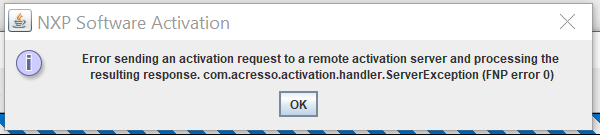
I uninstalled the program (as well as s32ds for s32k), in preparation to reinstall, thinking some program file got corrupted. Now, i can't seem to even install it. The installer asks for the activation key, and when i choose 'online' activation it soon errors out, saying "Error sending an activation request to a remote server and processing the resulting response. com.acresso.activation.handler.ServerException (FNP error 0)".
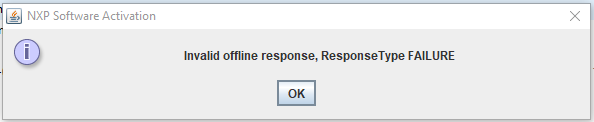
I've also tried an offline activation, but this produces an error as well. i can generate the 'request.xml', and get an 'activation.xml' via the nxp website, but when I proovide the 'activation.xml' file to the installer, it errors out saying, "Invalid offline response, ResponseType FAILURE". if i look inside (text editor) the 'activation.xml' generated by the NXP website, I do actually see a failure message within (<ResponseType>FAILURE</ResponseType>).
I've tried both online and offline activation, with the installer started as an administrator (and not). I've also tried various fixes others have posted to the forums, including deleting c:\programdata\flex, clearing out appdata/local/temp, running the 'clean.bat' from S32 Design Studio Offline activation issue hot fix - NXP Community, I've attempted to use the "CLL_FNP.11.18.0.2" fix from here (Troubleshooting: Activation fails with error messa... - NXP Community), but i feel like I wasn't understanding how to use it properly. I've tried creating a second NXP account and getting a fresh activation code. I've tried disabling my windows firewall.
Any help would be appreciated to install S32 Design Studio for Power Arch 2.1

- Mark as New
- Bookmark
- Subscribe
- Mute
- Subscribe to RSS Feed
- Permalink
- Report Inappropriate Content
Just adding to this old thread since it seems to come up first on the internet search engines. I was having the exact same issue with the java error, and it does recur periodically. For me, the solution is to delete the folder "C:\ProgramData\FLEXnet", start the program and go through the licensing steps again. Unfortunately the information in the log file is of zero use in indicating this problem is actually due to a licensing issue, so it's just something you'll have to know.
Hopefully this helps others out there searching for a solution and in need of a quick fix!

 jiri_kral
- Mark as New
- Bookmark
- Subscribe
- Mute
- Subscribe to RSS Feed
- Permalink
- Report Inappropriate Content
Hi,
I checked you account and it looks that you was able activate S32DS PA v2.1. Is the issue still present?
- Mark as New
- Bookmark
- Subscribe
- Mute
- Subscribe to RSS Feed
- Permalink
- Report Inappropriate Content
Hi @jiri_kral, do you have any advice on getting S32DS working on my pc?
jiri_kral
- Mark as New
- Bookmark
- Subscribe
- Mute
- Subscribe to RSS Feed
- Permalink
- Report Inappropriate Content
Hi Liam,
sorry for delay. I checked the account again and for some reason the license expiration date was Aug 2023. I extend it again. Please try to re-activate S32DS with your old code.
- Mark as New
- Bookmark
- Subscribe
- Mute
- Subscribe to RSS Feed
- Permalink
- Report Inappropriate Content
Hello Jiri,
I installed and activated the product on another 'loaner' PC, but I could not resolve it on my workstation. So the issue is still pending. I'm able to get some work done at least on the other workstation. But if you have any insights that will help me get S32DS running on my pc, they would be appreciated.
-Liam
