
- Forums
- Product Forums
- General Purpose MicrocontrollersGeneral Purpose Microcontrollers
- i.MX Forumsi.MX Forums
- QorIQ Processing PlatformsQorIQ Processing Platforms
- Identification and SecurityIdentification and Security
- Power ManagementPower Management
- Wireless ConnectivityWireless Connectivity
- RFID / NFCRFID / NFC
- Advanced AnalogAdvanced Analog
- Neural Processing UnitsNeural Processing Units
- MCX Microcontrollers
- S32G
- S32K
- S32V
- MPC5xxx
- Other NXP Products
- S12 / MagniV Microcontrollers
- Powertrain and Electrification Analog Drivers
- Sensors
- Vybrid Processors
- Digital Signal Controllers
- 8-bit Microcontrollers
- ColdFire/68K Microcontrollers and Processors
- PowerQUICC Processors
- OSBDM and TBDML
- S32M
- S32Z/E
-
- Solution Forums
- Software Forums
- MCUXpresso Software and ToolsMCUXpresso Software and Tools
- CodeWarriorCodeWarrior
- MQX Software SolutionsMQX Software Solutions
- Model-Based Design Toolbox (MBDT)Model-Based Design Toolbox (MBDT)
- FreeMASTER
- eIQ Machine Learning Software
- Embedded Software and Tools Clinic
- S32 SDK
- S32 Design Studio
- GUI Guider
- Zephyr Project
- Voice Technology
- Application Software Packs
- Secure Provisioning SDK (SPSDK)
- Processor Expert Software
- Generative AI & LLMs
-
- Topics
- Mobile Robotics - Drones and RoversMobile Robotics - Drones and Rovers
- NXP Training ContentNXP Training Content
- University ProgramsUniversity Programs
- Rapid IoT
- NXP Designs
- SafeAssure-Community
- OSS Security & Maintenance
- Using Our Community
-
- Cloud Lab Forums
-
- Knowledge Bases
- ARM Microcontrollers
- i.MX Processors
- Identification and Security
- Model-Based Design Toolbox (MBDT)
- QorIQ Processing Platforms
- S32 Automotive Processing Platform
- Wireless Connectivity
- CodeWarrior
- MCUXpresso Suite of Software and Tools
- MQX Software Solutions
- RFID / NFC
- Advanced Analog
- Neural Processing Units
-
- NXP Tech Blogs
- Home
- :
- ソフトウェア・フォーラム
- :
- S32 デザインスタジオ・ナレッジベース
- :
- HOWTO: Link a binary file(s) into the application project using GNU build tools
HOWTO: Link a binary file(s) into the application project using GNU build tools
- RSS フィードを購読する
- 新着としてマーク
- 既読としてマーク
- ブックマーク
- 購読
- 印刷用ページ
- 不適切なコンテンツを報告
HOWTO: Link a binary file(s) into the application project using GNU build tools
HOWTO: Link a binary file(s) into the application project using GNU build tools
This document describes how to link a binary file(s) with an existing project in S32 Design Studio using GCC build tools.
Let's demonstrate this on S32K144 project in S32DS for ARM. Nevertheless it should work with any other GCC based development tools.
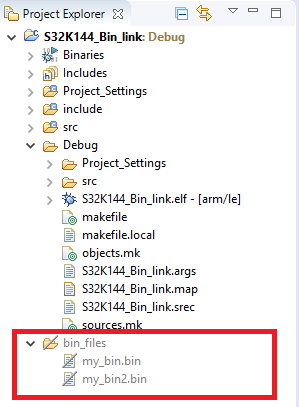
The first step is to add the binary file(s) into your project folder in the workspace.
In the example below I created two binary files "my_bin.bin" and "my_bin2.bin" and added them into a custom folder "bin_files".
I also entered 10 characters into each file.
my_bin.bin: 0x41 0x41 0x41 0x41 0x41 0x41 0x41 0x41 0x41 0x41 (represents 10 characters "A")
my_bin2.bin: 0x42 0x42 0x42 0x42 0x42 0x42 0x42 0x42 0x42 0x42 (represents 10 characters "B")

The next step is to modify the linker configuration file (.ld) in order to specify input file format and path to the binary files (see the line 14-17)
/* Specify the memory areas */
MEMORY
{
/* Flash */
m_interrupts (RX) : ORIGIN = 0x00000000, LENGTH = 0x00000400
m_flash_config (RX) : ORIGIN = 0x00000400, LENGTH = 0x00000010
m_text (RX) : ORIGIN = 0x00000410, LENGTH = 0x0007FBF0
/* SRAM_L */
m_data (RW) : ORIGIN = 0x1FFF8000, LENGTH = 0x00008000
/* SRAM_U */
m_data_2 (RW) : ORIGIN = 0x20000000, LENGTH = 0x00007000
}
TARGET(binary) /* specify the file format of binary file */
INPUT (..\bin_files\my_bin.bin) /* first bin file path (relative to the output folder)*/
INPUT (..\bin_files\my_bin2.bin) /* second bin file path (relative to the output folder)*/
OUTPUT_FORMAT(default) /* restore the out file format */
/* Define output sections */
SECTIONS
{
...
Finally, in the SECTIONS block of .ld file specify where to place the binary files (in the example it is placed at the end of .text section - see the line 37,38).
/* Define output sections */
SECTIONS
{
/* The startup code goes first into internal flash */
.interrupts :
{
__VECTOR_TABLE = .;
__interrupts_start__ = .;
. = ALIGN(4);
KEEP(*(.isr_vector)) /* Startup code */
__interrupts_end__ = .;
. = ALIGN(4);
} > m_interrupts
.flash_config :
{
. = ALIGN(4);
KEEP(*(.FlashConfig)) /* Flash Configuration Field (FCF) */
. = ALIGN(4);
}> m_flash_config
/* The program code and other data goes into internal flash */
.text :
{
. = ALIGN(4);
*(.text) /* .text sections (code) */
*(.text*) /* .text* sections (code) */
*(.rodata) /* .rodata sections (constants, strings, etc.) */
*(.rodata*) /* .rodata* sections (constants, strings, etc.) */
*(.glue_7) /* glue arm to thumb code */
*(.glue_7t) /* glue thumb to arm code */
*(.eh_frame)
KEEP (*(.init))
KEEP (*(.fini))
. = ALIGN(4);
..\bin_files\my_bin.bin /* First binary file */
..\bin_files\my_bin2.bin /* Second binary file */
} > m_text
After successful compilation and link let's check map and s-record file (HOWTO: Generate S-Record/Intel HEX/Binary file ) to confirm the binary files have been linked correctly:
.glue_7t 0x0000080c 0x0 linker stubs
*(.eh_frame)
*(.init)
*(.fini)
0x0000080c . = ALIGN (0x4)
..\bin_files\my_bin.bin()
.data 0x0000080c 0xa ..\bin_files\my_bin.bin
0x0000080c _binary____bin_files_my_bin_bin_start
0x00000816 _binary____bin_files_my_bin_bin_end
..\bin_files\my_bin2.bin()
.data 0x00000816 0xa ..\bin_files\my_bin2.bin
0x00000816 _binary____bin_files_my_bin2_bin_start
0x00000820 _binary____bin_files_my_bin2_bin_end
.vfp11_veneer 0x00000820 0x0
.vfp11_veneer 0x00000820 0x0 linker stubs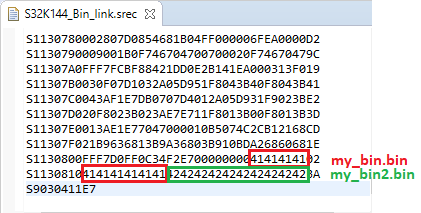
If you need a reference to the binary file block start/end address in your code you can use the linker symbols generated automatically or you can define your own symbols in the linker script.
/* declare symbols from linker script file */
extern unsigned int _binary____bin_files_my_bin_bin_start;
extern unsigned int _binary____bin_files_my_bin_bin_end;
int main(void)
{
#define COUNTER_LIMIT 100
unsigned int counter = 0;
unsigned int * bin_start_ptr;
unsigned int * bin_end_ptr;
bin_start_ptr = &_binary____bin_files_my_bin_bin_start;
bin_end_ptr = &_binary____bin_files_my_bin_bin_end;
for(;;) {
counter++;
counter = *(bin_start_ptr); /*loads 0x4141_4141 into counter*/
if(counter > COUNTER_LIMIT) {
counter = 0;
}
}
return 0;
}Note:
if it is intended to place the binary file at specific absolute address (e.g. if binary file that represent bootloader) you have to create a separate custom MEMORY and SECTION block in .ld file.
/* Specify the memory areas */
MEMORY
{
/* Flash */
m_bootloader (RX) : ORIGIN = 0x001000, LENGTH = 0x00010000 /* section for bootloadeer*/
m_text (RX) : ORIGIN = 0x00011000, LENGTH = 0x0040000 /*section for application code*/
...
}
TARGET(binary) /* specify the file format of binary file */
INPUT (..\bin_files\my_booloader.bin) /* bootloader bin file path (relative to the output folder)*/
OUTPUT_FORMAT(default) /* restore the out file format */
/* Define output sections */
SECTIONS
{
/* place the bootloader binary into 0x0..0x10000 */
.bootloader :
{
..\binary_files\my_bootloader.bin /* place the binary file here */
} > m_bootloader
...
Enjoy linking binaries in S32 Design Studio!

- 既読としてマーク
- 新着としてマーク
- ブックマーク
- ハイライト
- 印刷
- 不適切なコンテンツを報告
Thank you for the write-up. Just so you are aware, it doesn't work with my set-up: CodeWarrior 10.6 (CW), using gcc in a Kinetis project with MQX 4. The linker (arm-none-eabi-gcc) does not recognize the syntax "TARGET", nor "OUTPUT_FORMAT", in the .ld script file ('Syntax error.'). (In fact, the CW IDE changes recognized .ld commands to blue text in the editor, but does not change the words "TARGET" and "OUTPUT_FORMAT" to blue.)

- 既読としてマーク
- 新着としてマーク
- ブックマーク
- ハイライト
- 印刷
- 不適切なコンテンツを報告
I'm not sure where it is legal or illegal to add the sections, I just know that I could not add them at the end of the sections.
P.S. Good write up. Thanks.
MEMORY
{
m_hex_file : org = 0x00FA0000, len = 96K /* data flash memory segment */
m_boot_loader : org = 0x00FC8000, len = 96K /* Bootloader additions */
...
}
TARGET(binary)
INPUT(boot_loader.bin) /* Bootloader additions */
INPUT(hex_file.bin) /* Bootloader additions */
OUTPUT_FORMAT(default)
SECTIONS
{
/* Bootloader addition */
.boot_loader :
{
__BOOT_LOADER_BEGIN = . ;
boot_loader.bin (.data)
__BOOT_LOADER_END = . ;
} > m_boot_loader
/* hex file to flash addition */
.hex_file :
{
__HEX_FILE_BEGIN = . ;
hex_file.bin (.data)
__HEX_FILE_END = . ;
} > m_hex_file
.

- 既読としてマーク
- 新着としてマーク
- ブックマーク
- ハイライト
- 印刷
- 不適切なコンテンツを報告
Thank you providing this. I have one query, if i want to define my own symbol then how can i? I tried this:
    .data :
    {
        . = ALIGN(4);
        __DATA_RAM = .;
        __data_start__ = .;      /* Create a global symbol at data start. */
        *(.data)                 /* .data sections */
        *(.data*)                /* .data* sections */
        . = ALIGN(8);
        server1_crt_begin =.;
        ..\..\..\..\test\data_files\server1.crt
        server1_crt_begin =.;
        . = ALIGN(8);

        __data_end__ = .;        /* Define a global symbol at data end. */
    } > m_ram_c0
But it is not working, it showing error cannot find server1_crt_begin
