
- Forums
- Product Forums
- General Purpose MicrocontrollersGeneral Purpose Microcontrollers
- i.MX Forumsi.MX Forums
- QorIQ Processing PlatformsQorIQ Processing Platforms
- Identification and SecurityIdentification and Security
- Power ManagementPower Management
- Wireless ConnectivityWireless Connectivity
- RFID / NFCRFID / NFC
- Advanced AnalogAdvanced Analog
- Neural Processing UnitsNeural Processing Units
- MCX Microcontrollers
- S32G
- S32K
- S32V
- MPC5xxx
- Other NXP Products
- S12 / MagniV Microcontrollers
- Powertrain and Electrification Analog Drivers
- Sensors
- Vybrid Processors
- Digital Signal Controllers
- 8-bit Microcontrollers
- ColdFire/68K Microcontrollers and Processors
- PowerQUICC Processors
- OSBDM and TBDML
- S32M
- S32Z/E
-
- Solution Forums
- Software Forums
- MCUXpresso Software and ToolsMCUXpresso Software and Tools
- CodeWarriorCodeWarrior
- MQX Software SolutionsMQX Software Solutions
- Model-Based Design Toolbox (MBDT)Model-Based Design Toolbox (MBDT)
- FreeMASTER
- eIQ Machine Learning Software
- Embedded Software and Tools Clinic
- S32 SDK
- S32 Design Studio
- GUI Guider
- Zephyr Project
- Voice Technology
- Application Software Packs
- Secure Provisioning SDK (SPSDK)
- Processor Expert Software
- Generative AI & LLMs
-
- Topics
- Mobile Robotics - Drones and RoversMobile Robotics - Drones and Rovers
- NXP Training ContentNXP Training Content
- University ProgramsUniversity Programs
- Rapid IoT
- NXP Designs
- SafeAssure-Community
- OSS Security & Maintenance
- Using Our Community
-
- Cloud Lab Forums
-
- Knowledge Bases
- ARM Microcontrollers
- i.MX Processors
- Identification and Security
- Model-Based Design Toolbox (MBDT)
- QorIQ Processing Platforms
- S32 Automotive Processing Platform
- Wireless Connectivity
- CodeWarrior
- MCUXpresso Suite of Software and Tools
- MQX Software Solutions
- RFID / NFC
- Advanced Analog
- Neural Processing Units
-
- NXP Tech Blogs
- Home
- :
- 基于模型的设计工具箱(MBDT)
- :
- 基于模型的设计工具箱(MBDT)
- :
- Re: S32k344- MBDT error for BLDC or PMSM
S32k344- MBDT error for BLDC or PMSM

Hello,
We are an urgent need of some support please. We are currently using this eval board from NXP: (https://www.digikey.com/en/products/detail/nxp-usa-inc/MCSPTE1AK344/18647986)
We are trying to spin the motor using the BLDC and PMSM folders in the "s32k3_Examples " folder of the NXP_MBDTToolbox. We are able to successfully download the firmware to the board using MATLAB/Simulink, however, we are seeing two issues: First, the MCAT tool is not working and we get the below error:

Second, every time we press the SW4, the LED D3 goes red indicating a fault I think.
We have confirmed the eval board is fine and work as expected with the S32 design studio and NXP hand written FOC codes. We are able to pin the motor with that but not with the MBDT generated codes.
We highly appreciate your urgent support.
已解决! 转到解答。
 stefanvlad
Hi @Eduardo2000 ,
I have looked into the attached s32k344_mc_pmsm_2sh_s32ct2_20240822_103156.txt log,
I think there might still be an error with your NXP_MBDToolbox_S32K3xx installation.
Can you provide screenshots for the MATLAB:
- Add-Ons
- Set Path
For next steps to work i recommend you start fresh,
- Uninstall all previous Toolboxes from MATLAB Manage Add-Ons, then delete the local folders+files, if any remain in:
C:\Users\MAHMADI\AppData\Roaming\MathWorks\MATLAB Add-Ons\Toolboxes\NXP_MBDToolbox_S32K3xxor
C:\MATLABAddOns\Toolboxes\NXP_MBDToolbox_S32K3xx\
- Go to MATLAB -> Preferences and set Add-Ons location to the following location:

This should be the default location.
- Open MATLAB Set Path -> Default -> Save ->Close and then restart MATLAB:
- Install the latest MBDT V1.5.0 from NXP Model-Based Design Toolbox for S32K3xx version 1.5.0.
- Delete the BLDC and PMSM folders, and copy the ones from the mc_v1.5.0_tppsdk_rtd_P19.zip
- Enter the following path to the MATLAB Current Path C:\Matworks\Toolboxes\NXP_MBDToolbox_S32K3xx\S32K3_Examples\mc\PMSM\s32k344_mc_pmsm_2sh_ebt:
- Open the s32k344_mc_pmsm_2sh_ebt.mdl and build&deploy.


Please provide pictures and details on your side, when replicating the steps above.
stefanvlad
Hello @Eduardo2000 ,
Thank you for the explanation and can i ask what is the exact error in the picture? the uploaded image quality is too small 400x239pixels.
First I recommend using the latest MBDT V1.5.0 from NXP Model-Based Design Toolbox for S32K3xx version 1.5.0 - Product Release Announcement - NXP Commun...
Secondly i will check the Jumper position on the DEVKIT-MOTORGD (GD3000) jumpers J9, J10, and J11 are in positions 2-1 and J8 is open, this configuration works with all MBDT BLDC/PMSM models:

In the case of the PMSM models, if the Jumpers are not as in the configuration above, the USERLED_0 will be RED indication a fault.
More details on the setup are in the s32k344_mc_pmsm_2sh_ebt_example_readme.html files included in the MBDT v1.5.0 release.
Then regarding the FreeMASTER connection to the board, you need to check your PC COM Port, for example:

In my case it is COM8 and then i need to set up the FreeMASTER communication:

Select the COM8 Port and speed 115200 as above, it should connect and work well with the board:

Let me know if this helps you,
Stefan V.
Hi @stefanvlad ;
Thanks for your response! We have confirmed all the items you mentioned. Basically we are seeing this error on two different eval boards we have ordered from digikey on two different laptops so it confirms something is not right! Is there a difference between the hardware you have with the ones on digikey? The one we have has a sticker with " SCH-53148 REVB". Do we need to DNP or populate something else on the board in addition to the jumpers configuration ?
stefanvlad
Hello @Eduardo2000 ,
I have one question , what MBDT version are you using?
There are some rare cases where the GD3000 chip on the DEVKIT-MOTORGD board has some issues with the timing and that why it gets stuck in the GD3000_Config() function.
To fix this we have a new version for that GD3000 Driver, based on The new TPPSDK (GD3000 driver) based on RTD for S32K3 - NXP Community.
I have integrated this driver into the MBDT v1.5.0 release, to use it, you need first to delete all files inside the BLDC and PMSM folders:
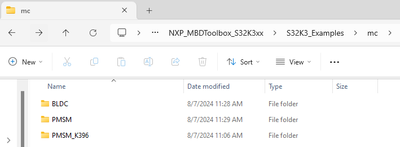
Then unzip the attached mc_v1.5.0_tppsdk_rtd_P19.zip archive and paste it in the mc folder

After this you should be able to run the models with no issues, we have been tested this on multiple boards, in multiple regions, with success.
PS: there is a faster way to load the .elf on the S32K344 board, by using MATLAB Command Window:
>> mbd_s32k3.nxp.download.jtag('s32k344_mc_pmsm_2sh_ebt.elf','S32K344')
This will load the pre-generated binary into the S32K344 board, without the need to open the model.
PS2: regarding "Second, every time we press the SW4, the LED D3 goes red indicating a fault I think." this is normal, because SW4 is the Reset button, and LED D3 is the Reset LED for the S32K344 board.
My advice is to press User_SW0 or User_SW1, see below picture:
-
Overview of the location of USER_SW0/SW1, RGBLED0, 12 Vin DC power, USB J40 connector, SW1 for powering ON, board jumpers J8, J9, J10, and J11:

PS3: Also please note, that the s32k344_mc_pmsm_2sh_ebt_example_readme.html documentation is updated for all MC models:
The MCSPTE1AK344 Development kit contains:
- DEVKIT-MOTORGD board
- S32K3X4EVB-T172 board or S32K3X4EVB-Q172 board
- Sunrise 42BLY3A78-24110 Motor
- 12V Power Supply
- Micro USB cable
Let me know how this works,
Stefan V.
We replaced the mc folder with the files you sent and tried to build the .mdl files in the bldc and pmsm folders. First of all, the models no longer are built successfully and we get the following error for all of them:
"s32k344_mc_pmsm_2sh_s32ct Failed Code generation information file does not exist"

Any thoughts why are getting this error now?
Also we tried to download the original .elf files in the folder you sent to see if they work using the MATLAB command window: >> mbd_s32k3.nxp.download.jtag('s32k344_mc_pmsm_2sh_ebt.elf','S32K344')
We noticed that the ebt.elf files work and turns on the userLED0 and FreeMaster also works and spins the motor. However, the s32ct.elf files don't and we run into same issue where the user LED stays OFF and FreeMaster doesn't connect. See below:
>> mbd_s32k3.nxp.download.jtag('s32k344_mc_bldc_ebt.elf','S32K344') ----> Works!
>> mbd_s32k3.nxp.download.jtag('s32k344_mc_bldc_s32ct.elf','S32K344') ----> Doesn't work!
>> mbd_s32k3.nxp.download.jtag('s32k344_mc_pmsm_2sh_ebt.elf','S32K344') -----> works!
>> mbd_s32k3.nxp.download.jtag('s32k344_mc_pmsm_2sh_s32ct.elf','S32K344') ----> doesn't work
Please note that the commands below use the original .elf files you sent and not the files we generated! As mentioned above, we are no longer able to generate code as we are getting an error as sent above.
We appreciate your urgent support on this!
stefanvlad
Hi @Eduardo2000 ,
Can you include the complete log file, copy paste it in a log_error.txt file and attach it here.
Also there is no reason why s32ct.elf files don't work, as all files have been tested successfully working on the S32K344 board with the Sunrise and Linix motor spinning.
My guess is that you need to properly clean-up (delete all files) in the BLDC and PMSM folders, then add the files from the mc_v1.5.0_tppsdk_rtd_P19.zip and the in the MATLAB File Explorer, go to C:\MATLABAddOns\ToolBoxes\NXP_MBDToolbox_S32K3xx\S32K3xx_Examples\mc\
And select BLDC, PMSM folders and right click and select Add to Path -> Selected Folders and Subfolders:

Then enter the path in MATLAB current window
- C:\MATLABAddOns\ToolBoxes\NXP_MBDToolbox_S32K3xx\S32K3xx_Examples\mc\PMSM\s32k344_mc_pmsm_2sh_ebt\
This will result in seeing only the files from s32k344_mc_pmsm_2sh_ebt in the MATLAB Current Folder.
Now open the s32k344_mc_pmsm_2sh_ebt.mdl and after the model opens, press Build&Deploy(or CTRL+B keyboard shortcut).
This should build successfully,
Stefan V.
stefanvlad
Hi @Eduardo2000 ,
Looking into the log_error.txt file , i see two different paths for NXP_MBDToolbox_S32K3xx:
- C:\MATLABAddOns\Toolboxes\NXP_MBDToolbox_S32K3xx\S32K3_Examples\
- C:\Users\MAHMADI\AppData\Roaming\MathWorks\MATLAB Add-Ons\Toolboxes\NXP_MBDToolbox_S32K3xx\
This can be a problem, my advice is to remove previous Toolboxes installation from path no.2 then go into MATLAB:
- Click on -> Set Path
- Select Default
- Click Save, then Close
- Run the mbd_s32k3_path.m script

After running the mbd_s32k3_path.m script, it should give the Successful message:

After this you can restart MATLAB r2024a.
Can you also check the Add-Ons Manager, mine has the following installed:

Let me know what do you have installed.
After this go to the MC folder in MATLAB C:\MATLABAddOns\Toolboxes\NXP_MBDToolbox_S32K3xx\S32K3_Examples\mc\PMSM\s32k344_mc_pmsm_2sh_ebt:

Open the s32k344_mc_pmsm_2sh_ebt.mdl and build it, it should be successfully:

Stefan V.
Also can you send the list of changes you have made to the original mc folder files ? As mentioned, the original files that come with the toolbox can be built successfully but they just don't work. However, the files you sent don't build successfully. Maybe we can make your changes to the original files and get them to work somehow?
stefanvlad
Hi @Eduardo2000 ,
I have looked into the attached s32k344_mc_pmsm_2sh_s32ct2_20240822_103156.txt log,
I think there might still be an error with your NXP_MBDToolbox_S32K3xx installation.
Can you provide screenshots for the MATLAB:
- Add-Ons
- Set Path
For next steps to work i recommend you start fresh,
- Uninstall all previous Toolboxes from MATLAB Manage Add-Ons, then delete the local folders+files, if any remain in:
C:\Users\MAHMADI\AppData\Roaming\MathWorks\MATLAB Add-Ons\Toolboxes\NXP_MBDToolbox_S32K3xxor
C:\MATLABAddOns\Toolboxes\NXP_MBDToolbox_S32K3xx\
- Go to MATLAB -> Preferences and set Add-Ons location to the following location:
This should be the default location.
- Open MATLAB Set Path -> Default -> Save ->Close and then restart MATLAB:
- Install the latest MBDT V1.5.0 from NXP Model-Based Design Toolbox for S32K3xx version 1.5.0.
- Delete the BLDC and PMSM folders, and copy the ones from the mc_v1.5.0_tppsdk_rtd_P19.zip
- Enter the following path to the MATLAB Current Path C:\Matworks\Toolboxes\NXP_MBDToolbox_S32K3xx\S32K3_Examples\mc\PMSM\s32k344_mc_pmsm_2sh_ebt:
- Open the s32k344_mc_pmsm_2sh_ebt.mdl and build&deploy.
Please provide pictures and details on your side, when replicating the steps above.
After spending two weeks on NXP eval board, we can confirm something is wrong ! All the NXP documentations seem to be based on S32K344EVB-Q172 which seems to be obsolete and all the new boards are based MCSPTE1AK344. Have you guys ever tested that eval board to see if it works as expected before? We can confirm it won't ! And it seems like some other NXP customers had same issues! Can you please provide some support ? We are thinking on moving to other solutions at this point as we have had not much luck with NXP MATLAB based codes!
stefanvlad
Hi @Eduardo2000 ,
Glad to hear that you managed to follow the steps from above, and that it finally worked on your side!
PS: you can accept as solution the post that helped you solve your problem.
Stefan V.
