
- Forums
- Product Forums
- General Purpose MicrocontrollersGeneral Purpose Microcontrollers
- i.MX Forumsi.MX Forums
- QorIQ Processing PlatformsQorIQ Processing Platforms
- Identification and SecurityIdentification and Security
- Power ManagementPower Management
- Wireless ConnectivityWireless Connectivity
- RFID / NFCRFID / NFC
- Advanced AnalogAdvanced Analog
- Neural Processing UnitsNeural Processing Units
- MCX Microcontrollers
- S32G
- S32K
- S32V
- MPC5xxx
- Other NXP Products
- S12 / MagniV Microcontrollers
- Powertrain and Electrification Analog Drivers
- Sensors
- Vybrid Processors
- Digital Signal Controllers
- 8-bit Microcontrollers
- ColdFire/68K Microcontrollers and Processors
- PowerQUICC Processors
- OSBDM and TBDML
- S32M
- S32Z/E
-
- Solution Forums
- Software Forums
- MCUXpresso Software and ToolsMCUXpresso Software and Tools
- CodeWarriorCodeWarrior
- MQX Software SolutionsMQX Software Solutions
- Model-Based Design Toolbox (MBDT)Model-Based Design Toolbox (MBDT)
- FreeMASTER
- eIQ Machine Learning Software
- Embedded Software and Tools Clinic
- S32 SDK
- S32 Design Studio
- GUI Guider
- Zephyr Project
- Voice Technology
- Application Software Packs
- Secure Provisioning SDK (SPSDK)
- Processor Expert Software
- Generative AI & LLMs
-
- Topics
- Mobile Robotics - Drones and RoversMobile Robotics - Drones and Rovers
- NXP Training ContentNXP Training Content
- University ProgramsUniversity Programs
- Rapid IoT
- NXP Designs
- SafeAssure-Community
- OSS Security & Maintenance
- Using Our Community
-
- Cloud Lab Forums
-
- Knowledge Bases
- ARM Microcontrollers
- i.MX Processors
- Identification and Security
- Model-Based Design Toolbox (MBDT)
- QorIQ Processing Platforms
- S32 Automotive Processing Platform
- Wireless Connectivity
- CodeWarrior
- MCUXpresso Suite of Software and Tools
- MQX Software Solutions
- RFID / NFC
- Advanced Analog
- Neural Processing Units
-
- NXP Tech Blogs
- Home
- :
- Model-Based Design Toolbox (MBDT)
- :
- Model-Based Design Toolbox (MBDT)
- :
- Re: Problem with my Kit MCSPTE1AK344
Problem when I try load my program in MDB
- Subscribe to RSS Feed
- Mark Topic as New
- Mark Topic as Read
- Float this Topic for Current User
- Bookmark
- Subscribe
- Mute
- Printer Friendly Page
Problem when I try load my program in MDB

- Mark as New
- Bookmark
- Subscribe
- Mute
- Subscribe to RSS Feed
- Permalink
- Report Inappropriate Content
Hi,
I am using th example of "s32k344_mc_pmsm_2sh_s32ct" with model based design in simulinkin version 2022b. When I try to load to my Kit MCSPTE1AK344 I can´t load well and I don´t get any result. Moreover, I think the file .mex it´s wrong so someone can give a project with .mex?

Could you give some solution?
Thank you,
- Mark as New
- Bookmark
- Subscribe
- Mute
- Subscribe to RSS Feed
- Permalink
- Report Inappropriate Content
Hi,
I have bought your Kit MCSPTE1AK344 but I have different problems when I try to load. I open my project called "s32k344_mc_pmsm_2sh_s32ct" but I have always the same error. I have donde your steps to load but I don´t get nothing.

Thank you,
Jon Ander Amante
 stefanvlad
- Mark as New
- Bookmark
- Subscribe
- Mute
- Subscribe to RSS Feed
- Permalink
- Report Inappropriate Content
Hi @JonAnder_Amante ,
Thank you for using MBDT for S32K3,
I do recommend you follow the Getting started with MCSPTE1AK344 | NXP Semiconductors
Have you connected USB cable to the board and PC?
3.5 Connect the Debugger Cable
Connect a micro-USB cable to the J40 connector to debug via the onboard S32K3 debugger.
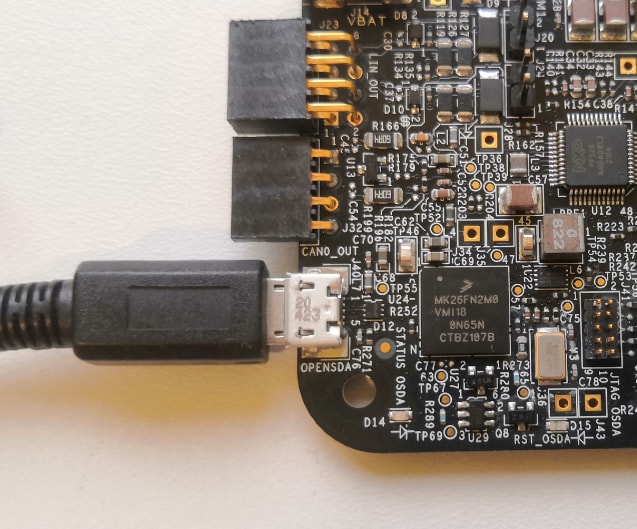
If yes, than can you open Device Manager, to see if the PEMicro shows up as OpenSDA Debug Driver and OpenSDA CDC Serial Port:

if not, than you need to install the latest PEmicro drivers from PEmicro Hardware Interface Drivers, v.12 (7/8/10/11)
Best regards,
Stefan V.
- Mark as New
- Bookmark
- Subscribe
- Mute
- Subscribe to RSS Feed
- Permalink
- Report Inappropriate Content
Hi,
I have already connected USB cable to the board and PC but I have looked Device manager and I don´t PE micro drivers. Could you tell me which I have to install?
Thank you,
stefanvlad
- Mark as New
- Bookmark
- Subscribe
- Mute
- Subscribe to RSS Feed
- Permalink
- Report Inappropriate Content
Hi @JonAnder_Amante ,
I have send the link above, but once again, here it is: https://www.pemicro.com/downloads/download_file.cfm?download_id=53
Regards,
Stefan V.
- Mark as New
- Bookmark
- Subscribe
- Mute
- Subscribe to RSS Feed
- Permalink
- Report Inappropriate Content
When I try to show the errors I have:

- Mark as New
- Bookmark
- Subscribe
- Mute
- Subscribe to RSS Feed
- Permalink
- Report Inappropriate Content
Hi,
I get to load my program but my led is always red and never change to blue or green. My exmaple of program is "S32K344_mc_pmsm_2sh_S32ct" and my version of matlab is R2022b. Could you give any solution?
- Mark as New
- Bookmark
- Subscribe
- Mute
- Subscribe to RSS Feed
- Permalink
- Report Inappropriate Content
Hi,
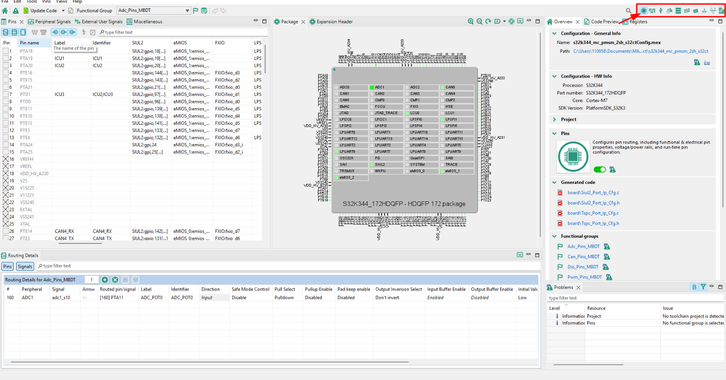
Sorry but I have a critical question. I am using Simulink with Model Based Design but I haven´t installed the application S32 Design studio. I have bought a kit MCSPTE1AK344 and I am trying to compile the example of project called "S32K344_mc_pmsm_2sh_s32ct". I compile well but when I open the configuration of pins, peripherals ... appear empty (in this picture you can see the configuration). I don´t know if you need to install S32 Design studio to see well the configuration. Moreover, the version of Matlab and Simulink and S32 Design Studio is important as I have 2022b version in Matlab in Simulink.

Thank you for all,
 dragostoma
- Mark as New
- Bookmark
- Subscribe
- Mute
- Subscribe to RSS Feed
- Permalink
- Report Inappropriate Content
Hi, @JonAnder_Amante,
Please consider the following aspects: S32 Design Studio is an IDE used for debugging, but its absence does not affect the proper functioning of the toolbox. S32 Configuration Tools is the utility through which you configure pins, clocks, peripherals, and all necessary settings required to build a model. It can be confusing because S32 Configuration Tools is also integrated into S32 Design Studio, which may lead to some misunderstanding. However, for the current situation, installing S32 Design Studio is not required.
Furthermore, what you see in the image is not empty. You have simply selected the Functional Group named Adc_Pins_MBDT from the dropdown menu in the top bar, which displays only the pins configured for the ADC peripheral. By clicking on the Functional Group section, you will be able to select the pins you need.

The image you presented is from the Pins tab, but by switching to the Peripherals tab, you can view the configuration settings for each individual peripheral. Similarly, you can switch between tabs depending on what you need to modify or inspect: Pins, Peripherals, or Clocks.
Hope this helps,
Dragos
- Mark as New
- Bookmark
- Subscribe
- Mute
- Subscribe to RSS Feed
- Permalink
- Report Inappropriate Content
Hi,
I get to load my program but my led is always red and never change to blue or green. My example of program is "S32K344_mc_pmsm_2sh_S32ct" and my version of matlab is R2022b. Could you give any solution?
stefanvlad
- Mark as New
- Bookmark
- Subscribe
- Mute
- Subscribe to RSS Feed
- Permalink
- Report Inappropriate Content
Have you followed the steps in Getting started with MCSPTE1AK344 | NXP Semiconductors
3.4 Plug in the Power Supply
Switch SW1 to the OFF position (fully to the left).
Connect the 12 V power supply adapter
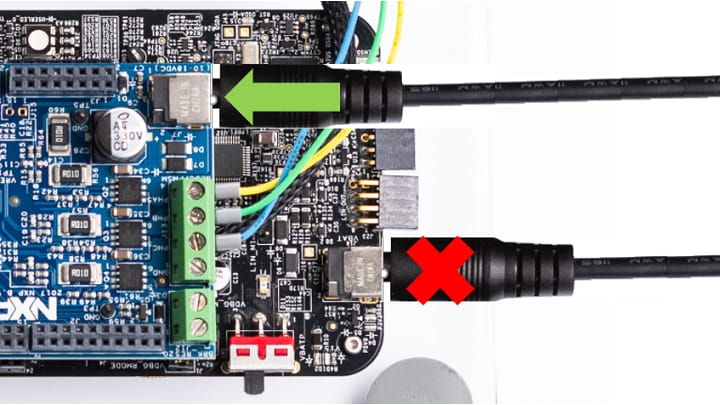
and switch SW1 to the ON position (fully to the right).
When power is applied to the EVB, four orange LED’s adjacent to the voltage regulators show the presence of the supply voltages (12 V, 5 V, 3.3 V and 1.5 V).
Also check if the GD3000 board is properly inserted into the S32K344-T172 board, by pressing on the Pins headers.
Best regards,
Stefan V.
- Mark as New
- Bookmark
- Subscribe
- Mute
- Subscribe to RSS Feed
- Permalink
- Report Inappropriate Content
Hi,
I have connected all connections well but I have the same problem so the led is always red. Moreover, if I look the interfaz of freemaster I have different problems in current Ia and current Ib.

stefanvlad
- Mark as New
- Bookmark
- Subscribe
- Mute
- Subscribe to RSS Feed
- Permalink
- Report Inappropriate Content
The FreeMaster S32K_PMSM_Sensorless.pmpx file you opened is not from MBDT S32K3 Toolbox, it is from the Bare-metal C code from C:\NXP\MC_DevKits\MCSPTE1AK344\sw\MCSPTE1AK344_PMSM_FOC_2Sh_ll
Use MBDT S32K3 Toolbox project from S32K3\src\S32K3_Examples\mc\PMSM\s32k344_mc_pmsm_2sh_s32ct
- open the model s32k344_mc_pmsm_2sh_s32ct.mdl and press CTRL+B to build and deploy
- or you can flash the .elf file on the S32K344 board with Matlab command: >> mbd_s32k3.nxp.download.jtag('s32k344_mc_pmsm_2sh_s32ct.elf','S32K344')
- open the corresponding FreeMaster file: s32k344_mc_pmsm_2sh_s32ct.pmpx

Second i have kindly asked you to press on the GD3000 Pin Headers to make better contact with S32K344-T172 board, as in the picture below:

Third , have you connected the 12V power supply on the GD3000 board, as below?
Can you send me a picture with your boards and setup?
Have you followed the steps above?
- Mark as New
- Bookmark
- Subscribe
- Mute
- Subscribe to RSS Feed
- Permalink
- Report Inappropriate Content
Hi,
I have managed to get the engine to turn correctly but I have a qquestion. When I open freemaster there are some variables that have a interrogation and I don´t know why.


Thank you for all
stefanvlad
- Mark as New
- Bookmark
- Subscribe
- Mute
- Subscribe to RSS Feed
- Permalink
- Report Inappropriate Content
Hi @JonAnder_Amante ,
Some variables appear with "?" since they haven't been implemented in the Simulink model, as the FreeMASTER project comes from the bare metal S32K3 Motor control SW examples.
What was the problem regarding your setup? can you please provide feedback?
Also, i recommend you press button "Accept as Solution" the topic that helped you solve the issues you had, in order to close this topic
Best regards,
Stefan V.
- Mark as New
- Bookmark
- Subscribe
- Mute
- Subscribe to RSS Feed
- Permalink
- Report Inappropriate Content
HI,
Today I load my project but suddenly the led switched off and the chip FS26 started to heat so I don´t know if I have done dead short.
stefanvlad
- Mark as New
- Bookmark
- Subscribe
- Mute
- Subscribe to RSS Feed
- Permalink
- Report Inappropriate Content
Hi @JonAnder_Amante ,
Sorry to hear that, you can check voltages in the S32K344-T172 Schematic, there is also a block diagram:

You can order a new board from S32K3X4EVB-T172 Evaluation Board
or you can also order the new S32K312MINI-EVB Evaluation Board
Best regards,
Stefan V.
- Mark as New
- Bookmark
- Subscribe
- Mute
- Subscribe to RSS Feed
- Permalink
- Report Inappropriate Content
Hi,
I have found the solution but I have another problem. I got debug my project but in the example which I told you, the configuration of S32 Config tool is empty as there aren´t any pin configured. The example is "S32K344_mc_pmsm_2sh_s32ct". I don´t know if you can help me. Thank you

stefanvlad
- Mark as New
- Bookmark
- Subscribe
- Mute
- Subscribe to RSS Feed
- Permalink
- Report Inappropriate Content
Hi @JonAnder_Amante ,
In the screenshot you provided there is ADC_POT0 pin PTA11, there are more pins in Functional Group, by selecting other than Adc_Pins_MBDT.
Also press on Pin Name to sort it, and you will see all green highlighted pins that are used:

For more details we have a compressive guide here Interacting with Digital Inputs/Outputs on MR-CANHUBK344 - NXP Community
Regards,
Stefan V.
