
- Forums
- Product Forums
- General Purpose MicrocontrollersGeneral Purpose Microcontrollers
- i.MX Forumsi.MX Forums
- QorIQ Processing PlatformsQorIQ Processing Platforms
- Identification and SecurityIdentification and Security
- Power ManagementPower Management
- Wireless ConnectivityWireless Connectivity
- RFID / NFCRFID / NFC
- Advanced AnalogAdvanced Analog
- MCX Microcontrollers
- S32G
- S32K
- S32V
- MPC5xxx
- Other NXP Products
- S12 / MagniV Microcontrollers
- Powertrain and Electrification Analog Drivers
- Sensors
- Vybrid Processors
- Digital Signal Controllers
- 8-bit Microcontrollers
- ColdFire/68K Microcontrollers and Processors
- PowerQUICC Processors
- OSBDM and TBDML
- S32M
- S32Z/E
-
- Solution Forums
- Software Forums
- MCUXpresso Software and ToolsMCUXpresso Software and Tools
- CodeWarriorCodeWarrior
- MQX Software SolutionsMQX Software Solutions
- Model-Based Design Toolbox (MBDT)Model-Based Design Toolbox (MBDT)
- FreeMASTER
- eIQ Machine Learning Software
- Embedded Software and Tools Clinic
- S32 SDK
- S32 Design Studio
- GUI Guider
- Zephyr Project
- Voice Technology
- Application Software Packs
- Secure Provisioning SDK (SPSDK)
- Processor Expert Software
- Generative AI & LLMs
-
- Topics
- Mobile Robotics - Drones and RoversMobile Robotics - Drones and Rovers
- NXP Training ContentNXP Training Content
- University ProgramsUniversity Programs
- Rapid IoT
- NXP Designs
- SafeAssure-Community
- OSS Security & Maintenance
- Using Our Community
-
- Cloud Lab Forums
-
- Knowledge Bases
- ARM Microcontrollers
- i.MX Processors
- Identification and Security
- Model-Based Design Toolbox (MBDT)
- QorIQ Processing Platforms
- S32 Automotive Processing Platform
- Wireless Connectivity
- CodeWarrior
- MCUXpresso Suite of Software and Tools
- MQX Software Solutions
- RFID / NFC
- Advanced Analog
-
- NXP Tech Blogs
- Home
- :
- MCUXpresso Software and Tools
- :
- MCUXpresso IDE
- :
- Re: How do I configure MCUXpresso for FRDM-K66F and recover the FRDM-K66F
How do I configure MCUXpresso for FRDM-K66F and recover the FRDM-K66F
- Subscribe to RSS Feed
- Mark Topic as New
- Mark Topic as Read
- Float this Topic for Current User
- Bookmark
- Subscribe
- Mute
- Printer Friendly Page
How do I configure MCUXpresso for FRDM-K66F and recover the FRDM-K66F

- Mark as New
- Bookmark
- Subscribe
- Mute
- Subscribe to RSS Feed
- Permalink
- Report Inappropriate Content
I have been using MCUXpresso with LPC processors, but now need to use a Kinetis processor.
I have used the SDK builder to download an SDK and installed it into MCUXpresso. I can build a demo application, but when I tried to run it on the FRDM-K66F then the IDE could not find any debugger probe.
I tried following the instruction here What debugger i-face should I use with FRDM-K66F in MCUXpresso IDE but I did not unsderstand what i was doing and I have ended to making the situation worse in that any boot of the FRDM-K66 just makes another storage device appear on the PC.
It looks as if to recover the FRDM I need a programmer, so I will get another FRDM-K66, but is there a list of simple steps I can follow to correctly setup the FRDM and MCUXpresso to avoid repeating the mistake.
I am running Window 10, but have easy access to Linux, and could reinstall Win7 if needed.
Thanks for any help.
Regards
Tim.
- Mark as New
- Bookmark
- Subscribe
- Mute
- Subscribe to RSS Feed
- Permalink
- Report Inappropriate Content
Alice,
Many thanks for your reply.
Any attempt to boot the FRDM-K66F even without pressing the reset button goes into bootloader mode and creates a "disk" on the PC. I am assuming that this means that there is a valid bootloader but a corrupt debug application. I am Correct?
I have already tried to reload the debug application by dragging the .bin file from OpenSDAv2.2_DAPLink_frdmk66f_rev0242.zip onto the BOOTLOADER disk, but a subsequent reboot still goes into bootloader mode.
I now have a 2nd FRDM-K66F, that boot correctly, both in normal mode running the tilt application and in bootloader mode,(connected to linux).
Before plugging it into Windows 10 I need to check the bootloader version to see if it is safe. How do I do that?
OpenSDA Serial and Debug Adapter|NXP says to check the bootload version, but remains silent on how to do it.
Bricking and Unbricking OpenSDA with Windows 8 and 10 - YouTube indicates that I should see a file SDA_INFO.HTM thay would say. But booting in bootloader mode on linux only shows bootload.htm that gives a link to mbed.org and a couple of zero size hidden files.
Your help is appreciated.
Regards
Tim

 Alice_Yang
- Mark as New
- Bookmark
- Subscribe
- Mute
- Subscribe to RSS Feed
- Permalink
- Report Inappropriate Content
Hello Tim,
1. 1)Press the Reset button (and keep it pressed) while power the board with the OpenSDA USB connector.
2) The board will show up as BOOTLOADER drive on your system.
Does it can shows the bootloder on your side ?
You'd better take a video or screenshots show the steps about your side.
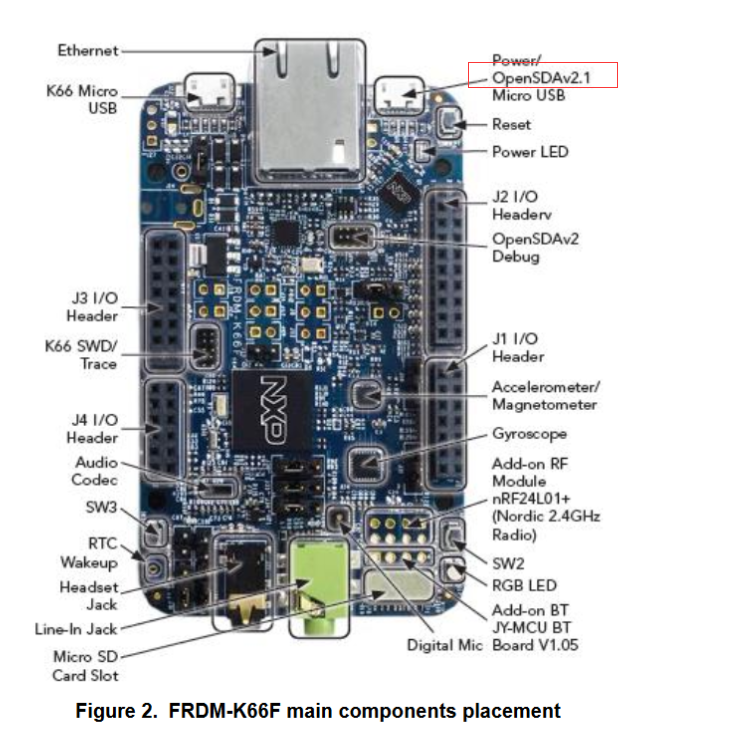
2.. From the User's Guide, it shows the OpenSDA version is v2.1:
https://www.nxp.com/docs/en/user-guide/FRDMK66FUG.pdf
BR
Alice
Alice_Yang
- Mark as New
- Bookmark
- Subscribe
- Mute
- Subscribe to RSS Feed
- Permalink
- Report Inappropriate Content
Hello Tim,
There is a same question with yours, and it describe the steps in detail,
hope it can help you :
My FRDM-K66F will no longer talk to MCUXpresso 10.0.2 IDE. Did win10 corrupt bootloader?
Have a great day,
TIC
-----------------------------------------------------------------------------------------------------------------------
Note: If this post answers your question, please click the Correct Answer button. Thank you!
-----------------------------------------------------------------------------------------------------------------------
