
- Forums
- Product Forums
- General Purpose MicrocontrollersGeneral Purpose Microcontrollers
- i.MX Forumsi.MX Forums
- QorIQ Processing PlatformsQorIQ Processing Platforms
- Identification and SecurityIdentification and Security
- Power ManagementPower Management
- Wireless ConnectivityWireless Connectivity
- RFID / NFCRFID / NFC
- Advanced AnalogAdvanced Analog
- Neural Processing UnitsNeural Processing Units
- MCX Microcontrollers
- S32G
- S32K
- S32V
- MPC5xxx
- Other NXP Products
- S12 / MagniV Microcontrollers
- Powertrain and Electrification Analog Drivers
- Sensors
- Vybrid Processors
- Digital Signal Controllers
- 8-bit Microcontrollers
- ColdFire/68K Microcontrollers and Processors
- PowerQUICC Processors
- OSBDM and TBDML
- S32M
- S32Z/E
-
- Solution Forums
- Software Forums
- MCUXpresso Software and ToolsMCUXpresso Software and Tools
- CodeWarriorCodeWarrior
- MQX Software SolutionsMQX Software Solutions
- Model-Based Design Toolbox (MBDT)Model-Based Design Toolbox (MBDT)
- FreeMASTER
- eIQ Machine Learning Software
- Embedded Software and Tools Clinic
- S32 SDK
- S32 Design Studio
- GUI Guider
- Zephyr Project
- Voice Technology
- Application Software Packs
- Secure Provisioning SDK (SPSDK)
- Processor Expert Software
- Generative AI & LLMs
-
- Topics
- Mobile Robotics - Drones and RoversMobile Robotics - Drones and Rovers
- NXP Training ContentNXP Training Content
- University ProgramsUniversity Programs
- Rapid IoT
- NXP Designs
- SafeAssure-Community
- OSS Security & Maintenance
- Using Our Community
-
- Cloud Lab Forums
-
- Knowledge Bases
- ARM Microcontrollers
- i.MX Processors
- Identification and Security
- Model-Based Design Toolbox (MBDT)
- QorIQ Processing Platforms
- S32 Automotive Processing Platform
- Wireless Connectivity
- CodeWarrior
- MCUXpresso Suite of Software and Tools
- MQX Software Solutions
- RFID / NFC
- Advanced Analog
- Neural Processing Units
-
- NXP Tech Blogs
- Home
- :
- MCUXpresso Software and Tools
- :
- MCUXpresso IDE
- :
- Re: Flash interface initialization
Flash interface initialization
- Subscribe to RSS Feed
- Mark Topic as New
- Mark Topic as Read
- Float this Topic for Current User
- Bookmark
- Subscribe
- Mute
- Printer Friendly Page

- Mark as New
- Bookmark
- Subscribe
- Mute
- Subscribe to RSS Feed
- Permalink
- Report Inappropriate Content
Hello
I would please like to ask:
On IDE user guide it says that flash is programmed on debug session too.
Is it that the flash interface is initialized with the FCB block parameters using the already programmed application in flash (which contains FCB), or is it initialized because of flash driver support in MCUXpresso IDE?
Or is it that the answer to this question depends on how we set the MCU memory map inside the IDE (adding driver name on the flash line or deleting the driver name)?
I also seen the following question and the answer there confused me on this topic
Quad SPI flash support on MCUXpresso IDE v10.1.1 for the iMX.RT1050?
Another question is what the difference between gui programmer and simple press of debug button?
Thank you
ranran
Solved! Go to Solution.

 lpcxpresso_supp
- Mark as New
- Bookmark
- Subscribe
- Mute
- Subscribe to RSS Feed
- Permalink
- Report Inappropriate Content
For i.MX RT1050 projects, if the project is configured to build the image at the address of flash, then the managed linker script mechanism will automatically place the files from the xip folder (provided by the SDK) into the correct memory location to allow execute in place. For more details see the https://community.nxp.com/community/mcuxpresso/mcuxpresso-ide/blog/2017/12/07/overview-of-using-the-...
The flash driver then just programs the image that is created into flash, it doesn't patch it in any way.
Regards,
MCUXpresso IDE Support
lpcxpresso_supp
- Mark as New
- Bookmark
- Subscribe
- Mute
- Subscribe to RSS Feed
- Permalink
- Report Inappropriate Content
For i.MX RT1050 projects, if the project is configured to build the image at the address of flash, then the managed linker script mechanism will automatically place the files from the xip folder (provided by the SDK) into the correct memory location to allow execute in place. For more details see the https://community.nxp.com/community/mcuxpresso/mcuxpresso-ide/blog/2017/12/07/overview-of-using-the-...
The flash driver then just programs the image that is created into flash, it doesn't patch it in any way.
Regards,
MCUXpresso IDE Support
 Alice_Yang
- Mark as New
- Bookmark
- Subscribe
- Mute
- Subscribe to RSS Feed
- Permalink
- Report Inappropriate Content
Hello ran shalit ,
Download image to external flash (hyper flash or QSPI flash), need two additional parts:
flash driver and image header XIP.
- In the new MCUXpresso IDE v10.2.1, flash drivers are located at: <MDE install Directory>\ide\bin\Flash,
about detail you can have a look at the DOC : Overview of using the MIMXRT1050-EVK(B) with MCUXpresso IDE
-> 7 Flash Drivers.
- "In the case of the RT1050, all fash memory is external to the MCU and therefore unknown
to the BootROM. For the BootROM to boot an image from this fash, some additonal
informaton must be supplied to allow fash initalisaton and optmal coniguraton etc. The
BootROM speciicaton expects this coniguraton data to be located in an 8KB header at the
start of the users image (applicaton)r. An XIP image supplies this informaton in an 8KB
header at the start image itself." (RT1050_BriefOverview_v201).
In SDK demos and create new project, automatcally including an xip folder.
About the detail about XIP, you can also refer to the below DOC ->9 XIP Hiw and Why .
- Configure the flash driver and address in below view:
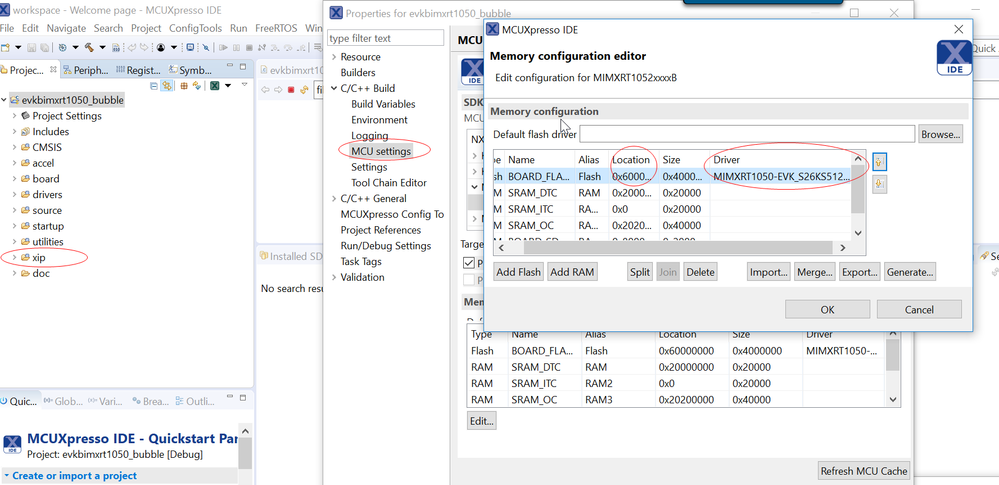
- About "gui programmer and simple press of debug button", the GUI Flash Tool directly flash program,
while the debug button , also includes debug function with IDE.
Have a great day,
TIC
-----------------------------------------------------------------------------------------------------------------------
Note: If this post answers your question, please click the Correct Answer button. Thank you!
-----------------------------------------------------------------------------------------------------------------------
- Mark as New
- Bookmark
- Subscribe
- Mute
- Subscribe to RSS Feed
- Permalink
- Report Inappropriate Content
Hello Alice
I am trying to figure out how to create cfx file.
I use the hyperflash zip project in the driver examples.
But building does not creare cfx in builds folder, but only axf format.
Do you mind help with it? Can you please say how to create cfx? Why is it not created on building pressing the build button?
Thank you
Ranran

- Mark as New
- Bookmark
- Subscribe
- Mute
- Subscribe to RSS Feed
- Permalink
- Report Inappropriate Content
You are building the Debug build configuration, which just builds the .axf file. If you build one of the release configurations, then it will create the .cfx file
Note that a .cfx file is just a renamed .axf file - there is no other difference.
