
- Forums
- Product Forums
- General Purpose MicrocontrollersGeneral Purpose Microcontrollers
- i.MX Forumsi.MX Forums
- QorIQ Processing PlatformsQorIQ Processing Platforms
- Identification and SecurityIdentification and Security
- Power ManagementPower Management
- Wireless ConnectivityWireless Connectivity
- RFID / NFCRFID / NFC
- Advanced AnalogAdvanced Analog
- MCX Microcontrollers
- S32G
- S32K
- S32V
- MPC5xxx
- Other NXP Products
- S12 / MagniV Microcontrollers
- Powertrain and Electrification Analog Drivers
- Sensors
- Vybrid Processors
- Digital Signal Controllers
- 8-bit Microcontrollers
- ColdFire/68K Microcontrollers and Processors
- PowerQUICC Processors
- OSBDM and TBDML
- S32M
- S32Z/E
-
- Solution Forums
- Software Forums
- MCUXpresso Software and ToolsMCUXpresso Software and Tools
- CodeWarriorCodeWarrior
- MQX Software SolutionsMQX Software Solutions
- Model-Based Design Toolbox (MBDT)Model-Based Design Toolbox (MBDT)
- FreeMASTER
- eIQ Machine Learning Software
- Embedded Software and Tools Clinic
- S32 SDK
- S32 Design Studio
- GUI Guider
- Zephyr Project
- Voice Technology
- Application Software Packs
- Secure Provisioning SDK (SPSDK)
- Processor Expert Software
- Generative AI & LLMs
-
- Topics
- Mobile Robotics - Drones and RoversMobile Robotics - Drones and Rovers
- NXP Training ContentNXP Training Content
- University ProgramsUniversity Programs
- Rapid IoT
- NXP Designs
- SafeAssure-Community
- OSS Security & Maintenance
- Using Our Community
-
- Cloud Lab Forums
-
- Knowledge Bases
- ARM Microcontrollers
- i.MX Processors
- Identification and Security
- Model-Based Design Toolbox (MBDT)
- QorIQ Processing Platforms
- S32 Automotive Processing Platform
- Wireless Connectivity
- CodeWarrior
- MCUXpresso Suite of Software and Tools
- MQX Software Solutions
- RFID / NFC
- Advanced Analog
-
- NXP Tech Blogs
- Home
- :
- MCUXpresso软件和工具
- :
- MCUXpresso通用功能
- :
- Re: LinkServer behaviour on uninitialized flash part
LinkServer behaviour on uninitialized flash part
LinkServer behaviour on uninitialized flash part

Hello,
I have a Kinetis K60 part with uninitialized flash on a custom board and I’m trying to debug for the first time. I have gone through all the discussions in NXP forum and nothing seems to answer my question below.
Temporarily, I’m using a FREEDOM K64 board as a debugger for my custom board. (I plan to switch to LPC_LINK2 soon. BTW, I get same error message even with LPC_LINK2. So, the debugger is not the issue.) When I try to debug a simple basic project using SWD, the debugger exits with error “Unable to configure core for probe index 1. Wire not connected.”. Redlink Server log has following:
[Started server]
[Connected on port 3025]
redlink> ProbeList
Index = 1
Manufacturer = ARM
Description = DAPLink CMSIS-DAP
VID:PID = 0D28:0204
redlink> ProbeStatus
Index = 1
Manufacturer = ARM
Description = DAPLink CMSIS-DAP
VID:PID = 0D28:0204
IsOpen = FALSE
WireInitialized = FALSE
WireProtocol = JTAG
CoresConfigured = FALSE
PacketSize = 64
Reference Count = 0
HasSWV = FALSE
HasETM = FALSE
HasJTAG = TRUE
HasSWD = TRUE
Probe Type = CMSIS-DAP
Probe Reference Count = 0
redlink> ProbeList
Index = 1
Manufacturer = ARM
Description = DAPLink CMSIS-DAP
VID:PID = 0D28:0204
redlink> ProbeStatus
Index = 1
Manufacturer = ARM
Description = DAPLink CMSIS-DAP
VID:PID = 0D28:0204
IsOpen = FALSE
WireInitialized = FALSE
WireProtocol = JTAG
CoresConfigured = FALSE
PacketSize = 64
Reference Count = 0
HasSWV = FALSE
HasETM = FALSE
HasJTAG = TRUE
HasSWD = TRUE
Probe Type = CMSIS-DAP
Probe Reference Count = 0
redlink> ProbeIsOpen 1
FALSE
redlink> ProbeOpenByIndex 1
Probe Handle 1 Open
redlink> WireIsConnected 1
FALSE
redlink> WireSwdConnect 1
Wire Ack Fault - target connected?
redlink> CoresConfigured 1
FALSE
redlink> CoreConfig 1
Wire not connected
[Closed]
[Connected on port 3025]
redlink> ProbeStatus
Index = 1
Manufacturer = ARM
Description = DAPLink CMSIS-DAP
VID:PID = 0D28:0204
IsOpen = TRUE
WireInitialized = FALSE
WireProtocol = SWD
CoresConfigured = FALSE
PacketSize = 64
Reference Count = 0
HasSWV = FALSE
HasETM = FALSE
HasJTAG = TRUE
HasSWD = TRUE
Probe Type = CMSIS-DAP
Probe Reference Count = 0
redlink> quit
[Closed]
The log shows the debugger is unable to find K60 core on SWD and this explains the error.
However, interestingly, when I keep reset button on FREEDOM board pressed (so that it resets my custom board and keeps K60 under reset) and try to debug my custom board (of course, I don’t expect it to work but this is an experiment), the debugger is able to detect the core and goes way beyond this point. Here’s the Redlink log with reset pin of FREEDOM board asserted:
[Started server]
[Connected on port 3025]
redlink> ProbeList
Index = 1
Manufacturer = ARM
Description = DAPLink CMSIS-DAP
VID:PID = 0D28:0204
redlink> ProbeStatus
Index = 1
Manufacturer = ARM
Description = DAPLink CMSIS-DAP
VID:PID = 0D28:0204
IsOpen = FALSE
WireInitialized = FALSE
WireProtocol = JTAG
CoresConfigured = FALSE
PacketSize = 64
Reference Count = 0
HasSWV = FALSE
HasETM = FALSE
HasJTAG = TRUE
HasSWD = TRUE
Probe Type = CMSIS-DAP
Probe Reference Count = 0
redlink> ProbeList
Index = 1
Manufacturer = ARM
Description = DAPLink CMSIS-DAP
VID:PID = 0D28:0204
redlink> ProbeStatus
Index = 1
Manufacturer = ARM
Description = DAPLink CMSIS-DAP
VID:PID = 0D28:0204
IsOpen = FALSE
WireInitialized = FALSE
WireProtocol = JTAG
CoresConfigured = FALSE
PacketSize = 64
Reference Count = 0
HasSWV = FALSE
HasETM = FALSE
HasJTAG = TRUE
HasSWD = TRUE
Probe Type = CMSIS-DAP
Probe Reference Count = 0
redlink> ProbeIsOpen 1
FALSE
redlink> ProbeOpenByIndex 1
Probe Handle 1 Open
redlink> WireIsConnected 1
FALSE
redlink> WireSwdConnect 1
DpID = 2BA01477
redlink> CoresConfigured 1
TRUE
redlink> ProbeStatus
Index = 1
Manufacturer = ARM
Description = DAPLink CMSIS-DAP
VID:PID = 0D28:0204
IsOpen = FALSE
WireInitialized = FALSE
WireProtocol = JTAG
CoresConfigured = FALSE
PacketSize = 64
Reference Count = 0
HasSWV = FALSE
HasETM = FALSE
HasJTAG = TRUE
HasSWD = TRUE
Probe Type = CMSIS-DAP
Probe Reference Count = 0
redlink> quit
[Closed]
The debugger gets DpID and talks to core. As expected, I see saw tooth waveform on reset pin due to WD timer going off. The fact that the debugger is able to talk to core shows electrical issues on SWD pins are ruled out. (I did insert impedance matching/pull-up/pull-down/etc resistors/cap on SWD pins but didn't help.)
Question is why the debugger is unable to talk to core when K60 is NOT under reset? Is it because, core is busy executing/faulting the FF’s from uninitialied flash? If true, why is the debugger not halting the core before attempting to connect? I cannot even do mass erase of the device since SWD is unable to communicate to core.
Any suggestions?
Appreciate your help,
Satish

Hello,
Have you tried checking if the device is "Locked", this setting is write protected and can only be accessed when the device is in a halt state (reset), if it is protected then you can't access flash, as per in the Reference manual:
"The flash module provides security information to the MCU based on the state held by the FSEC[SEC] bits. The MCU, in turn, confirms the security request and limits access to flash resources. During reset, the flash module initializes the FSEC register using data read from the security byte of the flash configuration field. "
Also, if possible take a look to this AN
https://www.nxp.com/docs/en/application-note/AN4835.pdf
There you can find more about the flash programing for the Kinetis K and Kinetis L
Regards,
Aldo.

 lpcxpresso_supp
If your device is locked, the IDE's GUI Flash Tool provides a "Resurrect locked Kinetis device" option may be able to unlock it again. Please see chapter 14, "The GUI Flash Tool", of the MCUXpresso IDE v10.3 User Guide for more details.
Regards,
MCUXpresso IDE Support
ello,
Thank you for your suggestions.
When I try to perform Mass Erase or Resurrect Locked device, I get same “Could not connect to core” error. Here's the debug log:
Executing flash operation 'Resurrect locked Kinetis device' (Resurrect locked Kinetis device) - Mon Apr 08 10:41:41 IST 2019
Checking MCU info...
Scanning for targets...
Executing flash action...
MCUXpresso IDE RedlinkMulti Driver v10.3 (Nov 28 2018 02:33:57 - crt_emu_cm_redlink.exe build 748)
( 0) Reading remote configuration
Wc(03). No cache support.
Found part description in XML file MK60D10_internal.xml
( 5) Remote configuration complete
Reconnected to existing link server
Connecting to probe 1 core 0 (using server started externally) gave 'Ee(42). Could not connect to core.'
Connecting to probe 1 core 0 (using server started externally) gave 'Ee(42). Could not connect to core.'
Connecting to probe 1 core 0 (using server started externally) gave 'Ee(42). Could not connect to core.'
Server OK but no connection to probe 1 core 0 (after 3 attempts) - Ee(42). Could not connect to core.
Failed on connect: Ee(42). Could not connect to core.
No connection to chip's debug port
(100) Target Connection Failed
Unable to perform operation!
Command failed with exit code 1
So, I thought perhaps my reset RC delay is huge (R = 47K, C = 4.7u). So, I put a parallel 10K and RC delay reduces but I still get same error. I replaced FREEDOMK64F board with LPC-LINK2 and same story.
I did one more experiment and this is where it gets interesting. When I insert FREEDOMK64F into USB slot, at the DAPLINK: prompt, I open the folder. I took the small binary of a basic empty project, dragged and dropped into the DAPLINK: folder. Intent is to see if it writes into my flash. Now, the saw tooth waveform on the reset pin vanishes and reset pin goes to much higher voltage – I didn’t measure it though. Now, when I debug a project, the debugger is able to detect core and goes much farther but still fails with following log:
MCUXpresso IDE RedlinkMulti Driver v10.3 (Nov 28 2018 02:33:57 - crt_emu_cm_redlink build 748)
Found part description in XML file MK60D10_internal.xml
Reconnected to existing link server
Connecting to probe 1 core 0 (using server started externally) gave 'OK'
============= SCRIPT: kinetisconnect.scp =============
Kinetis Connect Script
Connecting to Probe Index = 1
This probe = 1
This TAP = 0
This core = 0
DpID = 2BA01477
Assert NRESET
Reset pin state: 00
Power up Debug
MDM-AP APID: 0x001C0000
MDM-AP System Reset/Hold Reset/Debug Request
MDM-AP Control: 0x0000001C
MDM-AP Status (Flash Ready) : 0x00000032
Part is not secured
MDM-AP Control: 0x00000014
Release NRESET
Reset pin state: 01
Wire Ack Fault - target connected?
MDM-AP Control (Debug Request): 0x00000004
Wire Ack Fault - target connected?
Wire Ack Fault - target connected?
.....
Wire Ack Fault - target connected?
Wire Ack Fault - target connected?
MDM-AP Status: 0x00000001
MDM-AP Core Halt Failed
Wire Ack Fault - target connected?
....
Wire Ack Fault - target connected?
MDM-AP Control (Debug Request): 0x00000004
Wire Ack Fault - target connected?
Wire Ack Fault - target connected?
....
Wire Ack Fault - target connected?
Wire Ack Fault - target connected?
MDM-AP Status: 0x00000001
MDM-AP Core Halt Failed
Wire Ack Fault - target connected?
....
Wire Ack Fault - target connected?
MDM-AP Control (Debug Request): 0x00000004
Wire Ack Fault - target connected?
....
Wire Ack Fault - target connected?
MDM-AP Status: 0x00000001
MDM-AP Core Halt Failed
Wire Ack Fault - target connected?
Wire Ack Fault - target connected?
Wire Ack Fault - target connected?
Wire Ack Fault - target connected?
Wire Ack Fault - target connected?
Wire Ack Fault - target connected?
Wire Ack Fault - target connected?
============= END SCRIPT =============================
Failed on connect: Ee(42). Could not connect to core.
No connection to chip's debug port
So, it does not look like my part is locked. Right?
When I turn off the power supply of my board and turn it back on, the sawtooth waveform reappears on the reset pin. So, the drag-n-drop didn’t actually update the flash. Now, I wonder why the sawtooth disappears after drag-n-drop !!!
I think there is some funny interaction with reset pin going on here. I even tried to keep reset pin low when power supply ramps up (to workaround the known Kinetis power supply POR ERRATA ID 4949) but it didn’t help. Are there any specs for RESET pin?
Any clues as to what is going on?
Appreciate your help.
Satish
This is the reset pin capture when I debug a project and I get the error: cannot connect to core.
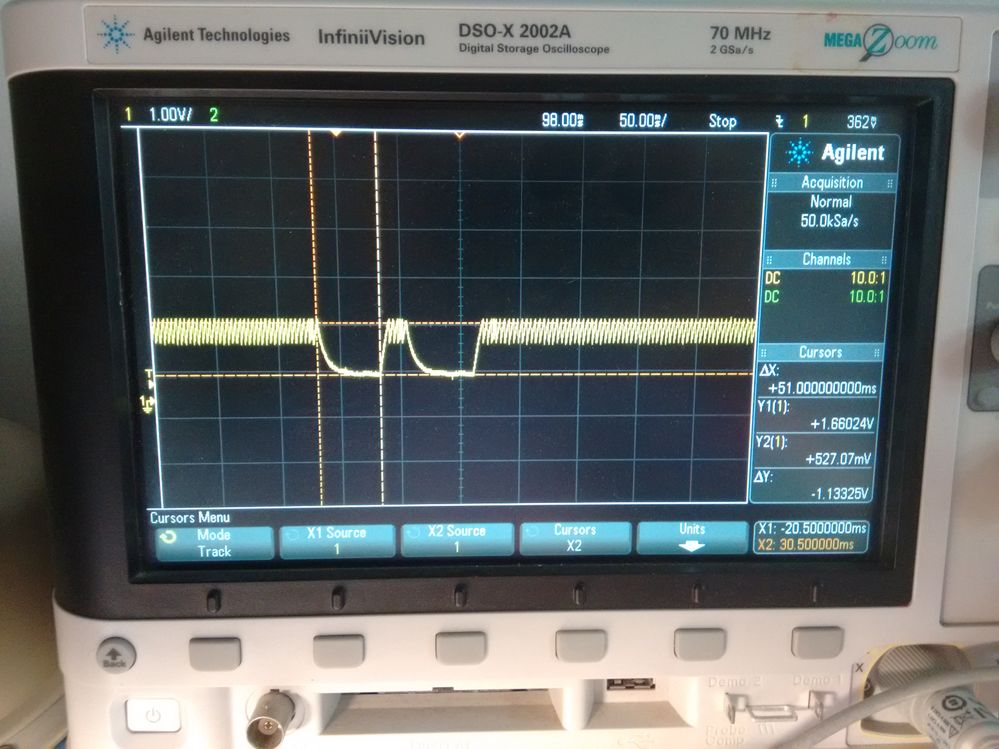
In contrast, this is the reset pin capture when I drag'n'drop a project into my board and the debugger makes better progress and can talk to the core but still fails.
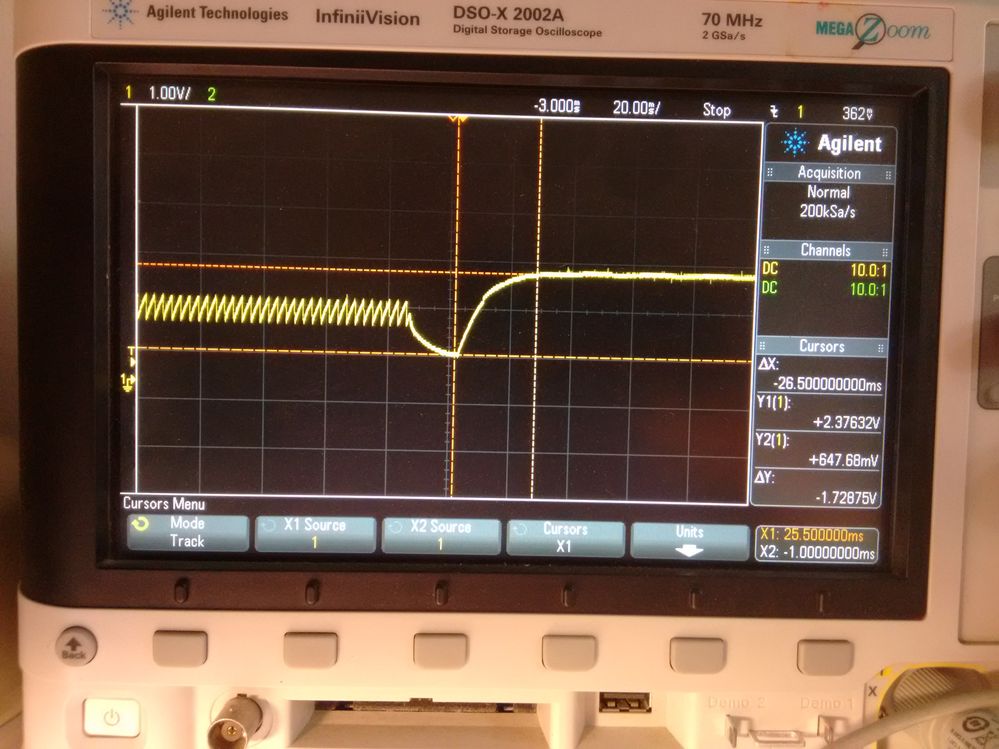
Looks like there is some fundamental difference in reset behavior between the drag'n'drop scheme vs MCUXpressoIDE's debug scheme.
Any insight?
Thanks,
Satish

Thanks Con Verse. That's a good reference and I'll check my board against it.
I checked signal integrity on SDIO and SDCLK pins also and they don't look all that bad.
In any case, the board is working now. It turns out the root-cause was a bad soldering joint on the ground reference wire between my FREEDOM Board and custom board. I found out by measuring DC voltages and saw huge offset in FREEDOM Board's ground voltage and then narrowed down to bad soldering connection. The bad ground connection does not explain any of the observations I made above but I'll figure them out some day.
This is a good forum and thanks for your help.
Satish
Looking at all the discussions in the forum, it seems like "unable to connect to core" using SWD is a common problem though underlying causes might vary. I wish the debugger could generate more information in the log files to help debug. I have wasted days on this issue. I had same problem with another identical board but it started working after trying different options and sequences using the MCUXpresso IDE and now I don't remember what caused it to work.
I'll try what was suggested by Eduard A in Redlink server unable to connect to core which is:
1.Prepare the flash manager tool on MCUXpresso to do a mass erase
2.Pres the reset button on the FREEDOM Board.
3. Press the Run button so the flash tool can start the mass erase
4. Release the reset button before the process starts
I hope I can get precise timing of reset release. Even if this works, I must say there should be a better, more efficient and reliable way to initialize a flash using SWD on K60 than the above trial and error sequence.
If above does not work, I'll switch from SWD to JTAG and see if it works.
Satish
