
- Forums
- Product Forums
- General Purpose MicrocontrollersGeneral Purpose Microcontrollers
- i.MX Forumsi.MX Forums
- QorIQ Processing PlatformsQorIQ Processing Platforms
- Identification and SecurityIdentification and Security
- Power ManagementPower Management
- Wireless ConnectivityWireless Connectivity
- RFID / NFCRFID / NFC
- Advanced AnalogAdvanced Analog
- Neural Processing UnitsNeural Processing Units
- MCX Microcontrollers
- S32G
- S32K
- S32V
- MPC5xxx
- Other NXP Products
- S12 / MagniV Microcontrollers
- Powertrain and Electrification Analog Drivers
- Sensors
- Vybrid Processors
- Digital Signal Controllers
- 8-bit Microcontrollers
- ColdFire/68K Microcontrollers and Processors
- PowerQUICC Processors
- OSBDM and TBDML
- S32M
- S32Z/E
-
- Solution Forums
- Software Forums
- MCUXpresso Software and ToolsMCUXpresso Software and Tools
- CodeWarriorCodeWarrior
- MQX Software SolutionsMQX Software Solutions
- Model-Based Design Toolbox (MBDT)Model-Based Design Toolbox (MBDT)
- FreeMASTER
- eIQ Machine Learning Software
- Embedded Software and Tools Clinic
- S32 SDK
- S32 Design Studio
- GUI Guider
- Zephyr Project
- Voice Technology
- Application Software Packs
- Secure Provisioning SDK (SPSDK)
- Processor Expert Software
- Generative AI & LLMs
-
- Topics
- Mobile Robotics - Drones and RoversMobile Robotics - Drones and Rovers
- NXP Training ContentNXP Training Content
- University ProgramsUniversity Programs
- Rapid IoT
- NXP Designs
- SafeAssure-Community
- OSS Security & Maintenance
- Using Our Community
-
- Cloud Lab Forums
-
- Knowledge Bases
- ARM Microcontrollers
- i.MX Processors
- Identification and Security
- Model-Based Design Toolbox (MBDT)
- QorIQ Processing Platforms
- S32 Automotive Processing Platform
- Wireless Connectivity
- CodeWarrior
- MCUXpresso Suite of Software and Tools
- MQX Software Solutions
- RFID / NFC
- Advanced Analog
- Neural Processing Units
-
- NXP Tech Blogs
- Home
- :
- MCUXpresso Software and Tools
- :
- MCUXpresso Config Tools
- :
- MCUXpresso Config Tools Install failed
MCUXpresso Config Tools Install failed
- Subscribe to RSS Feed
- Mark Topic as New
- Mark Topic as Read
- Float this Topic for Current User
- Bookmark
- Subscribe
- Mute
- Printer Friendly Page

 tonyyang
- Mark as New
- Bookmark
- Subscribe
- Mute
- Subscribe to RSS Feed
- Permalink
- Report Inappropriate Content
When i install the MCUXpresso_Config_Tools_v3_x64.exe(lasted version), it will get the error dialog:
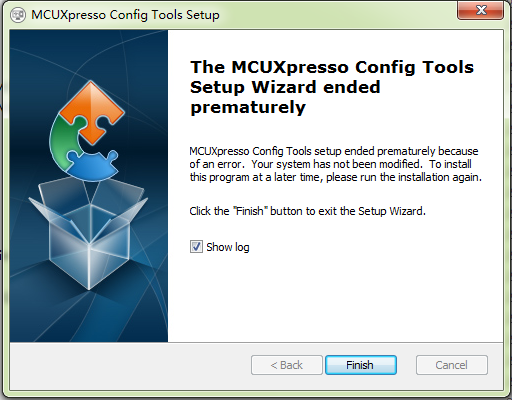
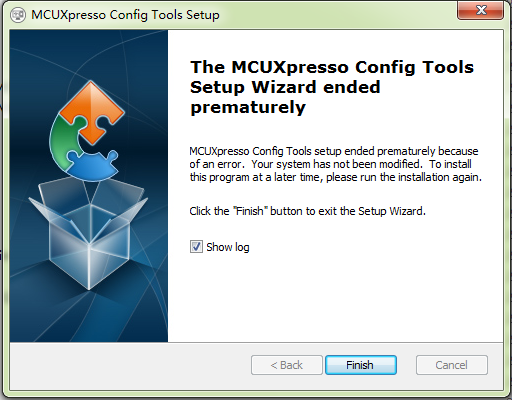
Attach is the log.
Original Attachment has been moved to: MSI208A.LOG.zip
Solved! Go to Solution.
 martinformanek-
- Mark as New
- Bookmark
- Subscribe
- Mute
- Subscribe to RSS Feed
- Permalink
- Report Inappropriate Content
Hi Liang,
We issued new version of the tools.
The issue you reported should be fixed in new build now.

- Mark as New
- Bookmark
- Subscribe
- Mute
- Subscribe to RSS Feed
- Permalink
- Report Inappropriate Content
Sorry to post on an old thread but I'm having the same issue with versions 4.0 and 4.1 of the Config Tools. I tried all of the suggestions above but have not had any success. Any other suggestions?
martinformanek-
- Mark as New
- Bookmark
- Subscribe
- Mute
- Subscribe to RSS Feed
- Permalink
- Report Inappropriate Content
Hello, please try our latest released version of MCUX Tools, issue should be fixed now.
MCUXpresso Config Tools, Windows 64bit package
please let me know if it solved your issue or not.
Best Regards,
Martin
- Mark as New
- Bookmark
- Subscribe
- Mute
- Subscribe to RSS Feed
- Permalink
- Report Inappropriate Content
Hello, I finally got around to trying this and it displayed the same error. However, the install worked well enough that I can run the software.
Thanks!
martinformanek-
- Mark as New
- Bookmark
- Subscribe
- Mute
- Subscribe to RSS Feed
- Permalink
- Report Inappropriate Content
Hi Liang,
We issued new version of the tools.
The issue you reported should be fixed in new build now.
tonyyang
- Mark as New
- Bookmark
- Subscribe
- Mute
- Subscribe to RSS Feed
- Permalink
- Report Inappropriate Content
My system:
Windows 7 64bit SP1 v1.0
JRE1.8
8 GB RAM
1600x900 display resolution.
Internet connection.
martinformanek-
- Mark as New
- Bookmark
- Subscribe
- Mute
- Subscribe to RSS Feed
- Permalink
- Report Inappropriate Content
Hi Liang,
This failure is most often caused by the lack of or corrupted registration of the Microsoft OLE Automation library OLEAUT32.DLL.
ou should confirm that this file is installed on your target system, and that is is correctly registered using regsvr32.exe.
Could you please try to register all the folllowing DLL files from administrator Command Prompt:
regsvr32.exe vbscript.dll
regsvr32.exe oleaut32.dll
regsvr32.exe jscript.dll
regsvr32.exe msxml3.dll
regsvr32.exe -i shell32.dllplease restart the machine and check if problem still persist.
2. You can also try to register the windows install service
C:\Windows\System32\msiexec.exe /regserver3. There is also some chance, that scripts run by installer might be blocked by antivirus program. Please try to disable it before installation.
4. If issue still persist, could you please send me your oleaut32.dll file? I will try to reproduce the issue on our machine.
