
- Forums
- Product Forums
- General Purpose MicrocontrollersGeneral Purpose Microcontrollers
- i.MX Forumsi.MX Forums
- QorIQ Processing PlatformsQorIQ Processing Platforms
- Identification and SecurityIdentification and Security
- Power ManagementPower Management
- Wireless ConnectivityWireless Connectivity
- RFID / NFCRFID / NFC
- Advanced AnalogAdvanced Analog
- Neural Processing UnitsNeural Processing Units
- MCX Microcontrollers
- S32G
- S32K
- S32V
- MPC5xxx
- Other NXP Products
- S12 / MagniV Microcontrollers
- Powertrain and Electrification Analog Drivers
- Sensors
- Vybrid Processors
- Digital Signal Controllers
- 8-bit Microcontrollers
- ColdFire/68K Microcontrollers and Processors
- PowerQUICC Processors
- OSBDM and TBDML
- S32M
- S32Z/E
-
- Solution Forums
- Software Forums
- MCUXpresso Software and ToolsMCUXpresso Software and Tools
- CodeWarriorCodeWarrior
- MQX Software SolutionsMQX Software Solutions
- Model-Based Design Toolbox (MBDT)Model-Based Design Toolbox (MBDT)
- FreeMASTER
- eIQ Machine Learning Software
- Embedded Software and Tools Clinic
- S32 SDK
- S32 Design Studio
- GUI Guider
- Zephyr Project
- Voice Technology
- Application Software Packs
- Secure Provisioning SDK (SPSDK)
- Processor Expert Software
- Generative AI & LLMs
-
- Topics
- Mobile Robotics - Drones and RoversMobile Robotics - Drones and Rovers
- NXP Training ContentNXP Training Content
- University ProgramsUniversity Programs
- Rapid IoT
- NXP Designs
- SafeAssure-Community
- OSS Security & Maintenance
- Using Our Community
-
- Cloud Lab Forums
-
- Knowledge Bases
- ARM Microcontrollers
- i.MX Processors
- Identification and Security
- Model-Based Design Toolbox (MBDT)
- QorIQ Processing Platforms
- S32 Automotive Processing Platform
- Wireless Connectivity
- CodeWarrior
- MCUXpresso Suite of Software and Tools
- MQX Software Solutions
- RFID / NFC
- Advanced Analog
- Neural Processing Units
-
- NXP Tech Blogs
- Home
- :
- QorIQプロセッシングプラットフォーム
- :
- レイヤースケープ
- :
- Re: Issues about OpenIL for LS1028 reference board
Issues about OpenIL for LS1028 reference board
- RSS フィードを購読する
- トピックを新着としてマーク
- トピックを既読としてマーク
- このトピックを現在のユーザーにフロートします
- ブックマーク
- 購読
- ミュート
- 印刷用ページ

- 新着としてマーク
- ブックマーク
- 購読
- ミュート
- RSS フィードを購読する
- ハイライト
- 印刷
- 不適切なコンテンツを報告
Hi everyone,
I am new for LS1028 reference board recently, and I have met some issues about this board.
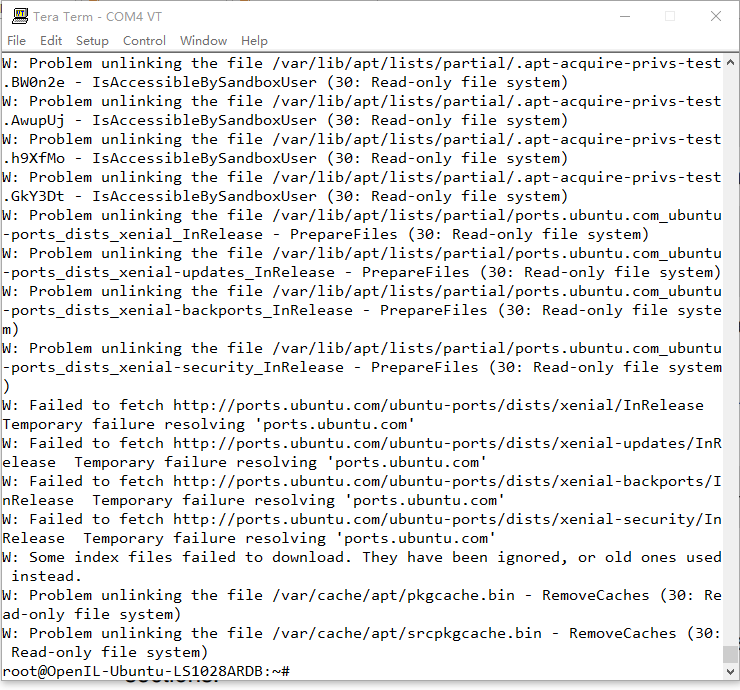
1. I used nxp_ls1028ardb-64b_ubuntu_defconfig of OpenIL, and programmed it into SD card. And I boot the board with root successfully, when I use command "apt-get update",(sudo is not avaliable) error occurs as shown in the following figure:
2. Also, I tried OpenIL with baremeta framework and I insert SD card to board after compling os successfully, but error occurs as follows,
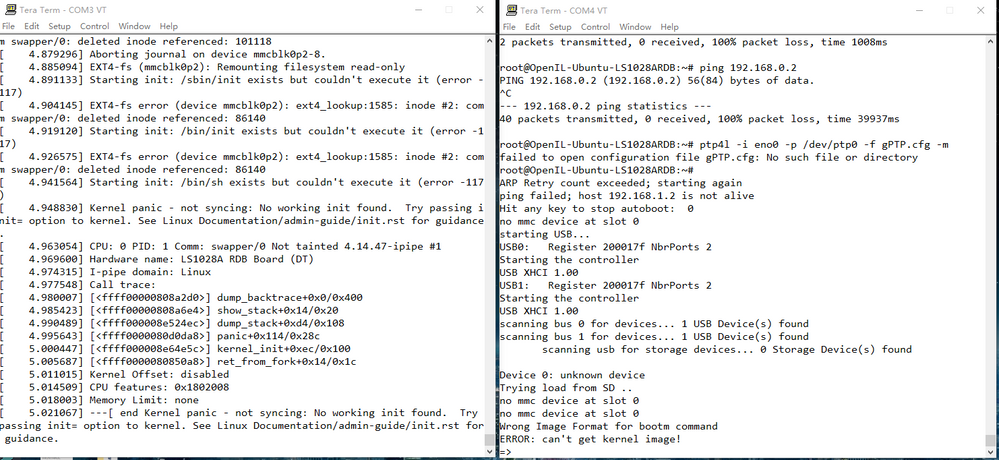
Note that left is UART1(COM3), right is UART2(COM4).
Thank you very much,
Best,
Junhui Jiang
解決済! 解決策の投稿を見る。
 yipingwang
- 新着としてマーク
- ブックマーク
- 購読
- ミュート
- RSS フィードを購読する
- ハイライト
- 印刷
- 不適切なコンテンツを報告
Are you using Openil 1.5 release?
Please refer to the attached log for "apt-get update", I used the images built from the latest release.
Run the following commands to build the final LS1028ARDB baremetal images:
$cd openil
$ make nxp_ls1028ardb_baremetal-64b_defconfig
$ make
├── sdcard.img --- entire image can be programmed into the SD
Use the following steps to bootup the Linux + Baremetal system with the images built from OpenIL.
1. Insert an SD card (of at least 2 GB size) into any Linux host machine.
2. Then, run the following commands:
$ sudo dd if=./output/images/sdcard.img of=/dev/sdx
# or in some other host machine:
$ sudo dd if=./output/images/sdcard.img of=/dev/mmcblkx
# find the right SD Card device name in your host machine and replace the “sdx” or “mmcblkx”.
3. Then, insert the SD card into the target board and power on.
After the above mentioned steps are complete, the Linux system is booted up on the master core (core 0), and the Baremetal system is booted up on slave core (core 1) automatically.
Thanks,
Yiping
yipingwang
- 新着としてマーク
- ブックマーク
- 購読
- ミュート
- RSS フィードを購読する
- ハイライト
- 印刷
- 不適切なコンテンツを報告
Are you using Openil 1.5 release?
Please refer to the attached log for "apt-get update", I used the images built from the latest release.
Run the following commands to build the final LS1028ARDB baremetal images:
$cd openil
$ make nxp_ls1028ardb_baremetal-64b_defconfig
$ make
├── sdcard.img --- entire image can be programmed into the SD
Use the following steps to bootup the Linux + Baremetal system with the images built from OpenIL.
1. Insert an SD card (of at least 2 GB size) into any Linux host machine.
2. Then, run the following commands:
$ sudo dd if=./output/images/sdcard.img of=/dev/sdx
# or in some other host machine:
$ sudo dd if=./output/images/sdcard.img of=/dev/mmcblkx
# find the right SD Card device name in your host machine and replace the “sdx” or “mmcblkx”.
3. Then, insert the SD card into the target board and power on.
After the above mentioned steps are complete, the Linux system is booted up on the master core (core 0), and the Baremetal system is booted up on slave core (core 1) automatically.
Thanks,
Yiping
- 新着としてマーク
- ブックマーク
- 購読
- ミュート
- RSS フィードを購読する
- ハイライト
- 印刷
- 不適切なコンテンツを報告
Hi, Yiming
1. I have complie sdcard.img following document below successfully. (environment:ubuntu 18.04 LTS running as virtual machine in my windows pc)


2. the sdcard.img burn into the sd card successfully

3. copy below file to sd card

4. Insert the SD card into the LS1028ARDB, the DIP switch (SW2) set as manual shows.

5. Link the board with Tera Term
the screen shows nothing.
