
- Forums
- Product Forums
- General Purpose MicrocontrollersGeneral Purpose Microcontrollers
- i.MX Forumsi.MX Forums
- QorIQ Processing PlatformsQorIQ Processing Platforms
- Identification and SecurityIdentification and Security
- Power ManagementPower Management
- Wireless ConnectivityWireless Connectivity
- RFID / NFCRFID / NFC
- Advanced AnalogAdvanced Analog
- Neural Processing UnitsNeural Processing Units
- MCX Microcontrollers
- S32G
- S32K
- S32V
- MPC5xxx
- Other NXP Products
- S12 / MagniV Microcontrollers
- Powertrain and Electrification Analog Drivers
- Sensors
- Vybrid Processors
- Digital Signal Controllers
- 8-bit Microcontrollers
- ColdFire/68K Microcontrollers and Processors
- PowerQUICC Processors
- OSBDM and TBDML
- S32M
- S32Z/E
-
- Solution Forums
- Software Forums
- MCUXpresso Software and ToolsMCUXpresso Software and Tools
- CodeWarriorCodeWarrior
- MQX Software SolutionsMQX Software Solutions
- Model-Based Design Toolbox (MBDT)Model-Based Design Toolbox (MBDT)
- FreeMASTER
- eIQ Machine Learning Software
- Embedded Software and Tools Clinic
- S32 SDK
- S32 Design Studio
- GUI Guider
- Zephyr Project
- Voice Technology
- Application Software Packs
- Secure Provisioning SDK (SPSDK)
- Processor Expert Software
- Generative AI & LLMs
-
- Topics
- Mobile Robotics - Drones and RoversMobile Robotics - Drones and Rovers
- NXP Training ContentNXP Training Content
- University ProgramsUniversity Programs
- Rapid IoT
- NXP Designs
- SafeAssure-Community
- OSS Security & Maintenance
- Using Our Community
-
- Cloud Lab Forums
-
- Knowledge Bases
- ARM Microcontrollers
- i.MX Processors
- Identification and Security
- Model-Based Design Toolbox (MBDT)
- QorIQ Processing Platforms
- S32 Automotive Processing Platform
- Wireless Connectivity
- CodeWarrior
- MCUXpresso Suite of Software and Tools
- MQX Software Solutions
- RFID / NFC
- Advanced Analog
- Neural Processing Units
-
- NXP Tech Blogs
- Home
- :
- 汎用マイクロコントローラ
- :
- Kinetisマイクロコントローラ
- :
- KL25Z GPIO Interrupt "IRQHandler"
KL25Z GPIO Interrupt "IRQHandler"
- RSS フィードを購読する
- トピックを新着としてマーク
- トピックを既読としてマーク
- このトピックを現在のユーザーにフロートします
- ブックマーク
- 購読
- ミュート
- 印刷用ページ

- 新着としてマーク
- ブックマーク
- 購読
- ミュート
- RSS フィードを購読する
- ハイライト
- 印刷
- 不適切なコンテンツを報告
Greetings,
I have a project where I need an external interrupt "push button" logic low. I will use PortA_PCR_0. I have some code and from what i can tell looking at the data sheet I am set up correctly. The issue I am having is the "PORTA_IRQHandler" I am not sure what it is or how the original author of the code made fired into the variable for what I assume is a flag for the interrupt. Can anyone shed some light on this IRQhandler? I am attempting this project without the use of project expert.
#include "derivative.h" /* include peripheral declarations */
int fired = 0;
void PORTA_IRQHandler() {
fired = 1;
}
int main(void)
{
SIM_SCGC5 |= SIM_SCGC5_PORTA_MASK;
PORTA_PCR0 = PORT_PCR_MUX(1) | PORT_PCR_IRQC(8) | PORT_PCR_PE_MASK | PORT_PCR_PS_MASK; // Interrupt on LOGIC ZERO
// enable IRQ on Port A, pin 0
int irq_num = INT_PORTA - 16;
NVIC_ICPR |= 1 << irq_num;
NVIC_ISER |= 1 << irq_num;
for (;;) {
if (fired == 1) {
// toggle LED
fired = 0;
}
}
return 0;
}
解決済! 解決策の投稿を見る。

- 新着としてマーク
- ブックマーク
- 購読
- ミュート
- RSS フィードを購読する
- ハイライト
- 印刷
- 不適切なコンテンツを報告
Hi Anthony
You can see a video guide at https://youtu.be/CubinvMuTwU
and get working code for individual interrupts on all port pins on the KL25 at the other links (including KL25 simulation)
In file Port_Interrupts.h enable IRQ_TEST and set
interrupt_setup.int_port = PORTA;
interrupt_setup.int_port_bits = PORTA_BIT0;
for PTA0 interrupts.
In visual studio you can test port interrupt operation (click on the pin to toggle it) and check the register setups to copy back to your other code if you prefer.
Regards
Mark
Kinetis: http://www.utasker.com/kinetis.html
Kinetis KL25, KL26, KL27, KL28, KL82:
- http://http://www.utasker.com/kinetis/FRDM-KL25Z.html
- http://www.utasker.com/kinetis/TWR-KL25Z48M.html
- http://www.utasker.com/kinetis/FRDM-KL26Z.html
- http://www.utasker.com/kinetis/TEENSY_LC.html
- http://www.utasker.com/kinetis/FRDM-KL27Z.html
- http://www.utasker.com/kinetis/Capuccino-KL27.html
- http://www.utasker.com/kinetis/FRDM-KL28Z.html
- http://www.utasker.com/kinetis/FRDM-KL82Z.html
Build with: CW10.x, KDS, MCUXpresso, IAR, Keil, Greenhills, Crossworks, CooCox, Atollic, S32 Design Studio, GNU Make and Visual Studio
Free Open Source solution: https://github.com/uTasker/uTasker-Kinetis
Working project in 15 minutes video: https://youtu.be/K8ScSgpgQ6M
For better, faster, cheaper product developments consider the uTasker developer's version, professional Kinetis support, one-on-one training and complete fast-track project solutions to set you apart from the herd : http://www.utasker.com/support.html

 Robin_Shen
- 新着としてマーク
- ブックマーク
- 購読
- ミュート
- RSS フィードを購読する
- ハイライト
- 印刷
- 不適切なコンテンツを報告
Hi anthonyverfaillie,
Please download the SDK_2.2_MKL25Z128xxx4 and SDK_2.2_FRDM-KL26Z package refer Generating a downloadable MCUXpresso SDK v.2 package.
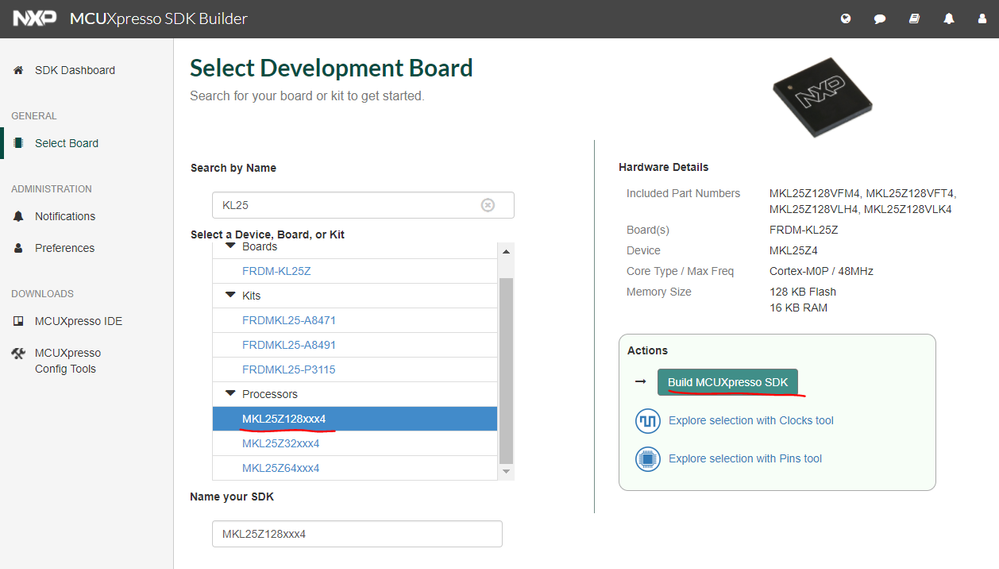
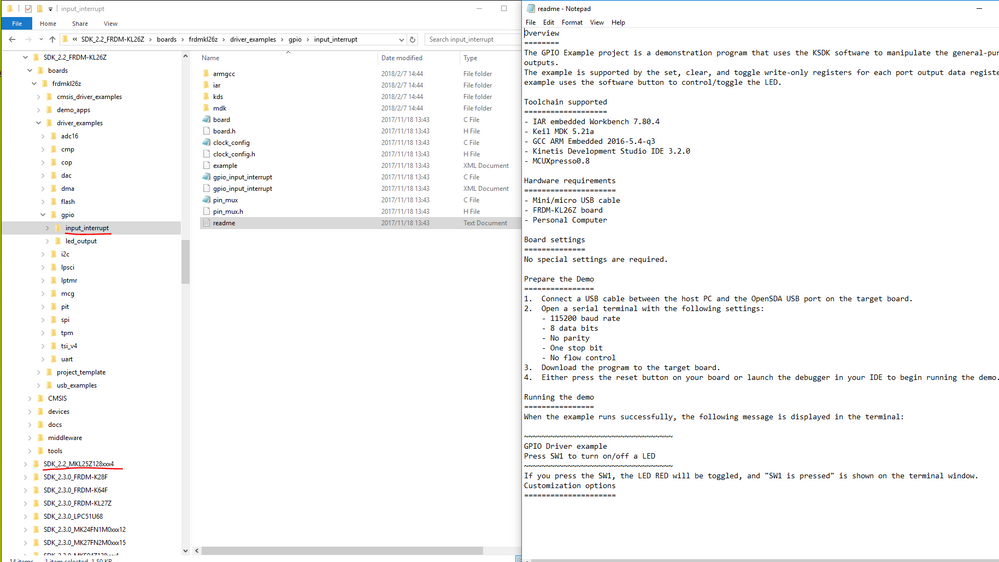
And then you can find the gpio input_interrupt example in it's folder. (For example: C:\SDK_2.2_FRDM-KL26Z\boards\frdmkl26z\driver_examples\gpio\input_interrupt)
Best Regards,
Robin
-----------------------------------------------------------------------------------------------------------------------
Note: If this post answers your question, please click the Correct Answer button. Thank you!
-----------------------------------------------------------------------------------------------------------------------
- 新着としてマーク
- ブックマーク
- 購読
- ミュート
- RSS フィードを購読する
- ハイライト
- 印刷
- 不適切なコンテンツを報告
Hi Anthony
You can see a video guide at https://youtu.be/CubinvMuTwU
and get working code for individual interrupts on all port pins on the KL25 at the other links (including KL25 simulation)
In file Port_Interrupts.h enable IRQ_TEST and set
interrupt_setup.int_port = PORTA;
interrupt_setup.int_port_bits = PORTA_BIT0;
for PTA0 interrupts.
In visual studio you can test port interrupt operation (click on the pin to toggle it) and check the register setups to copy back to your other code if you prefer.
Regards
Mark
Kinetis: http://www.utasker.com/kinetis.html
Kinetis KL25, KL26, KL27, KL28, KL82:
- http://http://www.utasker.com/kinetis/FRDM-KL25Z.html
- http://www.utasker.com/kinetis/TWR-KL25Z48M.html
- http://www.utasker.com/kinetis/FRDM-KL26Z.html
- http://www.utasker.com/kinetis/TEENSY_LC.html
- http://www.utasker.com/kinetis/FRDM-KL27Z.html
- http://www.utasker.com/kinetis/Capuccino-KL27.html
- http://www.utasker.com/kinetis/FRDM-KL28Z.html
- http://www.utasker.com/kinetis/FRDM-KL82Z.html
Build with: CW10.x, KDS, MCUXpresso, IAR, Keil, Greenhills, Crossworks, CooCox, Atollic, S32 Design Studio, GNU Make and Visual Studio
Free Open Source solution: https://github.com/uTasker/uTasker-Kinetis
Working project in 15 minutes video: https://youtu.be/K8ScSgpgQ6M
For better, faster, cheaper product developments consider the uTasker developer's version, professional Kinetis support, one-on-one training and complete fast-track project solutions to set you apart from the herd : http://www.utasker.com/support.html
