
- Forums
- Product Forums
- General Purpose MicrocontrollersGeneral Purpose Microcontrollers
- i.MX Forumsi.MX Forums
- QorIQ Processing PlatformsQorIQ Processing Platforms
- Identification and SecurityIdentification and Security
- Power ManagementPower Management
- Wireless ConnectivityWireless Connectivity
- RFID / NFCRFID / NFC
- Advanced AnalogAdvanced Analog
- Neural Processing UnitsNeural Processing Units
- MCX Microcontrollers
- S32G
- S32K
- S32V
- MPC5xxx
- Other NXP Products
- S12 / MagniV Microcontrollers
- Powertrain and Electrification Analog Drivers
- Sensors
- Vybrid Processors
- Digital Signal Controllers
- 8-bit Microcontrollers
- ColdFire/68K Microcontrollers and Processors
- PowerQUICC Processors
- OSBDM and TBDML
- S32M
- S32Z/E
-
- Solution Forums
- Software Forums
- MCUXpresso Software and ToolsMCUXpresso Software and Tools
- CodeWarriorCodeWarrior
- MQX Software SolutionsMQX Software Solutions
- Model-Based Design Toolbox (MBDT)Model-Based Design Toolbox (MBDT)
- FreeMASTER
- eIQ Machine Learning Software
- Embedded Software and Tools Clinic
- S32 SDK
- S32 Design Studio
- GUI Guider
- Zephyr Project
- Voice Technology
- Application Software Packs
- Secure Provisioning SDK (SPSDK)
- Processor Expert Software
- Generative AI & LLMs
-
- Topics
- Mobile Robotics - Drones and RoversMobile Robotics - Drones and Rovers
- NXP Training ContentNXP Training Content
- University ProgramsUniversity Programs
- Rapid IoT
- NXP Designs
- SafeAssure-Community
- OSS Security & Maintenance
- Using Our Community
-
- Cloud Lab Forums
-
- Knowledge Bases
- ARM Microcontrollers
- i.MX Processors
- Identification and Security
- Model-Based Design Toolbox (MBDT)
- QorIQ Processing Platforms
- S32 Automotive Processing Platform
- Wireless Connectivity
- CodeWarrior
- MCUXpresso Suite of Software and Tools
- MQX Software Solutions
- RFID / NFC
- Advanced Analog
- Neural Processing Units
-
- NXP Tech Blogs
- Home
- :
- 汎用マイクロコントローラ
- :
- Kinetisマイクロコントローラ
- :
- Re: FRDM-KL26Z DOA
FRDM-KL26Z DOA
- RSS フィードを購読する
- トピックを新着としてマーク
- トピックを既読としてマーク
- このトピックを現在のユーザーにフロートします
- ブックマーク
- 購読
- ミュート
- 印刷用ページ

- 新着としてマーク
- ブックマーク
- 購読
- ミュート
- RSS フィードを購読する
- ハイライト
- 印刷
- 不適切なコンテンツを報告
Hi,
Got a FRDM-KL26Z from Digikey and it's dead on arrival. Connecting the device to power via USB reveals no activity. Documentation indicates that there's a demo onboard. No evidence of any such thing with this board. Connecting it to a Mac and running USB Prober reveals that there's no device connected to the Mac. No activity on the board when powered in any way. No MSD. No change when holding down reset.
Digikey was very kind to send a replacement. It's just as useless.
What's the deal?
Thanks,
Andre.
解決済! 解決策の投稿を見る。

 jingpan
- 新着としてマーク
- ブックマーク
- 購読
- ミュート
- RSS フィードを購読する
- ハイライト
- 印刷
- 不適切なコンテンツを報告
Hi all,
I got a new board with a new K20 and try to replay all the problems you are facing. I know what happens when you trying to download bootloader and firmware now.
Download bootloader to K20 is easy. It can work immediately. Everybody can do it. But you will find that it is almost impossible to let the debug probe work, whatever firmware you use, it always mount as a MAINTANCE or DAPLINKBOOT. This is because the KL26 is empty too. If it is empty, it will hold its reset pin to 0.9V. The reset pin is also connect to SW2. It will also prevent openSDA into debug mode.


So, Please download a "hello world" demo to KL26 via J7. Then, openSDA will work fine.
Attachment is bootloader 244 and DAPLINK firmware 242.
Regards,
Jing

- 新着としてマーク
- ブックマーク
- 購読
- ミュート
- RSS フィードを購読する
- ハイライト
- 印刷
- 不適切なコンテンツを報告
Hello guys,
Unfortunately, I'm another victim of buying a dead FRDM-KL26Z at Digi-Key.
Mine has the same lot number as yours.
I will try to fix it, and I'll let you know.
Regards,
Pablo
- 新着としてマーク
- ブックマーク
- 購読
- ミュート
- RSS フィードを購読する
- ハイライト
- 印刷
- 不適切なコンテンツを報告
Hi Pablo,
I'd be very interested in hearing how you make out. I ended up soldering a DAP connector to the MPU and forgetting about using the onboard debug/USB etc.
Best,
Andre.
- 新着としてマーク
- ブックマーク
- 購読
- ミュート
- RSS フィードを購読する
- ハイライト
- 印刷
- 不適切なコンテンツを報告
Hi,
First off all, I sent an email to Digi-Key, they return the money without asking me for the board.
But despite that, I use the AN5331 app note (https://www.nxp.com/docs/en/application-note/AN5331.pdf) (https://www.nxp.com/docs/en/application-note-software/AN5331SW.zip) to load the firmware in a FRDM-K64F board as a programmer.
Then, I connected some pins of the FRDM-K64F (not the DAP connector) to the SDA SWD connector in the FRDM-KL26Z (J12). (See app note).
I flashed the bootloader in the K20 of my blanked FRDM-KL26Z. (0244_k20dx_bl_0x8000.bin) .
After unplug and plug the USB connector the MAINTENANCE window appeared.
(there is no need to press the reset button to enter to MAINTENANCE because that was the bootloader firmware)
Finally I drag-and-drop the firmware that is able to program the KL26Z (k20dx_frdmkl26z_if_crc.bin).
Now I can use my FRDM-KL26Z!
Regards,
Pablo

- 新着としてマーク
- ブックマーク
- 購読
- ミュート
- RSS フィードを購読する
- ハイライト
- 印刷
- 不適切なコンテンツを報告
Hi everyone,
interesting topic. We are also affected after buying two boards of FRDM - KL26Z. Seemed as if there was no SW installed at all. I finally managed to load OPEN- SDA V2.2 to Debug- uC using a modified FRDM-KL05x board as debugger. But now board starts in booloader mode each time. No matter if RESET button is pressed or not.
For me it seems as if internal SDA is not working properly. Because application SW is not loaded into target uC. Board remains in loader mode after powering up gain. But if I do the same using external SDA interface of targer uC SW starts and runs but the rest of the board remains in loader state.
Any idea how to solve?
Thanks in advance
Christian
- 新着としてマーク
- ブックマーク
- 購読
- ミュート
- RSS フィードを購読する
- ハイライト
- 印刷
- 不適切なコンテンツを報告
Hi Christian,
Forget about the on-board DAP. The best you can hope for is to solder a SWD connector to the board for the target and use an external DAP.
Where did you get yours from? I'm hoping some supplier out there has good boards, or that NXP will supply some working boards to us with dead ones. I now have three dead ones.
Best,
Andre.
- 新着としてマーク
- ブックマーク
- 購読
- ミュート
- RSS フィードを購読する
- ハイライト
- 印刷
- 不適切なコンテンツを報告
Hi Andre,
my two boards are also from Digikey.
I spent the whole day on trying to make them right but no success.
I only managed to flash the DAPLink Bootloader. Now board switches to maintenance mode all the time. No chance to download the debug part or an user defined application. No idea what's going wrong.
Every hint that was posted before did not succeed.
That's quite annoying because normally we would have been using these boards as reference to compare with our user defined application.
Any good idea is very welcomed.
Best,
Christian
- 新着としてマーク
- ブックマーク
- 購読
- ミュート
- RSS フィードを購読する
- ハイライト
- 印刷
- 不適切なコンテンツを報告
Hi together,
i could finally manage to get the boards right again. Here is what I did:
1. Using as FRDM- KL05- Board with USDM- SW to flash Bootloader to MK20xxx- Chip of FRDM- KL26- Board because there was no software flashed to the boards at all
2. changing settings in windows 10 (see more details below):
Although I've already tried to do the steps described here several times:
https://mcuoneclipse.com/2018/04/10/recovering-opensda-boards-with-windows-10/
Setting was not sufficient. I had to to another step as well:
https://mcuoneclipse.com/2016/08/01/bricking_and_recovering_opensda_boards_in_windows_8_and_10/
3. Place the bin file of the debug application in maintenance drive
After that suddenly drive was recognized correctly and maintenace mode was left. Now board is working as it should.
Maybe those hints are helpful for anyone else who does not want to do days of research and try as I did.
But for me it is no clear why NXP has not provided an appnote to that story because problem is not very seldom at all becaus win10 is state of the art.
I have attached my setup so you don't have to look for the files for your self.
- 新着としてマーク
- ブックマーク
- 購読
- ミュート
- RSS フィードを購読する
- ハイライト
- 印刷
- 不適切なコンテンツを報告
I just bought 2 of these from Digi-Key and they are DOA as well. Glad I found this post so I know I'm not crazy.
I don't think it's a Windows 10 issue, since the supposed demo doesn't run even when powered by a USB charger. My guess is that both chips are unprogrammed.
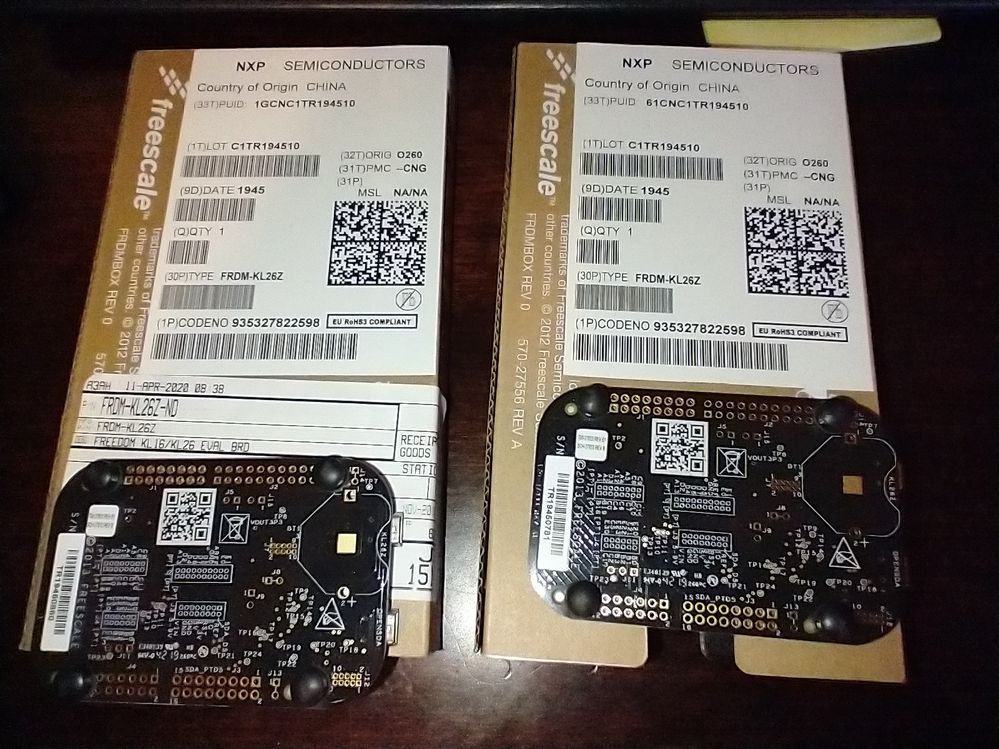
EDIT: as requested here's a photo of what I got:
- 新着としてマーク
- ブックマーク
- 購読
- ミュート
- RSS フィードを購読する
- ハイライト
- 印刷
- 不適切なコンテンツを報告
Hi,
I'm sorry you're having trouble. But I'm also relieved I'm not the only one!
You would have read the other posts in this thread by now and found that there's no way to get the K20 to reliably halt in order to reprogram it. I hope you can find some fix for it.
Incidentally, could you post a picture of the boards and the lot #'s like I did. I'd be interested to see if they're from the same lot/date.
Regards,
Andre.
- 新着としてマーク
- ブックマーク
- 購読
- ミュート
- RSS フィードを購読する
- ハイライト
- 印刷
- 不適切なコンテンツを報告
I was able to program the debugger chip MK20DN32M5 on my blank FRDM-KL26Z boards.
I used another board that I already had to program the new one. It's a FRDM-KL25Z board, which I had converted to USBDM see: http://usbdm.sourceforge.net/USBDM_V4.12/html/index.html
I initially programmed the patched DAPLink and it seemed to work somewhat. The MSD drive comes up with the name "MAINTENANCE", regardless of whether I hold down the reset button when plugging in to USB.
But I can't seem to get it to load USBDM. USBDM instructions assume that the K20 is running openSDA v1 from PEmicro, so I would like to flash the K20 with the original openSDA v1. Where can I find the binary to flash that?
I went to https://www.nxp.com/design/software/development-software/sensor-toolbox-sensor-development-ecosystem... which led me to PEmicro's site http://www.pemicro.com/opensda/
I downloaded Pemicro_OpenSDA_Debug_MSD_Update_Apps_2020_05_12.zip but it's not clear if any of the included binaries can be flashed directly to the K20. They are mostly *.SDA files and a few *.bin files.

- 新着としてマーク
- ブックマーク
- 購読
- ミュート
- RSS フィードを購読する
- ハイライト
- 印刷
- 不適切なコンテンツを報告
Hi @phatpaul ,
I initially programmed the patched DAPLink and it seemed to work somewhat. The MSD drive comes up with the name "MAINTENANCE", regardless of whether I hold down the reset button when plugging in to USB.
OK, that's great! it means that the bootloader is running. The MAINTENANCE drive indicates that the bootloader is running and waiting for the debug firmware to be loaded on top of it.
An OpenSDA (P&E) bootloader would report as BOOTLOADER with these files (this is from my FRDM-KL28Z if in Booloader mode):
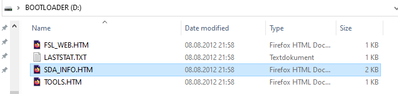
Now as it looks you have been able to program the OpenSDA V2.x bootloader (as it shows up as MAINTENANCE), you can copy (or drag&drop) a J-Link Firmware on it.
Use the 'Generic OpenSDA V2.1' firmware from
https://www.segger.com/downloads/jlink#JLinkOpenSDAGenericFirmwares
This one is 'generic' and works with any device supported by SEGGER (e.g. I use that one for the FRDM-K22F too).
With this after reboot of the board it should show up with a J-Link interface.
I hope this helps,
Erich
jingpan
- 新着としてマーク
- ブックマーク
- 購読
- ミュート
- RSS フィードを購読する
- ハイライト
- 印刷
- 不適切なコンテンツを報告
jingpan
- 新着としてマーク
- ブックマーク
- 購読
- ミュート
- RSS フィードを購読する
- ハイライト
- 印刷
- 不適切なコンテンツを報告
Hi,
I update a old FRDM-KL26 from V109 to V111 just now. A win7 is must. Win10 or Mac doesn't work.
1. Hold the reset button and connect the board on a win7 computer. You can see a new disk named bootloader.
2. Copy the BOOTUPDATEAPP_Pemicro_v111.sda to it. Then disconnect USB.
3. Connect USB again (needn't holding reset button), the disk appear. In the disk, there is a sda_info.htm. Open it, you can see a PEmicro webpage. It can tell you current openSDA version is 111.
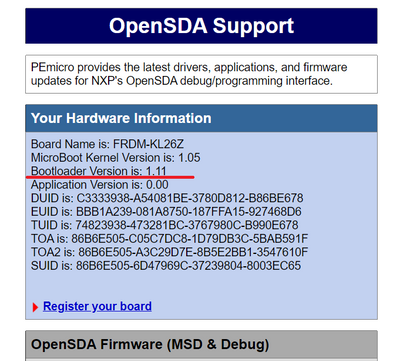
4. You can leave the win7 computer now. You can copy debug probe application to the board by a win10 or a Mac.
So, the key is to find a win7 or XP. Some one said XP is better. I'm sorry for it.
Regards,
Jing
- 新着としてマーク
- ブックマーク
- 購読
- ミュート
- RSS フィードを購読する
- ハイライト
- 印刷
- 不適切なコンテンツを報告
Hi Jing,
I don't think you understand what we are trying to telling you. The chips on the boards we got from Digi-Key are blank! There is nothing programmed on the MK20 chip (or the target). So how are we supposed to update the bootloader using a bootloader that isn't there?
I suggest you get one of these from Digi-Key to confirm.
Can I please get a copy of the original bootloader binary P&E Micro v109 so I can flash it to the KL20 with an external flasher? (or a newer bootloader which works on this board)
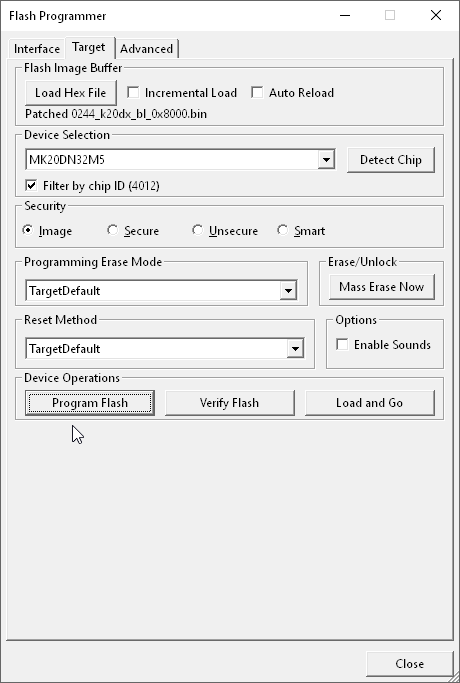
I said it was the MK20DN32M5 because that is how the USBDM programmer identified it (using chip ID). I guess it's possible they also put the wrong chip on these boards...
-Paul
- 新着としてマーク
- ブックマーク
- 購読
- ミュート
- RSS フィードを購読する
- ハイライト
- 印刷
- 不適切なコンテンツを報告
Hi @phatpaul ,
The chips on the boards we got from Digi-Key are blank! There is nothing programmed on the MK20 chip (or the target). So how are we supposed to update the bootloader using a bootloader that isn't there?
I suggest you get one of these from Digi-Key to confirm.
Can I please get a copy of the original bootloader binary P&E Micro v109 so I can flash it to the KL20 with an external flasher? (or a newer bootloader which works on this board)
As you were able to re-program the K20 on the board, that's definitely a huge issue: all the boards I know and have with OpenSDA V1.x (and the KL26 is one) have a protected bootloader from P&E. I'm not able to erase or reprogram it. So this tells me that there must be a batch of boards produced incorrectly. So this is something NXP needs to fix (I assume they get produced and then shipped to DigiKey). I would recomend that you report back to DigiKey because they probably have a large batch of not working boards.
The P&E Bootloader image is imho not available anywhere. But you could flash that patched bootloader you mentioned above (https://github.com/ErichStyger/mcuoneclipse/tree/master/OpenSDA/OpenSDA%20V2.2/mbed%20DAPLink%20v244 from https://mcuoneclipse.com/2017/10/29/adding-a-delay-to-the-arm-daplink-bootloader/ ) and you have that way even a better bootloader on it compared to the original one.
I hope this helps,
Erich
- 新着としてマーク
- ブックマーク
- 購読
- ミュート
- RSS フィードを購読する
- ハイライト
- 印刷
- 不適切なコンテンツを報告
Thanks for your suggestions Erich, I'm glad you're on this thread. Fortunately I'm able to keep working thanks to my other board with USBDM which can program the KL26 on the new board (which doesn't have a working debugger). But I'm willing to help troubleshoot this for the community and to learn more about the different debugger options.
I can't seem to load any debugging app on the K20 with the patched bootloader. Anything I drag into the "MAINTENANCE" MSD just results in a reboot and the device reappears a few seconds later in the previous state. (there is no status file like failed etc.)
I've tried loading USBDM, J-Link (https://www.segger.com/downloads/jlink/OpenSDA_V2_1), DAPLink app for FRDM-KL05Z and KL27Z and some other stuff that probably shouldn't work anyway. (I can't find the dapLink app for this board on https://armmbed.github.io/DAPLink/ it seems FRDM-KL26Z is missing from the list)
I also tried reflashing the patched bootloader to K20 using USBDM, this time selecting Unsecure Security. But the result is the same. I also tried with all versions of the unpatched bootloader from 0244_bootloader_release_package_d3095115.zip
The DETAILS.TXT file contains (with patched BL):
# DAPLink Firmware - see https://mbed.com/daplink
Unique ID: 0000000053274e450041800ef7c30014d811000097969900
HIC ID: 97969900
Auto Reset: 0
Automation allowed: 1
Overflow detection: 0
Daplink Mode: Bootloader
Bootloader Version: 0244
Git SHA: d3095115fcc01da408dc6f9663596d69a4d4959d
Local Mods: 0
USB Interfaces: MSD
Bootloader CRC: 0xb9fb79f9
Interface CRC: 0x430dd618
Remount count: 0
So even though I can flash code to the K20 chip, it doesn't seem to function as a bootloader. What am I missing?
BTW the text on my K20 is the same as reported by Frotz (OP): M20AGV 4N86B AALJG
- 新着としてマーク
- ブックマーク
- 購読
- ミュート
- RSS フィードを購読する
- ハイライト
- 印刷
- 不適切なコンテンツを報告
So even though I can flash code to the K20 chip, it doesn't seem to function as a bootloader. What am I missing?
Your DETAILS.TXT shows me that it *is* function as a bootloader. It shows that bootloader to wait for the firmware file.
Unzip the attached binary file (I mean it: unpack it so it is a file on your disk) and then drag&drop it with the Windows Explorer to that MAINTANANCE drive. Reboot the board and it will be acting as an OpenSDA J-Link.
Erich
- 新着としてマーク
- ブックマーク
- 購読
- ミュート
- RSS フィードを購読する
- ハイライト
- 印刷
- 不適切なコンテンツを報告
Erich,
I already tried that file (and several others). Like I said, the .bin file copies to the "MAINTENANCE" drive, then the drive disappears and several seconds later reappears exactly the same as before.
If I reset or powercycle the board, it also comes up the same. Holding the reset button makes no difference either.
I realize you can't reproduce my results on your end without getting one of these duds from Digi-Key, but thanks for the suggestions anyway.
I guess someone could build it from source and try to debug it with an external debugger, but I don't have time to mess with it any more.
Regards,
Paul
jingpan
- 新着としてマーク
- ブックマーク
- 購読
- ミュート
- RSS フィードを購読する
- ハイライト
- 印刷
- 不適切なコンテンツを報告
Hi @phatpaul ,
Have you programmed both of the board? Can both of them programmed with openSDA v2.2?
Regards
- 新着としてマーク
- ブックマーク
- 購読
- ミュート
- RSS フィードを購読する
- ハイライト
- 印刷
- 不適切なコンテンツを報告
Hi Erich & Paul,
I'm so glad to see that my experience is being corroborated! But sad that you're having so much trouble...
I contacted DigiKey earlier this week asking them to test their boards by applying power to them to see if they have any that are programmed. Since then I noticed that their complement of ~35 boards have been removed from stock. If I hear any details, I'll let you know.
Best,
Andre.
p.s. My two boards show M20AGV 4N86B AALJG so they're MK20's on the outside. Are the MK20's on the inside?! Remember that I got almost nowhere with a J-Link...
