
- Forums
- Product Forums
- General Purpose MicrocontrollersGeneral Purpose Microcontrollers
- i.MX Forumsi.MX Forums
- QorIQ Processing PlatformsQorIQ Processing Platforms
- Identification and SecurityIdentification and Security
- Power ManagementPower Management
- Wireless ConnectivityWireless Connectivity
- RFID / NFCRFID / NFC
- Advanced AnalogAdvanced Analog
- MCX Microcontrollers
- S32G
- S32K
- S32V
- MPC5xxx
- Other NXP Products
- S12 / MagniV Microcontrollers
- Powertrain and Electrification Analog Drivers
- Sensors
- Vybrid Processors
- Digital Signal Controllers
- 8-bit Microcontrollers
- ColdFire/68K Microcontrollers and Processors
- PowerQUICC Processors
- OSBDM and TBDML
- S32M
- S32Z/E
-
- Solution Forums
- Software Forums
- MCUXpresso Software and ToolsMCUXpresso Software and Tools
- CodeWarriorCodeWarrior
- MQX Software SolutionsMQX Software Solutions
- Model-Based Design Toolbox (MBDT)Model-Based Design Toolbox (MBDT)
- FreeMASTER
- eIQ Machine Learning Software
- Embedded Software and Tools Clinic
- S32 SDK
- S32 Design Studio
- GUI Guider
- Zephyr Project
- Voice Technology
- Application Software Packs
- Secure Provisioning SDK (SPSDK)
- Processor Expert Software
- Generative AI & LLMs
-
- Topics
- Mobile Robotics - Drones and RoversMobile Robotics - Drones and Rovers
- NXP Training ContentNXP Training Content
- University ProgramsUniversity Programs
- Rapid IoT
- NXP Designs
- SafeAssure-Community
- OSS Security & Maintenance
- Using Our Community
-
- Cloud Lab Forums
-
- Knowledge Bases
- ARM Microcontrollers
- i.MX Processors
- Identification and Security
- Model-Based Design Toolbox (MBDT)
- QorIQ Processing Platforms
- S32 Automotive Processing Platform
- Wireless Connectivity
- CodeWarrior
- MCUXpresso Suite of Software and Tools
- MQX Software Solutions
- RFID / NFC
- Advanced Analog
-
- NXP Tech Blogs
- Home
- :
- MCUXpresso Software and Tools
- :
- Kinetis Design Studio
- :
- Re: Porocessor Expert: ERROR: Not possible to run ...
Porocessor Expert: ERROR: Not possible to run ...
- Subscribe to RSS Feed
- Mark Topic as New
- Mark Topic as Read
- Float this Topic for Current User
- Bookmark
- Subscribe
- Mute
- Printer Friendly Page

- Mark as New
- Bookmark
- Subscribe
- Mute
- Subscribe to RSS Feed
- Permalink
- Report Inappropriate Content
Hi.
Finally i got KDS installed and updated to newest version 3.1.0, PEx 3.0.2b, KSDS 1.3.0.
I'm trying to start new simple project with PEx for processor: mkl03z8vfg4
Every time I add one of those components:
Component: i2cCom1 of type fsl_i2c<br/>Description: Kinetis SDK
Peripheral Driver (i2c)
Repository: KSDK 1.3.0
Component: spiCom1 of type fsl_spi<br/>Description: Kinetis SDK
Peripheral Driver (spi)
Repository: KSDK 1.3.0
Component: adConv1 of type fsl_adc16<br/>Description: Kinetis SDK
Peripheral Driver (adc16)
Repository: KSDK 1.3.0
Component: voltageRef1 of type fsl_vref<br/>Description: Kinetis SDK
Peripheral Driver (vref)
Repository: KSDK 1.3.0
and press the Generate PEx code button (Cant remember the right name) I get a following ERROR:
ERROR: Not possible to run: Drivers\Kinetis\printConfigs.js.javax.script.ScriptException:
sun.org.mozilla.javascript.internal.EcmaError: TypeError: Cannot find
function getEditorData in object
com.processorexpert.core.service.api.internal.PExInspectorIntegerItemAPI@404e93.
(<Unknown source>#89) in <Unknown source> at line number 89
Components are configured, and I can not see any errors.
Other components added (and dependent of those) are working fine.
What i'm doing wrong ?
Solved! Go to Solution.
- Mark as New
- Bookmark
- Subscribe
- Mute
- Subscribe to RSS Feed
- Permalink
- Report Inappropriate Content
Marek & Jennie thanks or your involvement in my problem, but that was a wrong way. The problem was much deeper.
So.
After 2 days of investigation, dozens of attemps to install, update and repair etc. the problem has been identified and I found a solution (workaround).
The BUG:
When trying to update KDS to 3.1.0 it fails with following message:
An error occurred while uninstalling
session context was:(profile=DefaultProfile, phase=org.eclipse.equinox.internal.p2.engine.phases.Uninstall, operand=[R]com.somniumtech.kds.executable.win32.win32.x86 3.0.0 --> null, action=org.eclipse.equinox.internal.p2.touchpoint.natives.actions.CleanupzipAction).
Backup of file D:\nxp\KDS_3.0.0\eclipse\kinetis-design-studio.exe failed.
File that was copied to backup could not be deleted: D:\nxp\KDS_3.0.0\eclipse\kinetis-design-studio.exe
At this point the KSD is BROKEN. Any attempt to rescue or repair does not give expected result - even if you get everything looking fine. If You will continue using KDS, it will be unpredictable, You will not be able to update or install addons or you will get lot of very strange errors.
The ONLY solution is to install KDS from scratch!!
Trust me, I spend 2 days trying dozens of different solutions.
The problem exists ONLY under Windows. Linux and probably MAC should not be affected.
It is derectly related to this:Unable to update KDS from 3.0.0 to 3.1.0
ant it has source in ECLIPSE bug under windows: Bug 427148 – Unable to update from one version to the next, on Windows only - can not remove eclipse...
Solution: (workaround)
- Uninstall KDS
- The KSDK is unaffected !! so if you got it installed, dont touch it. It is OK.
- Do a fresh Install of KDS 3.0.0
- BEFORE you attempt to update KDS to 3.1.0 you HAVE TO rename KDS executable and INI file:
- Exit KDS
- rename your KDS executable file located usualy at:
- C:\Freescale\KDS_3.0.0\eclipse\kinetis-design-studio.exe
- to something like this:
- C:\Freescale\KDS_3.0.0\eclipse\__kinetis-design-studio__.exe
- rename your KDS.ini file located in same folder:
- "C:\Freescale\KDS_3.0.0\eclipse\kinetis-design-studio.ini"
- to something like this:
- "C:\Freescale\KDS_3.0.0\eclipse\__kinetis-design-studio__.ini"
- Both file file SHOULD have same filename but different extension.
- Now you have to start KDS by running the renamed exe file. Do not use shotrcut - it bassically do not work at this moment.
- Update KDS to 3.1.0 using standard procedure from KDS_3.1.0_Release_Notes.pdf.
- KDS will ask you to restart.
- Enjoy your fully working bug free(hope) KSD 3.1.0 with PEx 3.0.2b
- Now you can search for updates, install KSDK 1.3.0 plugin etc.
- Enjoy.
I hope it will be helpfull for many (all ?) Windows users :smileywink:
My conclusion is:
Have developers had tested update procedure under Windows ?
Could you please update KSD 3.1.0 release note? Or maybe better, release a full 3.1.0 installation package?
That was my 3rd (and last for sure) attempt to start development for Kinets devices ... and I'am sure I'am not the only one who dropped Kinetis devices because of broken tools...
Best Regards
Marcin.
- Mark as New
- Bookmark
- Subscribe
- Mute
- Subscribe to RSS Feed
- Permalink
- Report Inappropriate Content
Marek & Jennie thanks or your involvement in my problem, but that was a wrong way. The problem was much deeper.
So.
After 2 days of investigation, dozens of attemps to install, update and repair etc. the problem has been identified and I found a solution (workaround).
The BUG:
When trying to update KDS to 3.1.0 it fails with following message:
An error occurred while uninstalling
session context was:(profile=DefaultProfile, phase=org.eclipse.equinox.internal.p2.engine.phases.Uninstall, operand=[R]com.somniumtech.kds.executable.win32.win32.x86 3.0.0 --> null, action=org.eclipse.equinox.internal.p2.touchpoint.natives.actions.CleanupzipAction).
Backup of file D:\nxp\KDS_3.0.0\eclipse\kinetis-design-studio.exe failed.
File that was copied to backup could not be deleted: D:\nxp\KDS_3.0.0\eclipse\kinetis-design-studio.exe
At this point the KSD is BROKEN. Any attempt to rescue or repair does not give expected result - even if you get everything looking fine. If You will continue using KDS, it will be unpredictable, You will not be able to update or install addons or you will get lot of very strange errors.
The ONLY solution is to install KDS from scratch!!
Trust me, I spend 2 days trying dozens of different solutions.
The problem exists ONLY under Windows. Linux and probably MAC should not be affected.
It is derectly related to this:Unable to update KDS from 3.0.0 to 3.1.0
ant it has source in ECLIPSE bug under windows: Bug 427148 – Unable to update from one version to the next, on Windows only - can not remove eclipse...
Solution: (workaround)
- Uninstall KDS
- The KSDK is unaffected !! so if you got it installed, dont touch it. It is OK.
- Do a fresh Install of KDS 3.0.0
- BEFORE you attempt to update KDS to 3.1.0 you HAVE TO rename KDS executable and INI file:
- Exit KDS
- rename your KDS executable file located usualy at:
- C:\Freescale\KDS_3.0.0\eclipse\kinetis-design-studio.exe
- to something like this:
- C:\Freescale\KDS_3.0.0\eclipse\__kinetis-design-studio__.exe
- rename your KDS.ini file located in same folder:
- "C:\Freescale\KDS_3.0.0\eclipse\kinetis-design-studio.ini"
- to something like this:
- "C:\Freescale\KDS_3.0.0\eclipse\__kinetis-design-studio__.ini"
- Both file file SHOULD have same filename but different extension.
- Now you have to start KDS by running the renamed exe file. Do not use shotrcut - it bassically do not work at this moment.
- Update KDS to 3.1.0 using standard procedure from KDS_3.1.0_Release_Notes.pdf.
- KDS will ask you to restart.
- Enjoy your fully working bug free(hope) KSD 3.1.0 with PEx 3.0.2b
- Now you can search for updates, install KSDK 1.3.0 plugin etc.
- Enjoy.
I hope it will be helpfull for many (all ?) Windows users :smileywink:
My conclusion is:
Have developers had tested update procedure under Windows ?
Could you please update KSD 3.1.0 release note? Or maybe better, release a full 3.1.0 installation package?
That was my 3rd (and last for sure) attempt to start development for Kinets devices ... and I'am sure I'am not the only one who dropped Kinetis devices because of broken tools...
Best Regards
Marcin.

 MarekTrmac
- Mark as New
- Bookmark
- Subscribe
- Mute
- Subscribe to RSS Feed
- Permalink
- Report Inappropriate Content
Hi Marcin,
sorry for the problem. We're now releasing full installer of KDS 3.2. This will include KDS3.1 and several additional P&E and Segger updates.
Regards,Marek
- Mark as New
- Bookmark
- Subscribe
- Mute
- Subscribe to RSS Feed
- Permalink
- Report Inappropriate Content
MarekTrmac
- Mark as New
- Bookmark
- Subscribe
- Mute
- Subscribe to RSS Feed
- Permalink
- Report Inappropriate Content
Hi, I've tried your project "test_1" in KDS 3 and I can generate the code without any error.
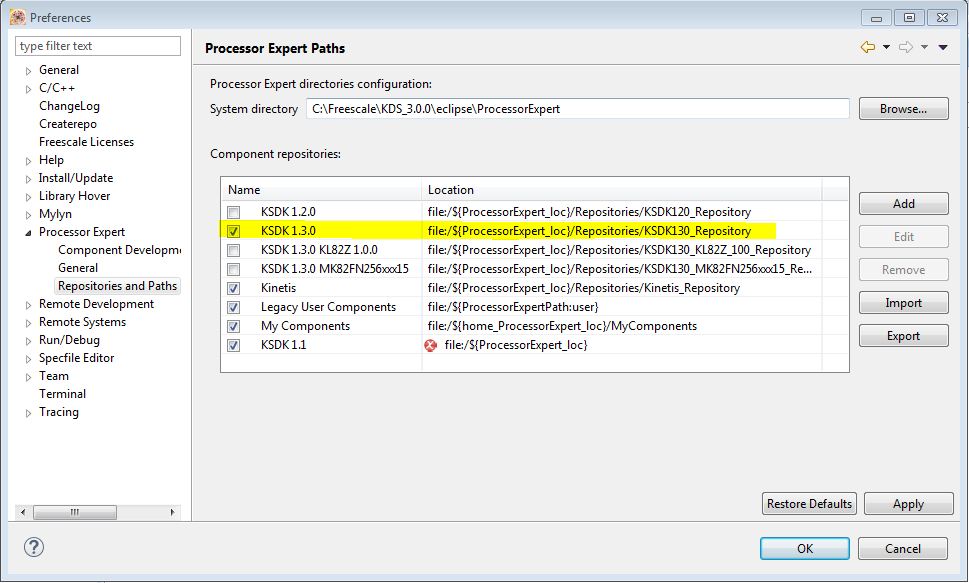
Can you go to Window - Preferences - Processor Expert - Repositories and Paths and checkl if KSDK1.3 repository is listed and enabled?
Attached is a screenshot, what I have installed on my computer I've highlighted row that should be mandatory for your project.
Regards, Marek
 MarekTrmac
- Mark as New
- Bookmark
- Subscribe
- Mute
- Subscribe to RSS Feed
- Permalink
- Report Inappropriate Content
Hi,
what operating system do you use?
I've created the project based on your description and I do not see any problem with code generation.
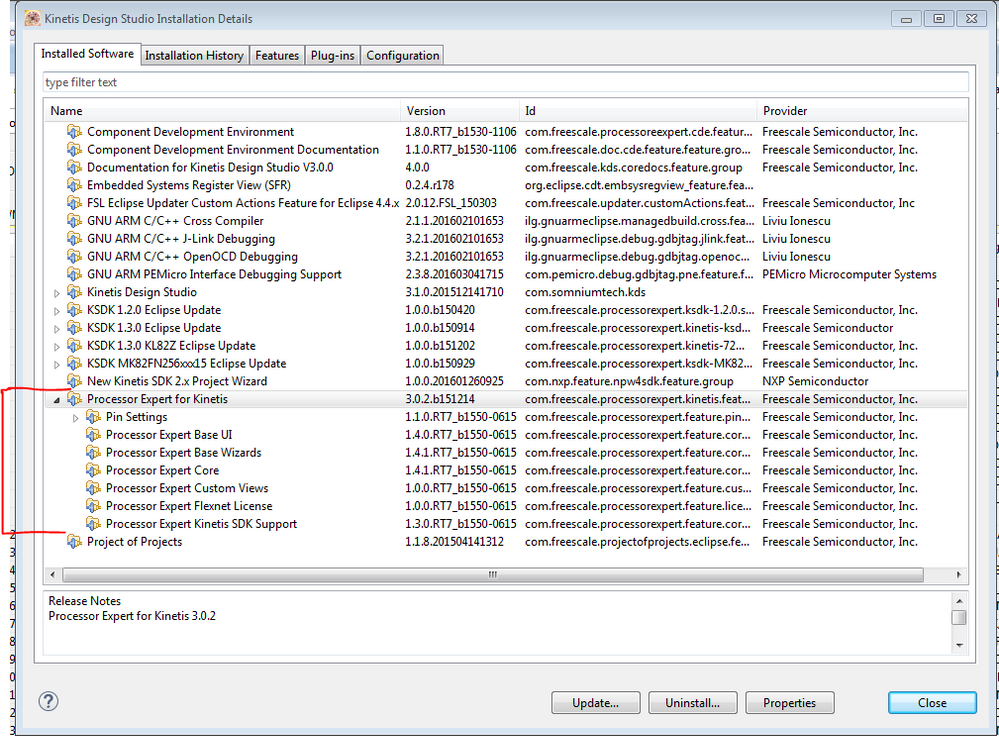
Can you double check, if you have the Processor Expert 3.0.2 fully installed, using Help - About - Installation details (see attached picture).
Regards
Marek
- Mark as New
- Bookmark
- Subscribe
- Mute
- Subscribe to RSS Feed
- Permalink
- Report Inappropriate Content
Hi.
I'am using Windows 7 Pro, 64bit.
Today I reindtalled whole KDS + KSDK ... and the problem still exists (new project)
My installed components seems to be pretty same as Yours:
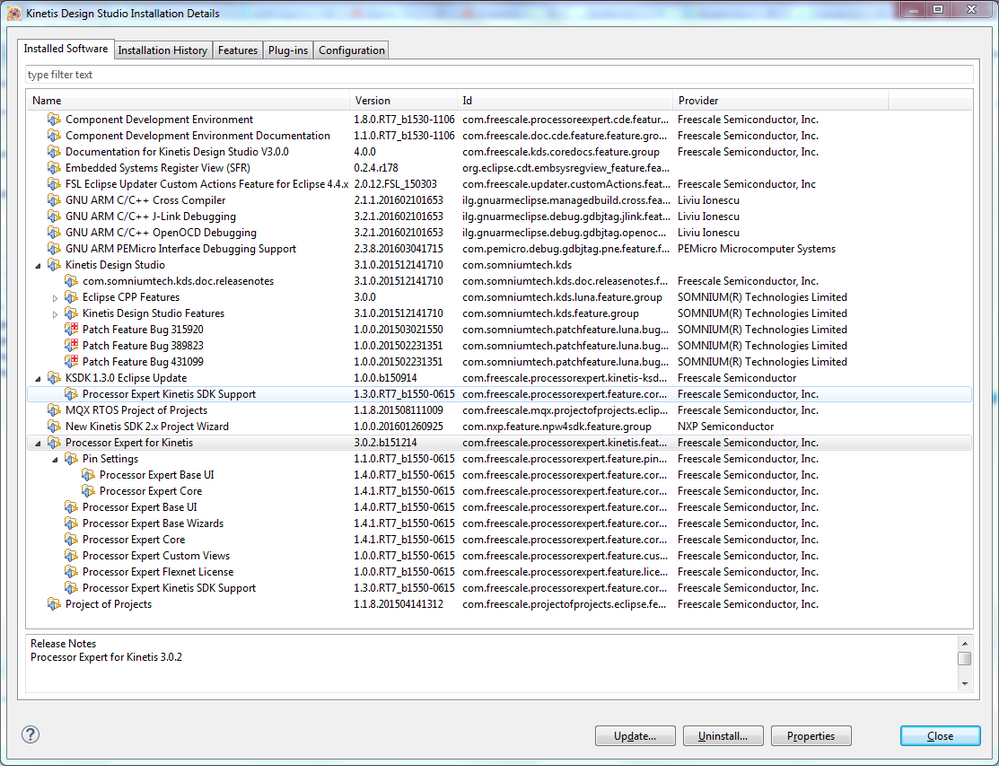
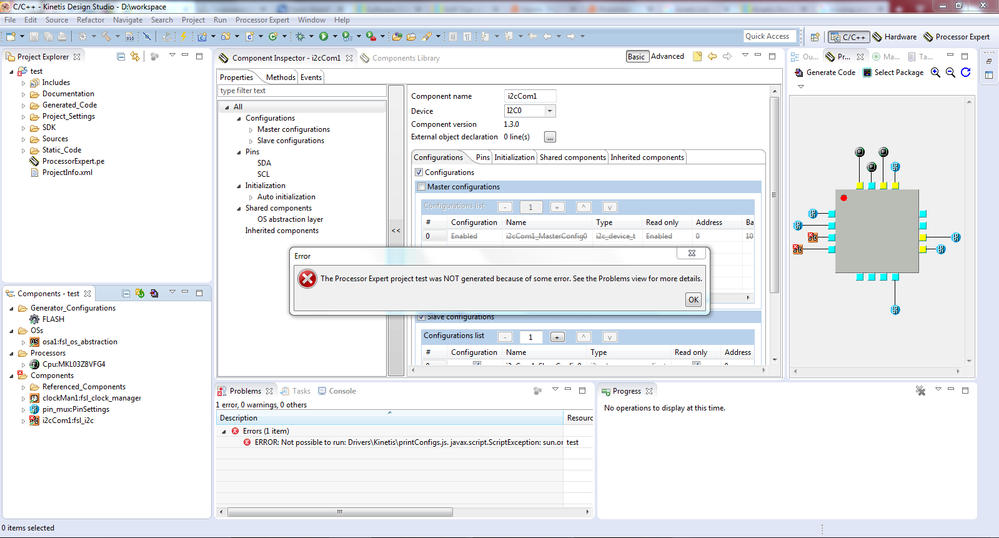
Any idea ?
 ZhangJennie
- Mark as New
- Bookmark
- Subscribe
- Mute
- Subscribe to RSS Feed
- Permalink
- Report Inappropriate Content
Hi Marek,
can you please post your project here? we would check the problem is in your project or KDS system issue. thanks!
Have a great day,
Jennie Zhang
-----------------------------------------------------------------------------------------------------------------------
Note: If this post answers your question, please click the Correct Answer button. Thank you!
-----------------------------------------------------------------------------------------------------------------------
