
- Forums
- Product Forums
- General Purpose MicrocontrollersGeneral Purpose Microcontrollers
- i.MX Forumsi.MX Forums
- QorIQ Processing PlatformsQorIQ Processing Platforms
- Identification and SecurityIdentification and Security
- Power ManagementPower Management
- Wireless ConnectivityWireless Connectivity
- RFID / NFCRFID / NFC
- Advanced AnalogAdvanced Analog
- Neural Processing UnitsNeural Processing Units
- MCX Microcontrollers
- S32G
- S32K
- S32V
- MPC5xxx
- Other NXP Products
- S12 / MagniV Microcontrollers
- Powertrain and Electrification Analog Drivers
- Sensors
- Vybrid Processors
- Digital Signal Controllers
- 8-bit Microcontrollers
- ColdFire/68K Microcontrollers and Processors
- PowerQUICC Processors
- OSBDM and TBDML
- S32M
- S32Z/E
-
- Solution Forums
- Software Forums
- MCUXpresso Software and ToolsMCUXpresso Software and Tools
- CodeWarriorCodeWarrior
- MQX Software SolutionsMQX Software Solutions
- Model-Based Design Toolbox (MBDT)Model-Based Design Toolbox (MBDT)
- FreeMASTER
- eIQ Machine Learning Software
- Embedded Software and Tools Clinic
- S32 SDK
- S32 Design Studio
- GUI Guider
- Zephyr Project
- Voice Technology
- Application Software Packs
- Secure Provisioning SDK (SPSDK)
- Processor Expert Software
- Generative AI & LLMs
-
- Topics
- Mobile Robotics - Drones and RoversMobile Robotics - Drones and Rovers
- NXP Training ContentNXP Training Content
- University ProgramsUniversity Programs
- Rapid IoT
- NXP Designs
- SafeAssure-Community
- OSS Security & Maintenance
- Using Our Community
-
- Cloud Lab Forums
-
- Knowledge Bases
- ARM Microcontrollers
- i.MX Processors
- Identification and Security
- Model-Based Design Toolbox (MBDT)
- QorIQ Processing Platforms
- S32 Automotive Processing Platform
- Wireless Connectivity
- CodeWarrior
- MCUXpresso Suite of Software and Tools
- MQX Software Solutions
- RFID / NFC
- Advanced Analog
- Neural Processing Units
-
- NXP Tech Blogs
- Home
- :
- MCUXpresso软件和工具
- :
- Kinetis Design Studio
- :
- Not a bug: KDS breakpoints don't work with Segger JLink
Not a bug: KDS breakpoints don't work with Segger JLink

Note: This post was split into the solved portion below, and a separate bug report (missing call stack, debugger crash).
Thanks to Erich for explaining the problem below.
K64F Freedom board, KDS 3.2.0 with all available updates installed, Windows 8 64-bit host.
Latest J-link updates are installed: JLink_V612a dated 2-December (KDS and J-link firmware both updated).
While KDS mostly works for an LED blinky application we're having serious problems with anything non-trivial (like our application).
We gave up on the NXP-provided OpenSDA SWD interface as it was too slow and buggy.
Purchased a couple of Segger J-Link Base units, cut the required traces on the Freedom board, and gave it a try...
Many things work for my C/C++ application; with J-Link I can:
- download into flash (15x faster than NXP-provided programming),
- start a debug session,
- catch a breakpoint coded as "__asm("bkpt #0");"
- examine variables (both stack and static)
- pause and continue execution
- single step
Unfortunately I cannot:
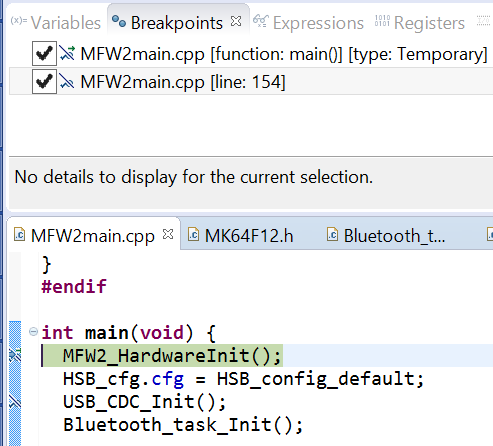
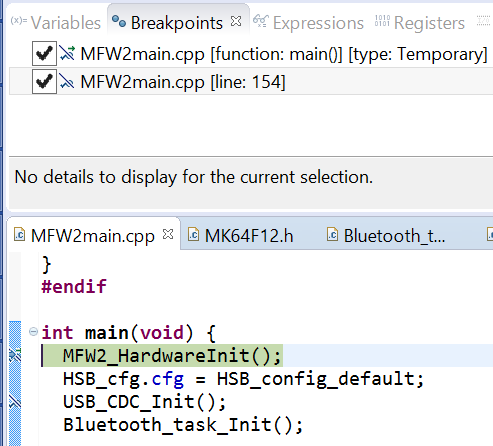
- set a breakpoint in KDS IDE (it tries, but shows a funny line through Eclipse breakpoint symbol)
- see a stack call trace when the program is paused (though it shows the current routine)
Below are snapshots of:
- the funny not-set breakpoints,
Segger has confirmed these are problems with KDS.
Is there any hope of getting these problems fixed?
Would you recommend using a different development environment for non-trivial applications on K64F?
Thanks,
Best Regards, Dave
已解决! 转到解答。

 BlackNight
Hi Dave,
from your screenshots and breakpoint icons I see that you have turned on 'skipping all breakpoints' in Eclipse for your project?
See Skipping Breakpoints | MCU on Eclipse
With this, the breakpoints will not be set. I assume you have turned on that feature accidentially?
I hope this helps,
Erich
BlackNight
Hi Dave,
from your screenshots and breakpoint icons I see that you have turned on 'skipping all breakpoints' in Eclipse for your project?
See Skipping Breakpoints | MCU on Eclipse
With this, the breakpoints will not be set. I assume you have turned on that feature accidentially?
I hope this helps,
Erich
Bingo, that's it, Thanks Erich!
I've no idea how that got set, and didn't even know the icon existed (neither did Segger; I'll pass it along).
Thanks again,
Best Regards, Dave
PS: I'm still not seeing the call stack - any ideas??
