
- Forums
- Product Forums
- General Purpose MicrocontrollersGeneral Purpose Microcontrollers
- i.MX Forumsi.MX Forums
- QorIQ Processing PlatformsQorIQ Processing Platforms
- Identification and SecurityIdentification and Security
- Power ManagementPower Management
- Wireless ConnectivityWireless Connectivity
- RFID / NFCRFID / NFC
- Advanced AnalogAdvanced Analog
- Neural Processing UnitsNeural Processing Units
- MCX Microcontrollers
- S32G
- S32K
- S32V
- MPC5xxx
- Other NXP Products
- S12 / MagniV Microcontrollers
- Powertrain and Electrification Analog Drivers
- Sensors
- Vybrid Processors
- Digital Signal Controllers
- 8-bit Microcontrollers
- ColdFire/68K Microcontrollers and Processors
- PowerQUICC Processors
- OSBDM and TBDML
- S32M
- S32Z/E
-
- Solution Forums
- Software Forums
- MCUXpresso Software and ToolsMCUXpresso Software and Tools
- CodeWarriorCodeWarrior
- MQX Software SolutionsMQX Software Solutions
- Model-Based Design Toolbox (MBDT)Model-Based Design Toolbox (MBDT)
- FreeMASTER
- eIQ Machine Learning Software
- Embedded Software and Tools Clinic
- S32 SDK
- S32 Design Studio
- GUI Guider
- Zephyr Project
- Voice Technology
- Application Software Packs
- Secure Provisioning SDK (SPSDK)
- Processor Expert Software
- Generative AI & LLMs
-
- Topics
- Mobile Robotics - Drones and RoversMobile Robotics - Drones and Rovers
- NXP Training ContentNXP Training Content
- University ProgramsUniversity Programs
- Rapid IoT
- NXP Designs
- SafeAssure-Community
- OSS Security & Maintenance
- Using Our Community
-
- Cloud Lab Forums
-
- Knowledge Bases
- ARM Microcontrollers
- i.MX Processors
- Identification and Security
- Model-Based Design Toolbox (MBDT)
- QorIQ Processing Platforms
- S32 Automotive Processing Platform
- Wireless Connectivity
- CodeWarrior
- MCUXpresso Suite of Software and Tools
- MQX Software Solutions
- RFID / NFC
- Advanced Analog
- Neural Processing Units
-
- NXP Tech Blogs
- Home
- :
- 软件论坛
- :
- FreeMASTER
- :
- FreeMaster LITE License not working
FreeMaster LITE License not working
Hello, I downloaded freeMaster Lite when I put the license code on the installation I get this error message:
software activation code is already used on this station for freemaster_lite 3.2
Then the instalation rolls back and doesnt let me install.
How to solve this?
Thanks
已解决! 转到解答。

 iulian_stan
Hi @GabeLogan,
Could you double check that the activation code is meant for your FreeMASTER Lite version.
Latest version of FreeMASTER Lite is 1.3.
During the installation process you should be prompted to visit NXP site (the link is also available in the product description in the component selection of the installation process).
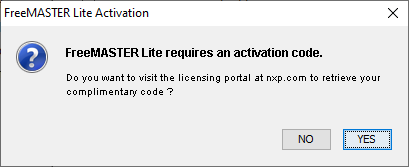
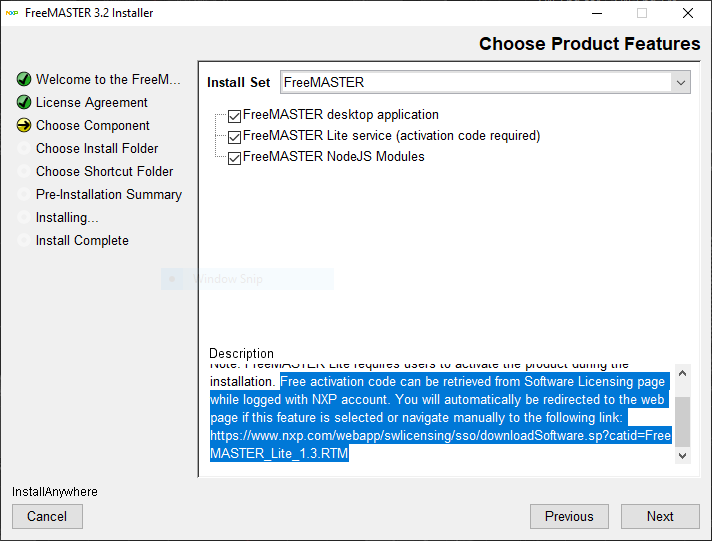
You need to access that link only once when installing a newer version of FreeMASTER Lite.
After this is done, you will see your license entitlement next to other product versions:
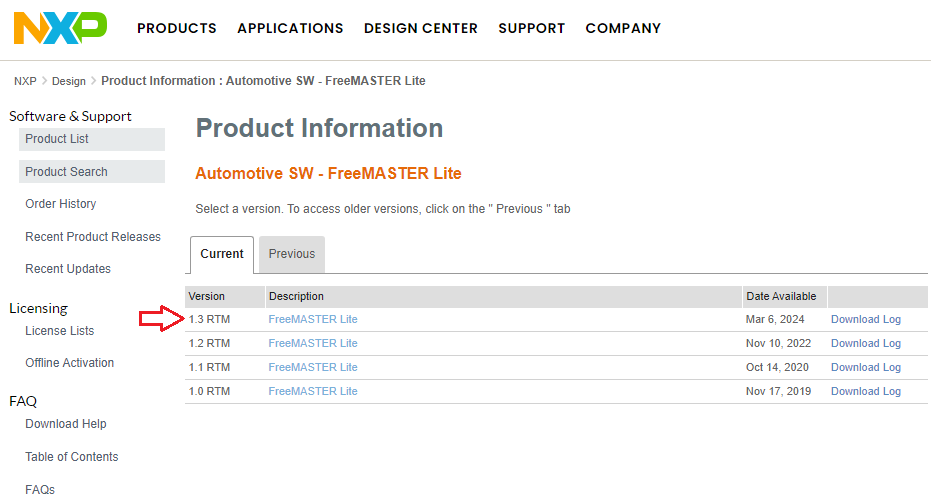
Hope it help,
Iulian
iulian_stan
Hi @GabeLogan,
Could you double check that the activation code is meant for your FreeMASTER Lite version.
Latest version of FreeMASTER Lite is 1.3.
During the installation process you should be prompted to visit NXP site (the link is also available in the product description in the component selection of the installation process).
You need to access that link only once when installing a newer version of FreeMASTER Lite.
After this is done, you will see your license entitlement next to other product versions:
Hope it help,
Iulian
