
- Forums
- Product Forums
- General Purpose MicrocontrollersGeneral Purpose Microcontrollers
- i.MX Forumsi.MX Forums
- QorIQ Processing PlatformsQorIQ Processing Platforms
- Identification and SecurityIdentification and Security
- Power ManagementPower Management
- Wireless ConnectivityWireless Connectivity
- RFID / NFCRFID / NFC
- Advanced AnalogAdvanced Analog
- MCX Microcontrollers
- S32G
- S32K
- S32V
- MPC5xxx
- Other NXP Products
- S12 / MagniV Microcontrollers
- Powertrain and Electrification Analog Drivers
- Sensors
- Vybrid Processors
- Digital Signal Controllers
- 8-bit Microcontrollers
- ColdFire/68K Microcontrollers and Processors
- PowerQUICC Processors
- OSBDM and TBDML
- S32M
- S32Z/E
-
- Solution Forums
- Software Forums
- MCUXpresso Software and ToolsMCUXpresso Software and Tools
- CodeWarriorCodeWarrior
- MQX Software SolutionsMQX Software Solutions
- Model-Based Design Toolbox (MBDT)Model-Based Design Toolbox (MBDT)
- FreeMASTER
- eIQ Machine Learning Software
- Embedded Software and Tools Clinic
- S32 SDK
- S32 Design Studio
- GUI Guider
- Zephyr Project
- Voice Technology
- Application Software Packs
- Secure Provisioning SDK (SPSDK)
- Processor Expert Software
- Generative AI & LLMs
-
- Topics
- Mobile Robotics - Drones and RoversMobile Robotics - Drones and Rovers
- NXP Training ContentNXP Training Content
- University ProgramsUniversity Programs
- Rapid IoT
- NXP Designs
- SafeAssure-Community
- OSS Security & Maintenance
- Using Our Community
-
- Cloud Lab Forums
-
- Knowledge Bases
- ARM Microcontrollers
- i.MX Processors
- Identification and Security
- Model-Based Design Toolbox (MBDT)
- QorIQ Processing Platforms
- S32 Automotive Processing Platform
- Wireless Connectivity
- CodeWarrior
- MCUXpresso Suite of Software and Tools
- MQX Software Solutions
- RFID / NFC
- Advanced Analog
-
- NXP Tech Blogs
- Home
- :
- Software Forums
- :
- FreeMASTER
- :
- Re: Error! - "Could not instantiate communication plugin object"
Error! - "Could not instantiate communication plugin object"
- Subscribe to RSS Feed
- Mark Topic as New
- Mark Topic as Read
- Float this Topic for Current User
- Bookmark
- Subscribe
- Mute
- Printer Friendly Page

- Mark as New
- Bookmark
- Subscribe
- Mute
- Subscribe to RSS Feed
- Permalink
- Report Inappropriate Content
I'm using S32K144 EVB, with Matlab R2019b and MBDT V4.2. I'm able to build and successfully generate the .mot file, the .elf file for the GPIO example of S32K144.
I'm using a 'PEMicro Multilink Universal FX' debugger with S32Design studio, using the Flash option, for flashing the board, Disabled auto-build, and select the generated elf that I wanted to flash. (which is GPIO example .elf file in my case) Here's a thread I followed - (https://community.nxp.com/t5/NXP-Model-Based-Design-Tools/Flashing-S32K144-with-PEMicro-Multilink-fr...)
I'm successfully able to flash the .elf to S32K144 EVB using S32DS and the debugger mentioned above.
Expected output: During execution, LED is blue and by pressing SW2, the LED changes color to Green. On the board, I'm seeing the expected output as per the example.
I wanted to check the status of the switch SW2 being used in the example using a real-time debugging tool - FreeMASTER.
I've got the latest version (FreeMASTER 3.1) installed along with FreeMASTER Serial communication driver V2.0
I also got P&E Micro drivers, P&E Multilink Universal installed and everything is up to date as per my knowledge.
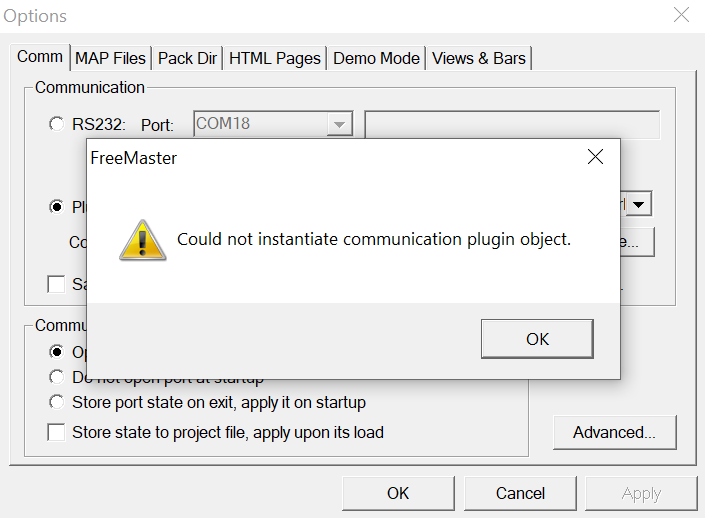
I open Freemaster, go to 'options' from the 'Project' menu to connect via 'plug-in' and 'Configure' options since I am using a debugger. I've attached a picture of the error I'm seeing.
It says "Could not instantiate communication plugin object" whenever I try to go under "Project>Options>Configure"
Please help me as to why it is not able to instantiate the plug-in and what I might be missing.
Thank you!
Solved! Go to Solution.
 iulian_stan
- Mark as New
- Bookmark
- Subscribe
- Mute
- Subscribe to RSS Feed
- Permalink
- Report Inappropriate Content
Sorry, I misread that part.
Can you try running the "register.bat". This file registers plugin libraries. It is is located inside FreeMASTER installation folder and should be run with admin privileges. Let me know if you can access the configuration after running this script.
Btw, FreeMASTER serial communication driver V2.0 is a library required by the embedded applications to enable advanced FreeMASTER features on the target side, thus does not affect the host (PC) side.
iulian_stan
- Mark as New
- Bookmark
- Subscribe
- Mute
- Subscribe to RSS Feed
- Permalink
- Report Inappropriate Content
Hi @saranya_chitta,
After plugin selection you need to configure it for your specific board. After plugin selection press the configure button under the Plugin combobox.
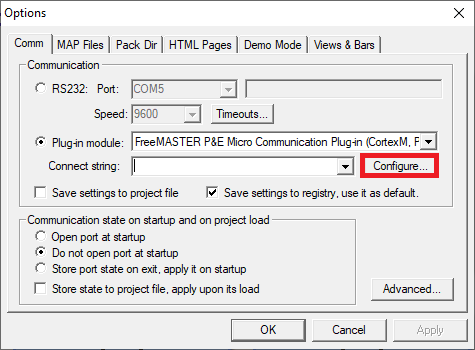
In your case S32K144 & PE Micro the configuration would look like this:
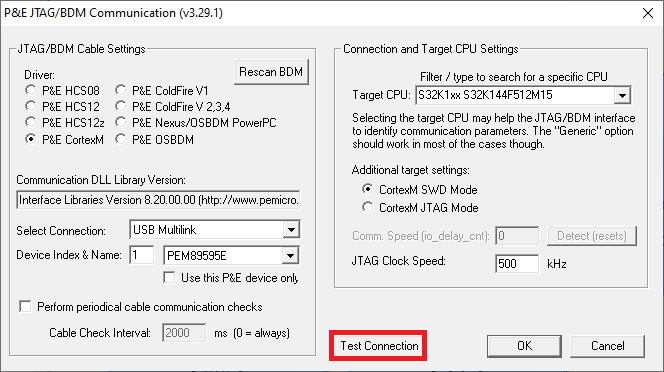
Once the configuration is done check it it by pressing the Test button. If everything is correct you should se the following window:
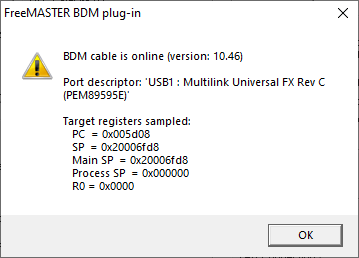

After this step you can confirm the option and connect to the board. You can check this short video to see how to add and monitor your embedded variable in this short video Connecting to the Board starting min 2:15.
Additional note: Without going to deep into details - this enables standard BDM communication (see chapter 7.2 of the User Manual: BDM vs PD-BDM), that does not support some advanced FreeMASTER functionalities, but considering that you may be new to the tool I won't insist on them. In case you run into the need to use some of those features we can discuss it separately.
- Mark as New
- Bookmark
- Subscribe
- Mute
- Subscribe to RSS Feed
- Permalink
- Report Inappropriate Content
Thanks @iulian_stan
The problem is when I click "Configure", I'm not seeing the window (P&E JTAG/BDM Communication v3.29.1) you've mentioned. That's what I was talking about in the question I posted too.
When I click "Configure", I'm seeing the error pop up that says "Could not instantiate communication plugin object" and I've attached a screenshot of the error as well to my previous post.
I got FreeMaster 3.0 reinstalled now (I don't have FreeMASTER Lite, I unchecked it during the installation process) and I also have FreeMASTER serial communication driver V2.0
Can you tell me what plugin I might be missing and why am I seeing that error?
Thanks in advance!
iulian_stan
- Mark as New
- Bookmark
- Subscribe
- Mute
- Subscribe to RSS Feed
- Permalink
- Report Inappropriate Content
Sorry, I misread that part.
Can you try running the "register.bat". This file registers plugin libraries. It is is located inside FreeMASTER installation folder and should be run with admin privileges. Let me know if you can access the configuration after running this script.
Btw, FreeMASTER serial communication driver V2.0 is a library required by the embedded applications to enable advanced FreeMASTER features on the target side, thus does not affect the host (PC) side.
- Mark as New
- Bookmark
- Subscribe
- Mute
- Subscribe to RSS Feed
- Permalink
- Report Inappropriate Content
Thank you, @iulian_stan
Running the "register.bat" helped solve the issue.
Verified using S32K144 EVB with GPIO example and it's all good now.
Thank you once again!
