
- Forums
- Product Forums
- General Purpose MicrocontrollersGeneral Purpose Microcontrollers
- i.MX Forumsi.MX Forums
- QorIQ Processing PlatformsQorIQ Processing Platforms
- Identification and SecurityIdentification and Security
- Power ManagementPower Management
- Wireless ConnectivityWireless Connectivity
- RFID / NFCRFID / NFC
- Advanced AnalogAdvanced Analog
- MCX Microcontrollers
- S32G
- S32K
- S32V
- MPC5xxx
- Other NXP Products
- S12 / MagniV Microcontrollers
- Powertrain and Electrification Analog Drivers
- Sensors
- Vybrid Processors
- Digital Signal Controllers
- 8-bit Microcontrollers
- ColdFire/68K Microcontrollers and Processors
- PowerQUICC Processors
- OSBDM and TBDML
- S32M
- S32Z/E
-
- Solution Forums
- Software Forums
- MCUXpresso Software and ToolsMCUXpresso Software and Tools
- CodeWarriorCodeWarrior
- MQX Software SolutionsMQX Software Solutions
- Model-Based Design Toolbox (MBDT)Model-Based Design Toolbox (MBDT)
- FreeMASTER
- eIQ Machine Learning Software
- Embedded Software and Tools Clinic
- S32 SDK
- S32 Design Studio
- GUI Guider
- Zephyr Project
- Voice Technology
- Application Software Packs
- Secure Provisioning SDK (SPSDK)
- Processor Expert Software
- Generative AI & LLMs
-
- Topics
- Mobile Robotics - Drones and RoversMobile Robotics - Drones and Rovers
- NXP Training ContentNXP Training Content
- University ProgramsUniversity Programs
- Rapid IoT
- NXP Designs
- SafeAssure-Community
- OSS Security & Maintenance
- Using Our Community
-
- Cloud Lab Forums
-
- Knowledge Bases
- ARM Microcontrollers
- i.MX Processors
- Identification and Security
- Model-Based Design Toolbox (MBDT)
- QorIQ Processing Platforms
- S32 Automotive Processing Platform
- Wireless Connectivity
- CodeWarrior
- MCUXpresso Suite of Software and Tools
- MQX Software Solutions
- RFID / NFC
- Advanced Analog
-
- NXP Tech Blogs
- Home
- :
- MCUXpresso Software and Tools
- :
- Kinetis Design Studio
- :
- Re: Moving from CW to KDS (new processor)
Moving from CW to KDS (new processor)
- Subscribe to RSS Feed
- Mark Topic as New
- Mark Topic as Read
- Float this Topic for Current User
- Bookmark
- Subscribe
- Mute
- Printer Friendly Page

- Mark as New
- Bookmark
- Subscribe
- Mute
- Subscribe to RSS Feed
- Permalink
- Report Inappropriate Content
Hello, my company has been using Codewarrior for a few years now and have been very pleased with it and Processor Expert and have a number of projects that use it.
With a new project we would like to use the MKL17Z256VMP4 processor and as I understand it, this is only supported in KDS.
I already have a project and a lot of code written for a different processor (as our prototype board used an old one: MKL25Z128VLK4). Unfortunately when importing it into KDS I couldn't find the MKL17Z processor to add to the project. After reading a couple of posts on this forum I installed the following updates to KDS:
- Freescale Kinetis SDK v1.0.0 for KL03Z
- Freescale Kinetis SDK v1.0.0 for KL43Z
- Freescale Kinetis SDK v1.1.0
This added the KL17 processor to the list but now Processor Expert does not work correctly. The imported CW project says "ERROR: This component is not supported in Kinetis SDK project mode". I can't seem to find a way to take the project out of this mode.
Also, when starting a new project in KDS, if I select MKL25Z I can select Processor Expert (but not Kinetis SDK) and the normal Processor Expert beans are there (Logical Device Drivers), however if I select he MKL17Z I *have* to select Kinetis SDK with Processor Expert (and cannot select Processor Expert individually) but the normal LDD beans are not there.
This means I am unable to use the old project in "legacy" mode and can't even start a new project using the "old" Processor Expert with the MKL17Z processor.
What am I doing wrong? Surely there is a Processor Expert update for KDS so that it works properly for the MKL17Z? The Kinetis SDK looks completely different (and frankly, not as fully-featured) as the old CW processor expert and I'd rather not have to completely re-write the work I've already done!
Solved! Go to Solution.

 Jorge_Gonzalez
- Mark as New
- Bookmark
- Subscribe
- Mute
- Subscribe to RSS Feed
- Permalink
- Report Inappropriate Content
Hello Nick Anderton:
For guides about importing CodeWarrior projects to KDS check the next document in community:
Importing MCU V10.6 projects (sample, using PE and MQX) under KDS
But I think the procedure is not so clean. I would recommend creating a new project for you device (in this case KL25) and simply copy or import processor expert component settings, as explained by colleague Erich Styger:
Copy of Processor Expert Components | MCU on Eclipse
Export and Import Processor Expert Component Settings | MCU on Eclipse.
Now, about KL17, the behavior you see is completely normal. "Legacy" Processor Expert LDD components will not be available for any new devices, since now all is focused in development with Kinetis SDK: Software Development Kit for Kinetis MCUs|Freescale
KL25 will have KSDK support probably in next release, but KL17 will not have LDD components. Some threads about this topic:
Re: How do I merge PEx components from PEx DriverSuite into KDS/SDK?
Re: KSDK and the old PEx (non-KSDK) compatibility
So for KL17 unfortunately you have to redesign your software to use the new KSDK drivers instead of Processor Expert legacy drivers.
Good part is that there are already some very good guides and content is growing over time. I leave you here just some examples:
Writing my first KSDK Application in KDS - Hello World and Toggle LED with GPIO Interrupt
Creating a New MQX RTOS for KSDK Project in KDS
Tutorial: FreeRTOS with the Kinetis SDK and Processor Expert | MCU on Eclipse
How To: Create an MQX RTOS project with Processor Expert in Kinetis Design Studio IDE
Not to mention the community dedicated space which is constantly monitored: Kinetis Software Development Kit
If you get stuck or have doubts do not hesitate to ask.
Regards!,
Jorge Gonzalez
-----------------------------------------------------------------------------------------------------------------------
Note: If this post answers your question, please click the Correct Answer button. Thank you!
-----------------------------------------------------------------------------------------------------------------------
Jorge_Gonzalez
- Mark as New
- Bookmark
- Subscribe
- Mute
- Subscribe to RSS Feed
- Permalink
- Report Inappropriate Content
Hello Nick Anderton:
For guides about importing CodeWarrior projects to KDS check the next document in community:
Importing MCU V10.6 projects (sample, using PE and MQX) under KDS
But I think the procedure is not so clean. I would recommend creating a new project for you device (in this case KL25) and simply copy or import processor expert component settings, as explained by colleague Erich Styger:
Copy of Processor Expert Components | MCU on Eclipse
Export and Import Processor Expert Component Settings | MCU on Eclipse.
Now, about KL17, the behavior you see is completely normal. "Legacy" Processor Expert LDD components will not be available for any new devices, since now all is focused in development with Kinetis SDK: Software Development Kit for Kinetis MCUs|Freescale
KL25 will have KSDK support probably in next release, but KL17 will not have LDD components. Some threads about this topic:
Re: How do I merge PEx components from PEx DriverSuite into KDS/SDK?
Re: KSDK and the old PEx (non-KSDK) compatibility
So for KL17 unfortunately you have to redesign your software to use the new KSDK drivers instead of Processor Expert legacy drivers.
Good part is that there are already some very good guides and content is growing over time. I leave you here just some examples:
Writing my first KSDK Application in KDS - Hello World and Toggle LED with GPIO Interrupt
Creating a New MQX RTOS for KSDK Project in KDS
Tutorial: FreeRTOS with the Kinetis SDK and Processor Expert | MCU on Eclipse
How To: Create an MQX RTOS project with Processor Expert in Kinetis Design Studio IDE
Not to mention the community dedicated space which is constantly monitored: Kinetis Software Development Kit
If you get stuck or have doubts do not hesitate to ask.
Regards!,
Jorge Gonzalez
-----------------------------------------------------------------------------------------------------------------------
Note: If this post answers your question, please click the Correct Answer button. Thank you!
-----------------------------------------------------------------------------------------------------------------------
- Mark as New
- Bookmark
- Subscribe
- Mute
- Subscribe to RSS Feed
- Permalink
- Report Inappropriate Content
Ok Jorge, thanks for your reply. Looks like I've got a lot of reading to do then!
Edit: After looking around the new FSL drivers, for some reason the MKL17 doesn't have an fsl_flash driver, although a processor using the Kinetis SDK 1.1.0 (such as the MK22FN) does. Is there any reason for this? Is this because V1.0.0 of the SDK doesn't include this driver?
Edit 2: After further investigation, lots of the FSL drivers for the MKL17 (V1.0.0) don't function correctly either, they don't have the correct settings or implementations for GPIO/I2C interrupts for example. I am currently in the process of uninstalling everything and starting again but if the MKL17 is only supported by V1.0.0 (and not by V1.1.0 which correctly implements interrupts) then that's a massive problem for our company. Is there any timescale for the MKL17 processor being properly supported in V1.1.0?
Jorge_Gonzalez
- Mark as New
- Bookmark
- Subscribe
- Mute
- Subscribe to RSS Feed
- Permalink
- Report Inappropriate Content
Hello Nick:
A couple comments to clarify:
- Which installer for KL43 did you download? There is one which was released in September 2014 and a newer which was released last month. I would recommend installing the newer one. The link: Freescale Freedom Development Platform for Ki|Freescale
Check below:
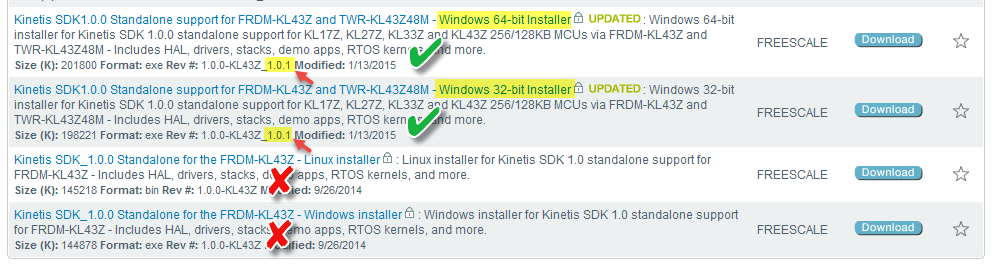
1) Yes, there is a flash driver included with KSDK. For your case it is in: C:\Freescale\KSDK1.0.0_KL43Z_1.0.1\platform\drivers\flash
All of the driver files need to be included in your project. For reference there is an example project for KL43:
C:\Freescale\KSDK1.0.0_KL43Z_1.0.1\demos\flash_demo\kds\frdmkl43z48m
- Now, if you enabled Processor Expert, then you are right, the fsl_flash component was introduced until KSDK v1.1.0, not in v1.0.0. For your case you need to manually add the driver.
2) The interrupts are properly handed, you just need to include the corresponding fsl_xxx_irq.c file to your project depending on the driver, as discussed in the next thread:
Re: Processor Expert Generated Interrupts
PEx team improved this in KSDK v1.1.0 by adding the interrupt callbacks to the Events.c file.
I think you will see both of these inconveniences resolved with the release of KSDK v1.2, expected for the end of April or start of May. In the meantime you can start with this release and migrate later if you wish.
PS. I do not receive notification if you just edit your comments. Please instead add new replies so I can be aware of your inputs.
Regards!
Jorge Gonzalez
