
- Forums
- Product Forums
- General Purpose MicrocontrollersGeneral Purpose Microcontrollers
- i.MX Forumsi.MX Forums
- QorIQ Processing PlatformsQorIQ Processing Platforms
- Identification and SecurityIdentification and Security
- Power ManagementPower Management
- Wireless ConnectivityWireless Connectivity
- RFID / NFCRFID / NFC
- Advanced AnalogAdvanced Analog
- Neural Processing UnitsNeural Processing Units
- MCX Microcontrollers
- S32G
- S32K
- S32V
- MPC5xxx
- Other NXP Products
- S12 / MagniV Microcontrollers
- Powertrain and Electrification Analog Drivers
- Sensors
- Vybrid Processors
- Digital Signal Controllers
- 8-bit Microcontrollers
- ColdFire/68K Microcontrollers and Processors
- PowerQUICC Processors
- OSBDM and TBDML
- S32M
- S32Z/E
-
- Solution Forums
- Software Forums
- MCUXpresso Software and ToolsMCUXpresso Software and Tools
- CodeWarriorCodeWarrior
- MQX Software SolutionsMQX Software Solutions
- Model-Based Design Toolbox (MBDT)Model-Based Design Toolbox (MBDT)
- FreeMASTER
- eIQ Machine Learning Software
- Embedded Software and Tools Clinic
- S32 SDK
- S32 Design Studio
- GUI Guider
- Zephyr Project
- Voice Technology
- Application Software Packs
- Secure Provisioning SDK (SPSDK)
- Processor Expert Software
- Generative AI & LLMs
-
- Topics
- Mobile Robotics - Drones and RoversMobile Robotics - Drones and Rovers
- NXP Training ContentNXP Training Content
- University ProgramsUniversity Programs
- Rapid IoT
- NXP Designs
- SafeAssure-Community
- OSS Security & Maintenance
- Using Our Community
-
- Cloud Lab Forums
-
- Knowledge Bases
- ARM Microcontrollers
- i.MX Processors
- Identification and Security
- Model-Based Design Toolbox (MBDT)
- QorIQ Processing Platforms
- S32 Automotive Processing Platform
- Wireless Connectivity
- CodeWarrior
- MCUXpresso Suite of Software and Tools
- MQX Software Solutions
- RFID / NFC
- Advanced Analog
- Neural Processing Units
-
- NXP Tech Blogs
- Home
- :
- Product Forums
- :
- Other NXP Products
- :
- Pegoda MFRD710 Driver help
Pegoda MFRD710 Driver help
- Subscribe to RSS Feed
- Mark Topic as New
- Mark Topic as Read
- Float this Topic for Current User
- Bookmark
- Subscribe
- Mute
- Printer Friendly Page
Pegoda MFRD710 Driver help

- Mark as New
- Bookmark
- Subscribe
- Mute
- Subscribe to RSS Feed
- Permalink
- Report Inappropriate Content
Hello
I am trying to program Defire Light cards and have this reader in house as well as RFIDiscover. I am trying to be able to read the full cards data as well as program the cards.
My immediate task is to: Update the driver from 1.33.11 to 2.2.8 but windows is telling me the best driver is already installed even when I manually browse my PC.
I am also not able to do anything within RFIDiscover software, everything I do fails even just trying to read the cards UID. I am not sure if this is related to the driver or what is going on but I really need help with this stuff.
I am really struggling with this and would greatly appreciate any help on the topic so I can start to program cards. I apologize and am totally new to Mifare cards of any type, this is my first time trying to program them and will be using this reader in the future to produce and program cards on a large scale if I can get this figured out.
Thank you in advance!

 Jonathan_Iglesi
- Mark as New
- Bookmark
- Subscribe
- Mute
- Subscribe to RSS Feed
- Permalink
- Report Inappropriate Content
Dear Adam Heiss,
Hope you are doing great, please install the following driver PEGODA Contactless Smart Card Reader | NXP \

also please confirm you have the full version of RFIDDiscover the lite version that is available in the webpage does not work with DESFire Light.
Have a great day !
BR
Jonathan
- Mark as New
- Bookmark
- Subscribe
- Mute
- Subscribe to RSS Feed
- Permalink
- Report Inappropriate Content
I have the driver above and RFIDDiscover full but everything I do fails when I try to write data. This is completely new to me so I am not sure what I am doing wrong? It connects to the reader fine but when I try to write any sort of data it immediately fails. The chips are unlocked and not programmed
Jonathan_Iglesi- Mark as New
- Bookmark
- Subscribe
- Mute
- Subscribe to RSS Feed
- Permalink
- Report Inappropriate Content
Hi Adam Heiss,
some things might be wrong, first let me know if you can connect the reader to the software if you dont see the SUCCESS

please try to avoid putting any card or anything before connecting to the software otherwise the reader won be able to connect, so first connect the card then put any card above or close to it. if this is not the case please confirm you are following the next steps :
1) Reset the RF Field
2) activate IDLE .- this activates the card in ISO 14443-3 so type 2 cards are activated in this level for example our products ( like Mifare Ultralight, Classic, all NTAG family but 413 and 424).
3) RATS + PPS ( RATS = Request answer to select and PPS = Protocol and Parameter Selection) this is optional and apply to tags that support layer 4 of ISO 14443 (like Mifare Plus, DESFire, NTAG 424, NTAG 413, etc.)
then once you have activated the tag you can proceed to send commands like write or other type of commands depending on the tag you are using.
please confirm this.
Have a great day !!
BR
Jonathan
- Mark as New
- Bookmark
- Subscribe
- Mute
- Subscribe to RSS Feed
- Permalink
- Report Inappropriate Content
I have the success when connecting and am activating the 3 commands you mention, I am just not sure how to actually write the data. Even when my boss and I read the manual we cannot seem to figure out what exactly what we are supposed to do. I know this is all on us, the users but we just don't know where to reach out to anymore to figure this out. RFIDDiscover team just lead me back to the forums and the Docstore team lead me to the RFIDDiscover team. We are really struggling figuring this out
We found a section under readers to write but it looks more like classic Mifare than anything else and when we write it tells us Success but then when we swap cards and read a different card then back to the one we programmed to verify, it shows the same number from before the write.
Jonathan_Iglesi- Mark as New
- Bookmark
- Subscribe
- Mute
- Subscribe to RSS Feed
- Permalink
- Report Inappropriate Content
Hi
Hope you are doing great, please let me know what type of tag are you using ? please share the product you want to activate and write to.
Have a great day !
BR
Jonathan
- Mark as New
- Bookmark
- Subscribe
- Mute
- Subscribe to RSS Feed
- Permalink
- Report Inappropriate Content
I am trying to write to Desfire LIGHT
Jonathan_Iglesi- Mark as New
- Bookmark
- Subscribe
- Mute
- Subscribe to RSS Feed
- Permalink
- Report Inappropriate Content
Hi Adam Heiss, for Mifare DESFire light, after connecting successfully the reader please follow the next steps:
1)First set up an AES 128 key in the key store with 00000000000000000000000000000000 this is the default key, if you have changed the key please put the key value there

2)
1.-select DESFire tab
2.- Activate Idle ( activate card in ISO 14443-3)
3.-RATS-PPS ( Activate card in ISO 14443-4)
4.-go to SELECT
5.-select by DF name
6.-verify this DFname ( usually is already set up)
7.- send ISO select command
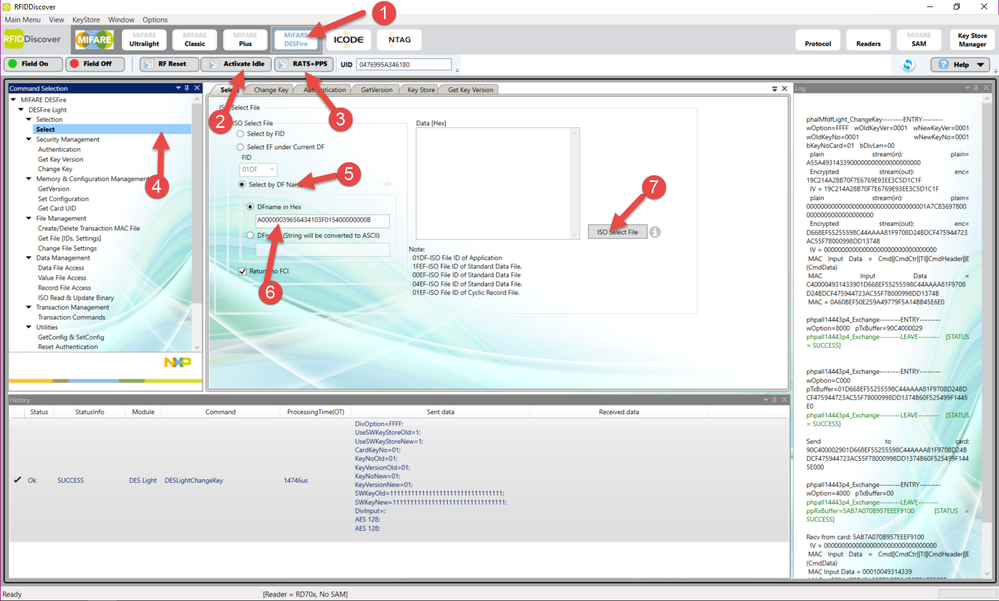
2)
8.- go to authentication
9.- select card key 03 ( as you can see in the DS the key 03 is the one with R/W rights to file 00) so if you want to write to different files please check the file settings before to know which key is used for R or W or R/W
10.- select the Key from keystore that has the value either the default value inc ase you have not changed or the changed one
11.-send Authenticate EV2 first
12.-send Authenticate EV2 non first
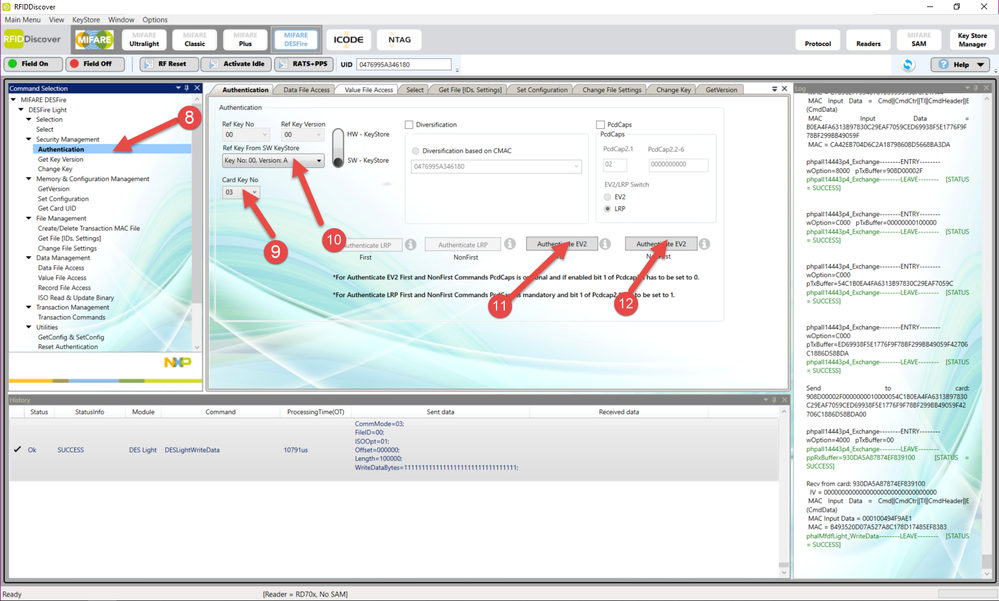
3)
13.- go to Data file Access
14.- select ID 00
15.-select fully enciphered communication
16.-offset to 00
17.-length 0x20 ( in this case I will write 32 byte)
18.-write the 32 bytes
19.-Write Data
20.-just to confirm please read the data
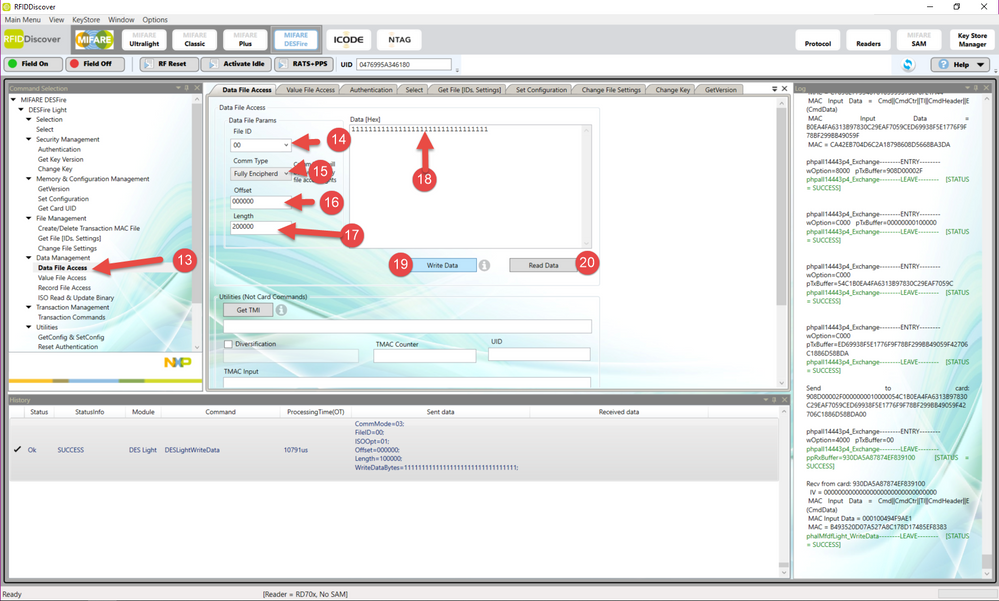
Please follow this and let me know if this worked.
Have a great day !
BR
Jonathan
- Mark as New
- Bookmark
- Subscribe
- Mute
- Subscribe to RSS Feed
- Permalink
- Report Inappropriate Content
Thanks Jonathan, sorry for my delayed reply but I am struggling on steps 11 and 12 with the Authenticare EV2, these options are greyed out and not able to be selected. Do you know how to correct this?
Jonathan_Iglesi- Mark as New
- Bookmark
- Subscribe
- Mute
- Subscribe to RSS Feed
- Permalink
- Report Inappropriate Content
in they key store you must set the used key to AES128 if it is not this type of key the authentication buttons wonk work because they need a selected AES key :smileygrin:
BR
Jonathan
- Mark as New
- Bookmark
- Subscribe
- Mute
- Subscribe to RSS Feed
- Permalink
- Report Inappropriate Content
I am sorry, I overlooked that.
Jonathan_Iglesi- Mark as New
- Bookmark
- Subscribe
- Mute
- Subscribe to RSS Feed
- Permalink
- Report Inappropriate Content
No problem :smileygrin: I am happy to help.
please let me know if this worked :smileygrin:
Have a great day !
BR
Jonathan
- Mark as New
- Bookmark
- Subscribe
- Mute
- Subscribe to RSS Feed
- Permalink
- Report Inappropriate Content
Where can I find the information you were talking about in step 9? The key and file relations.
Jonathan_Iglesi- Mark as New
- Bookmark
- Subscribe
- Mute
- Subscribe to RSS Feed
- Permalink
- Report Inappropriate Content
Glad to know that this helped, the key rights can be found in the datasheet section 8.2.3.5 File access rights management https://www.nxp.com/docs/en/data-sheet/MF2DLHX0.pdf or you can send the command to get the file settings explained in the section 11.7.2 GetFileSettings.
BR
Jonathan :smileygrin:
- Mark as New
- Bookmark
- Subscribe
- Mute
- Subscribe to RSS Feed
- Permalink
- Report Inappropriate Content
Success!! Thank you so much! We have been at this for what feels like ever and you have been so helpful. I cannot thank you enough.
