
- Forums
- Product Forums
- General Purpose MicrocontrollersGeneral Purpose Microcontrollers
- i.MX Forumsi.MX Forums
- QorIQ Processing PlatformsQorIQ Processing Platforms
- Identification and SecurityIdentification and Security
- Power ManagementPower Management
- Wireless ConnectivityWireless Connectivity
- RFID / NFCRFID / NFC
- Advanced AnalogAdvanced Analog
- Neural Processing UnitsNeural Processing Units
- MCX Microcontrollers
- S32G
- S32K
- S32V
- MPC5xxx
- Other NXP Products
- S12 / MagniV Microcontrollers
- Powertrain and Electrification Analog Drivers
- Sensors
- Vybrid Processors
- Digital Signal Controllers
- 8-bit Microcontrollers
- ColdFire/68K Microcontrollers and Processors
- PowerQUICC Processors
- OSBDM and TBDML
- S32M
- S32Z/E
-
- Solution Forums
- Software Forums
- MCUXpresso Software and ToolsMCUXpresso Software and Tools
- CodeWarriorCodeWarrior
- MQX Software SolutionsMQX Software Solutions
- Model-Based Design Toolbox (MBDT)Model-Based Design Toolbox (MBDT)
- FreeMASTER
- eIQ Machine Learning Software
- Embedded Software and Tools Clinic
- S32 SDK
- S32 Design Studio
- GUI Guider
- Zephyr Project
- Voice Technology
- Application Software Packs
- Secure Provisioning SDK (SPSDK)
- Processor Expert Software
- Generative AI & LLMs
-
- Topics
- Mobile Robotics - Drones and RoversMobile Robotics - Drones and Rovers
- NXP Training ContentNXP Training Content
- University ProgramsUniversity Programs
- Rapid IoT
- NXP Designs
- SafeAssure-Community
- OSS Security & Maintenance
- Using Our Community
-
- Cloud Lab Forums
-
- Knowledge Bases
- ARM Microcontrollers
- i.MX Processors
- Identification and Security
- Model-Based Design Toolbox (MBDT)
- QorIQ Processing Platforms
- S32 Automotive Processing Platform
- Wireless Connectivity
- CodeWarrior
- MCUXpresso Suite of Software and Tools
- MQX Software Solutions
- RFID / NFC
- Advanced Analog
- Neural Processing Units
-
- NXP Tech Blogs
- Home
- :
- MCUXpresso Software and Tools
- :
- MCUXpresso IDE
- :
- LPC54608 board doesnt see any debug probes
LPC54608 board doesnt see any debug probes
- Subscribe to RSS Feed
- Mark Topic as New
- Mark Topic as Read
- Float this Topic for Current User
- Bookmark
- Subscribe
- Mute
- Printer Friendly Page

- Mark as New
- Bookmark
- Subscribe
- Mute
- Subscribe to RSS Feed
- Permalink
- Report Inappropriate Content
Bought a LPC54608 board,
installed IDE, etc.
compiled an example SDK I2C example project
When i goe to download it i get
"No compatible probes available. They may be disabled, disconnected, not powered, already in use or not compatible with this target."
How do i get the default Link2 probe to show up in discovery ?
I see the LPC-LINK2 CMSIS-DAP V5.173 enumerated under devices in Win7.
The canned DEMO works fine - so i know the board is good.
Solved! Go to Solution.

 kerryzhou
- Mark as New
- Bookmark
- Subscribe
- Mute
- Subscribe to RSS Feed
- Permalink
- Report Inappropriate Content
Hello Kevin,
Thanks a lot for your updated information and that's very good to hear you make it working.
If your problem is solved, please help to mark the correct answer, just to close this question, thank you!
Have a great day,
Kerry
-----------------------------------------------------------------------------------------------------------------------
Note: If this post answers your question, please click the Correct Answer button. Thank you!
-----------------------------------------------------------------------------------------------------------------------
kerryzhou
- Mark as New
- Bookmark
- Subscribe
- Mute
- Subscribe to RSS Feed
- Permalink
- Report Inappropriate Content
Hello Kevin King,
Thank you for your interest in NXP LPC and MCUXpresso IDE, I would like to provide service for you.
Now, please follow my steps and try again.
1. I find your CMSIS DAP version is a little old
You can update it at first.
1) download lpcscrypt tool and install it.
2) power down the LPC54608 board
Short JP5
Use the USB cable connect J8.
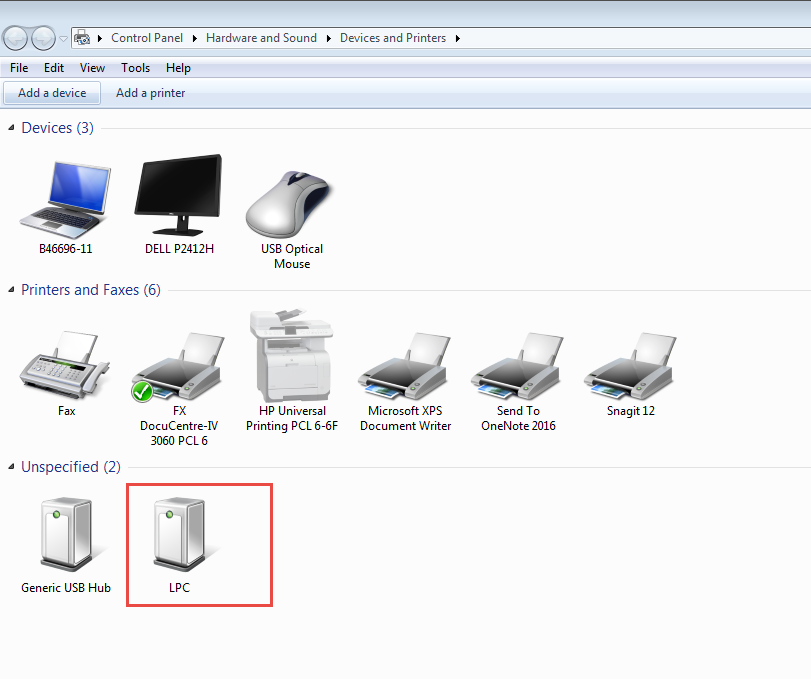
Open PC: Control Panel\Hardware and Sound\Devices and Printers
You will find your board is named as LPC, just like this picture:
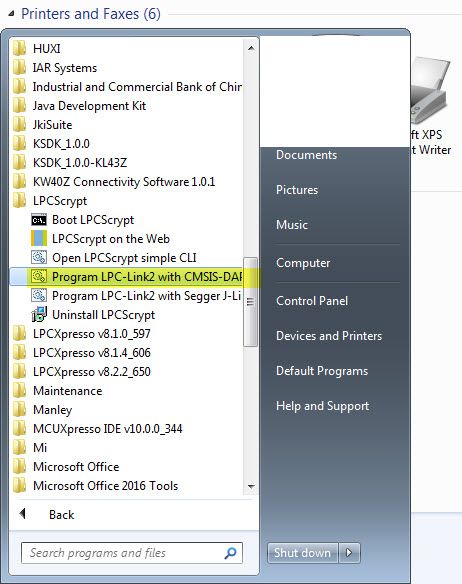
3) Open LPCScript, program LPC-LINK2 with CMSIS-DAP window
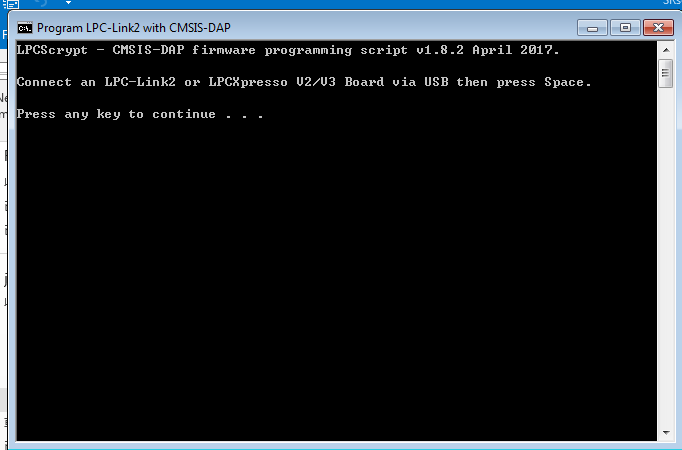
Press any key, wait the write finished.
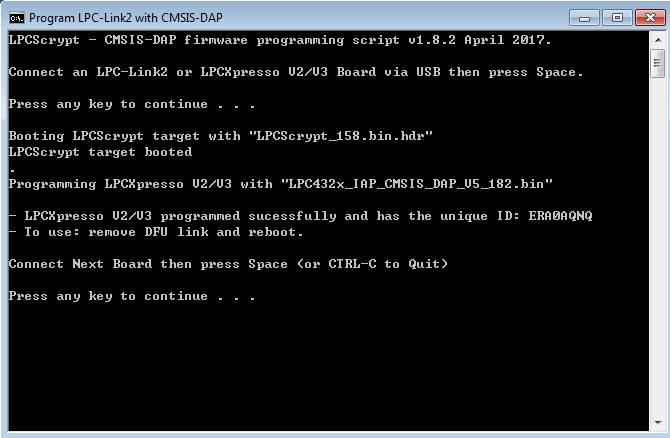
4) Power off the boad, remove the short between JP5, check PC: Control Panel\Hardware and Sound\Devices and Printers
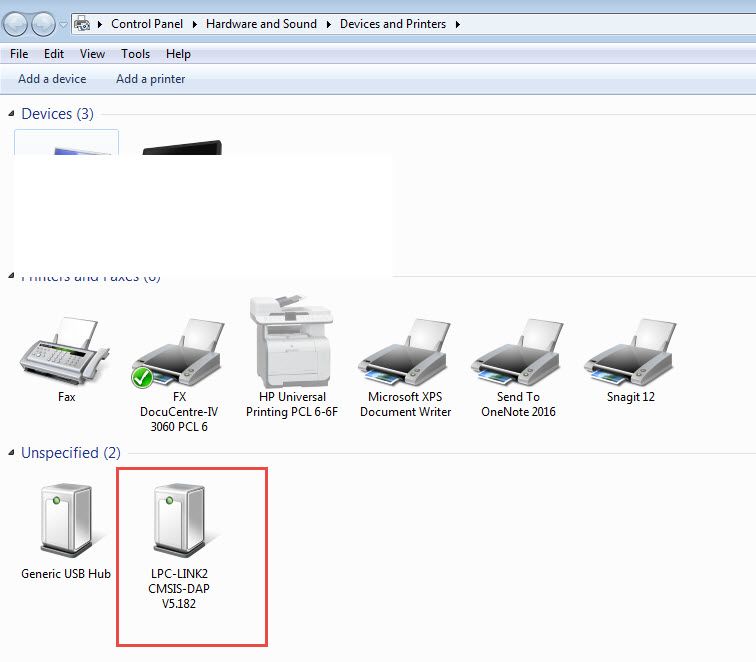
Until now, your CMSIS DAP is updated as the new version.
2. Open the SDK I2C example project with MCUXpress
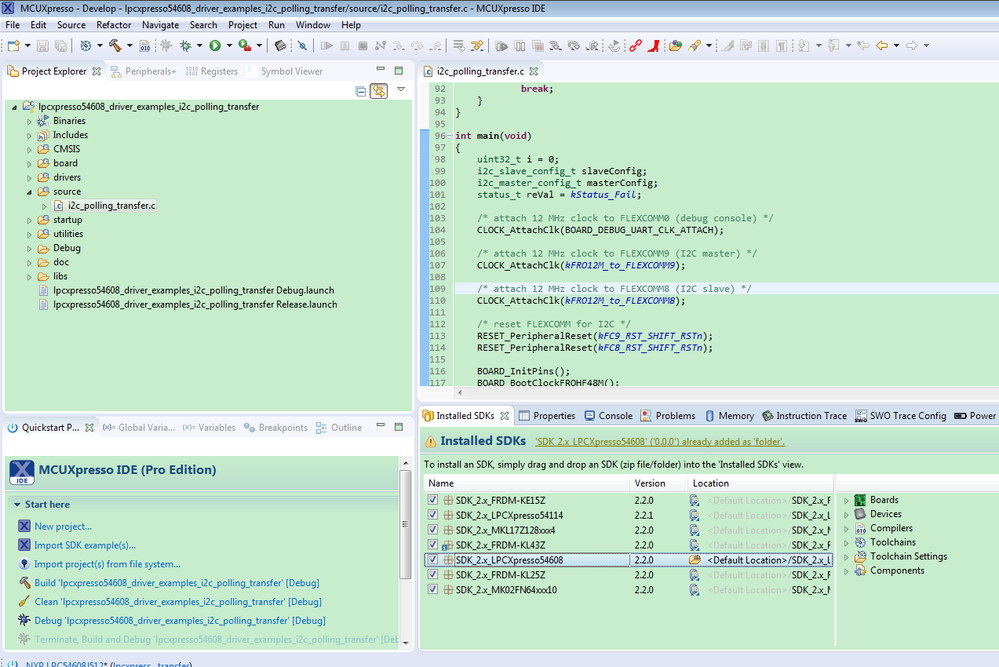
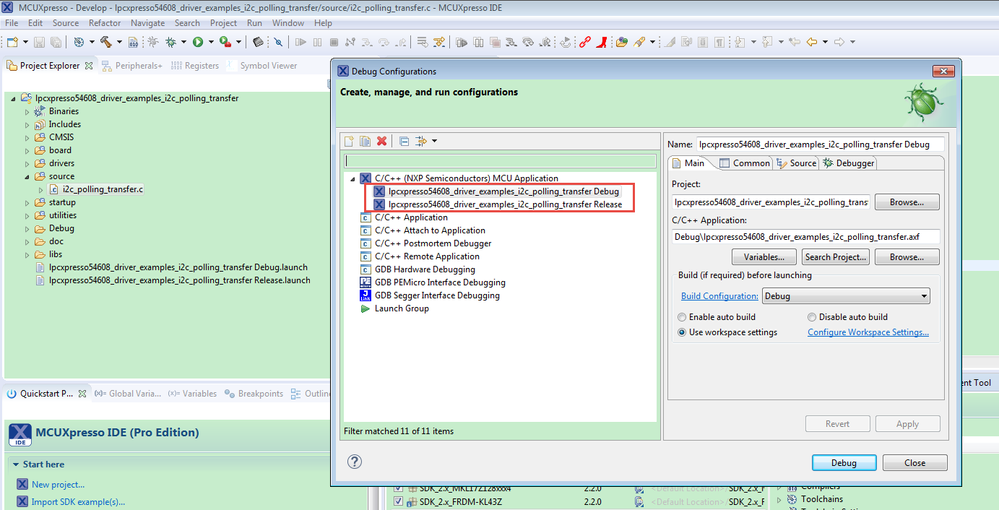
1.) RUN->debug configuration
Please delete the two files under MCU Application
2). Build the project
3). Click debug
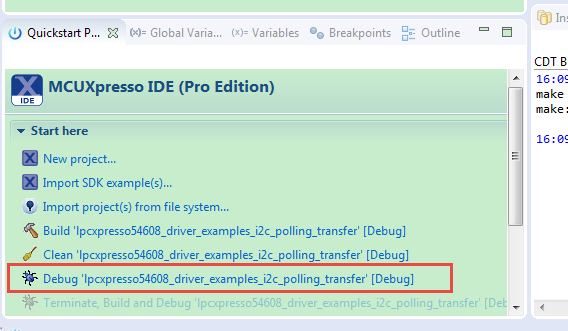
You will get this window:
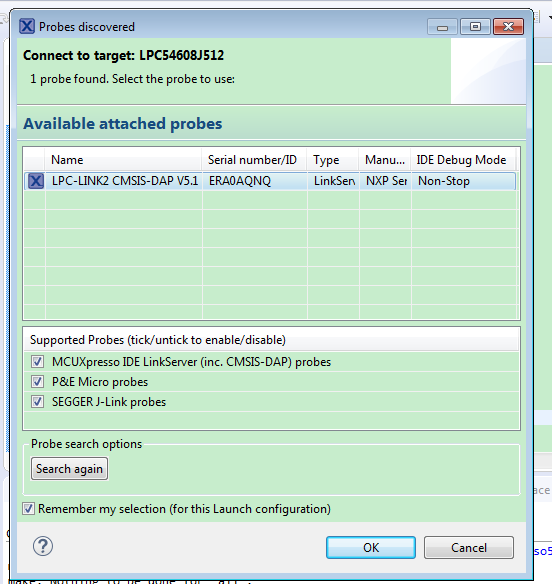
Press OK button
You will enter the debug mode:
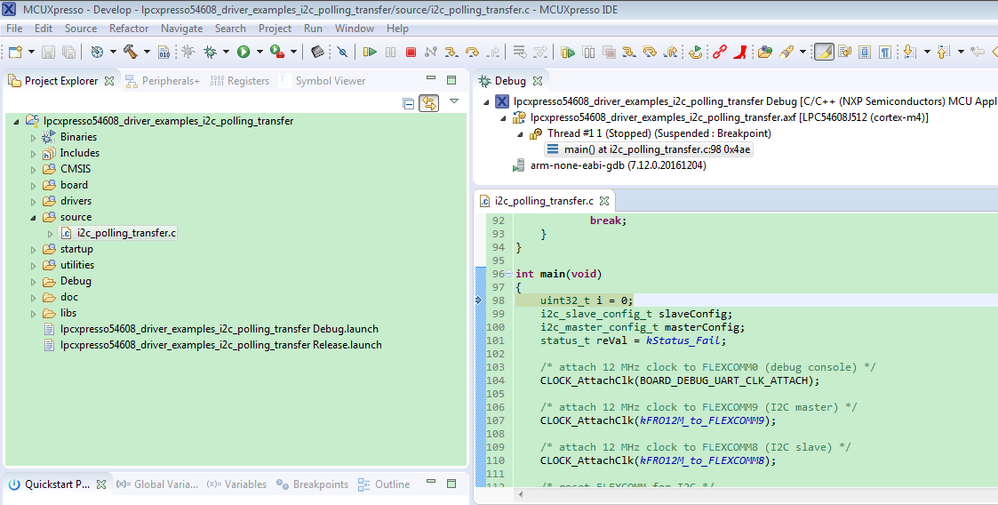
Please follow my above steps, and try again.
Any question, just let me know!
@ZhangJennie
Have a great day,
Kerry
-----------------------------------------------------------------------------------------------------------------------
Note: If this post answers your question, please click the Correct Answer button. Thank you!
-----------------------------------------------------------------------------------------------------------------------
- Mark as New
- Bookmark
- Subscribe
- Mute
- Subscribe to RSS Feed
- Permalink
- Report Inappropriate Content
Kerry,
I got it to connect one time after deleting and re-installing the IDE and etc.
I see the REDLINK server not active (red chain symbol) ...
doesn't that have to be active to connect ?
It seems after I first launch MCUxpresso it is RED and active - after I select a project - it goes inactive ?
and doesn't connect.
Got any clues ?
I turned off my wirewall just in case ... didn't help.
Kevin
kerryzhou
- Mark as New
- Bookmark
- Subscribe
- Mute
- Subscribe to RSS Feed
- Permalink
- Report Inappropriate Content
Hello Kevin King,
Don't use the REDLINK, just follow my method which is post in the above.
Which step you are stopping? You can also post some pictures on your side.
Have a great day,
Kerry
-----------------------------------------------------------------------------------------------------------------------
Note: If this post answers your question, please click the Correct Answer button. Thank you!
-----------------------------------------------------------------------------------------------------------------------
- Mark as New
- Bookmark
- Subscribe
- Mute
- Subscribe to RSS Feed
- Permalink
- Report Inappropriate Content
Kerry,
Got everything working now.
Re-installed everything ...
That was what fixed it.
Thanks for helping.
Kevin
Sent from my iPhone
kerryzhou
- Mark as New
- Bookmark
- Subscribe
- Mute
- Subscribe to RSS Feed
- Permalink
- Report Inappropriate Content
Hello Kevin,
Thanks a lot for your updated information and that's very good to hear you make it working.
If your problem is solved, please help to mark the correct answer, just to close this question, thank you!
Have a great day,
Kerry
-----------------------------------------------------------------------------------------------------------------------
Note: If this post answers your question, please click the Correct Answer button. Thank you!
-----------------------------------------------------------------------------------------------------------------------
