
- Forums
- Product Forums
- General Purpose MicrocontrollersGeneral Purpose Microcontrollers
- i.MX Forumsi.MX Forums
- QorIQ Processing PlatformsQorIQ Processing Platforms
- Identification and SecurityIdentification and Security
- Power ManagementPower Management
- Wireless ConnectivityWireless Connectivity
- RFID / NFCRFID / NFC
- Advanced AnalogAdvanced Analog
- Neural Processing UnitsNeural Processing Units
- MCX Microcontrollers
- S32G
- S32K
- S32V
- MPC5xxx
- Other NXP Products
- S12 / MagniV Microcontrollers
- Powertrain and Electrification Analog Drivers
- Sensors
- Vybrid Processors
- Digital Signal Controllers
- 8-bit Microcontrollers
- ColdFire/68K Microcontrollers and Processors
- PowerQUICC Processors
- OSBDM and TBDML
- S32M
- S32Z/E
-
- Solution Forums
- Software Forums
- MCUXpresso Software and ToolsMCUXpresso Software and Tools
- CodeWarriorCodeWarrior
- MQX Software SolutionsMQX Software Solutions
- Model-Based Design Toolbox (MBDT)Model-Based Design Toolbox (MBDT)
- FreeMASTER
- eIQ Machine Learning Software
- Embedded Software and Tools Clinic
- S32 SDK
- S32 Design Studio
- GUI Guider
- Zephyr Project
- Voice Technology
- Application Software Packs
- Secure Provisioning SDK (SPSDK)
- Processor Expert Software
- Generative AI & LLMs
-
- Topics
- Mobile Robotics - Drones and RoversMobile Robotics - Drones and Rovers
- NXP Training ContentNXP Training Content
- University ProgramsUniversity Programs
- Rapid IoT
- NXP Designs
- SafeAssure-Community
- OSS Security & Maintenance
- Using Our Community
-
- Cloud Lab Forums
-
- Knowledge Bases
- ARM Microcontrollers
- i.MX Processors
- Identification and Security
- Model-Based Design Toolbox (MBDT)
- QorIQ Processing Platforms
- S32 Automotive Processing Platform
- Wireless Connectivity
- CodeWarrior
- MCUXpresso Suite of Software and Tools
- MQX Software Solutions
- RFID / NFC
- Advanced Analog
- Neural Processing Units
-
- NXP Tech Blogs
- Home
- :
- MQX Software Solutions
- :
- MQX Software Solutions
- :
- Now Available: CyaSSL for MQX RTCS
Now Available: CyaSSL for MQX RTCS
- Subscribe to RSS Feed
- Mark Topic as New
- Mark Topic as Read
- Float this Topic for Current User
- Bookmark
- Subscribe
- Mute
- Printer Friendly Page
Now Available: CyaSSL for MQX RTCS

- Mark as New
- Bookmark
- Subscribe
- Mute
- Subscribe to RSS Feed
- Permalink
- Report Inappropriate Content
Now Available: CyaSSL for MQX RTCS – Enabling Secure Network Connections for Kinetis MCUs
We are pleased to announce the availability of the popular CyaSSL SSL / TLS software library in a pre-configured commercial-evaluation add-on package for Kinetis SDK v1.1.0 (and later).
In just a few extra steps, you can enable secure network connectivity with CyaSSL in MQX Real-Time TCP/IP Communication Suite (RTCS) examples.
Installers for Windows and Linux are available. CyaSSL version 3.2.0 (or later) included.
Description
The CyaSSL embedded SSL library is a lightweight SSL/TLS library written in ANSI C and targeted for embedded, RTOS, and resource-constrained environments - primarily because of its small size, speed, and feature set. CyaSSL supports industry standards up to the current TLS 1.2 and DTLS 1.2 levels, is up to 20 times smaller than OpenSSL, and offers progressive ciphers such as HC-128, RABBIT, NTRU, and SHA-3. User benchmarking and feedback indicates dramatically better performance when using CyaSSL over OpenSSL.
Key Features
- Support for securing both Client and Server applications
- Compliant to the latest industry standard SSL, TLS, and DTS protocols (SSL 3.0, TLS 1.0/1.1/1.2, DTLS 1.0/1.2)
- Up to 20x smaller than OpenSSL
- Lightweight and configurable memory footprint (FLASH 20-100 kB, RAM 1-36 kB)
- Hashing Functions Supported: MD2, MD4, MD5*, SHA-1*, SHA-2, SHA-256*, SHA-384, SHA-512, BLAKE2b, RIPEMD-160, Poly1305
* - Accelerated throughput available via the Memory-Mapped Cryptographic Acceleration Unit (MMCAU) on select Kinetis MCUs.
- Block, Stream, and Authenticated Ciphers Supported: AES* (CBC, CTR, GCM, CCM), Camellia, DES*, 3DES*, ARC4, RABBIT, HC-128, ChaCha20
* - Accelerated throughput available via the Memory-Mapped Cryptographic Acceleration Unit (MMCAU) on select Kinetis MCUs.
- Public Key Options Supported: RSA, DSS, DH, EDH, NTRU
- Numerous Other Key Features Provided:
Key Derivation (HMAC, PBKDF2, PKCS#5), Key Generation (RSA), Signed Certificate Generation (x509 v3 RSA and ECC), PEM and DER certificates, Private Key Encryption (PKCS #8, #5, #12), Elliptic Curve Cryptography (ECDH-ECDSA, ECDHE-ECDSA, ECDH-RSA, ECDHE-RSA), Online Certificate Status Protocol (OCSP), Certificate Revocation List (CRL), IPv4, IPv6, and more.
More details at CyaSSL Embedded SSL Library Product Details
Licensing
Through our partnership with WolfSSL, Freescale is providing a free commercial evaluation version of CyaSSL for Freescale customers to use for internal development, testing, and evaluation purposes. Customers who wish to incorporate CyaSSL into proprietary appliances must obtain a commercial license from WolfSSL, which is available at a very reasonable cost.
For additional information on licensing, see WolfSLL License Information.
Hardware Supported
Project build files are provided for the following Freescale evaluation boards:
FRDM-K64F
TWR-K64F120M
TWR-K60D100M
Example Projects Provided
HTTP Web Server - Access the board with a web browser using an authenticated and encrypted connection.
How to Get Started
1. Download Kinetis SDK v1.1.0 (or later) at www.freescale.com/ksdk
Click Download.
Choose the appropriate Kinetis SDK installer for your operating system, then download and install it.
2. Now install CyaSSL for Kinetis SDK with MQX RTOS
On the left side of the same download page, click Updates and Patches
3. Choose the appropriate CyaSSL installer for your operating system, download and install it.
CyaSSL source files will be installed within the <Kinetis SDK>\tcpip\rtcs\source\ssl\ folder in the Kinetis SDK directory tree.
On Windows, this path is typically: C:\Freescale\KSDK_1.1.0\tcpip\rtcs\source\ssl
4. Check out the _readme.txt file at <Kinetis SDK>\tcpip\rtcs\source\ssl to see how to run the example projects provided and to see how to add CyaSSL to your projects.
More tutorials to come.
Best of luck with your connected embedded projects!
Mac Lobdell
Freescale Software Technical Marketer

- Mark as New
- Bookmark
- Subscribe
- Mute
- Subscribe to RSS Feed
- Permalink
- Report Inappropriate Content
Is it possible to use CyaSSL with SMTP to make a SMTP+SSL+TLS or SMTP + STARTLS using MQX RTCS SMTP client to send emails using internet SMTP servers?

 dshimizu
- Mark as New
- Bookmark
- Subscribe
- Mute
- Subscribe to RSS Feed
- Permalink
- Report Inappropriate Content
Hello Thiago,
I've created this application for you: Secure e-mail sending (SMTP + SSL) with KSDK1.3 + WolfSSL for FRDM-K64F
Please, check it and let me know if it works for you.

- Mark as New
- Bookmark
- Subscribe
- Mute
- Subscribe to RSS Feed
- Permalink
- Report Inappropriate Content
Hi,
i am not getting CyaSSL for Kinetis SDK v1.1.0 with MQX RTOS download option.
am getting only SDK v1.2.0 but i am using KSDK V1.1.0 am already tried some example using V1.1.0. can you give exact link for download CyaSSL for Kinetis SDK v1.1.0
thanks and regards,
sudhakar p
- Mark as New
- Bookmark
- Subscribe
- Mute
- Subscribe to RSS Feed
- Permalink
- Report Inappropriate Content
Hi,
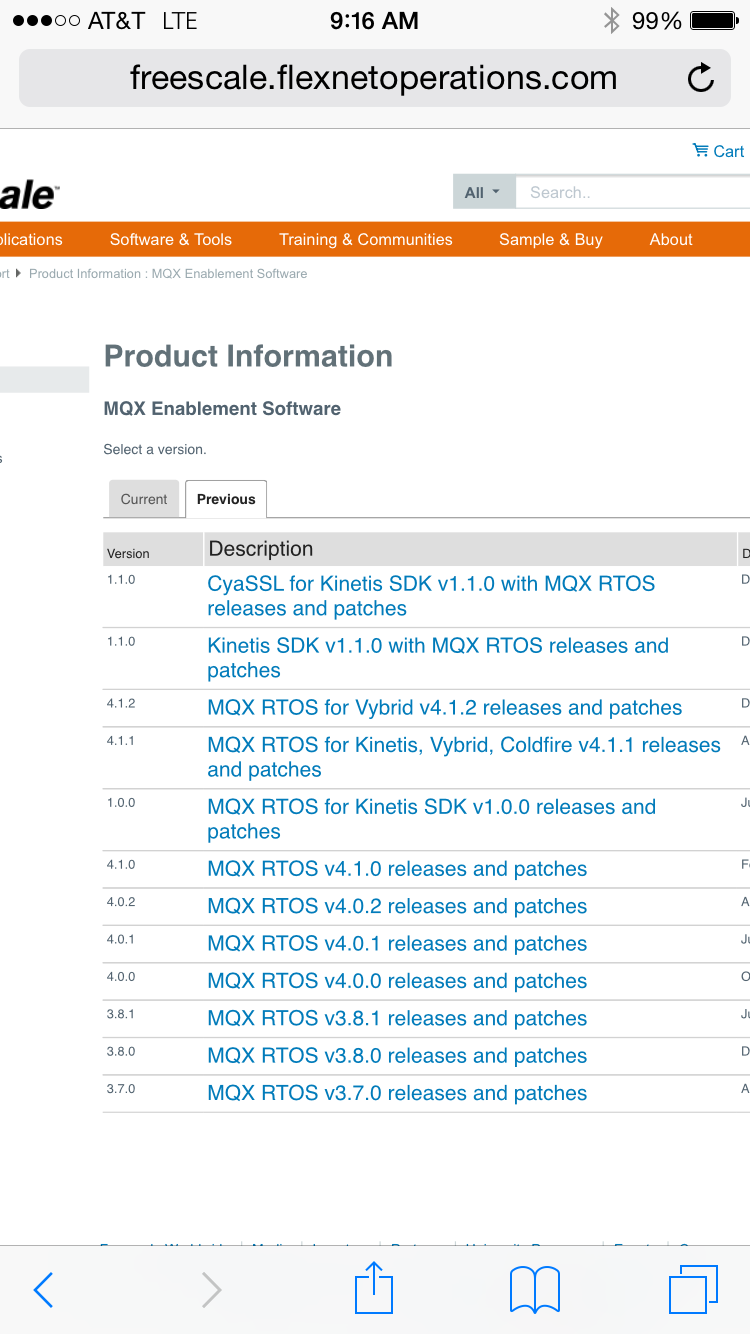
The cyaSSL patch for "MQX RTOS for KDSK v1.1" is available at www.freescale.com/mqxrtos<http://www.freescale.com/mqxrtos>. Click the big download button on the first page, then log in. This will take you to the MQX enablement software downloads portal. Click the "Previous" tab. Cyassl is on the top of the list.
Thanks,
Mac
- Mark as New
- Bookmark
- Subscribe
- Mute
- Subscribe to RSS Feed
- Permalink
- Report Inappropriate Content
hi Maclain,
thank you.
- Mark as New
- Bookmark
- Subscribe
- Mute
- Subscribe to RSS Feed
- Permalink
- Report Inappropriate Content
FYI
A cyaSSL patch for "MQX RTOS for KDSK v1.2" is available at www.freescale.com/mqxrtos<;http://www.freescale.com/mqxrtos>. Click the big download button on the first page, then log in. This will take you to the MQX enablement software downloads portal. Click the "Previous" tab. Cyassl is on the top of the list.
Thanks,
Mac

- Mark as New
- Bookmark
- Subscribe
- Mute
- Subscribe to RSS Feed
- Permalink
- Report Inappropriate Content
Hi Mac, Just trying to download the CyaSSL for SDK 1.2. There is an error on downloading "window.exe" version and cannot be downloaded. The others (Linux and Mac) are both fine.
Thanks
Paul
 TomasPaez
- Mark as New
- Bookmark
- Subscribe
- Mute
- Subscribe to RSS Feed
- Permalink
- Report Inappropriate Content
Hi Paul,
It should be working now.
Thank you
- Mark as New
- Bookmark
- Subscribe
- Mute
- Subscribe to RSS Feed
- Permalink
- Report Inappropriate Content
Thanks for letting us know. We are checking it.
- Mark as New
- Bookmark
- Subscribe
- Mute
- Subscribe to RSS Feed
- Permalink
- Report Inappropriate Content
Any idea how easy/complicated it is to use these examples or this library with the older Codewarrior development process? I haven't made the transition to KSDK yet.
Sean

- Mark as New
- Bookmark
- Subscribe
- Mute
- Subscribe to RSS Feed
- Permalink
- Report Inappropriate Content
Hi Sean,
I'm part of the wolfSSL engineering team. If you download wolfSSL (formerly CyaSSL) direct from the wolfSSL website, we include some example CodeWarrior project files under the <wolfssl_root>/mqx directory, specifically:
wolfcrypt_benchmark
wolfcrypt_test
wolfssl
wolfssl_client
These have been put together for CodeWarrior, MQX, RTCS, and MFS, on the TWR-K70F120M board. They may be insightful as to how to use wolfSSL/CyaSSL from CodeWarrior. The README located at <wolfssl_root>/mqx/README should be helpful as well.
Best Regards,
Chris
