
- Forums
- Product Forums
- General Purpose MicrocontrollersGeneral Purpose Microcontrollers
- i.MX Forumsi.MX Forums
- QorIQ Processing PlatformsQorIQ Processing Platforms
- Identification and SecurityIdentification and Security
- Power ManagementPower Management
- Wireless ConnectivityWireless Connectivity
- RFID / NFCRFID / NFC
- Advanced AnalogAdvanced Analog
- MCX Microcontrollers
- S32G
- S32K
- S32V
- MPC5xxx
- Other NXP Products
- S12 / MagniV Microcontrollers
- Powertrain and Electrification Analog Drivers
- Sensors
- Vybrid Processors
- Digital Signal Controllers
- 8-bit Microcontrollers
- ColdFire/68K Microcontrollers and Processors
- PowerQUICC Processors
- OSBDM and TBDML
- S32M
- S32Z/E
-
- Solution Forums
- Software Forums
- MCUXpresso Software and ToolsMCUXpresso Software and Tools
- CodeWarriorCodeWarrior
- MQX Software SolutionsMQX Software Solutions
- Model-Based Design Toolbox (MBDT)Model-Based Design Toolbox (MBDT)
- FreeMASTER
- eIQ Machine Learning Software
- Embedded Software and Tools Clinic
- S32 SDK
- S32 Design Studio
- GUI Guider
- Zephyr Project
- Voice Technology
- Application Software Packs
- Secure Provisioning SDK (SPSDK)
- Processor Expert Software
- Generative AI & LLMs
-
- Topics
- Mobile Robotics - Drones and RoversMobile Robotics - Drones and Rovers
- NXP Training ContentNXP Training Content
- University ProgramsUniversity Programs
- Rapid IoT
- NXP Designs
- SafeAssure-Community
- OSS Security & Maintenance
- Using Our Community
-
- Cloud Lab Forums
-
- Knowledge Bases
- ARM Microcontrollers
- i.MX Processors
- Identification and Security
- Model-Based Design Toolbox (MBDT)
- QorIQ Processing Platforms
- S32 Automotive Processing Platform
- Wireless Connectivity
- CodeWarrior
- MCUXpresso Suite of Software and Tools
- MQX Software Solutions
- RFID / NFC
- Advanced Analog
-
- NXP Tech Blogs
- Home
- :
- i.MX フォーラム
- :
- i.MX RT クロスオーバーMCU
- :
- 回复: Load application to MCUboot during Debug
Load application to MCUboot during Debug
- RSS フィードを購読する
- トピックを新着としてマーク
- トピックを既読としてマーク
- このトピックを現在のユーザーにフロートします
- ブックマーク
- 購読
- ミュート
- 印刷用ページ
Load application to MCUboot during Debug

- 新着としてマーク
- ブックマーク
- 購読
- ミュート
- RSS フィードを購読する
- ハイライト
- 印刷
- 不適切なコンテンツを報告
Hello NXP Community,
I'm encountering an issue while trying to load an application to MCUboot during the debug process. Here are the steps I've taken and the problems I'm facing:
Steps Taken:
Post-Build Script:
I created a post-build script that signs the application.
Loading the Signed .bin File:
- Initially, I attempted to load the signed .bin file using the GDB command load in the Debug configuration/Startup.
- I tried placing the command in both the Initialization and Run command sections with the following syntax:
load path/file_signed.elf 0x60...
To perform this task, I followed these articles:
Problems Encountered:
- The code appears to be completely ignored. After starting the debug session, I checked the flash, and it was blank.
- I'm not sure if there are issues with the GDB commands or the conversion process.
Alternative Method Tried:
- I also tried using LinkServer, which worked, but I don't know how to run the script when I start the debug session.
- I need the probe to remain unused and for the probe to be taken by GDB when I start the debug session. For the probe, I'm using an MCU-link.
Request for Assistance:
- Could anyone provide guidance or any suggestions on correctly loading the signed .bin file using GDB during the debug process?
Thank you for your help!
Best regards,
 Gavin_Jia
- 新着としてマーク
- ブックマーク
- 購読
- ミュート
- RSS フィードを購読する
- ハイライト
- 印刷
- 不適切なコンテンツを報告
Hi @MassimilianoPegaso ,
Thanks for your interest in NXP MIMXRT series!
Frankly the operation you mentioned is not something that anyone has gone through internally to do something similar, nor is it a standardized process. But from your description, the whole workflow would be very elegant if it could be implemented. It's very interesting. I'm not sure if this will work but will give what you mentioned a try. Once you find something new please don't hesitate to discuss it with us.
Best regards,
Gavin
Gavin_Jia
- 新着としてマーク
- ブックマーク
- 購読
- ミュート
- RSS フィードを購読する
- ハイライト
- 印刷
- 不適切なコンテンツを報告
Hi @MassimilianoPegaso ,
Thanks for your patience!
Following the reference link you gave, I tested it locally. https://mcuoneclipse.com/2022/11/01/loading-multiple-binary-files-with-gdb/
It is possible to load the MCUBoot project using GDB. The operation is consistent with the documentation. Here are my test results for reference:


Best regards,
Gavin
- 新着としてマーク
- ブックマーク
- 購読
- ミュート
- RSS フィードを購読する
- ハイライト
- 印刷
- 不適切なコンテンツを報告
Hi @Gavin_Jia,
I use an MCU-link as a debugger interface. To manually load the signed application, I use a command like this:
LinkServer.exe flash MIMXRT1052xxxxB:IMXRT1050_Refill load C:\application_signed.bin --addr 0x60100000
I need to specify the flash command because I need to load this application onto a custom board that uses a different flash memory than the EVK board.
It work, the problem is that I don't know how to run this code automatically in the IDE. I tried a solution like this:
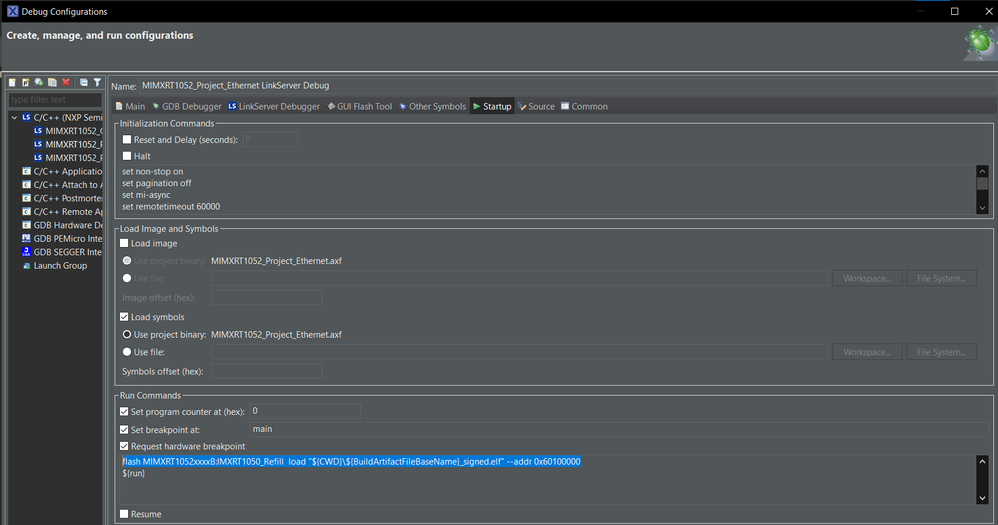
But it doesn't work; it seems that the command is completely ignored. I don't know how to check if the command reports an error when it is executed.
I tried various combinations of the command: I placed it in the initialization command section, in the run command section, and I tried the GDB version (like load data.bin.elf 0x70000). I attempted it with and without flash in front of it or on the previous line. Nothing changed; the load is never performed.

As a completion, the initialization command section included this command:
set non-stop on
set pagination off
set mi-async
set remotetimeout 60000
##target_extended_remote##
set mem inaccessible-by-default ${mem.access}
mon ondisconnect ${ondisconnect}
set arm force-mode thumb
${load}
Best regards.
Massimiliano
Gavin_Jia
- 新着としてマーク
- ブックマーク
- 購読
- ミュート
- RSS フィードを購読する
- ハイライト
- 印刷
- 不適切なコンテンツを報告
Hi @MassimilianoPegaso ,
Thanks for your update.
I tried your procedure with similar results. Also, I tried adding scripts, and if there are errors in the commands in the scripts, the IDE points them out when running Debug and the operation is interrupted:

So I think the commands in the script were actually executed successfully, except that in a subsequent operation, the IDE emptied the previous signed.bin file again. If you're just trying to burn it into flash and the command line succeeds, I don't think we actually need to stick to the IDE point-and-click-and-succeed approach.
It's perfectly fine to try writing scripts or executing it via the post-build command after compiling, after all, this operation doesn't require the IDE's debugging capabilities.
Best regards,
Gavin
