- Forums
- Product Forums
- General Purpose MicrocontrollersGeneral Purpose Microcontrollers
- i.MX Forumsi.MX Forums
- QorIQ Processing PlatformsQorIQ Processing Platforms
- Identification and SecurityIdentification and Security
- Power ManagementPower Management
- Wireless ConnectivityWireless Connectivity
- RFID / NFCRFID / NFC
- Advanced AnalogAdvanced Analog
- MCX Microcontrollers
- S32G
- S32K
- S32V
- MPC5xxx
- Other NXP Products
- S12 / MagniV Microcontrollers
- Powertrain and Electrification Analog Drivers
- Sensors
- Vybrid Processors
- Digital Signal Controllers
- 8-bit Microcontrollers
- ColdFire/68K Microcontrollers and Processors
- PowerQUICC Processors
- OSBDM and TBDML
- S32M
- S32Z/E
-
- Solution Forums
- Software Forums
- MCUXpresso Software and ToolsMCUXpresso Software and Tools
- CodeWarriorCodeWarrior
- MQX Software SolutionsMQX Software Solutions
- Model-Based Design Toolbox (MBDT)Model-Based Design Toolbox (MBDT)
- FreeMASTER
- eIQ Machine Learning Software
- Embedded Software and Tools Clinic
- S32 SDK
- S32 Design Studio
- GUI Guider
- Zephyr Project
- Voice Technology
- Application Software Packs
- Secure Provisioning SDK (SPSDK)
- Processor Expert Software
- Generative AI & LLMs
-
- Topics
- Mobile Robotics - Drones and RoversMobile Robotics - Drones and Rovers
- NXP Training ContentNXP Training Content
- University ProgramsUniversity Programs
- Rapid IoT
- NXP Designs
- SafeAssure-Community
- OSS Security & Maintenance
- Using Our Community
-
- Cloud Lab Forums
-
- Knowledge Bases
- ARM Microcontrollers
- i.MX Processors
- Identification and Security
- Model-Based Design Toolbox (MBDT)
- QorIQ Processing Platforms
- S32 Automotive Processing Platform
- Wireless Connectivity
- CodeWarrior
- MCUXpresso Suite of Software and Tools
- MQX Software Solutions
- RFID / NFC
- Advanced Analog
-
- NXP Tech Blogs
- Home
- :
- i.MX Forums
- :
- i.MX RT Crossover MCUs
- :
- How to recover from OpenSDA failure to reset/halt the target MCU
How to recover from OpenSDA failure to reset/halt the target MCU
- Subscribe to RSS Feed
- Mark Topic as New
- Mark Topic as Read
- Float this Topic for Current User
- Bookmark
- Subscribe
- Mute
- Printer Friendly Page
How to recover from OpenSDA failure to reset/halt the target MCU

- Mark as New
- Bookmark
- Subscribe
- Mute
- Subscribe to RSS Feed
- Permalink
- Report Inappropriate Content
Hi,
SDK example used is iled_blinky.
OpenSDA reported FAIL when dropping "iled_blinky.bin" into the disk,
"error: The interface firmware FAILED to reset/halt the target MCU
type: target".
Failure persisted after updating of OpenSDA firmware.
Note that it worked and LED was linking before it failed. Things I tried before it failed,
1) Compiled with default setting, flash image using openSDA, reboot and LED was blinking
2) Compiled version without XIP, flash image using openSDA, reboot and LED was blinking
3) Tried to Debug, break point at main successful once
4) Failed after reboot
If target MCU is hang due to corrupted spiFlash, is there away to clean the target spiFlash?
Please review and look forward to your suggestion to recover the board.
Thanks.
Cheers,
Shyan

- Mark as New
- Bookmark
- Subscribe
- Mute
- Subscribe to RSS Feed
- Permalink
- Report Inappropriate Content
Hello Shyan,
is this only happening if you try to boot from external flash? If the problem is an incorrect Image Vector Table in flash you can try one of the methods (MCU Boot Utility or SDK FlexSpi example project) in this post to erase the external flash.
Kind regards,
Stefan
- Mark as New
- Bookmark
- Subscribe
- Mute
- Subscribe to RSS Feed
- Permalink
- Report Inappropriate Content
Hi Stefan,
Thanks for sharing the post to erase the flash. I tried out Serial Downloader + NXP-MCUBootUtility approach and it worked.
I share my steps in details for beginners like me.
Cheers,
Shyan
[MIMXRT1060 EVK] Erasing Boot Device Memory with Serial Downloader Mode and NXP-MCUBootUtility
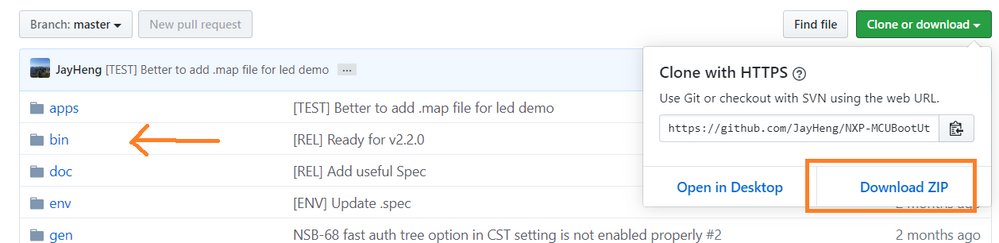
1.Download NXP-MCUBootUtility from Github
download zip - GitHub - JayHeng/NXP-MCUBootUtility
unzip - unzip into your user directory
exe - run NXP-MCUBootUtility.exe in bin later
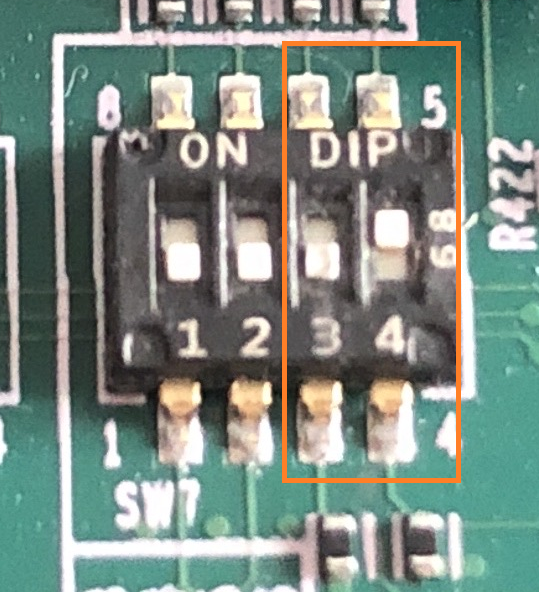
2. Configure EVB into Serial Downloader Mode
3. Connect PC USB cable to J9
4. Power up EVB
5. Run NXP-MCUBootUtility.exe
Follow these steps provided by the guide in the Github,
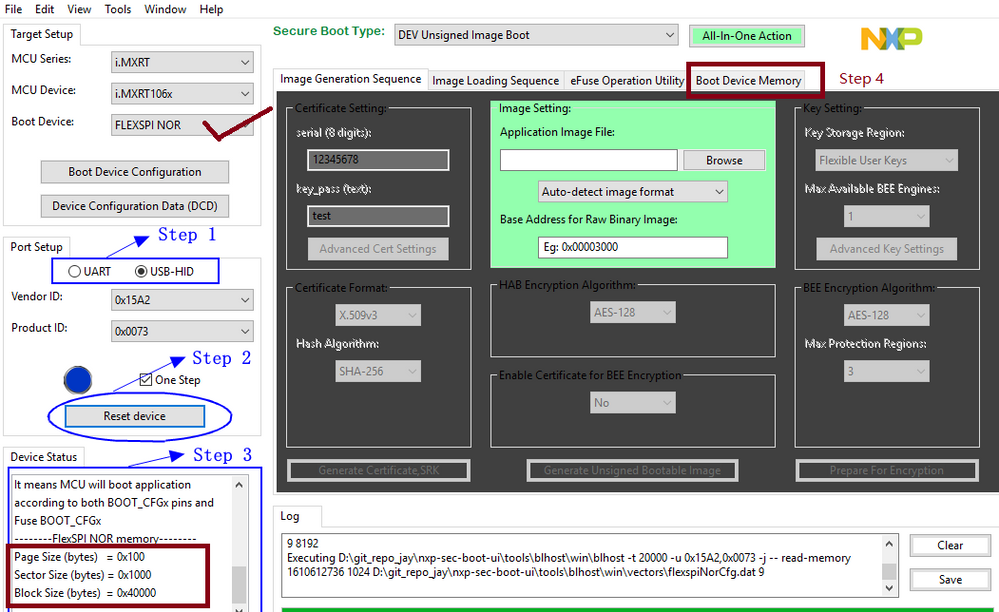
3.1 Setting the target device
- use default NOR settings, do not need to configure anything
3.2 Connecting target devices
- In Device status, should see Memory information after successful connection to the ROM (Step 3 shown below)
4.0 Advance Usage
- set tool to run in Master Mode through the function menu bar Tools->Option
4.4 Universal Flash Programmer
- Go to "Boot Device Memory" Tab (Step 4 shown below)
- Good to verify using read operation before erase or write