
- Forums
- Product Forums
- General Purpose MicrocontrollersGeneral Purpose Microcontrollers
- i.MX Forumsi.MX Forums
- QorIQ Processing PlatformsQorIQ Processing Platforms
- Identification and SecurityIdentification and Security
- Power ManagementPower Management
- Wireless ConnectivityWireless Connectivity
- RFID / NFCRFID / NFC
- Advanced AnalogAdvanced Analog
- MCX Microcontrollers
- S32G
- S32K
- S32V
- MPC5xxx
- Other NXP Products
- S12 / MagniV Microcontrollers
- Powertrain and Electrification Analog Drivers
- Sensors
- Vybrid Processors
- Digital Signal Controllers
- 8-bit Microcontrollers
- ColdFire/68K Microcontrollers and Processors
- PowerQUICC Processors
- OSBDM and TBDML
- S32M
- S32Z/E
-
- Solution Forums
- Software Forums
- MCUXpresso Software and ToolsMCUXpresso Software and Tools
- CodeWarriorCodeWarrior
- MQX Software SolutionsMQX Software Solutions
- Model-Based Design Toolbox (MBDT)Model-Based Design Toolbox (MBDT)
- FreeMASTER
- eIQ Machine Learning Software
- Embedded Software and Tools Clinic
- S32 SDK
- S32 Design Studio
- GUI Guider
- Zephyr Project
- Voice Technology
- Application Software Packs
- Secure Provisioning SDK (SPSDK)
- Processor Expert Software
- Generative AI & LLMs
-
- Topics
- Mobile Robotics - Drones and RoversMobile Robotics - Drones and Rovers
- NXP Training ContentNXP Training Content
- University ProgramsUniversity Programs
- Rapid IoT
- NXP Designs
- SafeAssure-Community
- OSS Security & Maintenance
- Using Our Community
-
- Cloud Lab Forums
-
- Knowledge Bases
- ARM Microcontrollers
- i.MX Processors
- Identification and Security
- Model-Based Design Toolbox (MBDT)
- QorIQ Processing Platforms
- S32 Automotive Processing Platform
- Wireless Connectivity
- CodeWarrior
- MCUXpresso Suite of Software and Tools
- MQX Software Solutions
- RFID / NFC
- Advanced Analog
-
- NXP Tech Blogs
- Home
- :
- i.MX Forums
- :
- i.MX Processors
- :
- Re: imx95 isp tuning
imx95 isp tuning
- Subscribe to RSS Feed
- Mark Topic as New
- Mark Topic as Read
- Float this Topic for Current User
- Bookmark
- Subscribe
- Mute
- Printer Friendly Page
imx95 isp tuning

- Mark as New
- Bookmark
- Subscribe
- Mute
- Subscribe to RSS Feed
- Permalink
- Report Inappropriate Content
Hi imx95 isp team,
About gtm/ltm tuning, 2 questions need your help.
1> For GTM LUT, setup 416 values, profiled as below left, how to understand the input and output of GTM?
2> For LTM LUT, setup 1024 values, profiled as below right, we know it split the image into 32x32, how to map each block to high/mid/low brightness zone?
Any method to get the suitable gtm/ltm profile?


Thanks,
yancheng
- Mark as New
- Bookmark
- Subscribe
- Mute
- Subscribe to RSS Feed
- Permalink
- Report Inappropriate Content
@Alan_Jia, could you push the issue. thanks~
 Alan_Jia
- Mark as New
- Bookmark
- Subscribe
- Mute
- Subscribe to RSS Feed
- Permalink
- Report Inappropriate Content
yipingwang
- Mark as New
- Bookmark
- Subscribe
- Mute
- Subscribe to RSS Feed
- Permalink
- Report Inappropriate Content
Firstly, the GTM and LTM DRC is used to enhance the performance of high dynamic range sensors like WDR. For linear sensors, GTM/LTM takes very limited effect.
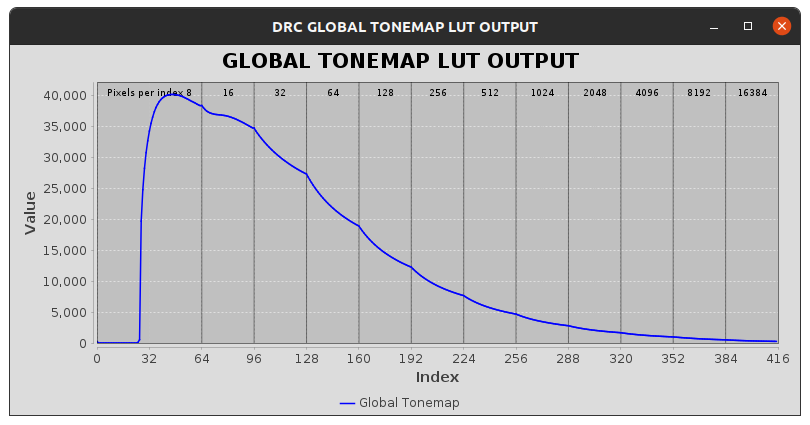
As for the LUT, the LUT for GTM/LTM can change dynamically. To apply a fixed LUT, you need to change the UPDATE POLICY of GTM/LTM to ON_CONFIG then import your LUT. There is a way to visualize the LUT. In AGLBCE module, click generate and a window will show like below:

You can see the GTM/LTM LUT as below:
Global:

Local:

The tuning tool user guide will have more information about how to interpret those two charts.
- Mark as New
- Bookmark
- Subscribe
- Mute
- Subscribe to RSS Feed
- Permalink
- Report Inappropriate Content
Thanks for your reply!
GTM/LTM should change dynamically by setting to ON_PROCESS based on the input LUT parameters. The 2 LUT maybe strongly effect the GTM/LTM performance. AGLBCE just shows the 2 LUT data and cannot adjust it. So how to calibrate the 2 LUT parameters to get good performance(hdr, contrast, ...)?
Thanks~
yipingwang
- Mark as New
- Bookmark
- Subscribe
- Mute
- Subscribe to RSS Feed
- Permalink
- Report Inappropriate Content
Basically, you need to follow these steps:
1) Start Camera, connect to the device via tuning tool.
2) Read dynamic parameters in “Live Control – Metadata”
3) Check the dynamic params for the scene (exposure, again, hdr_ratio, y_level,
lux_level)
4) Check the preview, capture raw/yuv images.
The AGLBCE WDR default tuning is split for example 2d interp of hdr_ratio and
lux_level to cover different scenes. For example hdr_ratio 1k, 2k, 5k, 10k, 40k,
>100k and lux <1k, >2k - for normal and high light. Interpolation is between them.
5) Find the region based on dynamic params and adjust tuning (via live tuning)
and check the preview/capture images (Raw image could be also PC simulated
instead live tuning).
6) Save the project when satisfied.
7) Test at different scenes and repeat. HDR studio scene with different illumination
level ratio between dark and bright side could be starting point.
The tuning is finished via AGLBCE block. But you need to tune GDRC by setting the alpha blending to 256 first and then tune LDRC by setting the alpha blending to 0.
The meaning of each parameter is captured in the user guide.
- Mark as New
- Bookmark
- Subscribe
- Mute
- Subscribe to RSS Feed
- Permalink
- Report Inappropriate Content
Thanks for the steps. BTW, how to understand every value of the table below from Live Control-METADATA?



yipingwang
- Mark as New
- Bookmark
- Subscribe
- Mute
- Subscribe to RSS Feed
- Permalink
- Report Inappropriate Content
Please refer to the following update from the AE team.
These values are used for our Tuning Tool vendor to do internal debug. Please ignore them and we will document the information in the future.
- Mark as New
- Bookmark
- Subscribe
- Mute
- Subscribe to RSS Feed
- Permalink
- Report Inappropriate Content
Still hope to parse the 2 info parameters which can map different wdr scene. thanks~
yipingwang
- Mark as New
- Bookmark
- Subscribe
- Mute
- Subscribe to RSS Feed
- Permalink
- Report Inappropriate Content
Please refer to the following update from the AE team.
I understand it is better to interpret every parameter. However, the information is not open to nxp either.
yipingwang
- Mark as New
- Bookmark
- Subscribe
- Mute
- Subscribe to RSS Feed
- Permalink
- Report Inappropriate Content
OK, thanks, will report your requirement to the AE team.
- Mark as New
- Bookmark
- Subscribe
- Mute
- Subscribe to RSS Feed
- Permalink
- Report Inappropriate Content
Any update about the two info data?
