
- Forums
- Product Forums
- General Purpose MicrocontrollersGeneral Purpose Microcontrollers
- i.MX Forumsi.MX Forums
- QorIQ Processing PlatformsQorIQ Processing Platforms
- Identification and SecurityIdentification and Security
- Power ManagementPower Management
- Wireless ConnectivityWireless Connectivity
- RFID / NFCRFID / NFC
- Advanced AnalogAdvanced Analog
- MCX Microcontrollers
- S32G
- S32K
- S32V
- MPC5xxx
- Other NXP Products
- S12 / MagniV Microcontrollers
- Powertrain and Electrification Analog Drivers
- Sensors
- Vybrid Processors
- Digital Signal Controllers
- 8-bit Microcontrollers
- ColdFire/68K Microcontrollers and Processors
- PowerQUICC Processors
- OSBDM and TBDML
- S32M
- S32Z/E
-
- Solution Forums
- Software Forums
- MCUXpresso Software and ToolsMCUXpresso Software and Tools
- CodeWarriorCodeWarrior
- MQX Software SolutionsMQX Software Solutions
- Model-Based Design Toolbox (MBDT)Model-Based Design Toolbox (MBDT)
- FreeMASTER
- eIQ Machine Learning Software
- Embedded Software and Tools Clinic
- S32 SDK
- S32 Design Studio
- GUI Guider
- Zephyr Project
- Voice Technology
- Application Software Packs
- Secure Provisioning SDK (SPSDK)
- Processor Expert Software
- Generative AI & LLMs
-
- Topics
- Mobile Robotics - Drones and RoversMobile Robotics - Drones and Rovers
- NXP Training ContentNXP Training Content
- University ProgramsUniversity Programs
- Rapid IoT
- NXP Designs
- SafeAssure-Community
- OSS Security & Maintenance
- Using Our Community
-
- Cloud Lab Forums
-
- Knowledge Bases
- ARM Microcontrollers
- i.MX Processors
- Identification and Security
- Model-Based Design Toolbox (MBDT)
- QorIQ Processing Platforms
- S32 Automotive Processing Platform
- Wireless Connectivity
- CodeWarrior
- MCUXpresso Suite of Software and Tools
- MQX Software Solutions
- RFID / NFC
- Advanced Analog
-
- NXP Tech Blogs
- Home
- :
- i.MX フォーラム
- :
- i.MXプロセッサ
- :
- Re: [i.mx8mplus] How to setup bypass-pipeline by 4K Bayer on ISP_0?
[i.mx8mplus] How to setup bypass-pipeline by 4K Bayer on ISP_0?
- RSS フィードを購読する
- トピックを新着としてマーク
- トピックを既読としてマーク
- このトピックを現在のユーザーにフロートします
- ブックマーク
- 購読
- ミュート
- 印刷用ページ
[i.mx8mplus] How to setup bypass-pipeline by 4K Bayer on ISP_0?

- 新着としてマーク
- ブックマーク
- 購読
- ミュート
- RSS フィードを購読する
- ハイライト
- 印刷
- 不適切なコンテンツを報告
How to setup bypass-pipeline by 4K Bayer on ISP_0?
I got image stream through IMX274 -(bayer RGGBx10)-> ISP -> DWE -> MEMORY.
If I set over gain or exposure, Image is changed like pixel value overflow by saturation.
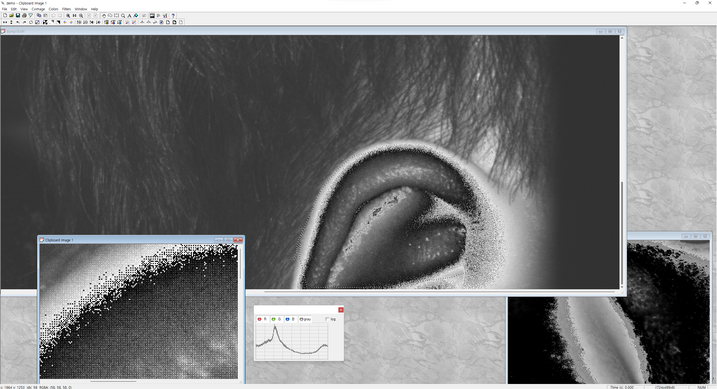
What should I change for this situation. pipeline or isp module setup?
And I have some question like below.
Q1. How to disable DWE? , I did try to changed dtb.("okay" -> "disable") but, fail.
Q2. How to get XML for bypass(no effect)? I copy and edit from /opt/imx8-isp/bin/*.xml.
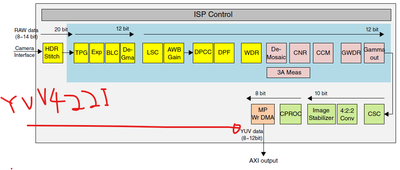
Q3. Where is detailed ISP Diagram? YUV processing, Bayer Processing, on-off mechanism...

- 新着としてマーク
- ブックマーク
- 購読
- ミュート
- RSS フィードを購読する
- ハイライト
- 印刷
- 不適切なコンテンツを報告
This command will actually give you video with undefined format.
gst-launch-1.0 v4l2src device=/dev/video3 ! video/x-raw,width=3840,height=2160,framerate=15/1,pixelformat=RG10 ! waylandsink window-width=800 window-height=450
The proof (in gst format list, there is no RG10):
gst-device-monitor-1.0 Video/Source
Probing devices...
...
Device found:
name : VIV
class : Video/Source
caps : video/x-raw, format=(string)YUY2, width=(int)[ 176, 3840, 16 ], height=(int)[ 144, 2160, 8 ], pixel-aspect-ratio=(fraction)1/1, framerate=(fraction){ 30/1, 29/1, 28/1, 27/1, 26/1, 25/1, 24/1, 23/1, 22/1, 21/1, 20/1, 19/1, 18/1, 17/1, 16/1, 15/1, 14/1, 13/1, 12/1, 11/1, 10/1, 9/1, 8/1, 7/1, 6/1, 5/1, 4/1, 3/1, 2/1, 1/1 };
video/x-raw, format=(string)NV16, width=(int)[ 176, 3840, 16 ], height=(int)[ 144, 2160, 8 ], pixel-aspect-ratio=(fraction)1/1, framerate=(fraction){ 30/1, 29/1, 28/1, 27/1, 26/1, 25/1, 24/1, 23/1, 22/1, 21/1, 20/1, 19/1, 18/1, 17/1, 16/1, 15/1, 14/1, 13/1, 12/1, 11/1, 10/1, 9/1, 8/1, 7/1, 6/1, 5/1, 4/1, 3/1, 2/1, 1/1 };
video/x-raw, format=(string)NV12, width=(int)[ 176, 3840, 16 ], height=(int)[ 144, 2160, 8 ], pixel-aspect-ratio=(fraction)1/1, framerate=(fraction){ 30/1, 29/1, 28/1, 27/1, 26/1, 25/1, 24/1, 23/1, 22/1, 21/1, 20/1, 19/1, 18/1, 17/1, 16/1, 15/1, 14/1, 13/1, 12/1, 11/1, 10/1, 9/1, 8/1, 7/1, 6/1, 5/1, 4/1, 3/1, 2/1, 1/1 };
properties:
udev-probed = true
device.bus_path = platform-vvcam-video.0
sysfs.path = /sys/devices/platform/vvcam-video.0/video4linux/video0
device.subsystem = video4linux
device.product.name = VIV
device.capabilities = :capture:
device.api = v4l2
device.path = /dev/video0
v4l2.device.driver = viv_v4l2_device
v4l2.device.card = VIV
v4l2.device.bus_info = platform:viv0
v4l2.device.version = 328774 (0x00050446)
v4l2.device.capabilities = 2216689665 (0x84200001)
v4l2.device.device_caps = 69206017 (0x04200001)
gst-launch-1.0 v4l2src ! ...
Also in your GST command line, there is no debayering. This means you cannot see nice picture on screen. You need to apply demosaicing to RAW images.
- 新着としてマーク
- ブックマーク
- 購読
- ミュート
- RSS フィードを購読する
- ハイライト
- 印刷
- 不適切なコンテンツを報告
hi., @malik_cisse
Thank you for your kindness.
You are correct.
pixelformat RG10 is not normal operation.

but I need no debayering image with IR bandpassfilter.
We will do debayering with my algorithm method.
..
ultimately,we just want to get Both 4k bayer stream and 1M YUV422I stream simultanuously.
- 新着としてマーク
- ブックマーク
- 購読
- ミュート
- RSS フィードを購読する
- ハイライト
- 印刷
- 不適切なコンテンツを報告
Some more precisions from me.
If you configure ISP to output RAW bayer, it will automatically bypass all ISP processing. It is like ISP does not exist. So AEC, AGC are off.
I noticed that one cannot access RAW via gst.
If I do:
gst-launch-1.0 v4l2src device=/dev/video3 ! video/x-raw,width=3840,height=2160,framerate=15/1,pixelformat=RG10 ! waylandsink window-width=800 window-height=450
This does not work in my case.
I get the raw bayer like this:
v4l2-ctl -d /dev/video0 --set-fmt-video=width=4056,height=3040,pixelformat=RG12 --stream-mmap --stream-count=1 --stream-to=test.raw
v4l2-ctl --device /dev/video0 --stream-mmap --stream-to=frame.raw --stream-count=1
v4l2-ctl --set-fmt-video=height=2160,width=3840 --stream-mmap
yavta /dev/video0 -c8 --skip 7 -f SRGGB12 -s 4056x3040 -Fimx477_PixDepth_SRGGB12_1X12_v2.raw
I am also attaching a v4l2 code to grab raw or yuv. There is only one line to change:
// fmt.fmt.pix.pixelformat = V4L2_PIX_FMT_YUYV;
fmt.fmt.pix.pixelformat = V4L2_PIX_FMT_SRGGB12;
- 新着としてマーク
- ブックマーク
- 購読
- ミュート
- RSS フィードを購読する
- ハイライト
- 印刷
- 不適切なコンテンツを報告
In my case,
IF you use pixelformat RG10 output, Image sensor driver pixelformat should similar format of RG10.
SO, maybe....If RG12, you can set pixleformat=RG12.
- 新着としてマーク
- ブックマーク
- 購読
- ミュート
- RSS フィードを購読する
- ハイライト
- 印刷
- 不適切なコンテンツを報告
I'm sorry @malik_cisse.
I re-executed this command for confirm.

but, this is not working RG10 -> RAW10.
INFO   : [MediaPipeline] MEDIA_EVENT_STREAM_OPEN
INFO   : [MediaPipeline] stream0 connect NativeSensor:0 ---> NativeDewarp:0
INFO   : [MediaPipeline] stream0 connect NativeDewarp:0 ---> V4l2Control:0
INFO   : [MediaPipeline] MEDIA_EVENT_STREAM_SET_FMT
INFO   : [MediaPipeline] set format:0   res: 3840 2160 1
isp  input: 3840x2160 RAW10
isp output: 3840x2160 YUV422I
INFO   : [NativeSensor] setFormat 1 3840 2160,  type 1, port: 0
INFO   : [NativeDewarp] setFormat 1 3840 2160,  type 0, port: 0
dewarp   input: 3840x2160 YUV422I
dewarp  output: 3840x2160 YUV422I
INFO   : [NativeDewarp] setFormat 1 3840 2160,  type 1, port: 0
INFO   : [MediaPipeline] MEDIA_EVENT_STREAM_START
INFO   : [MediaBufferQueue] create buffer queue 3840 2160 1 4
DEBUG  : [MediaBuffer] alloc buffer 0xd8e00000 0x00fd2000
DEBUG  : [MediaBuffer] alloc buffer 0xd9e00000 0x00fd2000
DEBUG  : [MediaBuffer] alloc buffer 0xdae00000 0x00fd2000
DEBUG  : [MediaBuffer] alloc buffer 0xdbe00000 0x00fd2000
Only, RAW10 -> RAW10 are showing saturate(?) or overflow(?) image.

- 新着としてマーク
- ブックマーク
- 購読
- ミュート
- RSS フィードを購読する
- ハイライト
- 印刷
- 不適切なコンテンツを報告
Hi @kiseok_ko ,
Q1. How to disable DWE? , I did try to changed dtb.("okay" -> "disable") but, fail.
Try disabled instead.
Q2. How to get XML for bypass(no effect)? I copy and edit from /opt/imx8-isp/bin/*.xml.
Not sure what you meant but you could run /opt/imx8-isp/bin/vvext <camera-id> utility then you could navigate to the appropriate sub-menu to bypass the ISP in order to get RAW output.
Q3. Where is detailed ISP Diagram? YUV processing, Bayer Processing, on-off mechanism...
In the i.MX_8M_Plus_Camera_and_Display_Guide.pdf of each release's documentation.
Regards,
K.
- 新着としてマーク
- ブックマーク
- 購読
- ミュート
- RSS フィードを購読する
- ハイライト
- 印刷
- 不適切なコンテンツを報告
Hi. @khang_letruong
Q1. How to disable DWE? , I did try to changed dtb.("okay" -> "disable") but, fail.
Try disabled instead.
--> I confirmed both "disable" and "disabled", but driver did not activate.
Q2. How to get XML for bypass(no effect)? I copy and edit from /opt/imx8-isp/bin/*.xml.
Not sure what you meant but you could run /opt/imx8-isp/bin/vvext <camera-id> utility then you could navigate to the appropriate sub-menu to bypass the ISP in order to get RAW output.
--> I did excute below.
# gst-launch-1.0 v4l2src device=/dev/video3 ! video/x-raw,width=3840,height=2160,framerate=15/1,pixelformat=RG10 ! waylandsink window-width=800 window-height=450
Like this captured well but AEC, AGC, is not working correctly. And high intensity color is not saturate high, looks like overflow.( ref image in main context. ) |

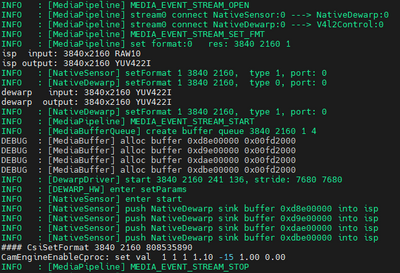 | If I setup output as default pixelformat, It is working well.
|
Q3. Where is detailed ISP Diagram? YUV processing, Bayer Processing, on-off mechanism...
In the i.MX_8M_Plus_Camera_and_Display_Guide.pdf of each release's documentation.
--> As you know, I did download and read file. you guided me through another issues.
1. I don't know how to turn on/off each block on Bayer input - Bayer output.
I also want to know which block is working or not in this case.
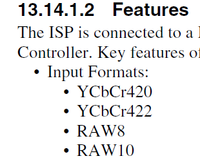
2. I don't know how to setup 'YUV422I input-> output' pipeline and where is start block below diagram?
| 
|
I just want to get more detailed diagram like this.
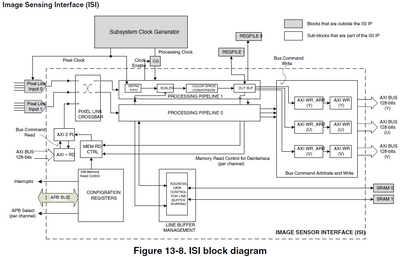
Regards,
kiseokko
- 新着としてマーク
- ブックマーク
- 購読
- ミュート
- RSS フィードを購読する
- ハイライト
- 印刷
- 不適切なコンテンツを報告
Hi,
I confirmed both "disable" and "disabled", but driver did not activate.
By default, dewarp node is disabled, if you do not enable it correctly (i.e. overwriting status = okay), it is still disabled.
                                dewarp: dwe@32e30000 {
                                        compatible = "fsl,imx8mp-dwe";
                                        reg = <0x32e30000 0x10000>;
                                        interrupts = <GIC_SPI 100 IRQ_TYPE_LEVEL_HIGH>;
                                        clocks = <&clk IMX8MP_CLK_MEDIA_AXI>,
                                                 <&clk IMX8MP_CLK_MEDIA_AXI>,
                                                 <&clk IMX8MP_CLK_MEDIA_APB>;
                                        clock-names = "core", "axi", "ahb";
                                        assigned-clocks = <&clk IMX8MP_CLK_MEDIA_AXI_ROOT>,
                                                          <&clk IMX8MP_CLK_MEDIA_APB_ROOT>;
                                        assigned-clock-rates = <500000000>, <200000000>;
                                        power-domains = <&ispdwp_pd>;
                                        id = <0>;
                                        status = "disabled";
                                };
So doesn't "did not activate" mean disabled, which is what you expect ?
Another way to disable DWE is setting "bypass" : true in one of the following file depending on the resolutions :
/opt/imx8-isp/bin/dewarp/dewarp_config/sensor_dwe_4K_config.json
/opt/imx8-isp/bin/dewarp/dewarp_config/sensor_dwe_1080P_config.json
/opt/imx8-isp/bin/dewarp/dewarp_config/sensor_dwe_720P_config.json
Like this captured well but AEC, AGC, is not working correctly.
From my experience, one should trigger the reset of AEC (menu 4->1), and AGC (menu 5->1) with /opt/imx8-isp/bin/vvext <camera-id> utility) to have them work correctly.
1. I don't know how to turn on/off each block on Bayer input - Bayer output.
I also want to know which block is working or not in this case.
Also with /opt/imx8-isp/bin/vvext <camera-id> utility
Regards,
Khang
- 新着としてマーク
- ブックマーク
- 購読
- ミュート
- RSS フィードを購読する
- ハイライト
- 印刷
- 不適切なコンテンツを報告
1. So doesn't "did not activate" mean disabled, which is what you expect ?
&isi_0 {
status = "disabled";
};

&isi_1 {
status = "okay";
};

&isp_0 {
status = "okay";
};
&isp_1 {
status = "disabled";
};
&dewarp {
status = "disabled";
};
When I setup dewarp.status from "okay" to "disabled",
root@imx8mpevk:/opt/imx8-isp/bin# cd /opt/imx8-isp/bin/ && ISP_LOG_LEVEL=8 ./run.sh -c imx274_4k -lm
RUN_SCRIPT=/opt/imx8-isp/bin/run.sh
RUN_SCRIPT_PATH=/opt/imx8-isp/bin
Trying configuration "imx274_4k"...
Removing vvcam-isp...
Removing vvcam-dwe...
Removing vvcam-video...
Removing imx8-media-dev...
Removing as0149at...
Removing imx274...
Removing ov2775...
Removing os08a20...
Removing basler-camera-driver-vvcam...
Loading module imx274 ...
imx274
Loaded /lib/modules/5.10.72-lts-5.10.y+ga68e31b63f86/extra/sensor/imx274/imx274.ko
Loading module as0149at ...
as0149at
Loaded /lib/modules/5.10.72-lts-5.10.y+ga68e31b63f86/extra/sensor/as0149at/as0149at.ko
Loading module imx8-media-dev ...
imx8_media_dev
Loaded /lib/modules/5.10.72-lts-5.10.y+ga68e31b63f86/kernel/drivers/staging/media/imx/imx8-media-dev.ko
Loading module vvcam-video ...
vvcam_video
Loaded /lib/modules/5.10.72-lts-5.10.y+ga68e31b63f86/extra/video/vvcam-video.ko
Loading module vvcam-dwe ...
vvcam_dwe
Loaded /lib/modules/5.10.72-lts-5.10.y+ga68e31b63f86/extra/vvcam-dwe.ko
Loading module vvcam-isp ...
vvcam_isp
vvcam_isp              65536  1
vvcam-isp already loaded.
Starting isp_media_server with configuration file CAMERA0
INFO   : [ISP_MEDIA_SERVER] ******************************************************************
INFO   : [ISP_MEDIA_SERVER] VIV ISP Media Control Framework V4.2.2p16 (Apr 05 2011)
INFO   : [ISP_MEDIA_SERVER] ******************************************************************
like this isp deamon start correctly.
But. when I executed gstreamer, I can see below message.
INFO   : [MediaPipeline] NativeSensor Creat
ERROR  : [MediaPipeline] NativeSensor open error!
ERROR  : [V4l2Event] initialize MediaPipeline error!
I did only changed dewarp.status.
Before changing, I captured
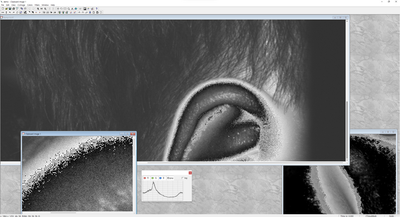
2.Another way to disable DWE is setting "bypass" : true in one of the following file depending on the resolutions :
dewarp configuration is "bypass".

{
        "dewarpConfigArray" :[
                {
                        "source_image":{
                                "width"  : 3840,
                                "height" : 2160
                        },

                        "?dewarpType": "LENS_CORRECTION, FISHEYE_EXPAND, SPLIT_SCREEN",
                        "dewarpType": "LENS_CORRECTION",

                        "scale": {
                                "roix"   : 0,
                                "roiy"   : 0,
                                "factor" : 1.0
                        },

                        "split": {
                                "horizon_line"      : 540,
                                "vertical_line_up"  : 960,
                                "vertical_line_down": 960
                        },

                        "bypass" : true,
                        "hflip"  : false,
                        "vflip"  : false,

                        "camera_matrix"   : [  1.9382053715646130e+003, 0.0, 1.9367040317520732e+003, 0.0, 1.9382053715646130e+003, 1.0995906524580364e+003, 0.0, 0.0, 1.0 ],
                        "distortion_coeff": [ -2.9762301011581477e-001, 9.9990207531256287e-002, 7.1750118655391590e-007, -4.8214607611670856e-004, -1.6082698420030749e-002 ],
                        "perspective"     : [1.0, 0, 0, 0, 1, 0, 0, 0, 1]

                }
        ]

}
3. From my experience, one should trigger the reset of AEC (menu 4->1), and AGC (menu 5->1) with /opt/imx8-isp/bin/vvext <camera-id> utility) to have them work correctly.
--> okay, I will try one more. "stream on" and then "AEC,AGC reset"....
When I setup output pixelformat RG10, AEC,AGC of vvext was not expected to output image.
so I just use exposure time(4-7) and gain(4-6).
Also with /opt/imx8-isp/bin/vvext <camera-id> utility
I did apply vvext my application. and I am controling exposure & gain on my application.
so I got that(saturelated) image.
