
- Forums
- Product Forums
- General Purpose MicrocontrollersGeneral Purpose Microcontrollers
- i.MX Forumsi.MX Forums
- QorIQ Processing PlatformsQorIQ Processing Platforms
- Identification and SecurityIdentification and Security
- Power ManagementPower Management
- Wireless ConnectivityWireless Connectivity
- RFID / NFCRFID / NFC
- Advanced AnalogAdvanced Analog
- MCX Microcontrollers
- S32G
- S32K
- S32V
- MPC5xxx
- Other NXP Products
- S12 / MagniV Microcontrollers
- Powertrain and Electrification Analog Drivers
- Sensors
- Vybrid Processors
- Digital Signal Controllers
- 8-bit Microcontrollers
- ColdFire/68K Microcontrollers and Processors
- PowerQUICC Processors
- OSBDM and TBDML
- S32M
- S32Z/E
-
- Solution Forums
- Software Forums
- MCUXpresso Software and ToolsMCUXpresso Software and Tools
- CodeWarriorCodeWarrior
- MQX Software SolutionsMQX Software Solutions
- Model-Based Design Toolbox (MBDT)Model-Based Design Toolbox (MBDT)
- FreeMASTER
- eIQ Machine Learning Software
- Embedded Software and Tools Clinic
- S32 SDK
- S32 Design Studio
- GUI Guider
- Zephyr Project
- Voice Technology
- Application Software Packs
- Secure Provisioning SDK (SPSDK)
- Processor Expert Software
- Generative AI & LLMs
-
- Topics
- Mobile Robotics - Drones and RoversMobile Robotics - Drones and Rovers
- NXP Training ContentNXP Training Content
- University ProgramsUniversity Programs
- Rapid IoT
- NXP Designs
- SafeAssure-Community
- OSS Security & Maintenance
- Using Our Community
-
- Cloud Lab Forums
-
- Knowledge Bases
- ARM Microcontrollers
- i.MX Processors
- Identification and Security
- Model-Based Design Toolbox (MBDT)
- QorIQ Processing Platforms
- S32 Automotive Processing Platform
- Wireless Connectivity
- CodeWarrior
- MCUXpresso Suite of Software and Tools
- MQX Software Solutions
- RFID / NFC
- Advanced Analog
-
- NXP Tech Blogs
- Home
- :
- i.MX Forums
- :
- i.MX Processors
- :
- i.MX7ULP is it possible to access the PMU (Performance Monitoring Unit) interrupts?
i.MX7ULP is it possible to access the PMU (Performance Monitoring Unit) interrupts?
- Subscribe to RSS Feed
- Mark Topic as New
- Mark Topic as Read
- Float this Topic for Current User
- Bookmark
- Subscribe
- Mute
- Printer Friendly Page
i.MX7ULP is it possible to access the PMU (Performance Monitoring Unit) interrupts?

- Mark as New
- Bookmark
- Subscribe
- Mute
- Subscribe to RSS Feed
- Permalink
- Report Inappropriate Content
Hi,
I'm trying to get perf recording working on the i.MX7ULP platform running linux 4.14.98-imx_4.14.98_2.0.0_ga but I'm not able to figure out how/or if it's possible to access the interrupts from the PMU by reading the reference manual.
arch/arm/boot/dts/imx7ulp.dtsi contains:
pmu: pmu@a7 {
compatible = "arm,cortex-a7-pmu";
};
but no interrupts specified. From the ref manual it looks like it could be possible to configure the A7 CTI interrupt to actually be the PMU Interrupt but I can't figure out how.
How should this be done, is it possible?
Thanks,
David

 weidong_sun
- Mark as New
- Bookmark
- Subscribe
- Mute
- Subscribe to RSS Feed
- Permalink
- Report Inappropriate Content
Hello David,
>>i.MX7ULP is it possible to access the PMU interrupts?
yes, it is possible.
>>How should this be done?
On i.MX7ULP EVK schematic, PMIC_INT is connected ot PTB11(Port B No.11 pin), see below, please!
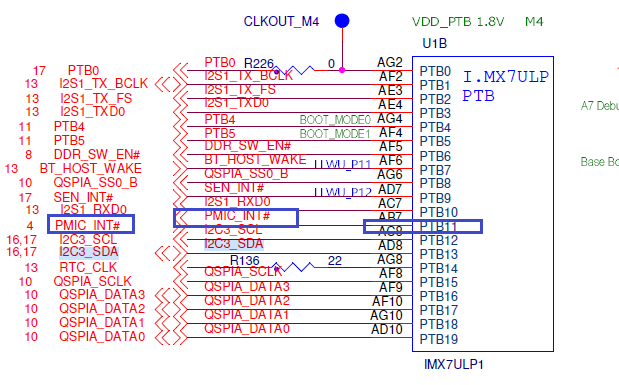
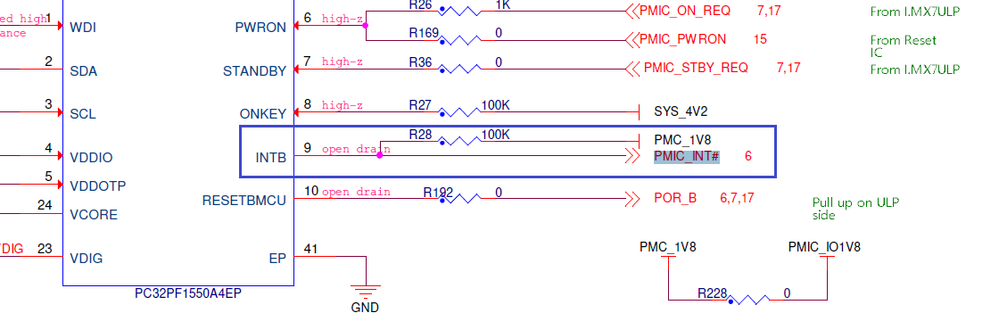
The pin has been defined GPIO in imx7ulp-pinfunc.h
#define IMX7ULP_PAD_PTB11__PTB11 0x00AC 0x0000 0x1 0x0
If you want A7 to response it's interrupt in linux BSP, you should use the "Table 3-2. A7 interrupt assignments"

68 is IRQ number.
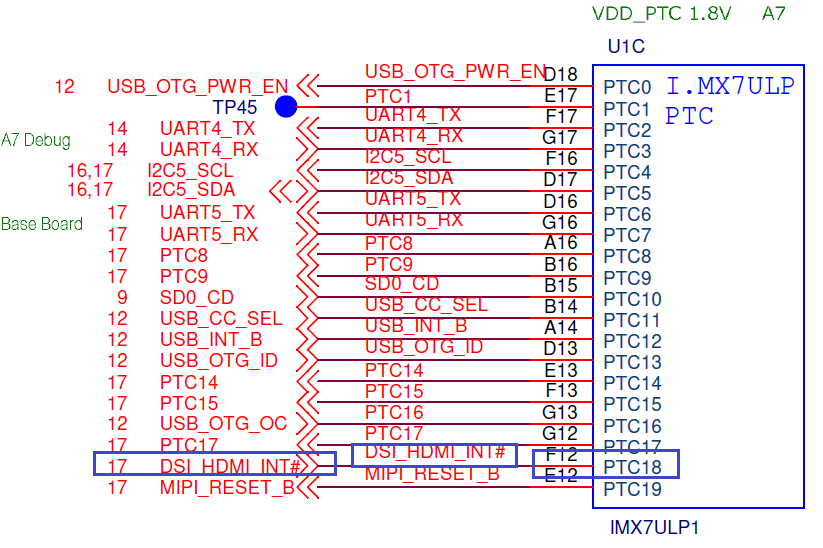
For detailed information on how to : Referring to interrupt of MIPI_DSI to HDMI .
pinctrl_dsi_hdmi: dsi_hdmi_grp {
fsl,pins = <
IMX7ULP_PAD_PTC18__PTC18 0x10003 /* DSI_HDMI_INT */
>;
};
};
--------------Reminder-----------
[Comment] Pay attention to configurations on PORT A/B/C/D..., voltage range is a little difference.
See reference manual, please!
31.4 GPIO pads operating range configuration
......
GPIO pads can operate in 3 ranges of I/O supply:
• 1.8 V range (1.71 V ~ 1.89 V)
• 3.3 V range (3.00 V ~ 3.60 V)
• Continuous range (1.71 V ~ 3.60 V)
• Ports A, C, E, F GPIO pads must be configured to operate in one of the 3 possible
operating ranges.
• Port B GPIO pads must be configured to operate in either "Continuous range" or in
"1.8 V range".
• Port D GPIO pads are not configurable and can operate in "1.8 V range" or "3.3 V
range".
• Each GPIO port can be individually configured in the SIM_DGO_GP11 register
according to the values shown in the following table.
• Operating in the "Continuous range" turns on a voltage detection circuitry resulting
in additional power consumption. If this additional power consumption is not
desired, for example in low power modes, it's recommended to configure either Low
or High range.
......--------------------------
Have a nice day!
BR,
Weidong
- Mark as New
- Bookmark
- Subscribe
- Mute
- Subscribe to RSS Feed
- Permalink
- Report Inappropriate Content
Hi Weidong,
Thank you for your reply, but what I meant by PMU is Performance Monitoring Unit. (NOT Power Management Unit!) I've edited the title of the question now.
The performance monitoring unit events are needed to be able to profile an application using the tool perf, but I can't figure out how to configure the system to get these events.
Kind regards,
David
weidong_sun
- Mark as New
- Bookmark
- Subscribe
- Mute
- Subscribe to RSS Feed
- Permalink
- Report Inappropriate Content
Hello David,
Sorry for my misunderstanding your question!
OK, for your question, you can refer to the link from "arm community" :
Using ARM Performance Monitor Unit (PMU) Linux Driver - Embedded blog - System - Arm Community
Hope it is helpful for you!
Have a nice day!
BR,
Weidong
- Mark as New
- Bookmark
- Subscribe
- Mute
- Subscribe to RSS Feed
- Permalink
- Report Inappropriate Content
Hi again Weidong,
I'm familiar with the kernel configuration options needed and the device tree entries, my question is regarding the missing interrupt parameters in the PMU section of the device tree source file provided for the i.MX7ULP.
In the article you linked the device tree entry is:
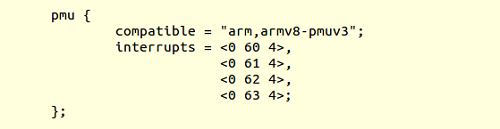
But in arch/arm/boot/dts/imx7ulp.dtsi:
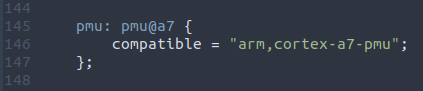
No interrupts are specified, as I said in my original question, I have tried to find information in the reference manual for the i.MX7ULP - the PMU IRQ doesn't seem to be available at the GIC (Generic Interrupt Controller) as it is on other i.MX platforms, but I saw some information that it might be possible to route the PMU interrupt to the CTI interrupt (which is connected to the GIC)?
Would this be possible, and is this the way it should be done to get access to the PMU IRQs or are they exposed in some other way?
Best Regards,
David
weidong_sun
- Mark as New
- Bookmark
- Subscribe
- Mute
- Subscribe to RSS Feed
- Permalink
- Report Inappropriate Content
OK, got it. I will confirm PMU IRQ with Expert team, wait for me, please!
Have a nice day!
BR,
weidong
weidong_sun
- Mark as New
- Bookmark
- Subscribe
- Mute
- Subscribe to RSS Feed
- Permalink
- Report Inappropriate Content
Hi, David
Expert team gave reply, see below, please!
---------------------------------
In the current silicon revision PMU interrupt is not connected in the 7ULP design. So we cannot enable the PMU functions that are driven by hardware events during performance profiling.
---------------------------------
Have a nice day!
BR,
Weidong
- Mark as New
- Bookmark
- Subscribe
- Mute
- Subscribe to RSS Feed
- Permalink
- Report Inappropriate Content
Hi,
I realise this is an older thread but I wanted to ask if this is perhaps also true for the i.MX 8M Plus?
I ask because when attempting to use perf record I get this error:
"imx8_ddr0/axid-read/: PMU Hardware doesn't support sampling/overflow-interrupts. Try 'perf stat'"
