
- Forums
- Product Forums
- General Purpose MicrocontrollersGeneral Purpose Microcontrollers
- i.MX Forumsi.MX Forums
- QorIQ Processing PlatformsQorIQ Processing Platforms
- Identification and SecurityIdentification and Security
- Power ManagementPower Management
- Wireless ConnectivityWireless Connectivity
- RFID / NFCRFID / NFC
- Advanced AnalogAdvanced Analog
- Neural Processing UnitsNeural Processing Units
- MCX Microcontrollers
- S32G
- S32K
- S32V
- MPC5xxx
- Other NXP Products
- S12 / MagniV Microcontrollers
- Powertrain and Electrification Analog Drivers
- Sensors
- Vybrid Processors
- Digital Signal Controllers
- 8-bit Microcontrollers
- ColdFire/68K Microcontrollers and Processors
- PowerQUICC Processors
- OSBDM and TBDML
- S32M
- S32Z/E
-
- Solution Forums
- Software Forums
- MCUXpresso Software and ToolsMCUXpresso Software and Tools
- CodeWarriorCodeWarrior
- MQX Software SolutionsMQX Software Solutions
- Model-Based Design Toolbox (MBDT)Model-Based Design Toolbox (MBDT)
- FreeMASTER
- eIQ Machine Learning Software
- Embedded Software and Tools Clinic
- S32 SDK
- S32 Design Studio
- GUI Guider
- Zephyr Project
- Voice Technology
- Application Software Packs
- Secure Provisioning SDK (SPSDK)
- Processor Expert Software
- Generative AI & LLMs
-
- Topics
- Mobile Robotics - Drones and RoversMobile Robotics - Drones and Rovers
- NXP Training ContentNXP Training Content
- University ProgramsUniversity Programs
- Rapid IoT
- NXP Designs
- SafeAssure-Community
- OSS Security & Maintenance
- Using Our Community
-
- Cloud Lab Forums
-
- Knowledge Bases
- ARM Microcontrollers
- i.MX Processors
- Identification and Security
- Model-Based Design Toolbox (MBDT)
- QorIQ Processing Platforms
- S32 Automotive Processing Platform
- Wireless Connectivity
- CodeWarrior
- MCUXpresso Suite of Software and Tools
- MQX Software Solutions
- RFID / NFC
- Advanced Analog
- Neural Processing Units
-
- NXP Tech Blogs
- Home
- :
- i.MX フォーラム
- :
- i.MXプロセッサ
- :
- i.MX6ULL mfgTool error 12
i.MX6ULL mfgTool error 12
- RSS フィードを購読する
- トピックを新着としてマーク
- トピックを既読としてマーク
- このトピックを現在のユーザーにフロートします
- ブックマーク
- 購読
- ミュート
- 印刷用ページ

- 新着としてマーク
- ブックマーク
- 購読
- ミュート
- RSS フィードを購読する
- ハイライト
- 印刷
- 不適切なコンテンツを報告
I would like to get an image on a SD card, that a i.MX6ULL target will boot from. I have verified this working with a pre-built binary. The issue I am running concerns building a new bootable image. I tried putting the image resulting from "mkimage.sh sd" directly onto the SD card. It did not run.
I installed iMX6ULL SDK 2.2. Per the instructions in Section 5.2 Using Manufacturing Tool (MFGTool), in the getting started pdf, I built a basic hello UART binary using arm-none-eabi-gcc. I ran it through "mkimage.sh sd". I copied the resulting sdk20-app.img to the specified sub-folder within mfgtools. I attached the SD card to the target, and ran the specified visual basic script: "mfgtool2-sdk20-mx6ul-evk-sdcard.vbs".
Here are the contents of MfgTool.log:
DLL version: 2.7.0
Friday, September 07, 2018 18:49:02 Start new logging
ModuleID[2] LevelID[1]: Error: Can't find the specified list(SDCard SDK20) in the xml file
ModuleID[2] LevelID[1]: Parse ucl script failed, error code: 12
This doesn't tell me enough to know how to fix the issue. Am I using this the way it was intended?
解決済! 解決策の投稿を見る。

 igorpadykov
- 新着としてマーク
- ブックマーク
- 購読
- ミュート
- RSS フィードを購読する
- ハイライト
- 印刷
- 不適切なコンテンツを報告
Hi Stephen
"SDCard SDK20" is part of ucl2.xml (attached) included in SDK_2.2_MCIMX6ULL.
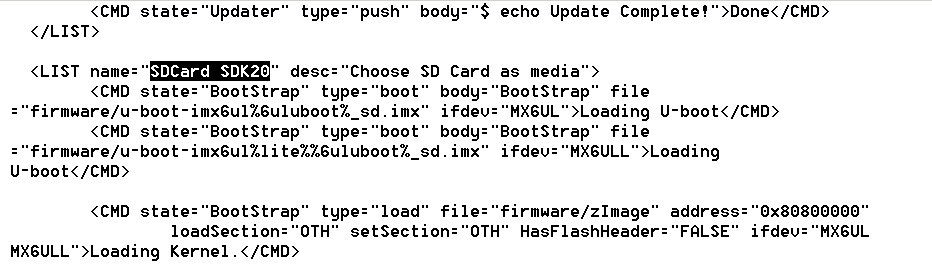
may be useful to check mfg tool presentation:
Best regards
igor
igorpadykov
- 新着としてマーク
- ブックマーク
- 購読
- ミュート
- RSS フィードを購読する
- ハイライト
- 印刷
- 不適切なコンテンツを報告
Hi Stephen
seems it can not find <LIST name="SDCard SDK20"..> in ucl2.xml which should be
replaced with new one from SDK mfgtool ..Profiles/Linux/OS Firmware folder
Best regards
igor
-----------------------------------------------------------------------------------------------------------------------
Note: If this post answers your question, please click the Correct Answer button. Thank you!
-----------------------------------------------------------------------------------------------------------------------
- 新着としてマーク
- ブックマーク
- 購読
- ミュート
- RSS フィードを購読する
- ハイライト
- 印刷
- 不適切なコンテンツを報告
Igor,
I don't understand what that means. What does <LIST name="SDCard SDK20"..> represent? Again, I had copied the application image to Profiles/Linux/OS Firmware/files/ per NXP documentation. What is missing exactly?
I also updated the manufacture tool as instructed in SDK_2.2_MCIM6ULL\tools\mfgtools\readme.txt:
"Manufacture tool patch User Guide
======================================
This patch is based on IMX6_L4.1.15_2.0.0_MFG_TOOL.
1. Download IMX6_L4.1.15_2.0.0_MFG_TOOL from nxp.com
2. Extract IMX6_L4.1.15_2.0.0_MFG_TOOL and override the contents in mfgtools folder with this patch."
I downloaded the patch by following the link in this post: Building image using mfgtool on Sabre Auto
I extracted the compressed mfgtools folder to SDK_2.2_MCIMX6ULL/tools/ (see image below). And replaced all duplicate files.
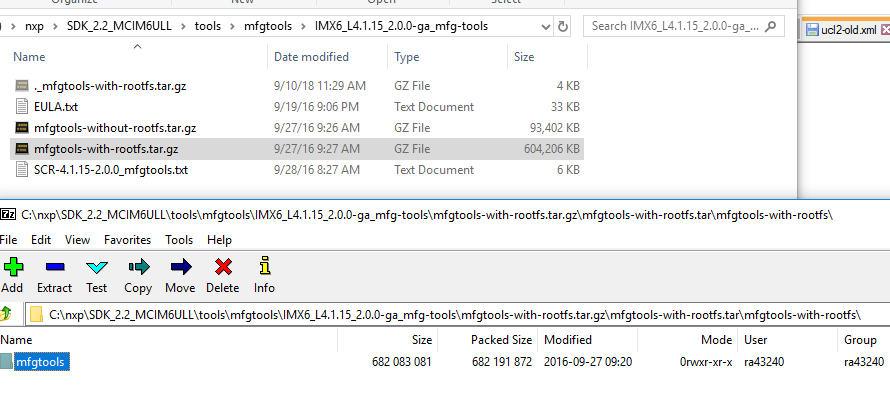
Should something have been copied over in the patch?
igorpadykov
- 新着としてマーク
- ブックマーク
- 購読
- ミュート
- RSS フィードを購読する
- ハイライト
- 印刷
- 不適切なコンテンツを報告
Hi Stephen
"SDCard SDK20" is part of ucl2.xml (attached) included in SDK_2.2_MCIMX6ULL.
may be useful to check mfg tool presentation:
Best regards
igor
- 新着としてマーク
- ブックマーク
- 購読
- ミュート
- RSS フィードを購読する
- ハイライト
- 印刷
- 不適切なコンテンツを報告
Interesting. There is no such section in the version of ucl2.xml that I have. I am certain I installed the SDK_2.2_MCIMX6ULL, as the screenshot above suggests. Perhaps the IMX6_L4.1.15_2.0.0_MFG_TOOL "patch" overwrote this file. That being the case, C:\nxp\SDK_2.2_MCIM6ULL\tools\mfgtools\readme.txt should be updated.
