
- Forums
- Product Forums
- General Purpose MicrocontrollersGeneral Purpose Microcontrollers
- i.MX Forumsi.MX Forums
- QorIQ Processing PlatformsQorIQ Processing Platforms
- Identification and SecurityIdentification and Security
- Power ManagementPower Management
- Wireless ConnectivityWireless Connectivity
- RFID / NFCRFID / NFC
- Advanced AnalogAdvanced Analog
- MCX Microcontrollers
- S32G
- S32K
- S32V
- MPC5xxx
- Other NXP Products
- S12 / MagniV Microcontrollers
- Powertrain and Electrification Analog Drivers
- Sensors
- Vybrid Processors
- Digital Signal Controllers
- 8-bit Microcontrollers
- ColdFire/68K Microcontrollers and Processors
- PowerQUICC Processors
- OSBDM and TBDML
- S32M
- S32Z/E
-
- Solution Forums
- Software Forums
- MCUXpresso Software and ToolsMCUXpresso Software and Tools
- CodeWarriorCodeWarrior
- MQX Software SolutionsMQX Software Solutions
- Model-Based Design Toolbox (MBDT)Model-Based Design Toolbox (MBDT)
- FreeMASTER
- eIQ Machine Learning Software
- Embedded Software and Tools Clinic
- S32 SDK
- S32 Design Studio
- GUI Guider
- Zephyr Project
- Voice Technology
- Application Software Packs
- Secure Provisioning SDK (SPSDK)
- Processor Expert Software
- Generative AI & LLMs
-
- Topics
- Mobile Robotics - Drones and RoversMobile Robotics - Drones and Rovers
- NXP Training ContentNXP Training Content
- University ProgramsUniversity Programs
- Rapid IoT
- NXP Designs
- SafeAssure-Community
- OSS Security & Maintenance
- Using Our Community
-
- Cloud Lab Forums
-
- Knowledge Bases
- ARM Microcontrollers
- i.MX Processors
- Identification and Security
- Model-Based Design Toolbox (MBDT)
- QorIQ Processing Platforms
- S32 Automotive Processing Platform
- Wireless Connectivity
- CodeWarrior
- MCUXpresso Suite of Software and Tools
- MQX Software Solutions
- RFID / NFC
- Advanced Analog
-
- NXP Tech Blogs
- Home
- :
- i.MX フォーラム
- :
- i.MXプロセッサ
- :
- Trouble debugging with Qt Creator and MCIMX6Q-SDP
Trouble debugging with Qt Creator and MCIMX6Q-SDP
- RSS フィードを購読する
- トピックを新着としてマーク
- トピックを既読としてマーク
- このトピックを現在のユーザーにフロートします
- ブックマーク
- 購読
- ミュート
- 印刷用ページ
Trouble debugging with Qt Creator and MCIMX6Q-SDP

- 新着としてマーク
- ブックマーク
- 購読
- ミュート
- RSS フィードを購読する
- ハイライト
- 印刷
- 不適切なコンテンツを報告
I followed instruction posted here (Re: Setup QT Creator with Yocto Build ) to setup development environment and Qt Creator.
I have both the development PC (Ubuntu 14.04.3 LTS) and the MCIMX6Q-SDP on the same Ethernet network where both can ping each other. I configured the device and the test pass for it with out a problem (Please see attachment: QtCreator_Device_Test_Pass.png).
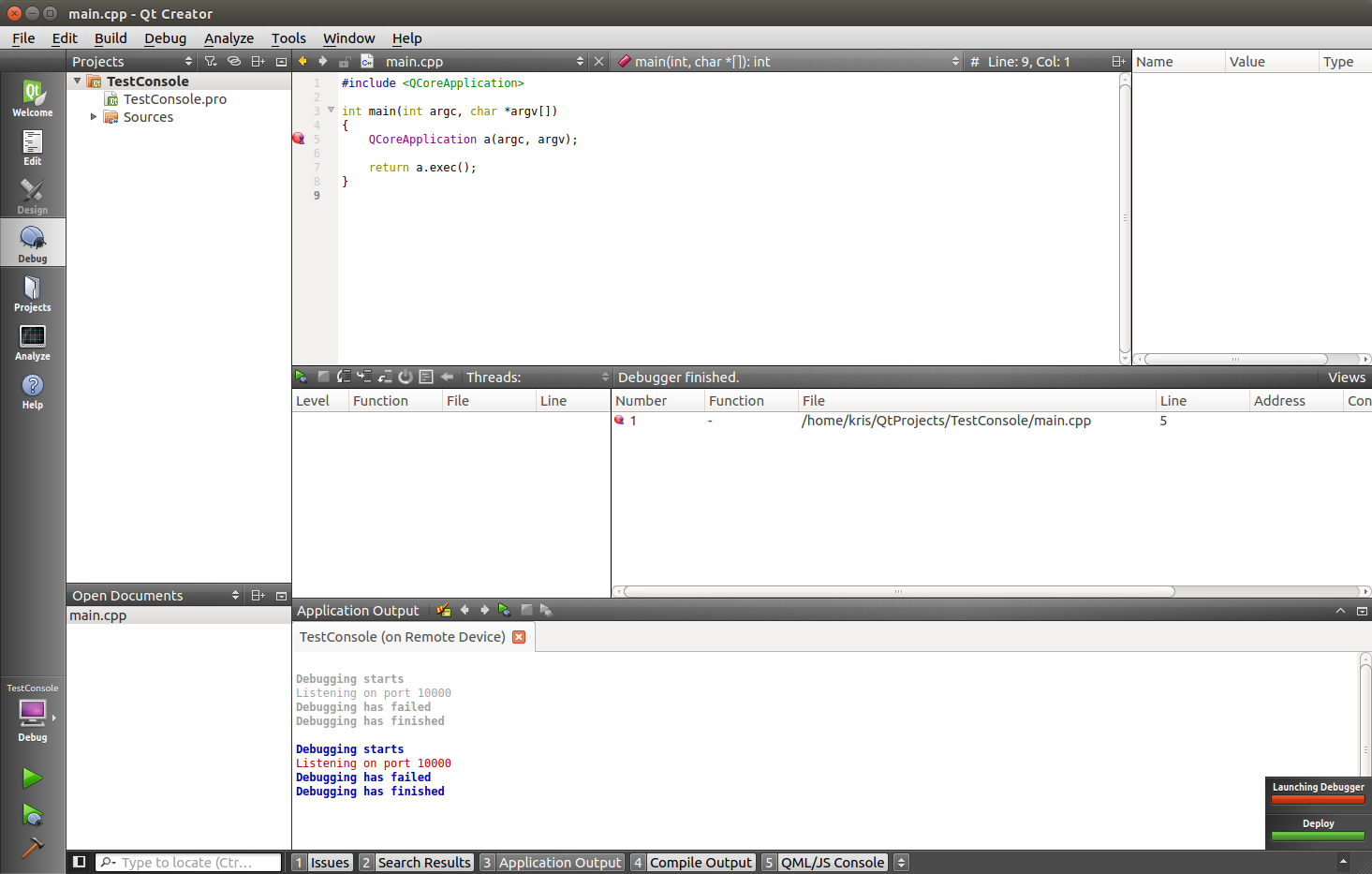
When I create a simple console application in Qt Creator, build it, and the try to debug it fails to launch the debug session. The indication shows "Launching Debugger":
Debugging starts
Listening to port 10000
Debugging has failed
Debugging has finished
Please see attachment for screenshot (QtCreator_ConsoleApplication_DebugError.png).
How do I determine what is wrong this this? Why is it not able to run the application debugging on the target?

- 新着としてマーク
- ブックマーク
- 購読
- ミュート
- RSS フィードを購読する
- ハイライト
- 印刷
- 不適切なコンテンツを報告
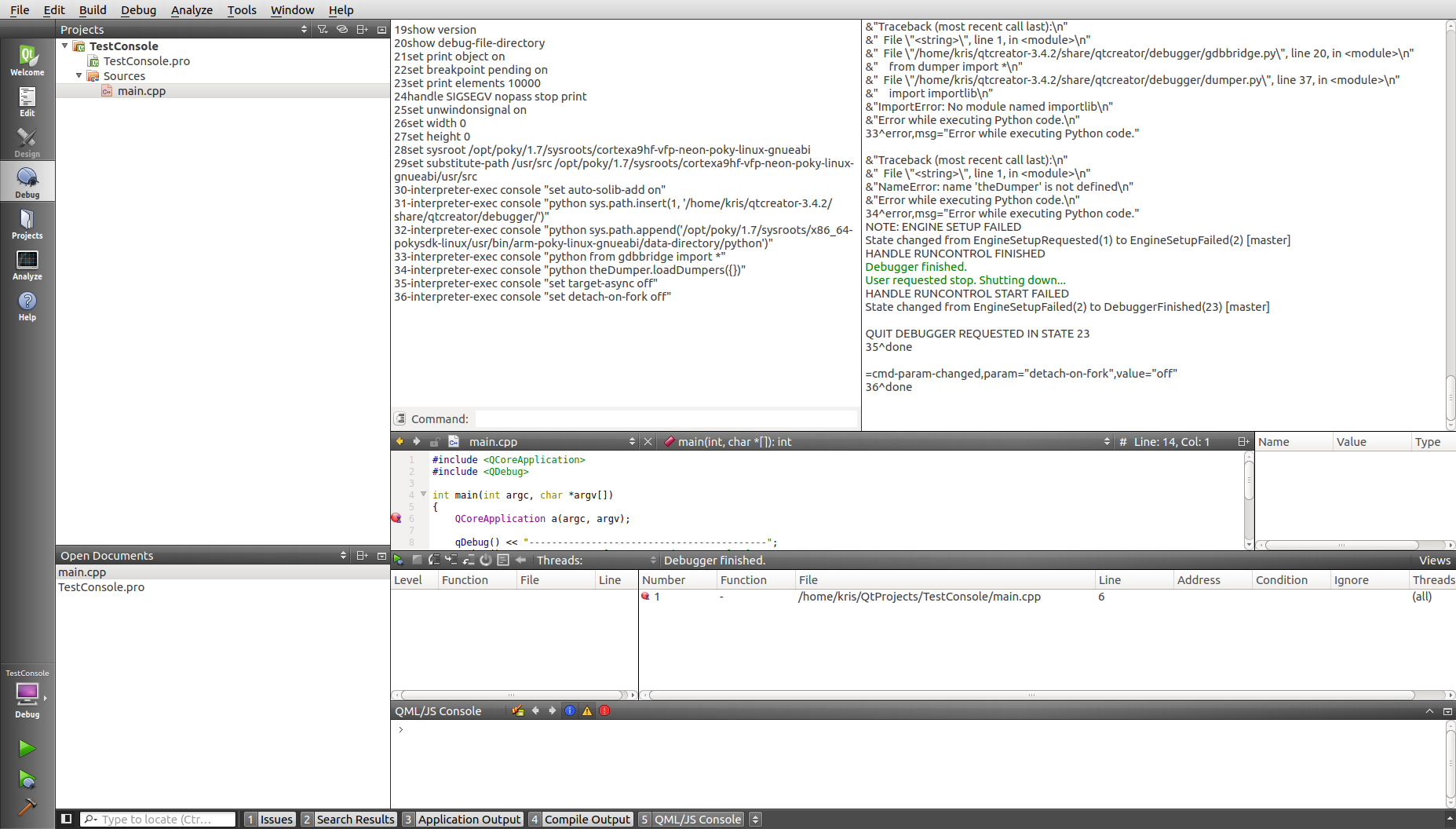
Struggle a bit more with this because I was trying to figure out how to get more debug information from QT Creator and GDB. To get more information the output has to be viewable and to do this from Qt Creator select from the menu bar Window->Views->Debugger Log.
This opened up quite a lot more information as shown in the attachment (QtCreator_DebuggerLog.png). The full log details are attached as QtCreator_DebuggerLog_LeftPane.txt and QtCreator_DebuggerLog_RightPane.txt.
To summarize the log there is an error that indicates the following:
>&"Traceback (most recent call last):\n"
>&" File \"<string>\", line 1, in <module>\n"
>&" File \"/home/kris/qtcreator-3.4.2/share/qtcreator/debugger/gdbbridge.py\", line 20, in <module>\n"
>&" from dumper import *\n"
>&" File \"/home/kris/qtcreator-3.4.2/share/qtcreator/debugger/dumper.py\", line 37, in <module>\n"
>&" import importlib\n"
>&"ImportError: No module named importlib\n"
>&"Error while executing Python code.\n"
>33^error,msg="Error while executing Python code."
>&"Traceback (most recent call last):\n"
>&" File \"<string>\", line 1, in <module>\n"
>&"NameError: name 'theDumper' is not defined\n"
>&"Error while executing Python code.\n"
>34^error,msg="Error while executing Python code."
The Ubuntu development machine that I am using has the following python version:
$ python --version
Python 2.7.6
A quick search for this error indicates that it is either a Python version problem (<=2.7) or GDB needs to be rebuilt with '--with-python' option (http://stackoverflow.com/questions/30661671/qt-creator-failed-to-start-debugger ). Since my version of Python is 2.7.6 I am assuming that I need to follow the second option.
Has anyone ran into this issue? Where in the Yocto build configuration does '--with-python' need to be used?
- 新着としてマーク
- ブックマーク
- 購読
- ミュート
- RSS フィードを購読する
- ハイライト
- 印刷
- 不適切なコンテンツを報告
First, I had to resolve 2 issues:
1) The built application was not getting deployed to the target because I did not have a path set so that Qt Creator knew where to put it on the target. I needed to go to my application specific project file and add to the *.pro file (project setting file, in this case "TestConsole.pro") the following:
target.path = /home/root
INSTALLS += target
This caused the application to be deployed to the target into directory '/home/root'.
2) The second issue that I noticed was that when I would run the binary on the target board I would get an error with finding Qt libraries as shown below.
./TestConsole: error while loading shared libraries: libQt5Core.so.5: cannot open shared object file: No such file or directory
To resolve this I needed a SD card image that contained all the Qt libraries in /usr/lib directory. To do this I needed to update '/home/kris/fsl-release-bsp/build-x11/conf/local.conf' by adding the following line of text:
IMAGE_INSTALL_apped=" qtbase qtbase-tools qtbase-plugins"
I re-ran bitbake and got an update SD card image which I programmed the SD card with. Now the image included all the Qt libraries needed for running my application.
