
- Forums
- Product Forums
- General Purpose MicrocontrollersGeneral Purpose Microcontrollers
- i.MX Forumsi.MX Forums
- QorIQ Processing PlatformsQorIQ Processing Platforms
- Identification and SecurityIdentification and Security
- Power ManagementPower Management
- Wireless ConnectivityWireless Connectivity
- RFID / NFCRFID / NFC
- Advanced AnalogAdvanced Analog
- Neural Processing UnitsNeural Processing Units
- MCX Microcontrollers
- S32G
- S32K
- S32V
- MPC5xxx
- Other NXP Products
- S12 / MagniV Microcontrollers
- Powertrain and Electrification Analog Drivers
- Sensors
- Vybrid Processors
- Digital Signal Controllers
- 8-bit Microcontrollers
- ColdFire/68K Microcontrollers and Processors
- PowerQUICC Processors
- OSBDM and TBDML
- S32M
- S32Z/E
-
- Solution Forums
- Software Forums
- MCUXpresso Software and ToolsMCUXpresso Software and Tools
- CodeWarriorCodeWarrior
- MQX Software SolutionsMQX Software Solutions
- Model-Based Design Toolbox (MBDT)Model-Based Design Toolbox (MBDT)
- FreeMASTER
- eIQ Machine Learning Software
- Embedded Software and Tools Clinic
- S32 SDK
- S32 Design Studio
- GUI Guider
- Zephyr Project
- Voice Technology
- Application Software Packs
- Secure Provisioning SDK (SPSDK)
- Processor Expert Software
- Generative AI & LLMs
-
- Topics
- Mobile Robotics - Drones and RoversMobile Robotics - Drones and Rovers
- NXP Training ContentNXP Training Content
- University ProgramsUniversity Programs
- Rapid IoT
- NXP Designs
- SafeAssure-Community
- OSS Security & Maintenance
- Using Our Community
-
- Cloud Lab Forums
-
- Knowledge Bases
- ARM Microcontrollers
- i.MX Processors
- Identification and Security
- Model-Based Design Toolbox (MBDT)
- QorIQ Processing Platforms
- S32 Automotive Processing Platform
- Wireless Connectivity
- CodeWarrior
- MCUXpresso Suite of Software and Tools
- MQX Software Solutions
- RFID / NFC
- Advanced Analog
- Neural Processing Units
-
- NXP Tech Blogs
- Home
- :
- i.MX Forums
- :
- i.MX Processors
- :
- Re: Not able to login as root user with the RFS generated
Not able to login as root user with the RFS generated
- Subscribe to RSS Feed
- Mark Topic as New
- Mark Topic as Read
- Float this Topic for Current User
- Bookmark
- Subscribe
- Mute
- Printer Friendly Page

- Mark as New
- Bookmark
- Subscribe
- Mute
- Subscribe to RSS Feed
- Permalink
- Report Inappropriate Content
I am using a imx6 based custom board
Made the build system ready using the following guide: https://www.nxp.com/docs/en/user-guide/IMX_YOCTO_PROJECT_USERS_GUIDE.pdf
After cloning the yocto source, initialized the build with: DISTRO=fsl-imx-fb MACHINE=imx6dlsabresd source imx-setup-release.sh -b build_imx
Then started the build using: bitbake -k core-image-minimal.
The core-image-minimal-xxxx-xxx.tar is generated. But when the board is booted with this RFS image, it did not accept any password for the root user.
I checked the local.conf. It has:
EXTRA_IMAGE_FEATURES ?= "debug-tweaks"
Yet it did not accept a blank password or any other password.
I had a look at /etc/shadow file. The root user's password field is empty.
I tried to change the password manually in /etc/shadow file, but it did not work out.
Can any one point out what should i do to fix the login issue.
Solved! Go to Solution.
- Mark as New
- Bookmark
- Subscribe
- Mute
- Subscribe to RSS Feed
- Permalink
- Report Inappropriate Content
the root cause of the issue is:
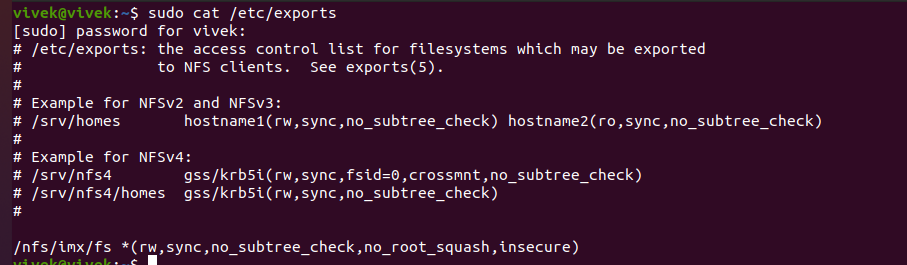
sysvinit version that comes with the RFS image: Sysvinit version 3.01 does not allow root login through NFS boot. But sysvinit version 2.88 works fine with the existing NFS boot settings.
So I started working on the nfsboot parameters, and found that two new nfs parameters had to be added: no_root_squash,insecure
- Mark as New
- Bookmark
- Subscribe
- Mute
- Subscribe to RSS Feed
- Permalink
- Report Inappropriate Content
the root cause of the issue is:
sysvinit version that comes with the RFS image: Sysvinit version 3.01 does not allow root login through NFS boot. But sysvinit version 2.88 works fine with the existing NFS boot settings.
So I started working on the nfsboot parameters, and found that two new nfs parameters had to be added: no_root_squash,insecure
 joanxie
- Mark as New
- Bookmark
- Subscribe
- Mute
- Subscribe to RSS Feed
- Permalink
- Report Inappropriate Content
did you find wic image in your images file? after you flash this image to the board, the password is "root", pls try this, if I misunderstand your question, pls tell me
- Mark as New
- Bookmark
- Subscribe
- Mute
- Subscribe to RSS Feed
- Permalink
- Report Inappropriate Content
Hi
Thanks for the reply,
I am booting the board through NFS. So what I did is that I mounted the partition in core-image-minimal-xxxx-xxx.wic through:
1) losetup -o 33554432 /dev/loop1 core-image-minimal-imx6dlsabresd-20230110062552.rootfs.wic
2) mount /dev/loop1 /mnt/
3) copied the contents of the /mnt/ folder to my NFS folder. After booting my board and tried to login I see the "Login incorrect" message for user: root and password: root.
Note: I have changed the default systemd to sysvinit in "meta-imx/meta-sdk/conf/distro/include/fsl-imx-preferred-env.inc" will that cause any problems?
joanxie
- Mark as New
- Bookmark
- Subscribe
- Mute
- Subscribe to RSS Feed
- Permalink
- Report Inappropriate Content
1) refer to the link https://docs.yoctoproject.org/ref-manual/classes.html#extrausers-bbclass
2)remove debug-weaks in the local.conf
This is a reference local.conf change; where the debug-tweaks has been deleted and line 30-35 showing how to set root password and add user named as user1; which has sudo capability.
MACHINE ??= 'imx6ulevk'
DISTRO ?= 'fsl-imx-fb'
PACKAGE_CLASSES ?= "package_rpm"
USER_CLASSES ?= "buildstats image-mklibs image-prelink"
PATCHRESOLVE = "noop"
BB_DISKMON_DIRS ??= "\
STOPTASKS,${TMPDIR},1G,100K \
STOPTASKS,${DL_DIR},1G,100K \
STOPTASKS,${SSTATE_DIR},1G,100K \
STOPTASKS,/tmp,100M,100K \
ABORT,${TMPDIR},100M,1K \
ABORT,${DL_DIR},100M,1K \
ABORT,${SSTATE_DIR},100M,1K \
ABORT,/tmp,10M,1K"
PACKAGECONFIG_append_pn-qemu-native = " sdl"
PACKAGECONFIG_append_pn-nativesdk-qemu = " sdl"
CONF_VERSION = "1"
DL_DIR ?= "/home/nxa15297/mydata/aosp/YoctoDN-4.9/downloads"
ACCEPT_FSL_EULA = "1"
BOOT_SPACE = "65536"
IMAGE_OVERHEAD_FACTOR = "1.5"
CORE_IMAGE_EXTRA_INSTALL += " cryptsetup cryptodev-module cryptodev-tests openssh dhcp-client dhcp-server connman"
TOOLCHAIN_HOST_TASK_append = " nativesdk-python nativesdk-python-pycrypto"
IMAGE_INSTALL_append = " sudo"
INHERIT += " extrausers"
EXTRA_USERS_PARAMS = "\
usermod -P 1876*18 root;\
useradd -P 2015*08 user1;\
usermod -a -G sudo user1;\
"refer to the document
if you couldn't access it, pls refer to:
To set up proper sudo access for use1, bootup the system and login as root using the above root password. Then using visudo to modify the following line as:
## Uncomment to allow members of group sudo to execute any command
%sudo ALL=(ALL) NOPASSWD: ALL
