
- Forums
- Product Forums
- General Purpose MicrocontrollersGeneral Purpose Microcontrollers
- i.MX Forumsi.MX Forums
- QorIQ Processing PlatformsQorIQ Processing Platforms
- Identification and SecurityIdentification and Security
- Power ManagementPower Management
- Wireless ConnectivityWireless Connectivity
- RFID / NFCRFID / NFC
- Advanced AnalogAdvanced Analog
- Neural Processing UnitsNeural Processing Units
- MCX Microcontrollers
- S32G
- S32K
- S32V
- MPC5xxx
- Other NXP Products
- S12 / MagniV Microcontrollers
- Powertrain and Electrification Analog Drivers
- Sensors
- Vybrid Processors
- Digital Signal Controllers
- 8-bit Microcontrollers
- ColdFire/68K Microcontrollers and Processors
- PowerQUICC Processors
- OSBDM and TBDML
- S32M
- S32Z/E
-
- Solution Forums
- Software Forums
- MCUXpresso Software and ToolsMCUXpresso Software and Tools
- CodeWarriorCodeWarrior
- MQX Software SolutionsMQX Software Solutions
- Model-Based Design Toolbox (MBDT)Model-Based Design Toolbox (MBDT)
- FreeMASTER
- eIQ Machine Learning Software
- Embedded Software and Tools Clinic
- S32 SDK
- S32 Design Studio
- GUI Guider
- Zephyr Project
- Voice Technology
- Application Software Packs
- Secure Provisioning SDK (SPSDK)
- Processor Expert Software
- Generative AI & LLMs
-
- Topics
- Mobile Robotics - Drones and RoversMobile Robotics - Drones and Rovers
- NXP Training ContentNXP Training Content
- University ProgramsUniversity Programs
- Rapid IoT
- NXP Designs
- SafeAssure-Community
- OSS Security & Maintenance
- Using Our Community
-
- Cloud Lab Forums
-
- Knowledge Bases
- ARM Microcontrollers
- i.MX Processors
- Identification and Security
- Model-Based Design Toolbox (MBDT)
- QorIQ Processing Platforms
- S32 Automotive Processing Platform
- Wireless Connectivity
- CodeWarrior
- MCUXpresso Suite of Software and Tools
- MQX Software Solutions
- RFID / NFC
- Advanced Analog
- Neural Processing Units
-
- NXP Tech Blogs
- Home
- :
- i.MX Forums
- :
- i.MX Processors
- :
- Re: MfgTool2.exe unable to start
MfgTool2.exe unable to start
- Subscribe to RSS Feed
- Mark Topic as New
- Mark Topic as Read
- Float this Topic for Current User
- Bookmark
- Subscribe
- Mute
- Printer Friendly Page

- Mark as New
- Bookmark
- Subscribe
- Mute
- Subscribe to RSS Feed
- Permalink
- Report Inappropriate Content
Hi,
I'm working with i.MX6 SoloLite EVK board.
I unzipped android_kk4.4.2_1.0.0-ga_tools and copied the files to the directory as specified in the quick start guide. But when I tried to run MfgTool2.exe I got this message.
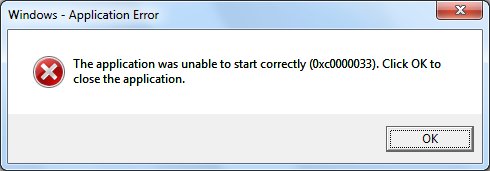
My OS is Windows 7 professional.
Can anybody help me with this?
Thanks.
Bruce
Solved! Go to Solution.
- Mark as New
- Bookmark
- Subscribe
- Mute
- Subscribe to RSS Feed
- Permalink
- Report Inappropriate Content
Hi, Carlos,
I moved the tools to another folder and it works now.
The old location of MfgTool2.exe is C:\00-mydoc\30_mc3000\Android\freescale\android_kk4.4.2_1.0.0-ga_tools\android_kk4.4.2_1.0\android_kk4.4.2_1.0.0-ga_tools\Mfgtools-Rel-13.01.00_ER_MX6SL_UPDATER.tar\Mfgtools-Rel-13.01.00_ER_MX6SL_UPDATER\Mfgtools-Rel-13.01.00_ER_MX6SL_UPDATER.
The new location is C:\Edison\Mfgtools-Rel-13.01.00_ER_MX6SL_UPDATER.
Regards,
Bruce

 CarlosCasillas
- Mark as New
- Bookmark
- Subscribe
- Mute
- Subscribe to RSS Feed
- Permalink
- Report Inappropriate Content
Hi Bruce,
Are you using a 64-bit Windows machine? Have you tried with 32-bit Windows? If you get errors when opening the tool, did you check the information saved on the log file?
Hope this will be useful for you.
Best regards!
/Carlos
-----------------------------------------------------------------------------------------------------------------------
Note: If this post answers your question, please click the Correct Answer button. Thank you!
-----------------------------------------------------------------------------------------------------------------------
- Mark as New
- Bookmark
- Subscribe
- Mute
- Subscribe to RSS Feed
- Permalink
- Report Inappropriate Content
Hi Carlos,
I have 64-bit machine but with 32-bit Windows 7 Professional SP1.
I deleted the old log file and tried the tool but no new log file generated.
This tool is from package android_kk4.4.2_1.0.0-ga_tools but after I tried the tool from package Mfgtools-Rel-4.1.0_130816_MX6SL_UPDATER the download process is good on my computer. But I have another issue now. The SD card can not boot the board.
Thank you very much for your support.
Regards,
Bruce
CarlosCasillas
- Mark as New
- Bookmark
- Subscribe
- Mute
- Subscribe to RSS Feed
- Permalink
- Report Inappropriate Content
Hi Bruce,
Have you tried opening the GUI in a PC with all the Windows updates installed and with Admin privileges?
Regarding the SD boot, have you ensured that you copied the files for SD boot, and the XML is properly pointed, besides of configuring the boot switches for the SD boot on the proper SD socket?
Hope this will be useful for you.
Best regards!
/Carlos
-----------------------------------------------------------------------------------------------------------------------
Note: If this post answers your question, please click the Correct Answer button. Thank you!
-----------------------------------------------------------------------------------------------------------------------
- Mark as New
- Bookmark
- Subscribe
- Mute
- Subscribe to RSS Feed
- Permalink
- Report Inappropriate Content
Hi, Carlos,
I moved the tools to another folder and it works now.
The old location of MfgTool2.exe is C:\00-mydoc\30_mc3000\Android\freescale\android_kk4.4.2_1.0.0-ga_tools\android_kk4.4.2_1.0\android_kk4.4.2_1.0.0-ga_tools\Mfgtools-Rel-13.01.00_ER_MX6SL_UPDATER.tar\Mfgtools-Rel-13.01.00_ER_MX6SL_UPDATER\Mfgtools-Rel-13.01.00_ER_MX6SL_UPDATER.
The new location is C:\Edison\Mfgtools-Rel-13.01.00_ER_MX6SL_UPDATER.
Regards,
Bruce
