
- Forums
- Product Forums
- General Purpose MicrocontrollersGeneral Purpose Microcontrollers
- i.MX Forumsi.MX Forums
- QorIQ Processing PlatformsQorIQ Processing Platforms
- Identification and SecurityIdentification and Security
- Power ManagementPower Management
- Wireless ConnectivityWireless Connectivity
- RFID / NFCRFID / NFC
- Advanced AnalogAdvanced Analog
- MCX Microcontrollers
- S32G
- S32K
- S32V
- MPC5xxx
- Other NXP Products
- S12 / MagniV Microcontrollers
- Powertrain and Electrification Analog Drivers
- Sensors
- Vybrid Processors
- Digital Signal Controllers
- 8-bit Microcontrollers
- ColdFire/68K Microcontrollers and Processors
- PowerQUICC Processors
- OSBDM and TBDML
- S32M
- S32Z/E
-
- Solution Forums
- Software Forums
- MCUXpresso Software and ToolsMCUXpresso Software and Tools
- CodeWarriorCodeWarrior
- MQX Software SolutionsMQX Software Solutions
- Model-Based Design Toolbox (MBDT)Model-Based Design Toolbox (MBDT)
- FreeMASTER
- eIQ Machine Learning Software
- Embedded Software and Tools Clinic
- S32 SDK
- S32 Design Studio
- GUI Guider
- Zephyr Project
- Voice Technology
- Application Software Packs
- Secure Provisioning SDK (SPSDK)
- Processor Expert Software
- Generative AI & LLMs
-
- Topics
- Mobile Robotics - Drones and RoversMobile Robotics - Drones and Rovers
- NXP Training ContentNXP Training Content
- University ProgramsUniversity Programs
- Rapid IoT
- NXP Designs
- SafeAssure-Community
- OSS Security & Maintenance
- Using Our Community
-
- Cloud Lab Forums
-
- Knowledge Bases
- ARM Microcontrollers
- i.MX Processors
- Identification and Security
- Model-Based Design Toolbox (MBDT)
- QorIQ Processing Platforms
- S32 Automotive Processing Platform
- Wireless Connectivity
- CodeWarrior
- MCUXpresso Suite of Software and Tools
- MQX Software Solutions
- RFID / NFC
- Advanced Analog
-
- NXP Tech Blogs
MCUXPresso IDE check Link application to RAM burn error

Hi,
I used MCUXPresso IDE to import a project evkmimxrt1020_iled_blinky, checked Link application to RAM, and compiled successfully. However, the following errors occurred when downloading to the EVK board, please help to analyze the problem,thanks.


Hi @jarman_zhou ,
Since the application is link to SRAM, it needn't flash. But it seems you want to program it to flash. You method won't work.
To download SRA</SDRAM application to flash, lease refer to this post.
https://community.nxp.com/t5/i-MX-RT-Knowledge-Base/I-MX-RT-How-to-booting-to-SDRAM/ta-p/1125054
Regards,
Jing
Hi.@jingpan,
Thank you for your reply!
I tried to operate it according to the link document you provided, but failed. The following are my steps and results.
1.Add DCD by MCUxpresso IDE
I completed steps 1-6 according to the article,Then use MCUBootUtility to download.s19 files to NOR flash,The following error message is displayed:

2.Add DCD by MCUBootUtility
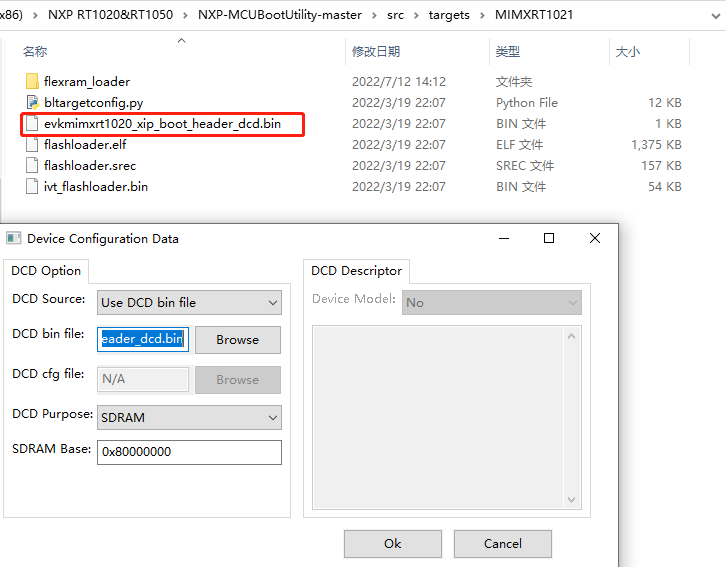
In step 3, set the Device Configuration Data,I choose to C:\Users\Admin\Desktop\NXP-MCUBootUtility-master\src\targets\MIMXRT1021\evkmimxrt1020_xip_boot_header_dcd.bin,The following error is displayed when you click OK:

Regards,
jarman
Hi @jarman_zhou ,
Where do you want the application run, SDRAM or DTC or OCRAM? All of them need to put the application at base_address+0x2000. Please try the second method again. I don't know why there is "permission denied" in your log. Is there security issue?
Regards
Jing
Hi,@jingpan
Thank you for your reply.
I put MCUBootUtility into another directory to successfully burn the application. I ran the application in SDRAM, but the program did not run after the burning, and there was no print out of the serial port. Here are my specific operation steps.
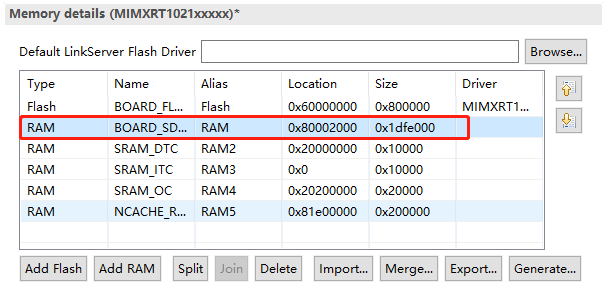
1.Memory configuration, specify RAM as SDRAM and modify the offset address.
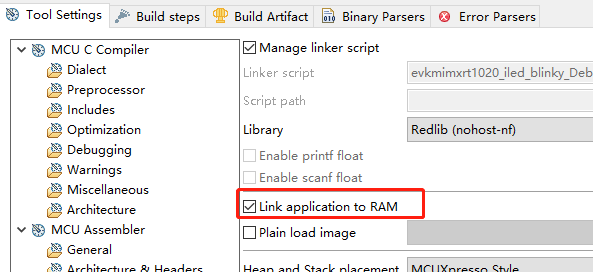
2.Select Link application to RAM.
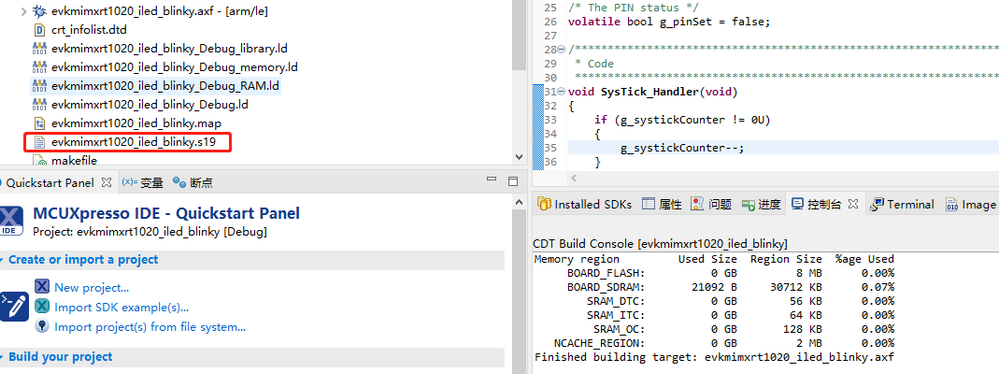
3.Compile the project and generate the.s19 file.
4.Configuration of DCD and burn the image.

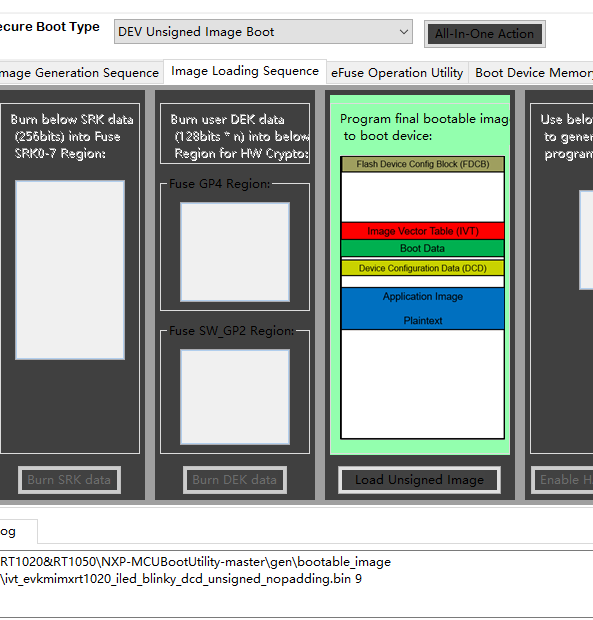
The above is my detailed operation steps.
When I tried to run in DTC, the LED was blinking but the debugging serial port still did not print.
Regards
Jarman
