
- Forums
- Product Forums
- General Purpose MicrocontrollersGeneral Purpose Microcontrollers
- i.MX Forumsi.MX Forums
- QorIQ Processing PlatformsQorIQ Processing Platforms
- Identification and SecurityIdentification and Security
- Power ManagementPower Management
- Wireless ConnectivityWireless Connectivity
- RFID / NFCRFID / NFC
- Advanced AnalogAdvanced Analog
- MCX Microcontrollers
- S32G
- S32K
- S32V
- MPC5xxx
- Other NXP Products
- S12 / MagniV Microcontrollers
- Powertrain and Electrification Analog Drivers
- Sensors
- Vybrid Processors
- Digital Signal Controllers
- 8-bit Microcontrollers
- ColdFire/68K Microcontrollers and Processors
- PowerQUICC Processors
- OSBDM and TBDML
- S32M
- S32Z/E
-
- Solution Forums
- Software Forums
- MCUXpresso Software and ToolsMCUXpresso Software and Tools
- CodeWarriorCodeWarrior
- MQX Software SolutionsMQX Software Solutions
- Model-Based Design Toolbox (MBDT)Model-Based Design Toolbox (MBDT)
- FreeMASTER
- eIQ Machine Learning Software
- Embedded Software and Tools Clinic
- S32 SDK
- S32 Design Studio
- GUI Guider
- Zephyr Project
- Voice Technology
- Application Software Packs
- Secure Provisioning SDK (SPSDK)
- Processor Expert Software
- Generative AI & LLMs
-
- Topics
- Mobile Robotics - Drones and RoversMobile Robotics - Drones and Rovers
- NXP Training ContentNXP Training Content
- University ProgramsUniversity Programs
- Rapid IoT
- NXP Designs
- SafeAssure-Community
- OSS Security & Maintenance
- Using Our Community
-
- Cloud Lab Forums
-
- Knowledge Bases
- ARM Microcontrollers
- i.MX Processors
- Identification and Security
- Model-Based Design Toolbox (MBDT)
- QorIQ Processing Platforms
- S32 Automotive Processing Platform
- Wireless Connectivity
- CodeWarrior
- MCUXpresso Suite of Software and Tools
- MQX Software Solutions
- RFID / NFC
- Advanced Analog
-
- NXP Tech Blogs
- Home
- :
- i.MX Forums
- :
- i.MX Processors
- :
- Re: How to build right version ATF+OpteeOS+uboot on i.MX8MQ-EVK ?
How to build right version ATF+OpteeOS+uboot on i.MX8MQ-EVK ?
- Subscribe to RSS Feed
- Mark Topic as New
- Mark Topic as Read
- Float this Topic for Current User
- Bookmark
- Subscribe
- Mute
- Printer Friendly Page

- Mark as New
- Bookmark
- Subscribe
- Mute
- Subscribe to RSS Feed
- Permalink
- Report Inappropriate Content
How can I build right version ATF + OpteeOS + uboot on i.MX8Mq-EVK board ? I try imx-atf + imx-optee-os + uboot-imx and imx-mkimge, not any branch is run OK.
Solved! Go to Solution.
- Mark as New
- Bookmark
- Subscribe
- Mute
- Subscribe to RSS Feed
- Permalink
- Report Inappropriate Content
Please navigate to the following link and download the archive containing Linux Documentation:
https://www.nxp.com/design/i.mx-developer-resources/i.mx-software-and-development-tool:IMX-SW
Inside you will find "i.MX Yocto Project User's Guide". Please follow the instructions to setup a Ubuntu host with the yocto environment. You can then build a SD-Card image and flash it. ATF is required on imx 8 and enabled through imx-atf by default. optee-os requires u-boot SPL to load it, which is used by default with imx8m, as well as optee-os itself. You can try running xtest to see if it is operational. If you use the yocto build, you don't need to run imx-mkimage manually. To be sure, check the output of "bitbake -e <YOUR_IMAGE> | grep IMAGE_INSTALL=.*optee", since packagegroup-fsl-optee must be included in your image, which happens if DISTRO_FEATURES and MACHINE_FEATURES include "optee".
Hope this helps!
- Mark as New
- Bookmark
- Subscribe
- Mute
- Subscribe to RSS Feed
- Permalink
- Report Inappropriate Content
Please navigate to the following link and download the archive containing Linux Documentation:
https://www.nxp.com/design/i.mx-developer-resources/i.mx-software-and-development-tool:IMX-SW
Inside you will find "i.MX Yocto Project User's Guide". Please follow the instructions to setup a Ubuntu host with the yocto environment. You can then build a SD-Card image and flash it. ATF is required on imx 8 and enabled through imx-atf by default. optee-os requires u-boot SPL to load it, which is used by default with imx8m, as well as optee-os itself. You can try running xtest to see if it is operational. If you use the yocto build, you don't need to run imx-mkimage manually. To be sure, check the output of "bitbake -e <YOUR_IMAGE> | grep IMAGE_INSTALL=.*optee", since packagegroup-fsl-optee must be included in your image, which happens if DISTRO_FEATURES and MACHINE_FEATURES include "optee".
Hope this helps!
- Mark as New
- Bookmark
- Subscribe
- Mute
- Subscribe to RSS Feed
- Permalink
- Report Inappropriate Content
Hi Matthias,
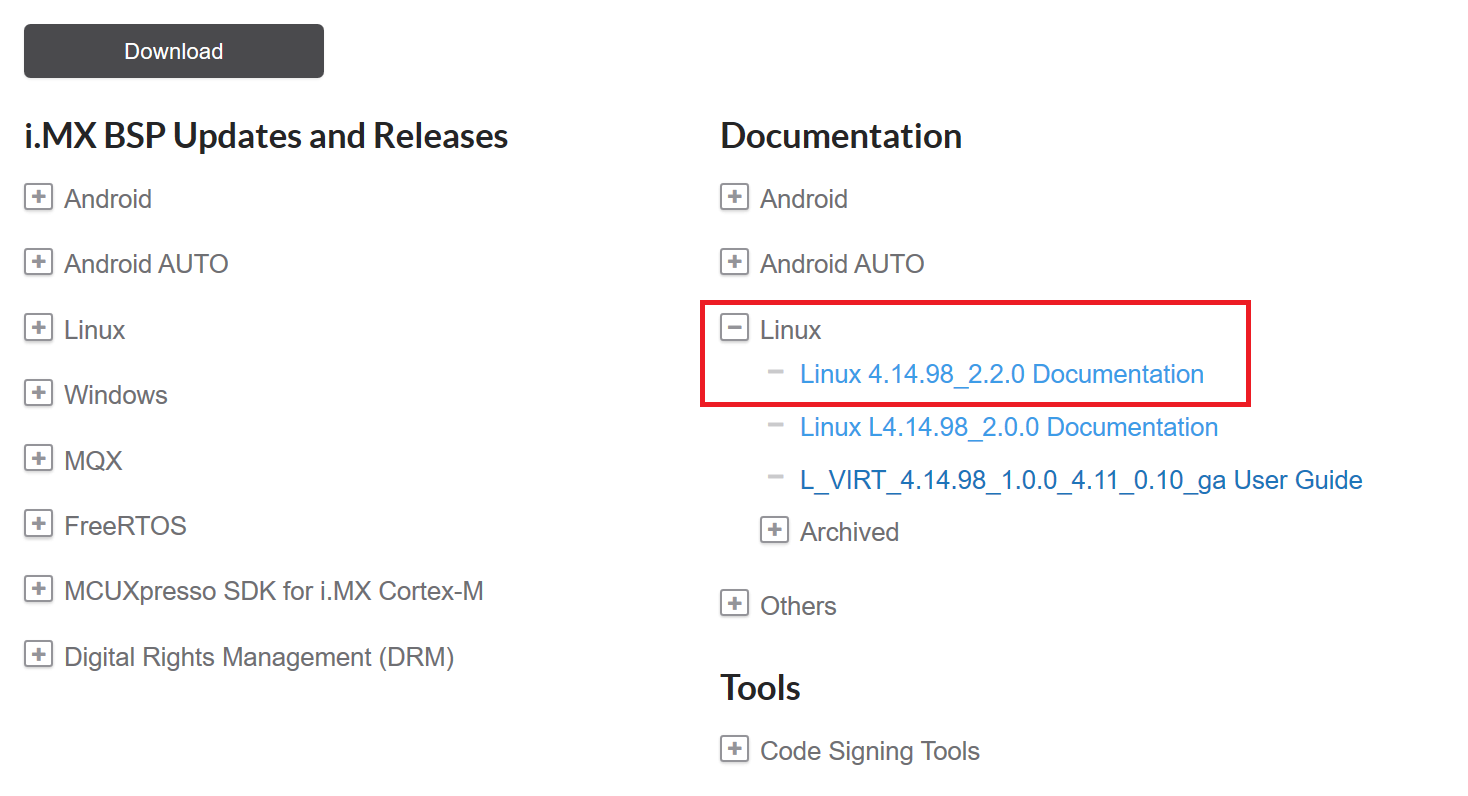
I can't find the document "i.MX Yocto Project User's Guide" in the link https://www.nxp.com/design/i.mx-developer-resources/i.mx-software-and-development-tool:IMX-SW . Can you give me more actual link ? Thank you.
- Mark as New
- Bookmark
- Subscribe
- Mute
- Subscribe to RSS Feed
- Permalink
- Report Inappropriate Content
This document is included inside an archive containing multiple documents. I cannot, at least to my current knowledge, link to only a specific one. However, if you follow my previous instructions, you should be able to acquire the document. For example, you could try this Archive (I'm not sure which version you would need):
- Mark as New
- Bookmark
- Subscribe
- Mute
- Subscribe to RSS Feed
- Permalink
- Report Inappropriate Content
Mathias,
I got it and finished this issue. Thank your help.
