
- Forums
- Product Forums
- General Purpose MicrocontrollersGeneral Purpose Microcontrollers
- i.MX Forumsi.MX Forums
- QorIQ Processing PlatformsQorIQ Processing Platforms
- Identification and SecurityIdentification and Security
- Power ManagementPower Management
- Wireless ConnectivityWireless Connectivity
- RFID / NFCRFID / NFC
- Advanced AnalogAdvanced Analog
- Neural Processing UnitsNeural Processing Units
- MCX Microcontrollers
- S32G
- S32K
- S32V
- MPC5xxx
- Other NXP Products
- S12 / MagniV Microcontrollers
- Powertrain and Electrification Analog Drivers
- Sensors
- Vybrid Processors
- Digital Signal Controllers
- 8-bit Microcontrollers
- ColdFire/68K Microcontrollers and Processors
- PowerQUICC Processors
- OSBDM and TBDML
- S32M
- S32Z/E
-
- Solution Forums
- Software Forums
- MCUXpresso Software and ToolsMCUXpresso Software and Tools
- CodeWarriorCodeWarrior
- MQX Software SolutionsMQX Software Solutions
- Model-Based Design Toolbox (MBDT)Model-Based Design Toolbox (MBDT)
- FreeMASTER
- eIQ Machine Learning Software
- Embedded Software and Tools Clinic
- S32 SDK
- S32 Design Studio
- GUI Guider
- Zephyr Project
- Voice Technology
- Application Software Packs
- Secure Provisioning SDK (SPSDK)
- Processor Expert Software
- Generative AI & LLMs
-
- Topics
- Mobile Robotics - Drones and RoversMobile Robotics - Drones and Rovers
- NXP Training ContentNXP Training Content
- University ProgramsUniversity Programs
- Rapid IoT
- NXP Designs
- SafeAssure-Community
- OSS Security & Maintenance
- Using Our Community
-
- Cloud Lab Forums
-
- Knowledge Bases
- ARM Microcontrollers
- i.MX Processors
- Identification and Security
- Model-Based Design Toolbox (MBDT)
- QorIQ Processing Platforms
- S32 Automotive Processing Platform
- Wireless Connectivity
- CodeWarrior
- MCUXpresso Suite of Software and Tools
- MQX Software Solutions
- RFID / NFC
- Advanced Analog
- Neural Processing Units
-
- NXP Tech Blogs
How to Flash Android 9 on IMX8 with 128G eMMC

Hi Sir,
My customer want to expand EMMC size from 32GB to 128GB. We modify and new a 128GB bpt file as below.
1.
{
"settings": {
"disk_size": "128 GiB",
"disk_alignment": 2097152,
"first_partition_offset": 8388608
},
2. Modify ~/ANDROID_CODEBASE/device/fsl/imx8m/rom5720_a1/BoardConfig.mk
# Support gpt
BOARD_BPT_INPUT_FILES += device/fsl/common/partition/device-partitions-13GB-ab.bpt
ADDITION_BPT_PARTITION = partition-table-7GB:device/fsl/common/partition/device-partitions-7GB-ab.bpt \
partition-table-128GB:device/fsl/common/partition/device-partitions-128GB-ab.bpt \
partition-table-28GB:device/fsl/common/partition/device-partitions-28GB-ab.bpt
We try to use uuu tool and get a fail when use download command.
./uuu_imx_android_flash.sh -f imx8mq -a -e -c 128
Please help to modify a "128GB dual-bootloader" .bpt file for 128G eMMC.
Thansk~

I suspect 119 is too big to accommodate the OS files. Please try 112 instead.
This is what i did for MX8QXP_MEK, and i was able to extend the userdata size to 112GB.
1. Copy partitions-28GB-ab.bpt, paste and rename it to partitions-112GB-ab.bpt. Change 28 to 112 as follow
{
"settings": {
"disk_size": "112 GiB",
"disk_alignment": 2097152,
"first_partition_offset": 8388608
},
2. Modify ~/ANDROID_CODEBASE/device/fsl/imx8m/rom5720_a1/BoardConfig.mk
# Support gpt
BOARD_BPT_INPUT_FILES += device/fsl/common/partition/device-partitions-13GB-ab.bpt
ADDITION_BPT_PARTITION = partition-table-7GB:device/fsl/common/partition/device-partitions-7GB-ab.bpt \
partition-table-112GB:device/fsl/common/partition/device-partitions-112GB-ab.bpt \
partition-table-28GB:device/fsl/common/partition/device-partitions-28GB-ab.bpt
3. Edit uuu_imx_android_flash.sh or uuu_imx_android_flash.bat script to accept 112, then use following command.
./uuu_imx_android_flash.sh -f imx8mq -a -e -c 112
Boot up the system and perform factory reset after flashing the image. Good luck.


The fail maybe caused by the 119 size, here recommend you to try the smaller size, such as 40, 60,80, 100, 116 and so on. If lower size works OK, add step by steps.
By the way, only modify the file device-partitions-128GB-ab.bpt the
"disk_size": "** GiB"
Hi Sir,
My customer first change to 40GB emmc size , it's can boot up system . We will try 60,80 100 116size step by step , and share the fail log to you.
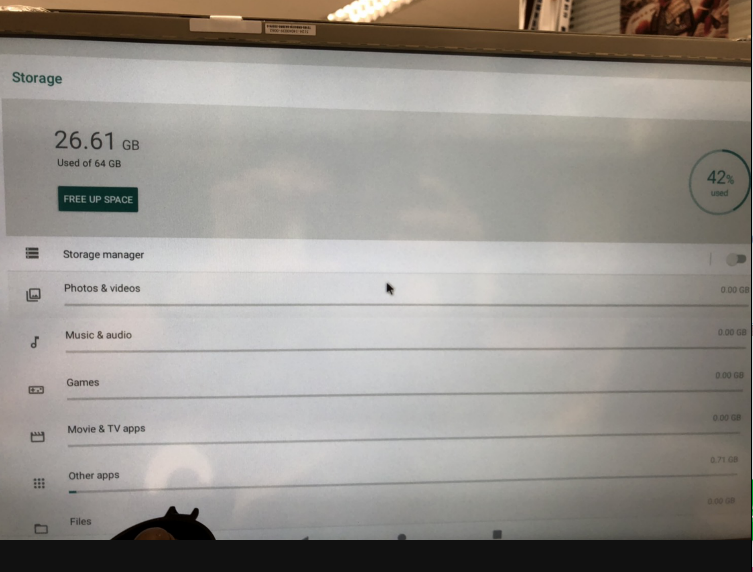
Hi Sir,
We change Emmc size to 80GB and get below error log.
........ wrote 12722176 bytes to 'vendor_a'
request 00000000ba29cbc0 was not queued to ep1in-bulk
request 00000000ba29cbc0 was not queued to ep1in-bulk
request 00000000ba29cbc0 was not queued to ep1in-bulk
Starting download of 4096 bytes
request 00000000ba29cbc0 was not queued to ep1in-bulk
request 00000000ba29cbc0 was not queued to ep1in-bulk
downloading of 4096 bytes finished
writing to partition 'vbmeta_a'
Initializing 'vbmeta_a'
switch to partitions #0, OK
mmc0(part 0) is current device
Writing 'vbmeta_a'
MMC write: dev # 0, block # 167759872, count 8 ... 8 blocks written: OK
Writing 'vbmeta_a' DONE!
request 00000000ba29cbc0 was not queued to ep1in-bulk
erase target is MMC:0
Erasing blocks 7569408 to 7577600 due to alignment
........ erased 4194304 bytes from 'misc'
request 00000000ba29cbc0 was not queued to ep1in-bulk
erase target is MMC:0
Erasing blocks 7581696 to 7583744 due to alignment
........ erased 1048576 bytes from 'presistdata'
request 00000000ba29cbc0 was not queued to ep1in-bulk
erase target is MMC:0
Erasing blocks 167755776 to 167757824 due to alignment
........ erased 1048576 bytes from 'fbmisc'
request 00000000ba29cbc0 was not queued to ep1in-bulk
avb_ab_flow.c:30: ERROR: Magic is incorrect.
avb_ab_flow.c:112: ERROR: Error validating A/B metadata from disk. Resetting and writing new A/B metadata to disk.
request 00000000ba29cbc0 was not queued to ep1in-bulk
erase target is MMC:0
Erasing blocks 8634368 to 167755776 due to alignment
Hi Sir,
112GB size still failure , and 60GB size use uuu download normal .
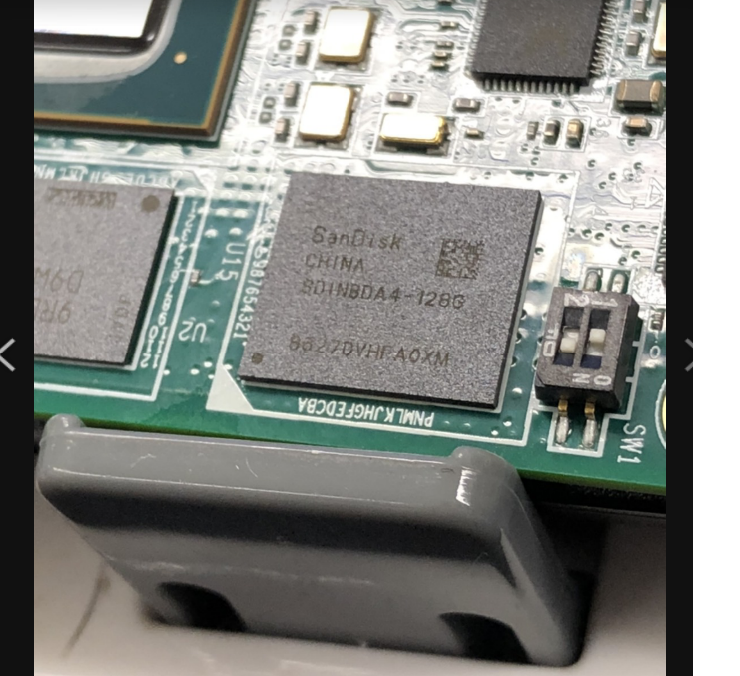
Hi Sir,
Do you have any update~ Thanks!
We want to change Emmc size to 128GB not 28GB .So We use 128GB .bpt file to generate 128GB .img file You means can use partition-table.img to burn 128GB Emmc ?
The test result is still show 32GB not 128GB as below post . Please help to check it. Thanks~
