
- Forums
- Product Forums
- General Purpose MicrocontrollersGeneral Purpose Microcontrollers
- i.MX Forumsi.MX Forums
- QorIQ Processing PlatformsQorIQ Processing Platforms
- Identification and SecurityIdentification and Security
- Power ManagementPower Management
- Wireless ConnectivityWireless Connectivity
- RFID / NFCRFID / NFC
- Advanced AnalogAdvanced Analog
- Neural Processing UnitsNeural Processing Units
- MCX Microcontrollers
- S32G
- S32K
- S32V
- MPC5xxx
- Other NXP Products
- S12 / MagniV Microcontrollers
- Powertrain and Electrification Analog Drivers
- Sensors
- Vybrid Processors
- Digital Signal Controllers
- 8-bit Microcontrollers
- ColdFire/68K Microcontrollers and Processors
- PowerQUICC Processors
- OSBDM and TBDML
- S32M
- S32Z/E
-
- Solution Forums
- Software Forums
- MCUXpresso Software and ToolsMCUXpresso Software and Tools
- CodeWarriorCodeWarrior
- MQX Software SolutionsMQX Software Solutions
- Model-Based Design Toolbox (MBDT)Model-Based Design Toolbox (MBDT)
- FreeMASTER
- eIQ Machine Learning Software
- Embedded Software and Tools Clinic
- S32 SDK
- S32 Design Studio
- GUI Guider
- Zephyr Project
- Voice Technology
- Application Software Packs
- Secure Provisioning SDK (SPSDK)
- Processor Expert Software
- Generative AI & LLMs
-
- Topics
- Mobile Robotics - Drones and RoversMobile Robotics - Drones and Rovers
- NXP Training ContentNXP Training Content
- University ProgramsUniversity Programs
- Rapid IoT
- NXP Designs
- SafeAssure-Community
- OSS Security & Maintenance
- Using Our Community
-
- Cloud Lab Forums
-
- Knowledge Bases
- ARM Microcontrollers
- i.MX Processors
- Identification and Security
- Model-Based Design Toolbox (MBDT)
- QorIQ Processing Platforms
- S32 Automotive Processing Platform
- Wireless Connectivity
- CodeWarrior
- MCUXpresso Suite of Software and Tools
- MQX Software Solutions
- RFID / NFC
- Advanced Analog
- Neural Processing Units
-
- NXP Tech Blogs

Hello,
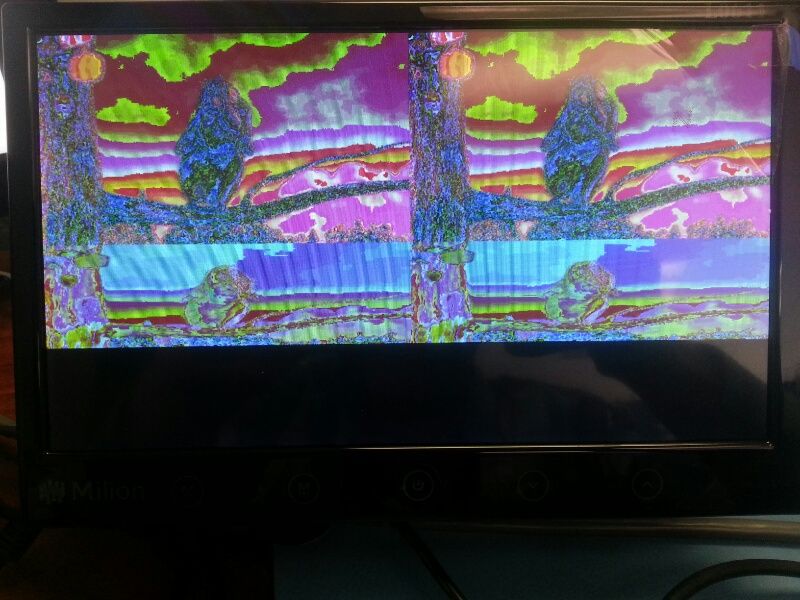
I am having problems with distorted video. I have done quite a bit of testing.
Attached is a picture of the issue (toward bottom)
My gStreamer pipelines must be correct because other resolutions work fine.
The problem only occurs when you play a video that has the same resolution as the display.
Display is HDMI.
For instance, a 1920x1080p video played on a 1280x720p video plays perfect. A 1280x720p video played on a 1920x1080p video plays perfect.
But a 1280x720p video played on a 1280x720p Display plays distorted. Also a 1920x1080p video played on a 1920x1080p display plays distorted.
I have tested Yocto 1.5 (3.10.17) and Yocto 1.3 (kernel 3.0.35)
Below is some snippets of information from my system that may help.
I am using the Big Buck Bunny Video for testing as well as video test source (free download HERE)
I am not sure if the issue is in the driver or the gstreamer plugin?
___________________________________
INFO BELOW:
PIPELINE:
gst-launch videotestsrc ! video/x-raw-yuv,width=1280,height=720 ! mfw_v4lsink device=/dev/video16
Other info:
root@ventana:~# cat /sys/class/graphics/fb0/mode
S:1280x720p-60
root@ventana:~# cat /sys/class/graphics/fb0/modes
S:1920x1080p-60
S:1920x1080p-50
S:1280x720p-60
S:1280x720p-50
S:720x576p-50
S:720x576p-50
S:720x480p-60
S:720x480p-60
V:640x480p-60
D:1280x720p-60
V:640x480p-60
Poky 8.0.2 (Yocto Project 1.3.2 Reference Distro) 1.3.2 ventana ttymxc1
ventana login: root
root@ventana:~# uname -a
Linux ventana 3.0.35-4.4.0-gateworks+yocto+gaabbed9 #1 SMP PREEMPT Fri May 2 09:54:05 PDT 2014 armv7l GNU/Linux
root@ventana:~# gst-inspect | grep imx
vpu.imx: vpudec: VPU-based video decoder
vpu.imx: vpuenc: VPU-based video encoder
v4lsink.imx: mfw_v4lsink: v4l2 video sink
isink.imx: mfw_isink: IPU-based video sink
tvsrc.imx: tvsrc: v4l2 based tv src
mp3enc.imx: mfw_mp3encoder: mp3 audio encoder
v4lsrc.imx: mfw_v4lsrc: v4l2 based camera src
audiopeq.imx: mfw_audio_pp: audio post equalizer
amrdec.imx: mfw_amrdecoder: amr audio decoder
aiur.imx: webm: webm
aiur.imx: aiurdemux: aiur universal demuxer
beep.imx: ac3: ac3
beep.imx: 3ca: ac3
beep.imx: beepdec: beep audio decoder
beep.imx: beepdec.vorbis: Vorbis decoder
beep.imx: beepdec.ac3: AC3 decoder
beep.imx: beepdec.wma: WMA decoder
beep.imx: beepdec.mp3: MP3 decoder
beep.imx: beepdec.aac: AAC LC decoder
ipucsc.imx: mfw_ipucsc: IPU-based video converter
aacdec.imx: mfw_aacdecoder: aac audio decoder
vorbisdec.imx: mfw_vorbisdecoder: vorbis audio decoder
Console output after running command:
root@ventana:~# gst-launch videotestsrc ! video/x-raw-yuv,width=1280,height=720 ! mfw_v4lsink device=/dev/video16
this is powerful mx6q
MFW_GST_V4LSINK_PLUGIN 3.0.1 build on Apr 29 2014 02:30:21.
Setting pipeline to PAUSED ...
Pipeline is PREROLLING ...
[ 409.674205] mxc_v4l2_output mxc_v4l2_output.0: Bypass IC.
>>V4L_SINK: Actually buffer status:
hardware buffer : 12
software buffer : 0
Pipeline is PREROLLED ...
Setting pipeline to PLAYING ...
full screen size:1280x720
[V4L Update Display]: left=0, top=0, width=1280, height=720
New clock: GstSystemClock
Here is some more console output for a simple gplay with a Big Buck Bunny Video:
root@ventana:~# gplay /media/sda1/big_buck_bunny_720p_h264.mov
playbin2 is employed!
fsl_player_init(): Successfully initialize!
fsl_player_set_media_location(): filename=/media/sda1/big_buck_bunny_720p_h264.mov
[Stopped ][Vol=01][00:00:00/00:00:00][fps:0]Aiur: 3.0.1
Core: MPEG4PARSER_06.04.22 build on Aug 22 2012 09:58:20
mime: video/quicktime; audio/x-m4a; application/x-3gp
file: /usr/lib/imx-mm/parser/lib_mp4_parser_arm11_elinux.so
Content Info:
URI:
file:///media/sda1/big_buck_bunny_720p_h264.mov
Idx File:
/home/root/.aiur/.media.sda1.big_buck_bunny_720p_h264.mov.aidx
Seekable : Yes
Size(byte): 416751190
Movie Info:
Seekable : Yes
Live : No
Duration : 0:09:56.461696000
ReadMode : File
Track : 3
Track 00 [video_0000] Enabled
Duration: 0:09:56.458304000
Language: und
Mime:
video/x-h264, parsed=(boolean)true, width=(int)1280, height=(int)720, framerate=
(fraction)24/1, codec_data=(buffer)00000001274d401fa9180a00b7600d4040406db0ad7bd
f010000000128de09c8
[INFO] Product Info: i.MX6Q/D/S
vpudec versions :smileyhappy:
plugin: 3.0.1
wrapper: 1.0.24(VPUWRAPPER_ARM_LINUX Build on Apr 29 2014 02:05:43)
vpulib: 5.4.6
firmware: 2.1.5.32515
Track 01 [subtitle]: Disabled
Codec: 0, SubCodec: 0
Track 02 [audio_0000] Enabled
Duration: 0:09:56.480000000
Language: und
Mime:
audio/mpeg, mpegversion=(int)4, channels=(int)6, rate=(int)48000, bitrate=(int)4
48000, framed=(boolean)true, codec_data=(buffer)11b0
BLN_MAD-MMCODECS_AACD_ARM_03.07.00 build on Jul 17 2012 17:47:46.
MFW_GST_AAC_PLUGIN 3.0.1 build on Apr 29 2014 02:30:35.
FOUND GST_MESSAGE_TAG!
codec: AAC
language code: und
bitrate: 448000
FOUND GST_MESSAGE_TAG!
container format: MOV/MP4/3GP
FOUND GST_MESSAGE_TAG!
codec: H.264/AVC
language code: und
this is powerful mx6q
MFW_GST_V4LSINK_PLUGIN 3.0.1 build on Apr 29 2014 02:30:21.
[INFO] bitstreamMode 1, chromaInterleave 1, mapType 0, tiled2LinearEnable 0
FOUND GST_MESSAGE_TAG!
audio codec: AAC decoder
bitrate: 448000
sampling frequency (Hz): 48000
number of channels: 6
[WARN] VPU iram is less than needed, some parts don't use iram
[ 486.470340] mxc_v4l2_output mxc_v4l2_output.0: Bypass IC.
>>V4L_SINK: Actually buffer status:
hardware buffer : 13
software buffer : 0
[Stopped ][Vol=01][00:00:00/00:09:56][fps:0]get GST_MESSAGE_ELEMENT prepare-xwindow-id;
get GST_MESSAGE_ELEMENT playbin2-stream-changed, uri=(string)file:///media/sda1/big_buck_bunny_720p_h264.mov;
full screen size:1280x720
[V4L Update Display]: left=0, top=0, width=1280, height=720
fsl_player_play()
FSL_PLAYER_01.00_LINUX build on Apr 29 2014 02:31:04
[h]display the operation Help
[p]Play
[s]Stop
[e]Seek
[a]Pause when playing, play when paused
[v]Volume
[m]Switch to mute or not
[>]Play next file
[<]Play previous file
[r]Switch to repeated mode or not
[f]Set full screen or not
[z]resize the width and height
[t]Rotate
[c]Setting play rate
[i]Display the metadata
[x]eXit
[Playing ][Vol=01][00:00:25/00:09:56][fps:24]^C Aborted by signal Interrupt...
Running time 0:00:26.922666666 render fps 23.995
Total rendered:647
[Playing ][Vol=01][00:00:00/00:00:00][fps:24]
已解决! 转到解答。

 qiang_li-mpu_se
It seems there is some issue in clk_round_rate(), I haven't found the root cause, but I think you can use the followed workaround to get the 27MHz BT656 pixel clock:
In file ipu_disp.c, function ipu_init_sync_panel():
rounded_pixel_clk =
clk_round_rate(ipu->di_clk[disp], pixel_clk);
+ if(pixel_fmt == IPU_PIX_FMT_BT656)
+ rounded_pixel_clk = 108000000;
ret = clk_set_rate(ipu->di_clk[disp],
rounded_pixel_clk);
if (ret) {
dev_err(ipu->dev,
"set di clk rate error:%d\n", ret);
return ret;
}
dev_dbg(ipu->dev, "di clk:%d\n", rounded_pixel_clk);
ret = clk_set_parent(ipu->pixel_clk_sel[disp],
ipu->di_clk[disp]);

I don't see any clk_set_rate(clk[pll3_pfd1_540m], 540000000) for imxdq but I guess what your saying is that the power-on default is for that clock to be set at 540MHz and it looks like it is based on /sys/kernel/debug/clk
# dmesg | grep identified
[ 0.000000] CPU identified as i.MX6Q, silicon rev 1.2
# cat /sys/kernel/debug/clk/osc/pll3_usb_otg/pll3_pfd1_540m/clk_rate
540000000
I'm still having trouble with this.
For IMX6Q with CVBS on IPU2_DISP0 and HDMI on IPU1_DISP1 I set clk_set_parent(clk[ipu2_di0_pre_sel], clk[pll3_pfd1_540m]) (instead of ipu1_di0_pre_sel) and I get the following:
# unblank fb0 (its actually already unblanked)
# echo 0 > /sys/class/graphics/fb0/blank
# unblank fb2 (which was previously blanked)
# echo 0 > /sys/class/graphics/fb2/blank
[ 33.309877] imx-ipuv3 2800000.ipu: IPU2_DISP0 pixel_clk=27000000 720/480 BT65
[ 33.309893] imx-ipuv3 2800000.ipu: margins:19/276/3/20/1/3 0
[ 33.309903] imx-ipuv3 2800000.ipu: pixel clk = 27000000
[ 33.309977] imx-ipuv3 2800000.ipu: try ipu internal clk
[ 33.309993] imx-ipuv3 2800000.ipu: rounded pix clk:27789473
[ 33.310001] imx-ipuv3 2800000.ipu: try ipu ext di clk
[ 33.310675] imx-ipuv3 2800000.ipu: di clk:27000000
[ 33.310736] imx-ipuv3 2800000.ipu: round pixel clk:27000000
[ 33.329355] imx-ipuv3 2800000.ipu: div:1
# colorbar pattern on fb0 (hdmi)
# gst-launch videotestsrc ! mfw_v4lsink device=/dev/video16 &
[1] 644
root@ventana:~# MFW_GST_V4LSINK_PLUGIN 3.0.11 build on Jul 22 2014 14:25:24.
Setting pipeline to PAUSED ...
Pipeline is PREROLLING ...
>>V4L_SINK: Actually buffer status:
hardware buffer : 12
software buffer : 0
Pipeline is PREROLLED ...
Setting pipeline to PLAYING ...
full screen size:1920x1080
[V4L Update Display]: left=0, top=0, width=1920, height=1080
set v4l display crop sucessfully
New clock: GstSystemClock
[ 38.406340] imx-ipuv3 2400000.ipu: DC stop timeout - 3 * 10ms
[ 38.518431] imx-ipuv3 2400000.ipu: IPU1_DISP1 pixel_clk=148500000 1920/1080 RGB3
[ 38.518437] imx-ipuv3 2400000.ipu: margins:148/44/88/36/5/4 0
[ 38.518441] imx-ipuv3 2400000.ipu: pixel clk = 148500000
[ 38.518478] imx-ipuv3 2400000.ipu: try ipu internal clk
[ 38.518505] imx-ipuv3 2400000.ipu: rounded pix clk:176000000
[ 38.518509] imx-ipuv3 2400000.ipu: try ipu ext di clk
[ 38.519062] imx-ipuv3 2400000.ipu: di clk:148500000
[ 38.519077] imx-ipuv3 2400000.ipu: round pixel clk:148500000
[ 38.529299] imx-ipuv3 2400000.ipu: div:1
[ 38.529345] imx-ipuv3 2400000.ipu: DMFC high resolution has set, will not change
# colorbar pattern on fb2 (cvbs)
root@ventana:~# gst-launch videotestsrc ! mfw_v4lsink device=/dev/video18
MFW_GST_V4LSINK_PLUGIN 3.0.11 build on Jul 22 2014 14:25:24.
Setting pipeline to PAUSED ...
Pipeline is PREROLLING ...
>>V4L_SINK: Actually buffer status:
hardware buffer : 12
software buffer : 0
Pipeline is PREROLLED ...
Setting pipeline to PLAYING ...
full screen size:1920x1080
[V4L Update Display]: left[ 72.419006] imx-ipuv3 2800000.ipu: DC stop timeout - 0 * 10ms
=0, top=0, width=1920, height=1080
set v4l display crop sucessfully
New clock: GstSystemClock
[ 72.444713] imx-ipuv3 2800000.ipu: IPU2_DISP0 pixel_clk=27000000 720/480 BT65
[ 72.444728] imx-ipuv3 2800000.ipu: margins:19/276/3/20/1/3 0
[ 72.444738] imx-ipuv3 2800000.ipu: pixel clk = 27000000
[ 72.444816] imx-ipuv3 2800000.ipu: try ipu internal clk
[ 72.444896] imx-ipuv3 2800000.ipu: rounded pix clk:27789473
[ 72.444905] imx-ipuv3 2800000.ipu: try ipu ext di clk
[ 72.445581] imx-ipuv3 2800000.ipu: di clk:27000000
[ 72.445618] imx-ipuv3 2800000.ipu: round pixel clk:27000000
[ 72.459409] imx-ipuv3 2800000.ipu: div:1
# fb0 (hdmi) blanks when this comes up (just as it did before I changed the ipu2_di0_pre_sel clk
If I change my device-tree such that CVBS is IPU1_DISP0 and HDMI is IPU1_DISP1 (like your sabresd patch) I'm finding that I can't use CVBS at all:
# dmesg | grep mxc_sdc_fb
[ 0.649850] mxc_sdc_fb fb.31: registered mxc display driver hdmi IPU1_DISP1
[ 0.685394] mxc_sdc_fb fb.32: registered mxc display driver adv739x IPU1_DISP0
[ 0.691709] mxc_sdc_fb fb.33: registered mxc display driver ldb IPU2_DISP0
# unblank fb2 (which was previously blanked)
# echo 0 > /sys/class/graphics/fb2/blank
[ 50.639796] imx-ipuv3 2400000.ipu: IPU1_DISP0 pixel_clk=27000000 720/480 BT65
[ 50.639813] imx-ipuv3 2400000.ipu: margins:19/276/3/20/1/3 0
[ 50.639824] imx-ipuv3 2400000.ipu: pixel clk = 27000000
[ 50.639898] imx-ipuv3 2400000.ipu: try ipu internal clk
[ 50.639914] imx-ipuv3 2400000.ipu: rounded pix clk:27789473
[ 50.639923] imx-ipuv3 2400000.ipu: try ipu ext di clk
[ 50.639969] imx-ipuv3 2400000.ipu: di clk:90000000
[ 50.640032] imx-ipuv3 2400000.ipu: round pixel clk:30000000
[ 50.659328] imx-ipuv3 2400000.ipu: div:3
# gst-launch videotestsrc ! mfw_v4lsink device=/dev/video18
MFW_GST_V4LSINK_PLUGIN 3.0.11 build on Jul 22 2014 14:25:24.
Setting pipeline to PAUSED ...
Pipeline is PREROLLING ...
>>V4L_SINK: Actually buffer status:
hardware buffer : 12
software buffer : 0
Pipeline is PREROLLED ...
Setting pipeline to PLAYING ...
full screen size:1920x1080
[V4L Update Display]: left=0, top=0, width=1920, height=1080
set v4l display crop sucessfully
New clock: GstSystemClock
[ 66.140114] imx-ipuv3 2400000.ipu: DC stop timeout - 3 * 10ms
[ 66.165677] imx-ipuv3 2400000.ipu: IPU1_DISP0 pixel_clk=27000000 720/480 BT65
[ 66.165693] imx-ipuv3 2400000.ipu: margins:19/276/3/20/1/3 0
[ 66.165702] imx-ipuv3 2400000.ipu: pixel clk = 27000000
[ 66.165774] imx-ipuv3 2400000.ipu: try ipu internal clk
[ 66.165848] imx-ipuv3 2400000.ipu: rounded pix clk:27789473
[ 66.165857] imx-ipuv3 2400000.ipu: try ipu ext di clk
[ 66.165886] imx-ipuv3 2400000.ipu: di clk:90000000
[ 66.165924] imx-ipuv3 2400000.ipu: round pixel clk:30000000
[ 66.179316] imx-ipuv3 2400000.ipu: div:3
[ 66.215135] imx-ipuv3 2400000.ipu: IPU Warning - IPU_INT_STAT_5 = 0x10000000
[ 66.225671] imx-ipuv3 2400000.ipu: IPU Warning - IPU_INT_STAT_10 = 0x00080000
[ 66.231290] imx-ipuv3 2400000.ipu: IPU Warning - IPU_INT_STAT_10 = 0x00100000
[ 66.314762] imx-ipuv3 2400000.ipu: IPU Warning - IPU_INT_STAT_10 = 0x00080000
[ 66.329802] imx-ipuv3 2400000.ipu: IPU Warning - IPU_INT_STAT_10 = 0x00100000
[ 66.404867] imx-ipuv3 2400000.ipu: IPU Warning - IPU_INT_STAT_10 = 0x00080000
[ 66.413151] imx-ipuv3 2400000.ipu: IPU Warning - IPU_INT_STAT_10 = 0x00100000
[ 66.494957] imx-ipuv3 2400000.ipu: IPU Warning - IPU_INT_STAT_10 = 0x00080000
[ 66.503097] imx-ipuv3 2400000.ipu: IPU Warning - IPU_INT_STAT_10 = 0x00100000
[ 66.585047] imx-ipuv3 2400000.ipu: IPU Warning - IPU_INT_STAT_10 = 0x00080000
[ 66.596486] imx-ipuv3 2400000.ipu: IPU Warning - IPU_INT_STAT_10 = 0x00100000
[ 66.675136] imx-ipuv3 2400000.ipu: IPU Warning - IPU_INT_STAT_10 = 0x00080000
[ 66.683279] imx-ipuv3 2400000.ipu: IPU Warning - IPU_INT_STAT_10 = 0x00100000
[ 66.765226] imx-ipuv3 2400000.ipu: IPU Warning - IPU_INT_STAT_10 = 0x00080000
[ 66.779817] imx-ipuv3 2400000.ipu: IPU Warning - IPU_INT_STAT_10 = 0x00100000
[ 66.855314] imx-ipuv3 2400000.ipu: IPU Warning - IPU_INT_STAT_10 = 0x00080000
[ 66.863456] imx-ipuv3 2400000.ipu: IPU Warning - IPU_INT_STAT_10 = 0x00100000
[ 66.945407] imx-ipuv3 2400000.ipu: IPU Warning - IPU_INT_STAT_10 = 0x00080000
[ 66.953546] imx-ipuv3 2400000.ipu: IPU Warning - IPU_INT_STAT_10 = 0x00100000
[ 67.035497] imx-ipuv3 2400000.ipu: IPU Warning - IPU_INT_STAT_10 = 0x00080000
[ 67.046482] imx-ipuv3 2400000.ipu: IPU Warning - IPU_INT_STAT_10 = 0x00100000
[ 67.125584] imx-ipuv3 2400000.ipu: IPU Warning - IPU_INT_STAT_10 = 0x00080000
[ 67.133722] imx-ipuv3 2400000.ipu: IPU Warning - IPU_INT_STAT_10 = 0x00100000
[ 67.215676] imx-ipuv3 2400000.ipu: IPU Warning - IPU_INT_STAT_10 = 0x00080000
[ 67.229817] imx-ipuv3 2400000.ipu: IPU Warning - IPU_INT_STAT_10 = 0x00100000
[ 67.305765] imx-ipuv3 2400000.ipu: IPU Warning - IPU_INT_STAT_10 = 0x00080000
[ 67.313901] imx-ipuv3 2400000.ipu: IPU Warning - IPU_INT_STAT_10 = 0x00100000
[ 67.395856] imx-ipuv3 2400000.ipu: IPU Warning - IPU_INT_STAT_10 = 0x00080000
[ 67.396476] imx-ipuv3 2400000.ipu: IPU Warning - IPU_INT_STAT_10 = 0x00100000
[ 67.485944] imx-ipuv3 2400000.ipu: IPU Warning - IPU_INT_STAT_10 = 0x00080000
[ 67.496482] imx-ipuv3 2400000.ipu: IPU Warning - IPU_INT_STAT_10 = 0x00100000
[ 67.576034] imx-ipuv3 2400000.ipu: IPU Warning - IPU_INT_STAT_10 = 0x00080000
[ 67.584176] imx-ipuv3 2400000.ipu: IPU Warning - IPU_INT_STAT_10 = 0x00100000
[ 67.666127] imx-ipuv3 2400000.ipu: IPU Warning - IPU_INT_STAT_10 = 0x00080000
[ 67.679817] imx-ipuv3 2400000.ipu: IPU Warning - IPU_INT_STAT_10 = 0x00100000
...
any ideas?
Tim
qiang_li-mpu_se
For your issue with HDMI and CVBS on two IPUs, do you mean you can't make them working at same time?
Can you set CVBS as fb0 and hdmi as fb2? I think there is issue in videotestsrc, it will always use fb0's resolution to generate the test color patten and draw to fb2.
Qiang Li wrote:
For your issue with HDMI and CVBS on two IPUs, do you mean you can't make them working at same time?
Can you set CVBS as fb0 and hdmi as fb2? I think there is issue in videotestsrc, it will always use fb0's resolution to generate the test color patten and draw to fb2.
When using CVBS:IPU1_DI0 (fb2) and HDMI:IPU1_DI1 (fb0) I can't even make CVBS (fb2) work at all - when I unblank fb2 the display the monitor gets no signal. It doesn't matter if I flip fb0 and fb2 in my devicetree mxcfb settings. Note I'm not using any video= kernel cmdline options - I'm always using the devicetree defaults.
When using CVBS:IPU2_DISP0 (fb2) and HDMI:IPU1_DISP1 (fb0) I set clk_set_parent(clk[ipu2_di0_pre_sel], clk[pll3_pfd1_540m]) (instead of ipu1_di0_pre_sel) and as soon as I do that I can no longer unblank CVBS (fb2) - if I leave the ipu2_di0 clock at pll5_post_div then I can at least use CVBS, just not at the same time.
Note that I have both CVBS+HDMI working with the 3.0.35_4.1.0 kernel using your latest patch for that kernel so I know I don't have a hardware issue. I'm convinced there is something wrong with the ipu clock settings, I just haven't been able to put my finger on it. What hardware/processor did you test your 3.10.17 patch on?
I'm going to start comparing clock tree configuration between my 3.0.35 kernel and the 3.10.17 kernel to see what differs.
If you want to see my patches on top of fsl_3.10.17_1.0.0_ga I can e-mail it to you. On top of your patch, I have the adv7393 patch, and the patch that adds my boards device-tree.
Tim
I believe the issue with 3.10.17 CVBS(fb2) when I'm using IPU2_DI0 is that the clock can't get set to 27MHz. I can show the failure simply by trying to blank the CVBS framebuffer.
root@ventana:~# echo 0 > /sys/class/graphics/fb2/blank
[ 107.269807] imx-ipuv3 2800000.ipu: IPU2_DISP0 pixel_clk=27000000 720/480 BT65
[ 107.269823] imx-ipuv3 2800000.ipu: margins:19/276/3/20/1/3 0
[ 107.269834] imx-ipuv3 2800000.ipu: pixel clk = 27000000
[ 107.269911] imx-ipuv3 2800000.ipu: try ipu internal clk
[ 107.269977] imx-ipuv3 2800000.ipu: rounded pix clk:27789473
[ 107.269987] imx-ipuv3 2800000.ipu: try ipu ext di clk
[ 107.270015] imx-ipuv3 2800000.ipu: di clk:90000000
[ 107.270054] imx-ipuv3 2800000.ipu: round pixel clk:30000000
[ 107.289321] imx-ipuv3 2800000.ipu: div:3
root@ventana:~# cat /sys/kernel/debug/clk/osc/pll3_usb_otg/pll3_pfd1_540m/ipu2_di0_pre_sel/ipu2_di0_pre/clk_rate
90000000
There must be something different about the above clock-tree vs 3.0.35 causing it to not be able to scale down to 27MHz
If I change back to clk_set_parent(clk[ipu2_di1_pre_sel], clk[pll5_video_div]); the clock can get down to 27MHz ok:
root@ventana:~# echo 0 > /sys/class/graphics/fb2/blank
[ 24.070053] imx-ipuv3 2800000.ipu: IPU2_DISP0 pixel_clk=27000000 720/480 BT65
[ 24.070069] imx-ipuv3 2800000.ipu: margins:19/276/3/20/1/3 0
[ 24.070080] imx-ipuv3 2800000.ipu: pixel clk = 27000000
[ 24.070153] imx-ipuv3 2800000.ipu: try ipu internal clk
[ 24.070171] imx-ipuv3 2800000.ipu: rounded pix clk:27789473
[ 24.070179] imx-ipuv3 2800000.ipu: try ipu ext di clk
[ 24.070857] imx-ipuv3 2800000.ipu: di clk:27000000
[ 24.070921] imx-ipuv3 2800000.ipu: round pixel clk:27000000
[ 24.089320] imx-ipuv3 2800000.ipu: div:1
root@ventana:~# cat /sys/kernel/debug/clk/osc/pll5_video/pll5_post_div/pll5_video_div/ipu2_di0_pre_sel/ipu2_di0_pre/clk_rate
27000000
qiang_li-mpu_se
It seems there is some issue in clk_round_rate(), I haven't found the root cause, but I think you can use the followed workaround to get the 27MHz BT656 pixel clock:
In file ipu_disp.c, function ipu_init_sync_panel():
rounded_pixel_clk =
clk_round_rate(ipu->di_clk[disp], pixel_clk);
+ if(pixel_fmt == IPU_PIX_FMT_BT656)
+ rounded_pixel_clk = 108000000;
ret = clk_set_rate(ipu->di_clk[disp],
rounded_pixel_clk);
if (ret) {
dev_err(ipu->dev,
"set di clk rate error:%d\n", ret);
return ret;
}
dev_dbg(ipu->dev, "di clk:%d\n", rounded_pixel_clk);
ret = clk_set_parent(ipu->pixel_clk_sel[disp],
ipu->di_clk[disp]);
qiang_li-mpu_se
4) For dual display case, if the two displays work on same IPU, the BT656/BT1120 display must be enabled
first, otherwise, there is channce to get sync display error as followed:
imx-ipuv3 2400000.ipu: IPU Warning - IPU_INT_STAT_5 = 0x00800000
imx-ipuv3 2400000.ipu: IPU Warning - IPU_INT_STAT_10 = 0x00180000
That is the known issue as I descibed, when CVBS and HDMI run on same IPU, unblank the CVBS display with HDMI display enabled, the IPU error will happen.
The mfw_v4lsink will re-config the frame buffer, so blank/unblank will happen.
You can do the followed step to avoid the issue:
1. blank the HDMI display
2. run "gst-launch videotestsrc ! mfw_v4lsink ..." for CVBS display.
3. unblank the HDMI display
With the above step, there will be no issue for CVBS and HDMI working on same IPU.
 daiane_angolini
Hi timharvey
Are you saying that you cannot recreate the issue above using a SabreSD with 3.10.17_1.0.0-ga kernel, yocto1.6 userspace, and default kernel cmdline such that HDMI is fb0?
Yes, that´s what I´m saying. My command line is video=mxcfb0:dev=hdmi,1920x1080M@60,if=RGB24
I don´t have a "non-freescale" board to test it. So I´m guessing it´s related to the board name/id. I´m digging the source code but I was not able to find any clue on root cause for this problem. It would be easier if I could see the error over here, but It looks like we have already covered all the pieces that differs from our environment.
Do you have any other think I could test?
Your patch changes the kernel, and it removes completely the possibility of using bypass of pp (post processor from IPU). As I remember, this paramenter is passed by gstreamer source code (mfw_vl4sink). Have you tried to change gstreamer plugin instead?
Here is the TO from the bootloader:
CPU: Freescale i.MX6DL rev1.1 at 792 MHz
Here is some other information from the bootloader:
U-Boot SPL 2014.04-00125-g4d08626 (May 16 2014 - 13:31:51)
NAND : 256 MiB
U-Boot 2014.04-00125-g4d08626 (May 16 2014 - 13:31:51)
daiane_angolini
Can you, please share how are you changing the display resolution? And what is the display? (HDMI? LVDS?)
From your log, I see MFW_GST_V4LSINK_PLUGIN 3.0.1 which is quite old. I assume this log is from YP1.3 (denzil? dylan?) Is the log and the result using daisy with 3.10.17 exactly the same (the latest MM version is 3.0.11)
What happens when you use gplay to playback exactly the same movie?
Hello Daiane,
Thank you for the response.
The display is HDMI.
To run the tests, we do not need to change the resolution. But if you needed to, you can do a 'echo S:1280x720p-60 > /sys/class/graphics/fb0/mode'
Yes, the MFW_GST_V4LSINK_PLUGIN 3.0.1 was for 1.3.
On the 3.10.17 kernel I am showing MFW_GST_V4LSINK_PLUGIN 3.0.9 build on Feb 25 2014 14:23:55.
In my original post, I noted I had also tested in 1.5 Yocto with the 3.10.17 kernel and had the same problems.
Can you point me to where I can view the revision logs between 3.0.1 and 3.0.9 and also see the latest for MFW_GST_V4LSINK_PLUGIN?
Also note that my original post used gplay to run the commands.
At this point we are trying to eliminate all variables and therefore only testing with videotestsrc.
Are you able to reproduce this at your office?
Please let me know what other information I can provide.
Thank you,
Ryan
Here is my log from 3.10.17 (Yocto 1.5) on a 1920x1080p display (the problem still exists):
root@ventana:~# cat /sys/class/graphics/fb0/mode S:1920x1080p-60
root@ventana:~# gst-launch videotestsrc ! video/x-raw-yuv,width=1920,height=1080 ! mfw_v4lsink device=/dev/video16
MFW_GST_V4LSINK_PLUGIN 3.0.9 build on Feb 25 2014 14:23:55.
Setting pipeline to PAUSED ...
Pipeline is PREROLLING ...[ 1573.179469] mxc_v4l2_output v4l2_out.30: Bypass IC.
set v4l rotate sucessfully
>>V4L_SINK: Actually buffer status:
hardware buffer : 12
software buffer : 0
Pipeline is PREROLLED ...
Setting pipeline to PLAYING ...
full screen size:1920x1080
[V4L Update Display]: left=0, top=0, width=1920, height=1080
set v4l display crop sucessfully
New clock: GstSystemClock
WARNING: from element /GstPipeline:pipeline0/MFW_GST_V4LSINK_INFO_T:mfw_gst_v4lsink_info_t0: A lot of buffers are being dropped.
Additional debug info:
/usr/src/ventana/yocto/yocto-1.5/build/tmp/work/cortexa9hf-vfp-neon-poky-linux-gnueabi/gstreamer/0.10.36-r2/gstreamer-0.10.36/libs/gst/base/gstbasesink.c(2875): gst_base_sink_is_too_late (): /GstPipeline:pipeline0/MFW_GST_V4LSINK_INFO_T:mfw_gst_v4lsink_info_t0:
There may be a timestamping problem, or this computer is too slow.
WARNING: from element /GstPipeline:pipeline0/MFW_GST_V4LSINK_INFO_T:mfw_gst_v4lsink_info_t0: A lot of buffers are being dropped.
Additional debug info:
/usr/src/ventana/yocto/yocto-1.5/build/tmp/work/cortexa9hf-vfp-neon-poky-linux-gnueabi/gstreamer/0.10.36-r2/gstreamer-0.10.36/libs/gst/base/gstbasesink.c(2875): gst_base_sink_is_too_late (): /GstPipeline:pipeline0/MFW_GST_V4LSINK_INFO_T:mfw_gst_v4lsink_info_t0:
There may be a timestamping problem, or this computer is too slow.
WARNING: from element /GstPipeline:pipeline0/MFW_GST_V4LSINK_INFO_T:mfw_gst_v4lsink_info_t0: A lot of buffers are being dropped.
Additional debug info:
/usr/src/ventana/yocto/yocto-1.5/build/tmp/work/cortexa9hf-vfp-neon-poky-linux-gnueabi/gstreamer/0.10.36-r2/gstreamer-0.10.36/libs/gst/base/gstbasesink.c(2875): gst_base_sink_is_too_late (): /GstPipeline:pipeline0/MFW_GST_V4LSINK_INFO_T:mfw_gst_v4lsink_info_t0:
There may be a timestamping problem, or this computer is too slow.
WARNING: from element /GstPipeline:pipeline0/MFW_GST_V4LSINK_INFO_T:mfw_gst_v4lsink_info_t0: A lot of buffers are being dropped.
Additional debug info:
/usr/src/ventana/yocto/yocto-1.5/build/tmp/work/cortexa9hf-vfp-neon-poky-linux-gnueabi/gstreamer/0.10.36-r2/gstreamer-0.10.36/libs/gst/base/gstbasesink.c(2875): gst_base_sink_is_too_late (): /GstPipeline:pipeline0/MFW_GST_V4LSINK_INFO_T:mfw_gst_v4lsink_info_t0:
There may be a timestamping problem, or this computer is too slow.
WARNING: from element /GstPipeline:pipeline0/MFW_GST_V4LSINK_INFO_T:mfw_gst_v4lsink_info_t0: A lot of buffers are being dropped.
Additional debug info:
/usr/src/ventana/yocto/yocto-1.5/build/tmp/work/cortexa9hf-vfp-neon-poky-linux-gnueabi/gstreamer/0.10.36-r2/gstreamer-0.10.36/libs/gst/base/gstbasesink.c(2875): gst_base_sink_is_too_late (): /GstPipeline:pipeline0/MFW_GST_V4LSINK_INFO_T:mfw_gst_v4lsink_info_t0:
There may be a timestamping problem, or this computer is too slow.
WARNING: from element /GstPipeline:pipeline0/MFW_GST_V4LSINK_INFO_T:mfw_gst_v4lsink_info_t0: A lot of buffers are being dropped.
Additional debug info:
/usr/src/ventana/yocto/yocto-1.5/build/tmp/work/cortexa9hf-vfp-neon-poky-linux-gnueabi/gstreamer/0.10.36-r2/gstreamer-0.10.36/libs/gst/base/gstbasesink.c(2875): gst_base_sink_is_too_late (): /GstPipeline:pipeline0/MFW_GST_V4LSINK_INFO_T:mfw_gst_v4lsink_info_t0:
There may be a timestamping problem, or this computer is too slow.
WARNING: from element /GstPipeline:pipeline0/MFW_GST_V4LSINK_INFO_T:mfw_gst_v4lsink_info_t0: A lot of buffers are being dropped.
Additional debug info:
/usr/src/ventana/yocto/yocto-1.5/build/tmp/work/cortexa9hf-vfp-neon-poky-linux-gnueabi/gstreamer/0.10.36-r2/gstreamer-0.10.36/libs/gst/base/gstbasesink.c(2875): gst_base_sink_is_too_late (): /GstPipeline:pipeline0/MFW_GST_V4LSINK_INFO_T:mfw_gst_v4lsink_info_t0:
There may be a timestamping problem, or this computer is too slow.
^CCaught interrupt -- handling interrupt.
Interrupt: Stopping pipeline ...
Execution ended after 10022147334 ns.
Setting pipeline to PAUSED ...
Running time 0:00:10.023227334 render fps 0.798
Setting pipeline to READY ...
Setting pipeline to NULL ...
Total rendered:8
Freeing pipeline ...
[--->FINALIZE v4l_sink
daiane_angolini
If it´s HDMI, yes, you must set the resolution on kernel command line. There is a known issue in kernel regarding HDMI resolution when using FSL Community BSP (it was not properly upstreamed by Freescale yet, a workaround is available in meta-fsl-bsp-release)
I´m available to reproduce it, and, in fact, there is a similar bug reported here https://bugzilla.yoctoproject.org/show_bug.cgi?id=5202 that I´m working with. Can you, please, take a look if they are actually the same?
I missed the gplay, i´m sorry
Hello,
I tested this and the problem still occurs.
The problem happens whether or not we set the resolution on the kernel command line. (in the bootloader) (see logs below)
This does not seem to be a work around.
root@ventana:~# cat /sys/class/graphics/fb0/mode
S:1280x720p-60
root@ventana:~# cat /proc/cmdline
console=ttymxc1,115200 root=ubi0:rootfs ubi.mtd=2 rootfstype=ubifs video=mxcfb0:dev=hdmi,1280x720M@60,if=RGB24 video=mxcfb1:off video=mxcfb2:off video=mxcfb3:off
root@ventana:~# gst-launch videotestsrc ! video/x-raw-yuv,width=1280,height=720 ! mfw_v4lsink device=/dev/video16
MFW_GST_V4LSINK_PLUGIN 3.0.9 build on Feb 25 2014 14:23:55.
Setting pipeline to PAUSED ...
Pipeline is PREROLLING ...[ 312.499551] mxc_v4l2_output v4l2_out.30: Bypass IC.
set v4l rotate sucessfully
>>V4L_SINK: Actually buffer status:
hardware buffer : 12
software buffer : 0
Pipeline is PREROLLED ...
Setting pipeline to PLAYING ...
full screen size:1280x720
[V4L Update Display]: left=0, top=0, width=1280, height=720
set v4l display crop sucessfully
New clock: GstSystemClock
^CCaught interrupt -- handling interrupt.
Interrupt: Stopping pipeline ...
Execution ended after 335418118373 ns.
Setting pipeline to PAUSED ...
Running time 0:05:35.419081373 render fps 29.986
Setting pipeline to READY ...
Setting pipeline to NULL ...
Total rendered:10058
Freeing pipeline ...
[--->FINALIZE v4l_sink
