
- Forums
- Product Forums
- General Purpose MicrocontrollersGeneral Purpose Microcontrollers
- i.MX Forumsi.MX Forums
- QorIQ Processing PlatformsQorIQ Processing Platforms
- Identification and SecurityIdentification and Security
- Power ManagementPower Management
- Wireless ConnectivityWireless Connectivity
- RFID / NFCRFID / NFC
- Advanced AnalogAdvanced Analog
- Neural Processing UnitsNeural Processing Units
- MCX Microcontrollers
- S32G
- S32K
- S32V
- MPC5xxx
- Other NXP Products
- S12 / MagniV Microcontrollers
- Powertrain and Electrification Analog Drivers
- Sensors
- Vybrid Processors
- Digital Signal Controllers
- 8-bit Microcontrollers
- ColdFire/68K Microcontrollers and Processors
- PowerQUICC Processors
- OSBDM and TBDML
- S32M
- S32Z/E
-
- Solution Forums
- Software Forums
- MCUXpresso Software and ToolsMCUXpresso Software and Tools
- CodeWarriorCodeWarrior
- MQX Software SolutionsMQX Software Solutions
- Model-Based Design Toolbox (MBDT)Model-Based Design Toolbox (MBDT)
- FreeMASTER
- eIQ Machine Learning Software
- Embedded Software and Tools Clinic
- S32 SDK
- S32 Design Studio
- GUI Guider
- Zephyr Project
- Voice Technology
- Application Software Packs
- Secure Provisioning SDK (SPSDK)
- Processor Expert Software
- Generative AI & LLMs
-
- Topics
- Mobile Robotics - Drones and RoversMobile Robotics - Drones and Rovers
- NXP Training ContentNXP Training Content
- University ProgramsUniversity Programs
- Rapid IoT
- NXP Designs
- SafeAssure-Community
- OSS Security & Maintenance
- Using Our Community
-
- Cloud Lab Forums
-
- Knowledge Bases
- ARM Microcontrollers
- i.MX Processors
- Identification and Security
- Model-Based Design Toolbox (MBDT)
- QorIQ Processing Platforms
- S32 Automotive Processing Platform
- Wireless Connectivity
- CodeWarrior
- MCUXpresso Suite of Software and Tools
- MQX Software Solutions
- RFID / NFC
- Advanced Analog
- Neural Processing Units
-
- NXP Tech Blogs
- Home
- :
- Wireless Connectivity
- :
- Wireless MCU
- :
- Re: Network key disabled
Network key disabled
- Subscribe to RSS Feed
- Mark Topic as New
- Mark Topic as Read
- Float this Topic for Current User
- Bookmark
- Subscribe
- Mute
- Printer Friendly Page

 jasonchiang
- Mark as New
- Bookmark
- Subscribe
- Mute
- Subscribe to RSS Feed
- Permalink
- Report Inappropriate Content
Hi,
Under Beekit configuration, there is network key setup. If the value is set all 00s, the trust center will generate a random network key.
How to disable this network key setup ? As I would like to see ASDU data without any security. What kind of security key used in current default images under Zed1.6.5/Embedded/KW24D512TwrHa/
Solved! Go to Solution.
- Mark as New
- Bookmark
- Subscribe
- Mute
- Subscribe to RSS Feed
- Permalink
- Report Inappropriate Content
Dear Tzyy-Hong,
If you would like to modify the security settings of the images used in ZeD 1.6.5 you should first open the corresponding BeeKit solution file located in folder: C:\Program Files (x86)\Freescale\ZeD 1.6.5\BeeKitSolutionFiles.
In this case it would be the ZigBeeHcApps_TWR_KW24D512_CB401.bksln or, ZigBeeHcApps_TWR_KW24D512_CB400.bksln depending in the codebase you have in BeeKit. Once open, you may see all of the projects in the right side under “Project explorer”, see image below:
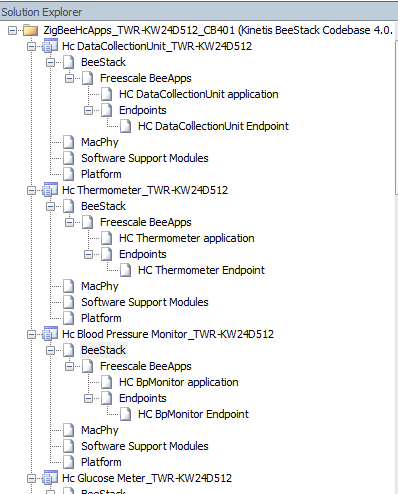
There you may click on “BeeStack” and change the stack profile to “No security with mesh routing – Stack Profile 2”.
IMPORTANT: Use this only for testing purposes. Real ZHA application may require security settings.
Regards,
AngelC
- Mark as New
- Bookmark
- Subscribe
- Mute
- Subscribe to RSS Feed
- Permalink
- Report Inappropriate Content
Dear Tzyy-Hong,
If you would like to modify the security settings of the images used in ZeD 1.6.5 you should first open the corresponding BeeKit solution file located in folder: C:\Program Files (x86)\Freescale\ZeD 1.6.5\BeeKitSolutionFiles.
In this case it would be the ZigBeeHcApps_TWR_KW24D512_CB401.bksln or, ZigBeeHcApps_TWR_KW24D512_CB400.bksln depending in the codebase you have in BeeKit. Once open, you may see all of the projects in the right side under “Project explorer”, see image below:
There you may click on “BeeStack” and change the stack profile to “No security with mesh routing – Stack Profile 2”.
IMPORTANT: Use this only for testing purposes. Real ZHA application may require security settings.
Regards,
AngelC
