
- Forums
- Product Forums
- General Purpose MicrocontrollersGeneral Purpose Microcontrollers
- i.MX Forumsi.MX Forums
- QorIQ Processing PlatformsQorIQ Processing Platforms
- Identification and SecurityIdentification and Security
- Power ManagementPower Management
- Wireless ConnectivityWireless Connectivity
- RFID / NFCRFID / NFC
- Advanced AnalogAdvanced Analog
- Neural Processing UnitsNeural Processing Units
- MCX Microcontrollers
- S32G
- S32K
- S32V
- MPC5xxx
- Other NXP Products
- S12 / MagniV Microcontrollers
- Powertrain and Electrification Analog Drivers
- Sensors
- Vybrid Processors
- Digital Signal Controllers
- 8-bit Microcontrollers
- ColdFire/68K Microcontrollers and Processors
- PowerQUICC Processors
- OSBDM and TBDML
- S32M
- S32Z/E
-
- Solution Forums
- Software Forums
- MCUXpresso Software and ToolsMCUXpresso Software and Tools
- CodeWarriorCodeWarrior
- MQX Software SolutionsMQX Software Solutions
- Model-Based Design Toolbox (MBDT)Model-Based Design Toolbox (MBDT)
- FreeMASTER
- eIQ Machine Learning Software
- Embedded Software and Tools Clinic
- S32 SDK
- S32 Design Studio
- GUI Guider
- Zephyr Project
- Voice Technology
- Application Software Packs
- Secure Provisioning SDK (SPSDK)
- Processor Expert Software
- Generative AI & LLMs
-
- Topics
- Mobile Robotics - Drones and RoversMobile Robotics - Drones and Rovers
- NXP Training ContentNXP Training Content
- University ProgramsUniversity Programs
- Rapid IoT
- NXP Designs
- SafeAssure-Community
- OSS Security & Maintenance
- Using Our Community
-
- Cloud Lab Forums
-
- Knowledge Bases
- ARM Microcontrollers
- i.MX Processors
- Identification and Security
- Model-Based Design Toolbox (MBDT)
- QorIQ Processing Platforms
- S32 Automotive Processing Platform
- Wireless Connectivity
- CodeWarrior
- MCUXpresso Suite of Software and Tools
- MQX Software Solutions
- RFID / NFC
- Advanced Analog
- Neural Processing Units
-
- NXP Tech Blogs
- Home
- :
- 製品フォーラム
- :
- Vybrid プロセッサ
- :
- Re: Re: Timestorm for Vybrid
Timestorm for Vybrid
- RSS フィードを購読する
- トピックを新着としてマーク
- トピックを既読としてマーク
- このトピックを現在のユーザーにフロートします
- ブックマーク
- 購読
- ミュート
- 印刷用ページ

- 新着としてマーク
- ブックマーク
- 購読
- ミュート
- RSS フィードを購読する
- ハイライト
- 印刷
- 不適切なコンテンツを報告
Dear Sir/Madam,
I am new for Linux Timestorm development environment for Vybrid. I set all factory tools and timestorm in ubuntu 12.04, and able to run and debug simple hello project. But When I debug the code, I could see the intel 8086 assembler instruction sets.
How can I set the project cross compile, link, debug parameters for Vybrid?
Thanks and best regards.
Mehmet Ali İpin
解決済! 解決策の投稿を見る。

- 新着としてマーク
- ブックマーク
- 購読
- ミュート
- RSS フィードを購読する
- ハイライト
- 印刷
- 不適切なコンテンツを報告
Hi Mehmet,
In your Factory directory mentioned above, the RFS image is located under build_*/images/rfs/rootfs.tar.gz.
You can test to see if SSH works by setting a username/password for your Vybrid (eg, root/root). Then, try to SSH from your host to the Vybrid. Run the following commands on the Vybrid, then your host:
Vybrid:
# passwd
Changing password for root
New password:
Bad password: too short
Retype password:
Password for root changed by root
#
Host:
# ssh [email protected]
[email protected]'s password:
BusyBox v1.20.2 (2014-06-18 19:06:35 EDT) built-in shell (ash)
Enter 'help' for a list of built-in commands.
#
Thanks, and let me know if you have any questions.
Timesys Support
- 新着としてマーク
- ブックマーク
- 購読
- ミュート
- RSS フィードを購読する
- ハイライト
- 印刷
- 不適切なコンテンツを報告
Hello Mehmet,
We have a guide for cross-compiling a TimeStorm project and performing a remote debug session with TimeStorm:
https://linuxlink.timesys.com/docs/how_to_create_and_debug_hello_world_in_timestorm
Please, let me know if you encounter any issues with this, or have any questions.
Thanks,
Timesys Support
- 新着としてマーク
- ブックマーク
- 購読
- ミュート
- RSS フィードを購読する
- ハイライト
- 印刷
- 不適切なコンテンツを報告
Dear Timesys,
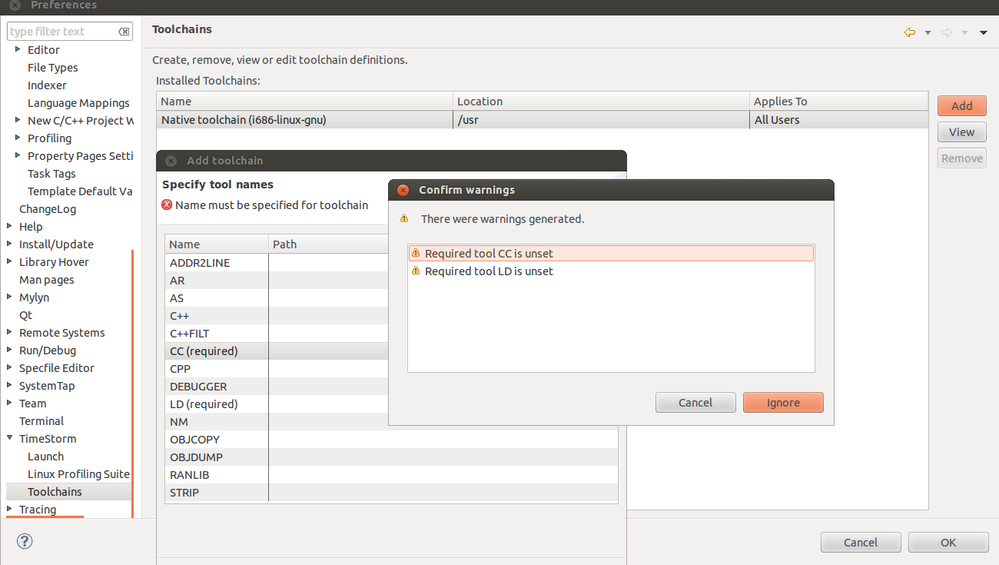
I read “How To Create and Debug Hello World in TimeStorm” document with “timestorm-manual-4.4.1.pdf”.
When I open the Preferences->Timestorm->Toolchains, I see “Native toolChain i686”. When I add I see the warning message "reqired tool CC is un set ", which I added screenShot.
What Should I do?
Best regards.
Mehmet Ali
- 新着としてマーク
- ブックマーク
- 購読
- ミュート
- RSS フィードを購読する
- ハイライト
- 印刷
- 不適切なコンテンツを報告
Hello Mehmet,
I would recommend following the prerequisites on the following link:
https://linuxlink.timesys.com/docs/how_to_create_and_debug_hello_world_in_timestorm
The first point, installing the SDK Installer from your Factory build output, is required in order to register a toolchain with TimeStorm. Once you do this, you can restart TimeStorm, and the cross-compile toolchain from the SDK will be listed in the Toolchains dialog box above and be available for use in compiling/debugging a TimeStorm project.
Thanks, and let me know if you have any questions.
Timesys Support
- 新着としてマーク
- ブックマーク
- 購読
- ミュート
- RSS フィードを購読する
- ハイライト
- 印刷
- 不適切なコンテンツを報告
Dear Timesys,
I have my tower board is running now. For the SSH server prerequisitie, how can I set an SSH server to run in Vybrid tower?
Thanks and best regards.
Mehmet Ali
- 新着としてマーク
- ブックマーク
- 購読
- ミュート
- RSS フィードを購読する
- ハイライト
- 印刷
- 不適切なコンテンツを報告
Hi Mehmet,
In order to run an SSH server on your target, you will want to select either the 'dropbear' or 'openssh' package in your Web or Desktop Factory build. Build your Factory, redeploy the resulting RFS image, and boot the Vybrid. The SSH server will start automatically.
You can also run/debug a TimeStorm project on your host PC instead of the Vybrid, To do so, in TimeStorm, right click your project on the leftmost panel and select 'Properties'. Under 'C/C++ Build > Settings', under the 'Cross Toolchain' tab, pick 'SDK Type: Other SDK' and 'Toolchain from SDK: Native toolchain' (if you are using an older version of TimeStorm, there will be no 'SDK Type:' option).
Save these settings, and clean and rebuild your project. You can now do a local run or debug session.
Thanks, and let me know if you have any questions.
Timesys Support
- 新着としてマーク
- ブックマーク
- 購読
- ミュート
- RSS フィードを購読する
- ハイライト
- 印刷
- 不適切なコンテンツを報告
Dear Timesys,
Thank you very much again for your answer;
I checked my "timesys/twr_vf600/factory-20121029$" directory and run "make menuconfig" command; and saw that "open ssh" is selected.
Where is this RFS image(in which directory)? How can I test if SSH is working?
Best regards.
- 新着としてマーク
- ブックマーク
- 購読
- ミュート
- RSS フィードを購読する
- ハイライト
- 印刷
- 不適切なコンテンツを報告
Hi Mehmet,
In your Factory directory mentioned above, the RFS image is located under build_*/images/rfs/rootfs.tar.gz.
You can test to see if SSH works by setting a username/password for your Vybrid (eg, root/root). Then, try to SSH from your host to the Vybrid. Run the following commands on the Vybrid, then your host:
Vybrid:
# passwd
Changing password for root
New password:
Bad password: too short
Retype password:
Password for root changed by root
#
Host:
# ssh [email protected]
[email protected]'s password:
BusyBox v1.20.2 (2014-06-18 19:06:35 EDT) built-in shell (ash)
Enter 'help' for a list of built-in commands.
#
Thanks, and let me know if you have any questions.
Timesys Support
- 新着としてマーク
- ブックマーク
- 購読
- ミュート
- RSS フィードを購読する
- ハイライト
- 印刷
- 不適切なコンテンツを報告
Dear Timesys,
After connecting the Ethernet cable between Tower kit and ubuntu, Now I can debug the Vybrid codes in Timestorm.
Thank you so much for your helps.
Best regards.
Mehmet Ali
- 新着としてマーク
- ブックマーク
- 購読
- ミュート
- RSS フィードを購読する
- ハイライト
- 印刷
- 不適切なコンテンツを報告
Hi Mehmet,
Glad to hear you were able to do the debug session. Let me know if you have any other questions.
Thanks,
Timesys Support
- 新着としてマーク
- ブックマーク
- 購読
- ミュート
- RSS フィードを購読する
- ハイライト
- 印刷
- 不適切なコンテンツを報告
Dear Timesys,
Thank you very much for your helps;
I can see the RFS image in the given directory, but after I wrote "ssh [email protected]" at terminal,I received /bin/sh:ssh: not found message
# passwd
Changing password for root
New password:
Bad password: too short
Retype password:
Password for root changed by root
# ssh [email protected]
-/bin/sh: ssh: not found
#
In Vybrid I have rootfs.tar.gz, when I enter ls:
# ls
(other files) rootfs.tar.gz usr
#
Does default factory image or rootfs.tar.gz in Vybrid includes ssh?
How am I sure that "ssh [email protected]" command written in terminal checks my hosts correct ../rootfs/ directory?
Should I connect Ethernet cable between the PC and Vybrid?
Thanks and best regards.
- 新着としてマーク
- ブックマーク
- 購読
- ミュート
- RSS フィードを購読する
- ハイライト
- 印刷
- 不適切なコンテンツを報告
Dear Timesys,
Thank you very much for your helps
I installed and executed the toolchain for cross compile in Timestorm.
Unfortunately, I have a problem with my Vybrid tower kit, Therefore, is it possible to debug the Vybrid codes in timestorm without hardware?
Best regards.

- 新着としてマーク
- ブックマーク
- 購読
- ミュート
- RSS フィードを購読する
- ハイライト
- 印刷
- 不適切なコンテンツを報告
Mehmet,
Timesys tool chain should be installed. You may get it with BSP/SDK from Timesyst. Configure packages etc for your board, build SDK, download something like twr_vf600-development-environment.sh configured for your purposes and run to install it.
Edward
- 新着としてマーク
- ブックマーク
- 購読
- ミュート
- RSS フィードを購読する
- ハイライト
- 印刷
- 不適切なコンテンツを報告
Dear Edward,
Tank you very much,
I installed timesys factory tool kit, and managed to cross compile, and link the project.
Is it possible to debug the Vybrid code in Ubuntu, without hardware(I mean Tower Kit)?
Best regards.

 karina_valencia
- 新着としてマーク
- ブックマーク
- 購読
- ミュート
- RSS フィードを購読する
- ハイライト
- 印刷
- 不適切なコンテンツを報告
timesyssupport are you available to help with this case?
