
- Forums
- Product Forums
- General Purpose MicrocontrollersGeneral Purpose Microcontrollers
- i.MX Forumsi.MX Forums
- QorIQ Processing PlatformsQorIQ Processing Platforms
- Identification and SecurityIdentification and Security
- Power ManagementPower Management
- Wireless ConnectivityWireless Connectivity
- RFID / NFCRFID / NFC
- Advanced AnalogAdvanced Analog
- Neural Processing UnitsNeural Processing Units
- MCX Microcontrollers
- S32G
- S32K
- S32V
- MPC5xxx
- Other NXP Products
- S12 / MagniV Microcontrollers
- Powertrain and Electrification Analog Drivers
- Sensors
- Vybrid Processors
- Digital Signal Controllers
- 8-bit Microcontrollers
- ColdFire/68K Microcontrollers and Processors
- PowerQUICC Processors
- OSBDM and TBDML
- S32M
- S32Z/E
-
- Solution Forums
- Software Forums
- MCUXpresso Software and ToolsMCUXpresso Software and Tools
- CodeWarriorCodeWarrior
- MQX Software SolutionsMQX Software Solutions
- Model-Based Design Toolbox (MBDT)Model-Based Design Toolbox (MBDT)
- FreeMASTER
- eIQ Machine Learning Software
- Embedded Software and Tools Clinic
- S32 SDK
- S32 Design Studio
- GUI Guider
- Zephyr Project
- Voice Technology
- Application Software Packs
- Secure Provisioning SDK (SPSDK)
- Processor Expert Software
- Generative AI & LLMs
-
- Topics
- Mobile Robotics - Drones and RoversMobile Robotics - Drones and Rovers
- NXP Training ContentNXP Training Content
- University ProgramsUniversity Programs
- Rapid IoT
- NXP Designs
- SafeAssure-Community
- OSS Security & Maintenance
- Using Our Community
-
- Cloud Lab Forums
-
- Knowledge Bases
- ARM Microcontrollers
- i.MX Processors
- Identification and Security
- Model-Based Design Toolbox (MBDT)
- QorIQ Processing Platforms
- S32 Automotive Processing Platform
- Wireless Connectivity
- CodeWarrior
- MCUXpresso Suite of Software and Tools
- MQX Software Solutions
- RFID / NFC
- Advanced Analog
- Neural Processing Units
-
- NXP Tech Blogs

I am trying to use a Segger J-Link debugger with ‘S32 Design Studio for Arm IDE’.
I am using a ‘UCANS32K146’ evaluation board which has a S32K146 processor.
I have imported some example code (libuavcan) into the IDE which builds successfully.
Below are the settings for the debugger…

When I click on ‘Debug’ I get the following error…

When I run JLink.exe it seems to connect successfully….

The programming cable is wired as follows…

How do I get the Segger J-Link to flash/debug code from the IDE to the evaluation board ?
Links below for reference:
- S32K146 UAVCAN V1 and MAVCAN Development System
- Segger J-Link Classic Base
https://www.segger.com/products/debug-probes/j-link/models/j-link-base/
- S32 Design Studio for Arm
- Processor S32K146
https://www.nxp.com/docs/en/data-sheet/S32K-DS.pdf
- Example software libuavcan
https://nxp.gitbook.io/ucans32k1/s32k1-sdk/sdk-example-with-libuavcan
已解决! 转到解答。
Thanks Robin,
I installed the correct SDK...

And used the can_pal_s32k146 example and this worked correctly (after a few minor tweaks to the software)...

Thanks for your help
Thanks Robin_Shen
I made the changes that you suggested and it now seems to flash, but it still doesnt work.
I set a breakpoint as shown...
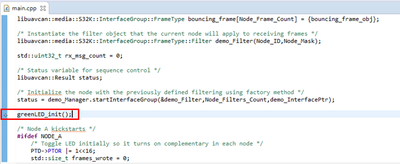
But the debugger does not seem to run to or stop at the break point, it seems to be in reset ?
Below is a copy of the console messages...
SEGGER J-Link GDB Server V6.42a Command Line Version

JLinkARM.dll V6.42a (DLL compiled Feb  1 2019 18:00:08)

Command line: -if swd -device S32K146 -endian little -speed 1000 -port 2331 -swoport 2332 -telnetport 2333 -vd -ir -localhostonly 1 -singlerun -strict -timeout 0 -nogui
-----GDB Server start settings-----
GDBInit file:                  none
GDB Server Listening port:     2331
SWO raw output listening port: 2332
Terminal I/O port:             2333
Accept remote connection:      localhost only
Generate logfile:              off
Verify download:               on
Init regs on start:            on
Silent mode:                   off
Single run mode:               on
Target connection timeout:     0 ms
------J-Link related settings------
J-Link Host interface:         USB
J-Link script:                 none
J-Link settings file:          none
------Target related settings------
Target device:                 S32K146
Target interface:              SWD
Target interface speed:        1000kHz
Target endian:                 little

Connecting to J-Link...
J-Link is connected.
Firmware: J-Link V10 compiled Jan 30 2023 11:28:07
Hardware: V10.10
S/N: 50116597
Feature(s): GDB
Checking target voltage...
Target voltage: 3.27 V
Listening on TCP/IP port 2331
Connecting to target...Connected to target
Waiting for GDB connection...Connected to 127.0.0.1
Reading all registers
Read 4 bytes @ address 0x00000000 (Data = 0xFFFFFFFF)
Read 2 bytes @ address 0x00000000 (Data = 0xFFFF)
Received monitor command: speed 1000
Target interface speed set to 1000 kHz
Received monitor command: clrbp
Received monitor command: reset
Resetting target
Received monitor command: halt
Halting target CPU...
...Target halted (PC = 0xFFFFFFFE)
Received monitor command: regs
R0 = 00000000, R1 = 00000000, R2 = 00000000, R3 = 00000000
R4 = 00000000, R5 = 00000000, R6 = 00000000, R7 = 00000000
R8 = 00000000, R9 = 00000000, R10= 00000000, R11= 00000000
R12= 00000000, R13= FFFFFFFC, MSP= FFFFFFFC, PSP= 00000000
R14(LR) = FFFFFFFF, R15(PC) = FFFFFFFE
XPSR 01000000, APSR 00000000, EPSR 01000000, IPSR 00000000
CFBP 00000000, CONTROL 00, FAULTMASK 00, BASEPRI 00, PRIMASK 00
Reading all registers
WARNING: Failed to read memory @ address 0xFFFFFFFE
Received monitor command: speed auto
Select auto target interface speed (2000 kHz)
Received monitor command: flash breakpoints 1
Flash breakpoints enabled
Received monitor command: semihosting enable
Semi-hosting enabled (Handle on BKPT)
Received monitor command: semihosting IOClient 1
Semihosting I/O set to TELNET Client
Received monitor command: SWO DisableTarget 0xFFFFFFFF
SWO disabled successfully.
Received monitor command: SWO EnableTarget 0 0 0x1 0
Failed to enable SWO. Could not measure target CPU frequency.
Read 2 bytes @ address 0x0000C5C8 (Data = 0x0000)
Read 2 bytes @ address 0x000070F0 (Data = 0x0000)
Read 4 bytes @ address 0xFFFFFFFE (Data = 0x00000000)
Read 2 bytes @ address 0xFFFFFFFE (Data = 0x0000)
Downloading 1024 bytes @ address 0x00000000 - Verified OK
Downloading 16 bytes @ address 0x00000400 - Verified OK
Downloading 15888 bytes @ address 0x00000410 - Verified OK
Downloading 15872 bytes @ address 0x00004220 - Verified OK
Downloading 16064 bytes @ address 0x00008020 - Verified OK
Downloading 15920 bytes @ address 0x0000BEE0 - Verified OK
Downloading 7392 bytes @ address 0x0000FD10 - Verified OK
Downloading 1004 bytes @ address 0x000119F0 - Verified OK
Downloading 960 bytes @ address 0x00011DDC - Verified OK
Downloading 16 bytes @ address 0x0001219C - Verified OK
Downloading 8 bytes @ address 0x000121AC - Verified OK
Downloading 2472 bytes @ address 0x000121B4 - Verified OK
WARNING: CPU could not be halted
ERROR: Failed to download RAMCode.
Failed to prepare for programming.
Failed to download RAMCode!
Can not read register 16 (XPSR) while CPU is running
Can not read register 20 (CFBP) while CPU is running
Can not read register 0 (R0) while CPU is running
Can not read register 1 (R1) while CPU is running
Can not read register 2 (R2) while CPU is running
Can not read register 3 (R3) while CPU is running
Can not read register 4 (R4) while CPU is running
Can not read register 5 (R5) while CPU is running
Can not read register 6 (R6) while CPU is running
Can not read register 7 (R7) while CPU is running
Can not read register 8 (R8) while CPU is running
Can not read register 9 (R9) while CPU is running
Can not read register 10 (R10) while CPU is running
Can not read register 11 (R11) while CPU is running
Can not read register 12 (R12) while CPU is running
Can not read register 14 (R14) while CPU is running
Can not read register 15 (R15) while CPU is running
Can not read register 17 (MSP) while CPU is running
Can not read r
Writing register (PC = 0x     528)
Read 2 bytes @ address 0x0000C5C8 (Data = 0x0000)
Read 2 bytes @ address 0x000070F0 (Data = 0x0000)
Read 4 bytes @ address 0x00000528 (Data = 0x00000000)
Read 2 bytes @ address 0x00000528 (Data = 0x0000)
Read 2 bytes @ address 0x0000B2E2 (Data = 0x0000)
Read 2 bytes @ address 0x0000B364 (Data = 0x0000)
Received monitor command: clrbp
Received monitor command: reset
Resetting target
Received monitor command: halt
Halting target CPU...
...Target halted (PC = 0xFFFFFFFE)
Read 2 bytes @ address 0x0000B2E2 (Data = 0xFFFF)
Read 2 bytes @ address 0x0000B2E2 (Data = 0xFFFF)
Read 2 bytes @ address 0x0000B2E2 (Data = 0xFFFF)
Received monitor command: regs
R0 = 00000000, R1 = 00000000, R2 = 00000000, R3 = 00000000
R4 = 00000000, R5 = 00000000, R6 = 00000000, R7 = 00000000
R8 = 00000000, R9 = 00000000, R10= 00000000, R11= 00000000
R12= 00000000, R13= FFFFFFFC, MSP= FFFFFFFC, PSP= 00000000
R14(LR) = FFFFFFFF, R15(PC) = FFFFFFFE
XPSR 01000000, APSR 00000000, EPSR 01000000, IPSR 00000000
CFBP 00000000, CONTROL 00, FAULTMASK 00, BASEPRI 00, PRIMASK 00
Reading all registers
WARNING: Failed to read memory @ address 0xFFFFFFFE
Setting breakpoint @ address 0x0000B2E2, Size = 2, BPHandle = 0x0001
Setting breakpoint @ address 0x0000B364, Size = 2, BPHandle = 0x0002
Starting target CPU...
Debugger requested to halt target...
WARNING: CPU could not be halted
Reading all registers
WARNING: CPU could not be halted
ERROR: Can not read register 0 (R0) while CPU is running
ERROR: Can not read register 1 (R1) while CPU is running
ERROR: Can not read register 2 (R2) while CPU is running
ERROR: Can not read register 3 (R3) while CPU is running
ERROR: Can not read register 4 (R4) while CPU is running
ERROR: Can not read register 5 (R5) while CPU is running
ERROR: Can not read register 6 (R6) while CPU is running
ERROR: Can not read register 7 (R7) while CPU is running
ERROR: Can not read register 8 (R8) while CPU is running
ERROR: Can not read register 9 (R9) while CPU is running
ERROR: Can not read register 10 (R10) while CPU is running
ERROR: Can not read register 11 (R11) while CPU is running
ERROR: Can not read register 12 (R12) while CPU is running
ERROR: Can not read register 13 (R13) while CPU is running
ERROR: Can not read register 14 (R14) while CPU is running
ERROR: Can not read register 15 (R15) while CPU is running
ERROR: Can not read register 16 (XPSR) while CPU is running
ERROR: Can not read register 17 (MSP) while CPU is running
ERROR: Can not read register 18 (PSP) while CPU is running
ERROR: Can not read register 24 (PRIMASK) while CPU is running
ERROR: Can not read register 25 (BASEPRI) while CPU is running
ERROR: Can not read register 26 (FAULTMASK) while CPU is running
ERROR: Can not read register 27 (CONTROL) while CPU is running
ERROR: Can not read register 32 (FPSCR) while CPU is running
ERROR: Can not read register 33 (FPS0) while CPU is running
ERROR: Can not read register 34 (FPS1) while CPU is running
ERROR: Can not read register 35 (FPS2) while CPU is running
ERROR: Can not read register 36 (FPS3) while CPU is running
ERROR: Can not read register 37 (FPS4) while CPU is running
ERROR: Can not read register 38 (FPS5) while CPU is running
ERROR: Can not read register 39 (FPS6) while CPU is running
ERROR: Can not read register 40 (FPS7) while CPU is running
ERROR: Can not read register 41 (FPS8) while CPU is running
ERROR: Can not read register 42 (FPS9) while CPU is running
ERROR: Can not read register 43 (FPS10) while CPU is running
ERROR: Can not read register 44 (FPS11) while CPU is running
ERROR: Can not read register 45 (FPS12) while CPU is running
ERROR: Can not read register 46 (FPS13) while CPU is running
ERROR: Can not read register 47 (FPS14) while CPU is running
ERROR: Can not read register 48 (FPS15) while CPU is running
ERROR: Can not read register 49 (FPS16) while CPU is running
ERROR: Can not read register 50 (FPS17) while CPU is running
ERROR: Can not read register 51 (FPS18) while CPU is running
ERROR: Can not read register 52 (FPS19) while CPU is running
ERROR: Can not read register 53 (FPS20) while CPU is running
ERROR: Can not read register 54 (FPS21) while CPU is running
ERROR: Can not read register 55 (FPS22) while CPU is running
ERROR: Can not read register 56 (FPS23) while CPU is running
ERROR: Can not read register 57 (FPS24) while CPU is running
ERROR: Can not read register 58 (FPS25) while CPU is running
ERROR: Can not read register 59 (FPS26) while CPU is running
ERROR: Can not read register 60 (FPS27) while CPU is running
ERROR: Can not read register 61 (FPS28) while CPU is running
ERROR: Can not read register 62 (FPS29) while CPU is running
ERROR: Can not read register 63 (FPS30) while CPU is running
ERROR: Can not read register 64 (FPS31) while CPU is running
ERROR: Can not read register 15 (R15) while CPU is running
ERROR: Can not read register 16 (XPSR) while CPU is running
ERROR: Can not read register 17 (MSP) while CPU is running
ERROR: Can not read register 18 (PSP) while CPU is running
ERROR: Can not read register 19 (RAZ) while CPU is running
ERROR: Can not read register 20 (CFBP) while CPU is running
ERROR: Can not read register 21 (APSR) while CPU is running
ERROR: Can not read register 22 (EPSR) while CPU is running
ERROR: Can not read register 23 (IPSR) while CPU is running
ERROR: Can not read register 24 (PRIMASK) while CPU is running
ERROR: Can not read register 25 (BASEPRI) while CPU is running
ERROR: Can not read register 26 (FAULTMASK) while CPU is running
ERROR: Can not read register 27 (CONTROL) while CPU is running
ERROR: Can not read register 28 (BASEPRI_MAX) while CPU is running
ERROR: Can not read register 29 (IAPSR) while CPU is running
ERROR: Can not read register 30 (EAPSR) while CPU is running
ERROR: Can not read register 31 (IEPSR) while CPU is running
ERROR: Can not read register 32 (FPSCR) while CPU is running
ERROR: Can not read register 33 (FPS0) while CPU is running
ERROR: Can not read register 34 (FPS1) while CPU is running
ERROR: Can not read register 35 (FPS2) while CPU is running
ERROR: Can not read register 36 (FPS3) while CPU is running
ERROR: Can not read register 37 (FPS4) while CPU is running
ERROR: Can not read register 38 (FPS5) while CPU is running
ERROR: Can not read register 39 (FPS6) while CPU is running
ERROR: Can not read register 40 (FPS7) while CPU is running
ERROR: Can not read register 41 (FPS8) while CPU is running
ERROR: Can not read register 42 (FPS9) while CPU is running
ERROR: Can not read register 43 (FPS10) while CPU is running
ERROR: Can not read register 44 (FPS11) while CPU is running
ERROR: Can not read register 45 (FPS12) while CPU is running
ERROR: Can not read register 46 (FPS13) while CPU is running
Read 4 bytes @ address 0xDEADBEEE (Data = 0x00000000)
WARNING: Failed to read memory @ address 0xDEADBEEF
Removing breakpoint @ address 0x0000B2E2, Size = 2
Removing breakpoint @ address 0x0000B364, Size = 2
Read 2 bytes @ address 0x0000B2E2 (Data = 0x0000)
Read 2 bytes @ address 0x0000B2EC (Data = 0x0000)
Setting breakpoint @ address 0x0000B2E2, Size = 2, BPHandle = 0x0003
Setting breakpoint @ address 0x0000B2EC, Size = 2, BPHandle = 0x0004
Setting breakpoint @ address 0x0000B364, Size = 2, BPHandle = 0x0005
Starting target CPU...
The Segger control panel shows the following...
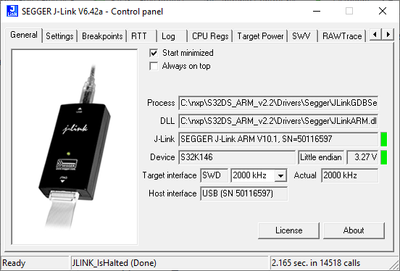
The LED on the Segger looks to be orange/red (its hard to tell) which means its either in reset or there's a fault.
A screenshot of the IDE during debugging is shown below...
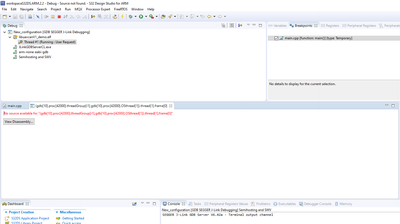
I was expecting the IDE to stop at that breakpoint so I could step through the lines of code.

 Robin_Shen
I don't have this board, so I connect Segger J-Link Plus to J14 of S32K146EVB. Here you can see: I am able to debug it and stop at the breakpoint.

But the debug connecter of UCANS32K146 is P6. I am not sure how you connect it with Segger J-Link, please make sure SWD_DIO\SWD_CLK\RST_N\GND\VTref are well connected.

The LED on the Segger looks to be orange/red (its hard to tell) which means its either in reset or there's a fault.
Please press SW1 and try to debug again. Or you can use loadbin commander. I have attached the bin file of that example.
Best Regards,
Robin
-------------------------------------------------------------------------------
Note:
- If this post answers your question, please click the "Mark Correct" button. Thank you!
- We are following threads for 7 weeks after the last post, later replies are ignored
Please open a new thread and refer to the closed one, if you have a related question at a later point in time.
-------------------------------------------------------------------------------
The Segger is connected correctly as shown in the table and diagram below (I have also tested continuity to confirm).
The UCANS32K14 connector P6 is shown on the left and the 20 way header connector for the debugger is shown on the right


It shouldn't be this difficult to get example code working on a development board !
Could someone from NXP contact me to arrange a screen share session to help resolve the problem ?
Robin_Shen
When y run JLink.exe it seems to connect successfully….
Have you tried loadbin command? loadbin C:\libuavcanV1_demo.bin,0x00
This should enable programming the S32K146 without using the S32DS IDE.
Robin_Shen
Hi johngreenjets,
Please configure the Debug Configurations by refer to:
NODE_A Debug\libuavcanV1_demo.elf

${jlink_path}/${jlink_gdbserver}
${S32DS_ARM32_TOOLCHAIN_DIR}/bin/${arm32_cross_prefix}gdb${arm32_cross_suffix}

Best Regards,
Robin
-------------------------------------------------------------------------------
Note:
- If this post answers your question, please click the "Mark Correct" button. Thank you!
- We are following threads for 7 weeks after the last post, later replies are ignored
Please open a new thread and refer to the closed one, if you have a related question at a later point in time.
-------------------------------------------------------------------------------
