
- Forums
- Product Forums
- General Purpose MicrocontrollersGeneral Purpose Microcontrollers
- i.MX Forumsi.MX Forums
- QorIQ Processing PlatformsQorIQ Processing Platforms
- Identification and SecurityIdentification and Security
- Power ManagementPower Management
- Wireless ConnectivityWireless Connectivity
- RFID / NFCRFID / NFC
- Advanced AnalogAdvanced Analog
- Neural Processing UnitsNeural Processing Units
- MCX Microcontrollers
- S32G
- S32K
- S32V
- MPC5xxx
- Other NXP Products
- S12 / MagniV Microcontrollers
- Powertrain and Electrification Analog Drivers
- Sensors
- Vybrid Processors
- Digital Signal Controllers
- 8-bit Microcontrollers
- ColdFire/68K Microcontrollers and Processors
- PowerQUICC Processors
- OSBDM and TBDML
- S32M
- S32Z/E
-
- Solution Forums
- Software Forums
- MCUXpresso Software and ToolsMCUXpresso Software and Tools
- CodeWarriorCodeWarrior
- MQX Software SolutionsMQX Software Solutions
- Model-Based Design Toolbox (MBDT)Model-Based Design Toolbox (MBDT)
- FreeMASTER
- eIQ Machine Learning Software
- Embedded Software and Tools Clinic
- S32 SDK
- S32 Design Studio
- GUI Guider
- Zephyr Project
- Voice Technology
- Application Software Packs
- Secure Provisioning SDK (SPSDK)
- Processor Expert Software
- Generative AI & LLMs
-
- Topics
- Mobile Robotics - Drones and RoversMobile Robotics - Drones and Rovers
- NXP Training ContentNXP Training Content
- University ProgramsUniversity Programs
- Rapid IoT
- NXP Designs
- SafeAssure-Community
- OSS Security & Maintenance
- Using Our Community
-
- Cloud Lab Forums
-
- Knowledge Bases
- ARM Microcontrollers
- i.MX Processors
- Identification and Security
- Model-Based Design Toolbox (MBDT)
- QorIQ Processing Platforms
- S32 Automotive Processing Platform
- Wireless Connectivity
- CodeWarrior
- MCUXpresso Suite of Software and Tools
- MQX Software Solutions
- RFID / NFC
- Advanced Analog
- Neural Processing Units
-
- NXP Tech Blogs
- Home
- :
- ソフトウェア・フォーラム
- :
- S32 SDK
- :
- FreeRTOS Processor Expert bug with static memory allocation
FreeRTOS Processor Expert bug with static memory allocation
- RSS フィードを購読する
- トピックを新着としてマーク
- トピックを既読としてマーク
- このトピックを現在のユーザーにフロートします
- ブックマーク
- 購読
- ミュート
- 印刷用ページ

- 新着としてマーク
- ブックマーク
- 購読
- ミュート
- RSS フィードを購読する
- ハイライト
- 印刷
- 不適切なコンテンツを報告
Dear NXP,
I created a new FREERTOS project from example for S32K144 in the SDK version 2.9.0:
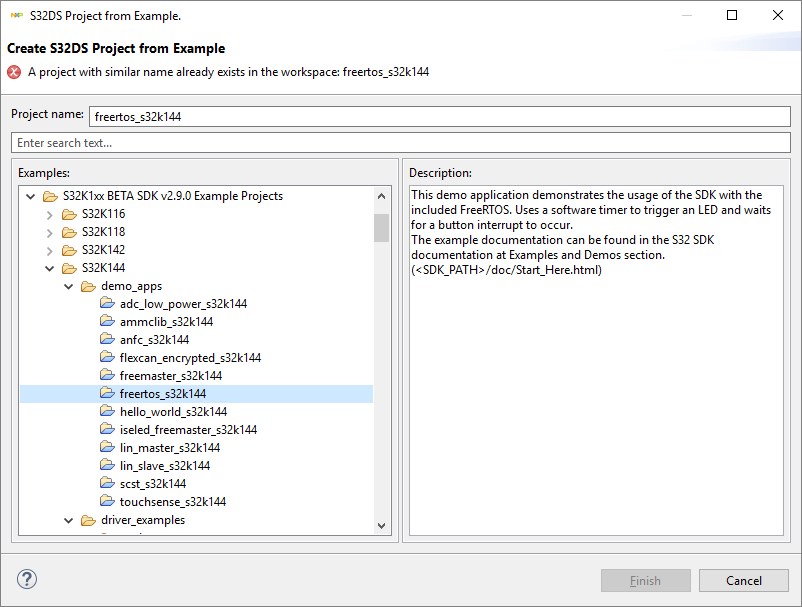
The example compiles and runs fine, however I would like to use static memory allocation, therefore I change this setting in the Processor Expert:
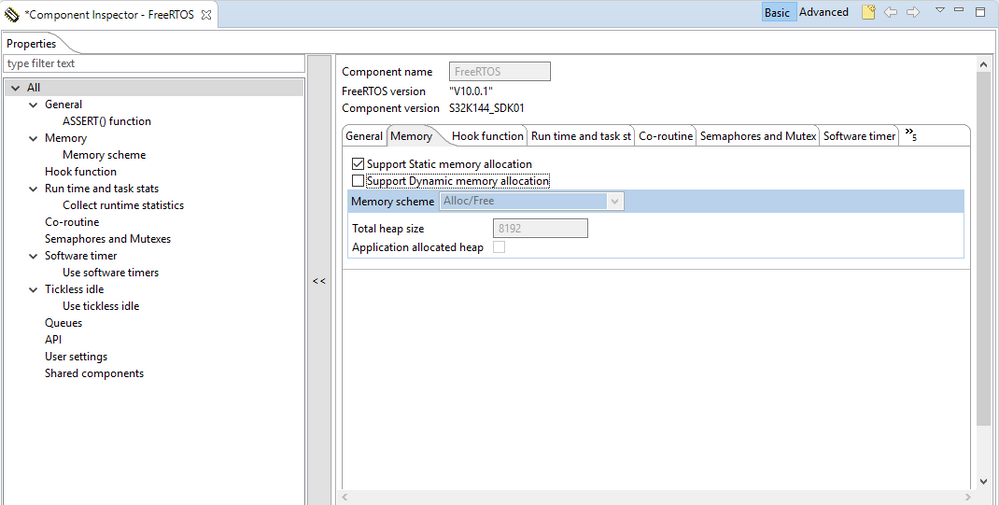
This way a few new lines are added to the generated FreeRTOSConfig.h:
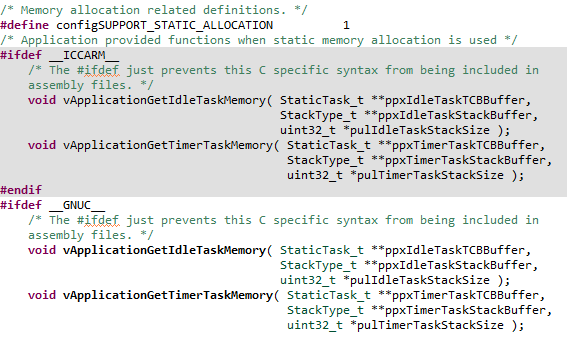
When I try to compile the code, the following error occurs:

There is a workaround for this (adding these few lines into the generated FreeRTOSConfig.h), which works, but it is not nice and gives warning messages while compiling:
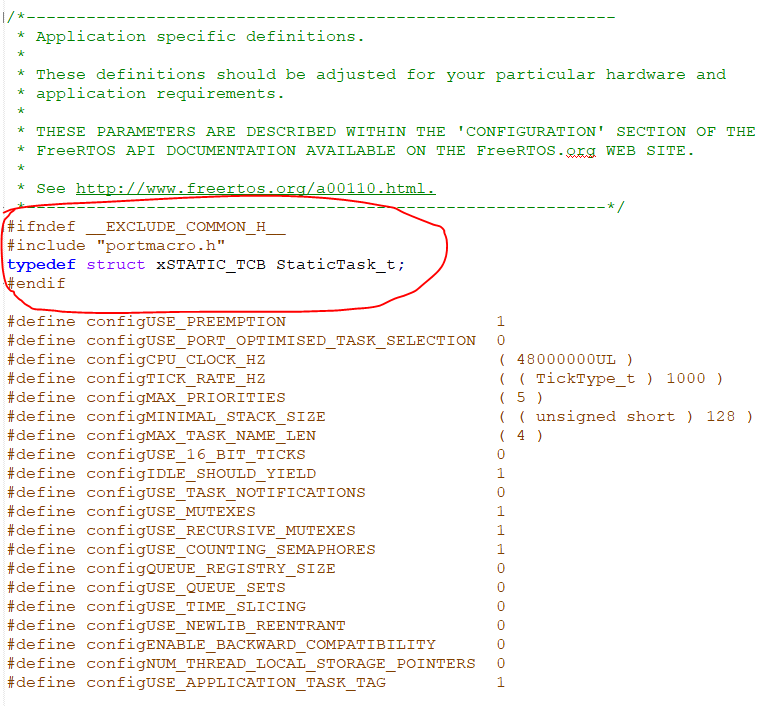
This way the code is working and it compiles. Is there a better solution for overcome this issue?
Thank you very much.
解決済! 解決策の投稿を見る。
 ovidiualexandru
- 新着としてマーク
- ブックマーク
- 購読
- ミュート
- RSS フィードを購読する
- ハイライト
- 印刷
- 不適切なコンテンツを報告
Hi tamaslorincz,
There is indeed a defect in the Processor Expert component for FreeRTOS, which will be fixed for future releases.
Meanwhile, please use the following workaround for your project:
1. Check only the "Dynamic allocation" scheme Processor Expert component, and override with the "User Settings" option.
In the FreeRTOS PEx component, check only the "Dynamic memory allocation" checkbox:
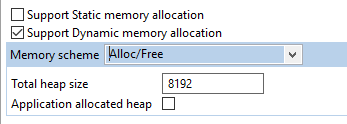
Then, in "User Settings" tab, click on the "Definitions" button (with three dots):

In the window, add these lines:
/* Additional settings can be defined in the property Settings > User settings > Definitions of the FreeRTOS component */
#undef configSUPPORT_DYNAMIC_ALLOCATION
#undef configSUPPORT_STATIC_ALLOCATION#define configSUPPORT_DYNAMIC_ALLOCATION 0
#define configSUPPORT_STATIC_ALLOCATION 1
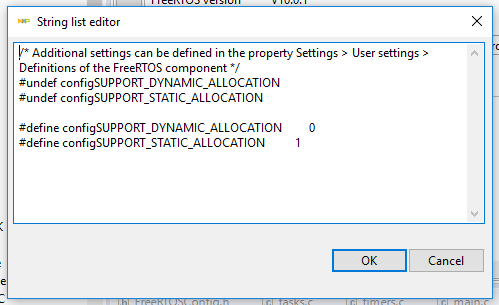
Now, the static allocation will be used and dynamic allocation will be disabled. There is one more step to be done:
2. Exclude "heap_x.c" file from build
The Pex component will still link a heap_x.c file to the project at this point. You will need to exclude it by selecting it, right click -> Resource Configurations -> "Exclude from Build..." and select all options.
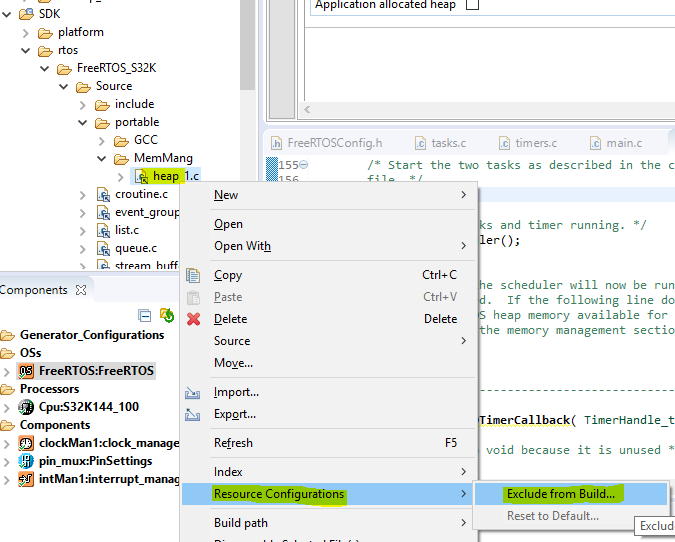
After this, the file should appear slightly greyed out and with a different icon, as below:
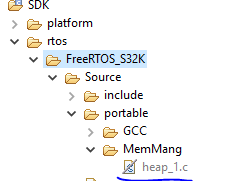
At this point, the setup is complete.
If you will need to use dynamic memory allocation as well, you will need to revert step 2 and remove the lines concerning configSUPPORT_DYNAMIC_ALLOCATION from the "User Settings" window.
Best regards,
Ovidiu
- 新着としてマーク
- ブックマーク
- 購読
- ミュート
- RSS フィードを購読する
- ハイライト
- 印刷
- 不適切なコンテンツを報告
Dear NXP,
Could you please check and confirm whether this bug is already fixed in S32 Design Studio for Arm version 2018.R1?
Best regards,
Tibor
ovidiualexandru
- 新着としてマーク
- ブックマーク
- 購読
- ミュート
- RSS フィードを購読する
- ハイライト
- 印刷
- 不適切なコンテンツを報告
Hi [email protected],
Sorry for long delay. I can confirm the issue is fixed since S32 SDK S32K1xx RTM 3.0.0, which is included in Update 9 for S32 Design Studio.
Best regards,
Ovidiu
- 新着としてマーク
- ブックマーク
- 購読
- ミュート
- RSS フィードを購読する
- ハイライト
- 印刷
- 不適切なコンテンツを報告
Hi Ovidiu,
Great! Thank you for your assistance. :smileyhappy:
Best regards,
Tibor
ovidiualexandru
- 新着としてマーク
- ブックマーク
- 購読
- ミュート
- RSS フィードを購読する
- ハイライト
- 印刷
- 不適切なコンテンツを報告
Hi tamaslorincz,
There is indeed a defect in the Processor Expert component for FreeRTOS, which will be fixed for future releases.
Meanwhile, please use the following workaround for your project:
1. Check only the "Dynamic allocation" scheme Processor Expert component, and override with the "User Settings" option.
In the FreeRTOS PEx component, check only the "Dynamic memory allocation" checkbox:
Then, in "User Settings" tab, click on the "Definitions" button (with three dots):
In the window, add these lines:
/* Additional settings can be defined in the property Settings > User settings > Definitions of the FreeRTOS component */
#undef configSUPPORT_DYNAMIC_ALLOCATION
#undef configSUPPORT_STATIC_ALLOCATION#define configSUPPORT_DYNAMIC_ALLOCATION 0
#define configSUPPORT_STATIC_ALLOCATION 1
Now, the static allocation will be used and dynamic allocation will be disabled. There is one more step to be done:
2. Exclude "heap_x.c" file from build
The Pex component will still link a heap_x.c file to the project at this point. You will need to exclude it by selecting it, right click -> Resource Configurations -> "Exclude from Build..." and select all options.
After this, the file should appear slightly greyed out and with a different icon, as below:
At this point, the setup is complete.
If you will need to use dynamic memory allocation as well, you will need to revert step 2 and remove the lines concerning configSUPPORT_DYNAMIC_ALLOCATION from the "User Settings" window.
Best regards,
Ovidiu
- 新着としてマーク
- ブックマーク
- 購読
- ミュート
- RSS フィードを購読する
- ハイライト
- 印刷
- 不適切なコンテンツを報告
Thank you very much, it is working.
