
- Forums
- Product Forums
- General Purpose MicrocontrollersGeneral Purpose Microcontrollers
- i.MX Forumsi.MX Forums
- QorIQ Processing PlatformsQorIQ Processing Platforms
- Identification and SecurityIdentification and Security
- Power ManagementPower Management
- Wireless ConnectivityWireless Connectivity
- RFID / NFCRFID / NFC
- Advanced AnalogAdvanced Analog
- Neural Processing UnitsNeural Processing Units
- MCX Microcontrollers
- S32G
- S32K
- S32V
- MPC5xxx
- Other NXP Products
- S12 / MagniV Microcontrollers
- Powertrain and Electrification Analog Drivers
- Sensors
- Vybrid Processors
- Digital Signal Controllers
- 8-bit Microcontrollers
- ColdFire/68K Microcontrollers and Processors
- PowerQUICC Processors
- OSBDM and TBDML
- S32M
- S32Z/E
-
- Solution Forums
- Software Forums
- MCUXpresso Software and ToolsMCUXpresso Software and Tools
- CodeWarriorCodeWarrior
- MQX Software SolutionsMQX Software Solutions
- Model-Based Design Toolbox (MBDT)Model-Based Design Toolbox (MBDT)
- FreeMASTER
- eIQ Machine Learning Software
- Embedded Software and Tools Clinic
- S32 SDK
- S32 Design Studio
- GUI Guider
- Zephyr Project
- Voice Technology
- Application Software Packs
- Secure Provisioning SDK (SPSDK)
- Processor Expert Software
- Generative AI & LLMs
-
- Topics
- Mobile Robotics - Drones and RoversMobile Robotics - Drones and Rovers
- NXP Training ContentNXP Training Content
- University ProgramsUniversity Programs
- Rapid IoT
- NXP Designs
- SafeAssure-Community
- OSS Security & Maintenance
- Using Our Community
-
- Cloud Lab Forums
-
- Knowledge Bases
- ARM Microcontrollers
- i.MX Processors
- Identification and Security
- Model-Based Design Toolbox (MBDT)
- QorIQ Processing Platforms
- S32 Automotive Processing Platform
- Wireless Connectivity
- CodeWarrior
- MCUXpresso Suite of Software and Tools
- MQX Software Solutions
- RFID / NFC
- Advanced Analog
- Neural Processing Units
-
- NXP Tech Blogs
- Home
- :
- ソフトウェア・フォーラム
- :
- S32 デザインスタジオ
- :
- Re: Vision Extension package for S32DS 3.2v
Vision Extension package for S32DS 3.2v
- RSS フィードを購読する
- トピックを新着としてマーク
- トピックを既読としてマーク
- このトピックを現在のユーザーにフロートします
- ブックマーク
- 購読
- ミュート
- 印刷用ページ
Vision Extension package for S32DS 3.2v

- 新着としてマーク
- ブックマーク
- 購読
- ミュート
- RSS フィードを購読する
- ハイライト
- 印刷
- 不適切なコンテンツを報告
Hi, I am trying to use Design Studio 3.2v and I notice that there is no vision extension package for this version available. Can I please know where I can find this ?

 alejandro_e
- 新着としてマーク
- ブックマーク
- 購読
- ミュート
- RSS フィードを購読する
- ハイライト
- 印刷
- 不適切なコンテンツを報告
Hello @Prathiksha,
Let me contact the team responsible for the software and I will let you know.
Thanks for your patience.
- 新着としてマーク
- ブックマーク
- 購読
- ミュート
- RSS フィードを購読する
- ハイライト
- 印刷
- 不適切なコンテンツを報告
alejandro_e
- 新着としてマーク
- ブックマーク
- 購読
- ミュート
- RSS フィードを購読する
- ハイライト
- 印刷
- 不適切なコンテンツを報告
Hello @Prathiksha,
I was not able to find version 1.5.4, however if you already downloaded and installed it you can check the release notes, for example in version 1.5.2 you can find it in C:\NXP\VisionSDK_S32V2_RTM_1_5_2\s32v234_sdk\ReleaseNotes.txt, in that file you can search for 'Design Studio', for instance in version 1.5.2, the recommended version is S32 Design Studio for Vision 2018.R1.
Please let me know if you have problems locating the file.
- 新着としてマーク
- ブックマーク
- 購読
- ミュート
- RSS フィードを購読する
- ハイライト
- 印刷
- 不適切なコンテンツを報告
alejandro_e
- 新着としてマーク
- ブックマーク
- 購読
- ミュート
- RSS フィードを購読する
- ハイライト
- 印刷
- 不適切なコンテンツを報告
Hello @Prathiksha,
As I mentioned it seems the installer for version 1.5.4 is no longer available, if you still have it, can you open a private support ticket and share the file with me?

Please add the link to this post and/or my name to the description of the ticket so we can ensure I keep helping you with this topic.
Thanks!
alejandro_e
- 新着としてマーク
- ブックマーク
- 購読
- ミュート
- RSS フィードを購読する
- ハイライト
- 印刷
- 不適切なコンテンツを報告
Hello @Prathiksha,
I have received a solution to original question, sorry for the late reply. Please follow these steps:
- Open S32DS 3.2, click on Help, then on Install New Software...

- In the new window, select the S32 DS update site:

- This will give you an error, this is expected, now change the link from http://www.nxp.com/lgfiles/updates/Eclipse/S32DS_3.2 to https://www.nxp.com/lgfiles/updates/Eclipse/S32DS_3.2 (not the added s: in https). Now you will se the Vision Extension package:
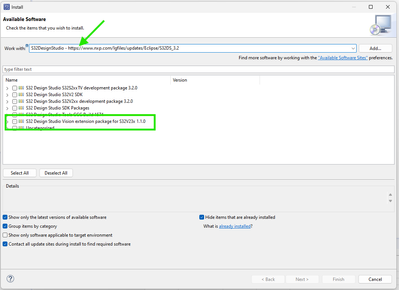
I was able to install the package successfully following this steps, please let me know if you are able to follow them as well.
Thanks.
- 新着としてマーク
- ブックマーク
- 購読
- ミュート
- RSS フィードを購読する
- ハイライト
- 印刷
- 不適切なコンテンツを報告
I actually need to use 3.2 version specifically for some testing. Is there any way I can get the vision extension package specifically for this version?
alejandro_e
- 新着としてマーク
- ブックマーク
- 購読
- ミュート
- RSS フィードを購読する
- ハイライト
- 印刷
- 不適切なコンテンツを報告
Hello @Prathiksha,
Thanks for reaching out to us. About your question, checking the S32V available software for S32DS I was only able to find the S32V Extension package as old as 3.3. Is it possible for you to use a newer version of S32DS?
Also, did you intend to publish this question in one of your companies private communities? if so let me know.
Thanks.
