
- Forums
- Product Forums
- General Purpose MicrocontrollersGeneral Purpose Microcontrollers
- i.MX Forumsi.MX Forums
- QorIQ Processing PlatformsQorIQ Processing Platforms
- Identification and SecurityIdentification and Security
- Power ManagementPower Management
- Wireless ConnectivityWireless Connectivity
- RFID / NFCRFID / NFC
- Advanced AnalogAdvanced Analog
- Neural Processing UnitsNeural Processing Units
- MCX Microcontrollers
- S32G
- S32K
- S32V
- MPC5xxx
- Other NXP Products
- S12 / MagniV Microcontrollers
- Powertrain and Electrification Analog Drivers
- Sensors
- Vybrid Processors
- Digital Signal Controllers
- 8-bit Microcontrollers
- ColdFire/68K Microcontrollers and Processors
- PowerQUICC Processors
- OSBDM and TBDML
- S32M
- S32Z/E
-
- Solution Forums
- Software Forums
- MCUXpresso Software and ToolsMCUXpresso Software and Tools
- CodeWarriorCodeWarrior
- MQX Software SolutionsMQX Software Solutions
- Model-Based Design Toolbox (MBDT)Model-Based Design Toolbox (MBDT)
- FreeMASTER
- eIQ Machine Learning Software
- Embedded Software and Tools Clinic
- S32 SDK
- S32 Design Studio
- GUI Guider
- Zephyr Project
- Voice Technology
- Application Software Packs
- Secure Provisioning SDK (SPSDK)
- Processor Expert Software
- Generative AI & LLMs
-
- Topics
- Mobile Robotics - Drones and RoversMobile Robotics - Drones and Rovers
- NXP Training ContentNXP Training Content
- University ProgramsUniversity Programs
- Rapid IoT
- NXP Designs
- SafeAssure-Community
- OSS Security & Maintenance
- Using Our Community
-
- Cloud Lab Forums
-
- Knowledge Bases
- ARM Microcontrollers
- i.MX Processors
- Identification and Security
- Model-Based Design Toolbox (MBDT)
- QorIQ Processing Platforms
- S32 Automotive Processing Platform
- Wireless Connectivity
- CodeWarrior
- MCUXpresso Suite of Software and Tools
- MQX Software Solutions
- RFID / NFC
- Advanced Analog
- Neural Processing Units
-
- NXP Tech Blogs
- Home
- :
- 软件论坛
- :
- S32 Design Studio
- :
- Re: S32 Design Studo for ARM - Error: Program "" not found in PATH - S32K142_EVB_JumpStart
S32 Design Studo for ARM - Error: Program "" not found in PATH - S32K142_EVB_JumpStart_Firmware
S32 Design Studo for ARM - Error: Program "" not found in PATH - S32K142_EVB_JumpStart_Firmware

Hello,
I downloaded the project "S32K142_EVB_JumpStart_Firmware" from the NXP site. When I try to compile it with S32 Design Studio for ARM 2.2, I get the following error:

I tried to compile the same project with S32 Design Studio for Platform, the problem is exactly the same.
Info: in both cases, I have uploaded the project by the menu "File > Open Projects from File System...".
Can you help me resolve this issue? Thank you very much.
Hi Julián,
I finally managed to install version 2.0 of S32 Design Studio for ARM using my admin account. I imported the project "S32K142_EVB_JumpStart_Firmware", but the generation results in the same error as with version 2.2. Here is the screenshot:

In case this could be useful to help me resolve this problem, the installation log file is attached.
Once again thank you for your help.
Bernard.

 Julián_AragónM
Hi @Bernez,
Could you help me confirm you installed SDK_S32K14x_08 and followed Q&A of S32K1x FreeMASTER JumpStart Project?
If the project still doesn't work, you can try the following community post:
- Cannot run program "": Launching failed, Error: Pr... - NXP Community
- Error : Program "" not found in PATH - NXP Community
Please update me on any findings.
Best regards,
Julián.
Hi Julián,
yes I tried to follow "Q&A of S32K1x FreeMASTER JumpStart Project", but everything is not working properly. In the "4.5 Set Up Debug Configuration" chapter, the "Apply" button is not active, only the "Debug" button is accessible. When you click on it, an error message appears.


When I proceed:
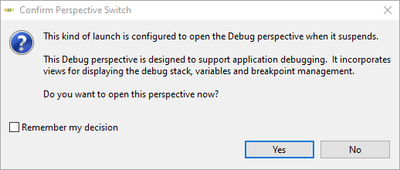
Click on "Yes":

it seems that we can debug (Run, Suspend, Resume, Step Into, Step Over, Step Return, Terminate… are available), but we do not have access to the source files, it is not viable. I don't know where the indicated path is found ("D:\GIT\033_jumpstart_sw\S32K142_EVB_JumpStart\S32K142_EVB_JumpStart_Firmware\Debug_FLASH/../Sources/main.c"), I looked in the paths specified in the project properties, this path is not specified anywhere, and it does not appear in the source files (according to what I could find).
Yes, I updated "S32 Design Studio for Arm® v2.0 Update 2 – S32 SDK 0.8.5 EAR & MQX", here are the installation details:

I reconfigured the baud rate to 115200 as indicated in chapter 4:
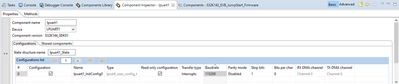
and then I clicked Generate Processor Expert Code:

The problem is still the same.
I had already read the community posts, but the only information that seemed interesting to me would be a command line exceeding 8192 characters and that the GNU ARM Eclipse build tool would have to be updated. The proposed version seems obsolete. I don't know how to check which version I'm currently using and I don't know exactly what to update.
Best regards.
Bernard
Julián_AragónM
Hi @Bernez,
Regarding to not having access to the source files when debugging, when you proceed with debugging with errors in the active configuration, the debug perspective does not function properly.
Just to confirm, there has been no modification to the example after importing, correct? I am asking this because I can build the example correctly with no modifications.

Best regards,
Julián
Julián_AragónM
Hi @Bernez,
When importing your project, S32DS throws me many errors in configuration for the SDK, as such:

As well as some path problems;

This seems to be a problem with the project configuration for the KSDK specific path:

Could you try installing S32 Design Studio for Arm v2.0 - Update 3, which includes S32K14x_EAR_0.8.6? This seems to fix the SDK path value issue:

Once this update is installed, please try importing the project I have shared into the workspace, the same way you already explained in the original post: Import > Existing Project Into Workspace > Select archive file > Finish
Once imported, move the Baudrate configuration first, generate Processor Expert Code which should prompt a "Track Changes" window:

After accepting and waiting for the code to be generated, the project should be able to be built:

If this is still not the case, I would suggest reinstalling S32DS, and only adding update 2 and 3, and testing these steps again, as your workspace or installation may have been broken.
I have also added the build log, and some project properties for the C Build, as you error seems to be related to the makefile, so you can compare:


Best regards,
Julián.
Hi Julián,
I have installed S32 Design Studio for Arm v2.0 - Update 3, which includes S32K14x_EAR_0.8.6. I then updated the project configuration for the KSDK specific path as you requested. The operation went well.
I then wanted to import the project that you just shared with me, but this is not possible because projects cannot be imported when they already exist in the workspace. So I deleted the old project from the workspace so I could import the new one.

but the following error appeared:

No action is then possible, an error systematically occurs.
So I decided to uninstall then reinstall S32DS and add update 3:


After that, I built the project, there are no more errors but there are still 7 warnings. I will now try to resolve them.


Bernard.
Julián_AragónM
Hi @Bernez,
I'm glad there are no more errors when building. You can still flash and debug the code if there are just warnings in the workspace.
I hope you found this helpful.
Best regards,
Julián
Hi Julián,
I think the installation went wrong because I didn't run as administrator. I'll start again, but I won't have time to do it until tomorrow morning. Wait to answer me, I'll give you news tomorrow. Excuse me for the disruption.
Best regards.
Bernard.
Julián_AragónM
Hi @Bernez,
No problem, please update me on any findings.
If this was a permission error, inside the nxp folder, under "C:\nxp\S32DS_ARM_v2.0\_S32 Design Studio for ARM v2.0_installation\Logs" you can find the .log file containing the following line:

I will be waiting for your answer.
Best regards,
Julián.
Hi Julián,
Thank you for your reply. I downloaded version 2.0 of S32 DS ("S32DS_ARM_Win32_v2.0_b170810.exe"). Unfortunately the installation does not go well, here is the message I get:

What is the problem, do I need to uninstall version 2.2 first?
Best regards.
Bernard.
Julián_AragónM
Hi @Bernez,
The S32K142 EVB JumpStart firmware was made for S32 Design Studio for ARM v2.0. Please try to compile the project on this SW version:

It is also required to install SDK_S32K14x_08, and to reconfigure the baud rate to 115200 as explained in the Q&A of S32K1x FreeMASTER JumpStart Project from the community post.
Hope you find this helpful.
Best regards,
Julián.
