
- Forums
- Product Forums
- General Purpose MicrocontrollersGeneral Purpose Microcontrollers
- i.MX Forumsi.MX Forums
- QorIQ Processing PlatformsQorIQ Processing Platforms
- Identification and SecurityIdentification and Security
- Power ManagementPower Management
- Wireless ConnectivityWireless Connectivity
- RFID / NFCRFID / NFC
- Advanced AnalogAdvanced Analog
- Neural Processing UnitsNeural Processing Units
- MCX Microcontrollers
- S32G
- S32K
- S32V
- MPC5xxx
- Other NXP Products
- S12 / MagniV Microcontrollers
- Powertrain and Electrification Analog Drivers
- Sensors
- Vybrid Processors
- Digital Signal Controllers
- 8-bit Microcontrollers
- ColdFire/68K Microcontrollers and Processors
- PowerQUICC Processors
- OSBDM and TBDML
- S32M
- S32Z/E
-
- Solution Forums
- Software Forums
- MCUXpresso Software and ToolsMCUXpresso Software and Tools
- CodeWarriorCodeWarrior
- MQX Software SolutionsMQX Software Solutions
- Model-Based Design Toolbox (MBDT)Model-Based Design Toolbox (MBDT)
- FreeMASTER
- eIQ Machine Learning Software
- Embedded Software and Tools Clinic
- S32 SDK
- S32 Design Studio
- GUI Guider
- Zephyr Project
- Voice Technology
- Application Software Packs
- Secure Provisioning SDK (SPSDK)
- Processor Expert Software
- Generative AI & LLMs
-
- Topics
- Mobile Robotics - Drones and RoversMobile Robotics - Drones and Rovers
- NXP Training ContentNXP Training Content
- University ProgramsUniversity Programs
- Rapid IoT
- NXP Designs
- SafeAssure-Community
- OSS Security & Maintenance
- Using Our Community
-
- Cloud Lab Forums
-
- Knowledge Bases
- ARM Microcontrollers
- i.MX Processors
- Identification and Security
- Model-Based Design Toolbox (MBDT)
- QorIQ Processing Platforms
- S32 Automotive Processing Platform
- Wireless Connectivity
- CodeWarrior
- MCUXpresso Suite of Software and Tools
- MQX Software Solutions
- RFID / NFC
- Advanced Analog
- Neural Processing Units
-
- NXP Tech Blogs
- Home
- :
- Software Forums
- :
- S32 Design Studio
- :
- Re: Include folder not created
Include folder not created
- Subscribe to RSS Feed
- Mark Topic as New
- Mark Topic as Read
- Float this Topic for Current User
- Bookmark
- Subscribe
- Mute
- Printer Friendly Page
Include folder not created

- Mark as New
- Bookmark
- Subscribe
- Mute
- Subscribe to RSS Feed
- Permalink
- Report Inappropriate Content
I am trying to compile a project with SDK. I get a bunch of "not resolved symbols" and undeclared variables.
I read in another thread that it migh be due the "include" folder is grayed out. The thing is that I checked in my project folder and that "include" folder does not exist. How can I create it?
Kind regards.

 jiri_kral
- Mark as New
- Bookmark
- Subscribe
- Mute
- Subscribe to RSS Feed
- Permalink
- Report Inappropriate Content
Hi Juliana,
just for reference - can you please share screenshot which Include folders are grayed-out? Are there some SDK ones? For folders which can't be found (are grey) - you can add path into project properties -> Settings -> Include:
- Mark as New
- Bookmark
- Subscribe
- Mute
- Subscribe to RSS Feed
- Permalink
- Report Inappropriate Content
Hi @jiri_kral ,
Sure, I'll attach the screenshots. In fact I'll attach 3: 1 showing the missing path, 1 showing the folders created when it is first imported from the model, and 1 showing the folders created after the SDK is added.
There are SDK folders created, yes.
But I don't think that's the problem anymore. What I think is, since I am importing the model from Simulink, it imports a bunch of .h and .c files that then, when the SDK is added, are added again with different parameters and in different locations but with the same names. There are a lot of variables that are "undefined" because the tool doesn't find the right document to look into, and manually change it would be super messy.
So, for example for the "system_s32k144.c" file, it is imported at the beggining from the simulink model into the Design Studio. But then, when the sdk is added, another "system_s32k144.c" file is created but in SDK>platform>devices>S32k144>startup.
In conclusion, I think the problem is that the creation of these additional files is creating conflict and that's why for all the undeclared and unresolved variables. I don't know how to solve that. Manually would be messy and doing manual changes for every project is not an option. The final objective was to implement RTOS but without the SDK working I don't see how this could be done.
Thanks for the reply. Kind regards.
jiri_kral
- Mark as New
- Bookmark
- Subscribe
- Mute
- Subscribe to RSS Feed
- Permalink
- Report Inappropriate Content
Hi Juliana,
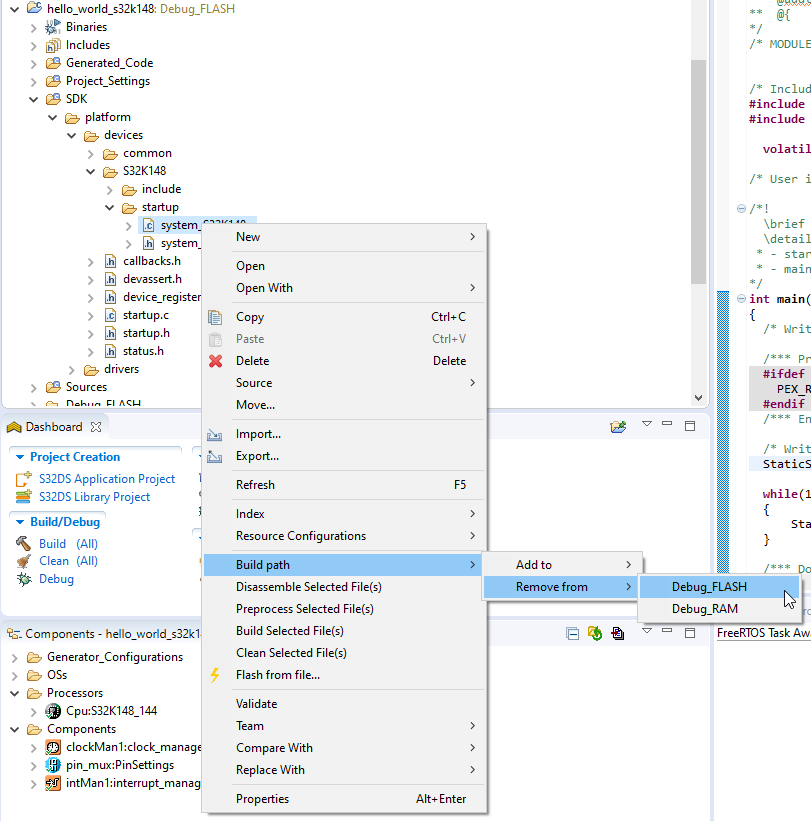
try to copy your include folder from your .zip into project folder. If there are duplicated SDK files, you can exclude it from build:
- Mark as New
- Bookmark
- Subscribe
- Mute
- Subscribe to RSS Feed
- Permalink
- Report Inappropriate Content
Hello Jiri,
It mostly worked! I don't have any more errors in the SDK folder. I have errors of "undefined variables" from files that used to work before the SDK were added. (I attached a screenshot).
I found here a solution, that didn't quite worked.
I also noticed here that you sugested something related to the AMMCLIB, which I don't think I have in my includes.
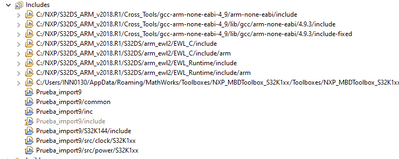
But I have the file .a added at the root.

Is that enough? Should it be among my includes?
Kind regards.
jiri_kral
- Mark as New
- Bookmark
- Subscribe
- Mute
- Subscribe to RSS Feed
- Permalink
- Report Inappropriate Content
Hi,
what is your S32DS Version? Did you generated Processor expert code before build?
Jiri
- Mark as New
- Bookmark
- Subscribe
- Mute
- Subscribe to RSS Feed
- Permalink
- Report Inappropriate Content
Edit @jiri_kral : I found here how to use the add the Expert Code, but I keep getting the errors.
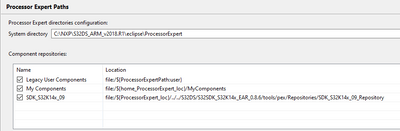
Regarding the SDKs, I have this data, I don't know if it's useful:
- Mark as New
- Bookmark
- Subscribe
- Mute
- Subscribe to RSS Feed
- Permalink
- Report Inappropriate Content
Hi @jiri_kral ,
Thanks very much for your fast reply.
I am using the S32DS.ARM.2018.R1 version. I don't think I used expert generator since I don't know what that is. I only imported a .xml from a project created in Simulink.
When I first build it, it goes well. There's only these warnings:
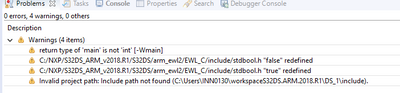
When I attach the SDK, and then press build again, it's when all the errors appear.
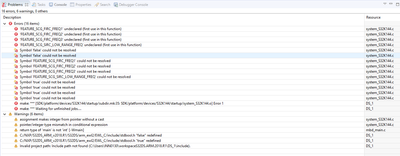
Kind regards, Juliana.
jiri_kral
- Mark as New
- Bookmark
- Subscribe
- Mute
- Subscribe to RSS Feed
- Permalink
- Report Inappropriate Content
Hi Juliana,
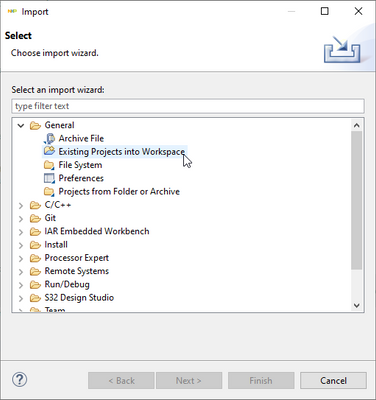
what kind of project do you have? Default way how to import an existing project is through File -> Import -> General -> Existing project into workspace:
Other possibility (actually I never use it) is import ProjectInfo.xml:
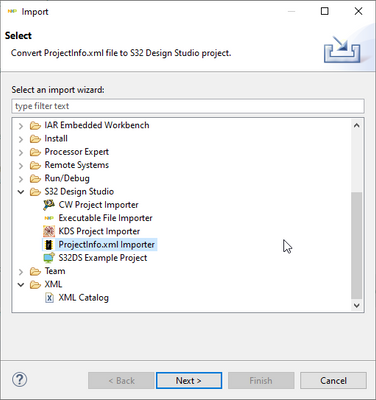
If I'm correct - the second method create project based on info inside.xml file, but doesn't copy source files into project itself and you need to copy it manually.
Jiri
- Mark as New
- Bookmark
- Subscribe
- Mute
- Subscribe to RSS Feed
- Permalink
- Report Inappropriate Content
I imported it using the second method you mentioned. When I tried the first one, it couldn't find the project in the folder I specified.
The process I followed when I tried the first method you mentioned (that I couln't make it work) was:
1. In matlab, I select the project folder example_mbd_rtw
2. I create a .zip with this folder.
3. I unzip it and put it in my desktop.
4. I open the DS and select Import>Existing Project into Workspace>
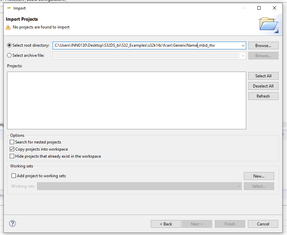
So I just tried the other way, in which I could find the file directly into the folder.
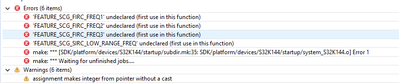
As you can see in the picture below, It seems that it can't find the definition of the variables, I am just assuming it is due the lack of the include folder but I might be mistaken. Maybe it's because something else is missing?
And it comes from here
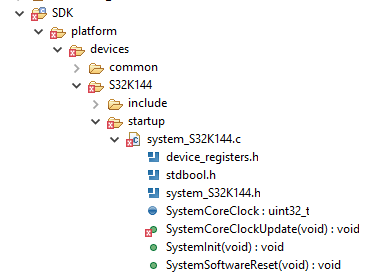
Which I don't understand, is that the error is given only for 3 variables that are the same as the first one in the declaration, but the first one doesn't give any errors.
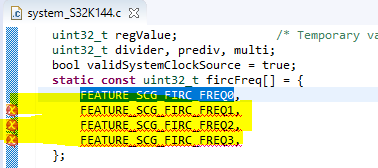


The error is only for 1, 2 and 3. 0 is OK.
Kind regards.
