HOWTO: Setup static IP address for S32 debug probe

cancel
Showing results for 
Show  only  | Search instead for 
Did you mean: 

HOWTO: Setup static IP address for S32 debug probe

HOWTO: Setup static IP address for S32 debug probe

Requirements:

  • S32 debug probe connected to network (with DHCP server) and visible for your PC machine  
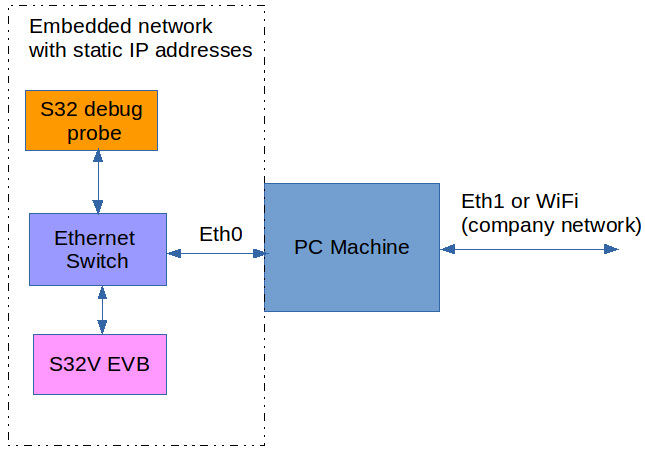
  • separate network using static IP addresses (or direct connection between PC and S32 debug probe). The scenario is similar like on this picture: 
pastedImage_3.png

Procedure:


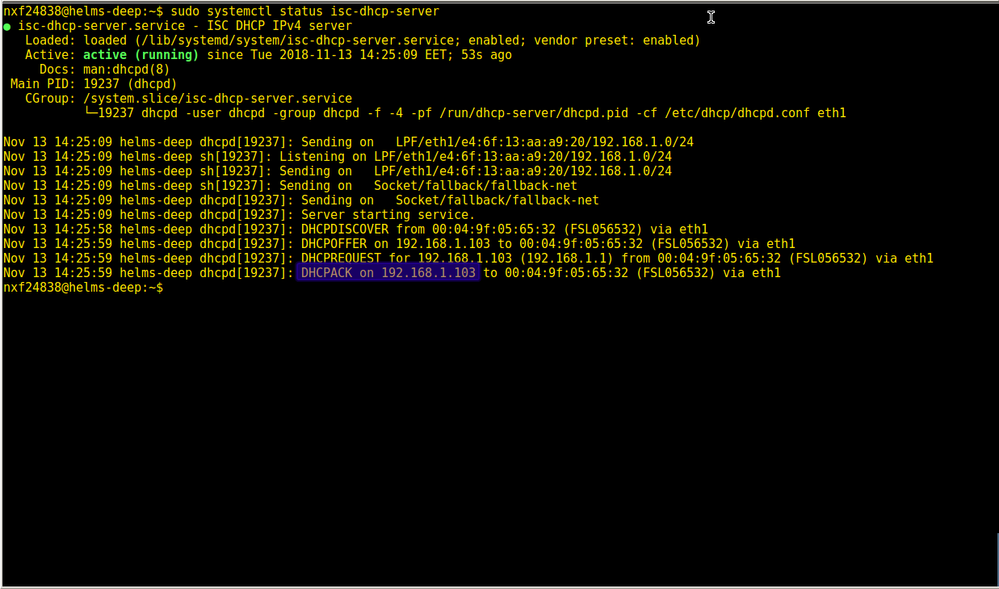
Connect power to S32 debug probe with already connected ethernet cable and wait until green LED (RX/TX) starts blink.Connect to S32 debug probe by telnet client. You can use default domain name FSLXXYYZZ where XXYYZZ are last 6 digits from S32 debug probe MAC address or assigned IP address:
pastedImage_79.png

pastedImage_80.png

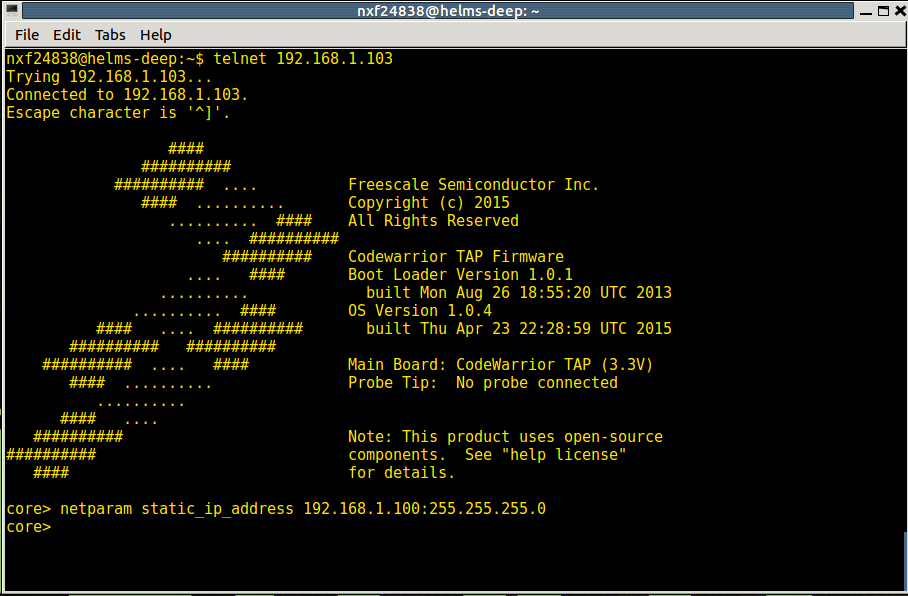
Static IP address can be set by netparam static_ip_address ADDRESS:NETMASK command. Make sure that you are choosing IP address from range of your Embedded network. My network uses standard 192.168.1.xxx here is mt setings: 

netparam static_ip_address 192.168.1.100:255.255.255.0
pastedImage_81.png

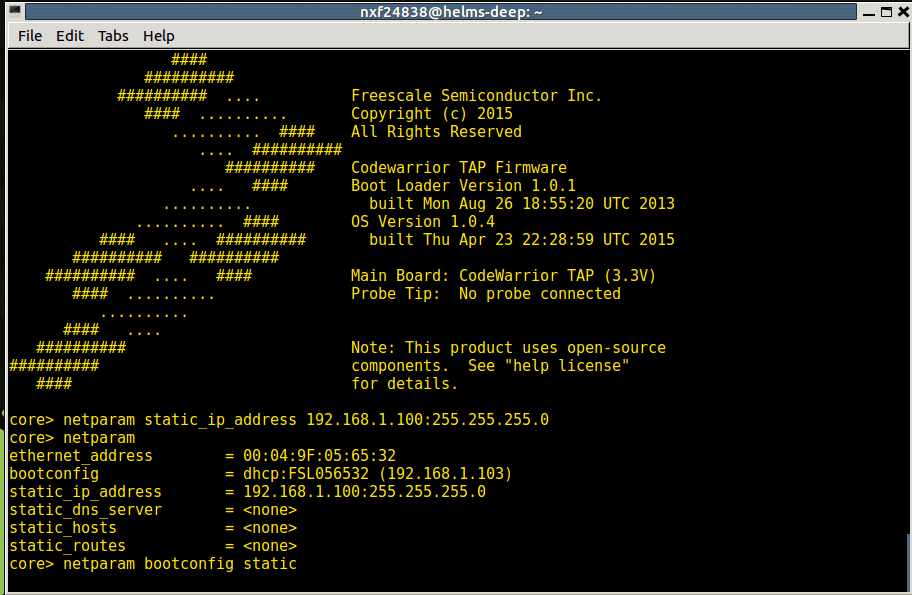
You also need to set boot config from DHCP to Static:

netparam bootconfig static
pastedImage_84.png

Turn OFF and ON again S32 debug probe and check the settings by telnet with static IP address - in my case 192.168.1.100:
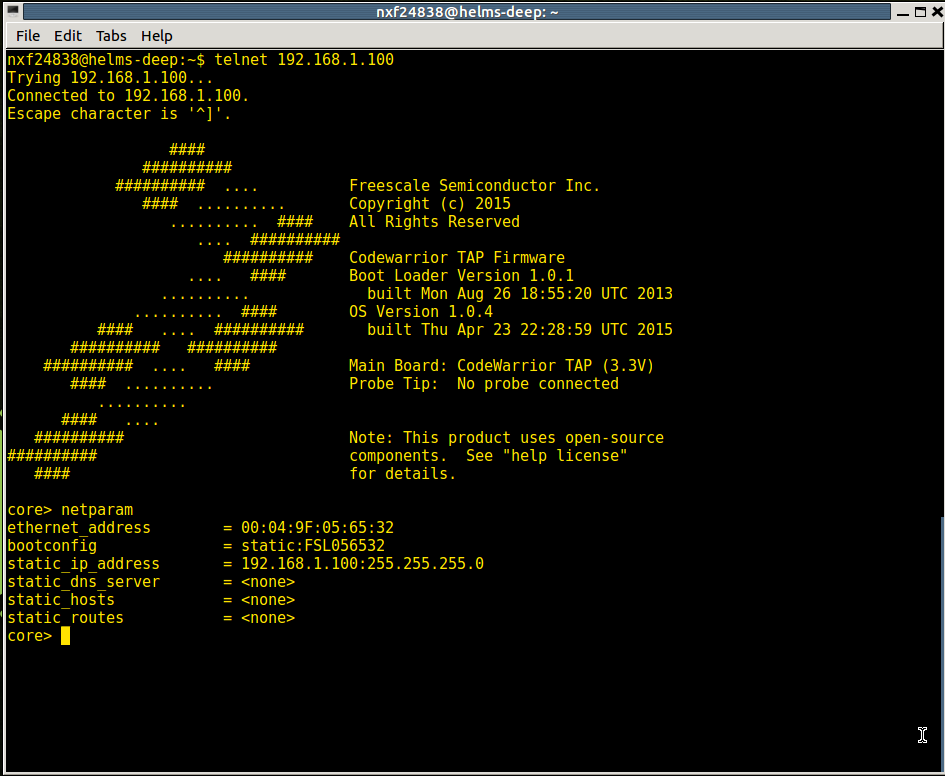
pastedImage_85.png

We are done. 

%3CLINGO-SUB%20id%3D%22lingo-sub-1103006%22%20slang%3D%22en-US%22%20mode%3D%22CREATE%22%3EHOWTO%3A%20Setup%20static%20IP%20address%20for%20S32%20debug%20probe%3C%2FLINGO-SUB%3E%3CLINGO-BODY%20id%3D%22lingo-body-1103006%22%20slang%3D%22en-US%22%20mode%3D%22CREATE%22%3E%3CP%3E%3CSPAN%20style%3D%22color%3A%20%2351626f%3B%20background-color%3A%20%23ffffff%3B%20border%3A%200px%3B%20font-weight%3A%20bold%3B%22%3E%3CSTRONG%3ERequirements%3A%3C%2FSTRONG%3E%3C%2FSPAN%3E%3C%2FP%3E%3CUL%3E%3CLI%3EPC%20machine%20with%20telnet%20client%20(for%20Windows%20you%20can%20use%20Putty%20-%26nbsp%3B%3CA%20class%3D%22link-titled%22%20href%3D%22https%3A%2F%2Fwww.putty.org%2F%22%20title%3D%22https%3A%2F%2Fwww.putty.org%2F%22%20rel%3D%22nofollow%20noopener%20noreferrer%22%20target%3D%22_blank%22%3EDownload%20PuTTY%20-%20a%20free%20SSH%20and%20telnet%20client%20for%20Windows%3C%2FA%3E%26nbsp%3B)%3C%2FLI%3E%3CLI%3EDHCP%20server%20running%20on%20your%20PC%20machine%20or%20network%20connection%20with%20DHCP%20server%20%3CUL%3E%3CLI%3EHow%20to%20install%20DHCP%20server%20on%20Linux%26nbsp%3B%3CA%20class%3D%22link-titled%22%20href%3D%22https%3A%2F%2Fwww.ostechnix.com%2Finstall-dhcp-server-in-ubuntu-16-04%2F%22%20title%3D%22https%3A%2F%2Fwww.ostechnix.com%2Finstall-dhcp-server-in-ubuntu-16-04%2F%22%20rel%3D%22nofollow%20noopener%20noreferrer%22%20target%3D%22_blank%22%3Ehttps%3A%2F%2Fwww.ostechnix.com%2Finstall-dhcp-server-in-ubuntu-16-04%2F%3C%2FA%3E%26nbsp%3B%3C%2FLI%3E%3CLI%3EDHCP%20server%20for%20Windows%20-%26nbsp%3B%3CA%20class%3D%22link-titled%22%20href%3D%22https%3A%2F%2Fsourceforge.net%2Fprojects%2Fdhcpserver%2F%22%20title%3D%22https%3A%2F%2Fsourceforge.net%2Fprojects%2Fdhcpserver%2F%22%20rel%3D%22nofollow%20noopener%20noreferrer%22%20target%3D%22_blank%22%3EOpen%20DHCP%20Server%20download%20%7C%20SourceForge.net%3C%2FA%3E%26nbsp%3B%20%26nbsp%3B%26nbsp%3B%26nbsp%3B%3C%2FLI%3E%3C%2FUL%3E%3C%2FLI%3E%3C%2FUL%3E%3CUL%3E%3CLI%3ES32%20debug%20probe%20connected%20to%20network%20(with%20DHCP%20server)%20and%20visible%20for%20your%20PC%20machine%26nbsp%3B%26nbsp%3B%3C%2FLI%3E%3CLI%3Eseparate%20network%20using%20static%20IP%20addresses%20(or%20direct%20connection%20between%20PC%20and%20S32%20debug%20probe).%20The%20scenario%20is%20similar%20like%20on%20this%20picture%3A%26nbsp%3B%3C%2FLI%3E%3C%2FUL%3E%3CP%3E%3C%2FP%3E%3CP%3E%3C%2FP%3E%3CP%20style%3D%22text-align%3A%20center%3B%22%3E%3CSPAN%20class%3D%22lia-inline-image-display-wrapper%22%20image-alt%3D%22pastedImage_3.png%22%3E%3Cspan%20class%3D%22lia-inline-image-display-wrapper%22%20image-alt%3D%22pastedImage_3.png%22%20style%3D%22width%3A%20645px%3B%22%3E%3Cimg%20src%3D%22https%3A%2F%2Fcommunity.nxp.com%2Ft5%2Fimage%2Fserverpage%2Fimage-id%2F74903i39FA2012548B760B%2Fimage-size%2Flarge%3Fv%3Dv2%26amp%3Bpx%3D999%22%20role%3D%22button%22%20title%3D%22pastedImage_3.png%22%20alt%3D%22pastedImage_3.png%22%20%2F%3E%3C%2Fspan%3E%3C%2FSPAN%3E%3C%2FP%3E%3CP%3E%3C%2FP%3E%3CP%3E%3C%2FP%3E%3CP%3E%3C%2FP%3E%3CP%3E%3C%2FP%3E%3CP%3E%3CSTRONG%3EProcedure%3A%3C%2FSTRONG%3E%3C%2FP%3E%3CP%3E%3CSTRONG%3E%26nbsp%3B%3C%2FSTRONG%3E%3C%2FP%3E%3CP%3EConnect%20power%20to%20S32%20debug%20probe%20with%20already%20connected%20ethernet%20cable%20and%20wait%20until%20green%20LED%20(RX%2FTX)%20starts%20blink.Connect%20to%20S32%20debug%20probe%20by%20telnet%20client.%20You%20can%20use%20default%20domain%20name%20FSLXXYYZZ%20where%20XXYYZZ%20are%20last%206%20digits%20from%20S32%20debug%20probe%20MAC%20address%20or%20assigned%20IP%20address%3A%3C%2FP%3E%3CP%3E%3CSPAN%20class%3D%22lia-inline-image-display-wrapper%22%20image-alt%3D%22pastedImage_79.png%22%3E%3Cspan%20class%3D%22lia-inline-image-display-wrapper%22%20image-alt%3D%22pastedImage_79.png%22%20style%3D%22width%3A%20999px%3B%22%3E%3Cimg%20src%3D%22https%3A%2F%2Fcommunity.nxp.com%2Ft5%2Fimage%2Fserverpage%2Fimage-id%2F74768i96A6F5126C8A1215%2Fimage-size%2Flarge%3Fv%3Dv2%26amp%3Bpx%3D999%22%20role%3D%22button%22%20title%3D%22pastedImage_79.png%22%20alt%3D%22pastedImage_79.png%22%20%2F%3E%3C%2Fspan%3E%3C%2FSPAN%3E%3C%2FP%3E%3CP%3E%3C%2FP%3E%3CP%3E%3CSPAN%20class%3D%22lia-inline-image-display-wrapper%22%20image-alt%3D%22pastedImage_80.png%22%3E%3Cspan%20class%3D%22lia-inline-image-display-wrapper%22%20image-alt%3D%22pastedImage_80.png%22%20style%3D%22width%3A%20999px%3B%22%3E%3Cimg%20src%3D%22https%3A%2F%2Fcommunity.nxp.com%2Ft5%2Fimage%2Fserverpage%2Fimage-id%2F74812iF03088FFB3524502%2Fimage-size%2Flarge%3Fv%3Dv2%26amp%3Bpx%3D999%22%20role%3D%22button%22%20title%3D%22pastedImage_80.png%22%20alt%3D%22pastedImage_80.png%22%20%2F%3E%3C%2Fspan%3E%3C%2FSPAN%3E%3C%2FP%3E%3CP%3E%3C%2FP%3E%3CP%3E%3C%2FP%3E%3CP%3EStatic%20IP%20address%20can%20be%20set%20by%20netparam%20static_ip_address%20ADDRESS%3ANETMASK%20command.%20Make%20sure%20that%20you%20are%20choosing%20IP%20address%20from%20range%20of%20your%20Embedded%20network.%20My%20network%20uses%20standard%20192.168.1.xxx%20here%20is%20mt%20setings%3A%26nbsp%3B%3C%2FP%3E%3CP%3E%3C%2FP%3E%3CP%3E%3CSPAN%20style%3D%22color%3A%20%23339966%3B%22%3E%3CSTRONG%3Enetparam%20static_ip_address%20192.168.1.100%3A255.255.255.0%3C%2FSTRONG%3E%3C%2FSPAN%3E%3C%2FP%3E%3CP%3E%3C%2FP%3E%3CP%3E%3CSPAN%20class%3D%22lia-inline-image-display-wrapper%22%20image-alt%3D%22pastedImage_81.png%22%3E%3Cspan%20class%3D%22lia-inline-image-display-wrapper%22%20image-alt%3D%22pastedImage_81.png%22%20style%3D%22width%3A%20908px%3B%22%3E%3Cimg%20src%3D%22https%3A%2F%2Fcommunity.nxp.com%2Ft5%2Fimage%2Fserverpage%2Fimage-id%2F75243i3CB92B60C804ED82%2Fimage-size%2Flarge%3Fv%3Dv2%26amp%3Bpx%3D999%22%20role%3D%22button%22%20title%3D%22pastedImage_81.png%22%20alt%3D%22pastedImage_81.png%22%20%2F%3E%3C%2Fspan%3E%3C%2FSPAN%3E%3C%2FP%3E%3CP%3E%3C%2FP%3E%3CP%3EYou%20also%20need%20to%20set%20boot%20config%20from%20DHCP%20to%20Static%3A%3C%2FP%3E%3CP%3E%3C%2FP%3E%3CP%3E%3CSPAN%20style%3D%22color%3A%20%23339966%3B%22%3E%3CSTRONG%3Enetparam%20bootconfig%20static%3C%2FSTRONG%3E%3C%2FSPAN%3E%3C%2FP%3E%3CP%3E%3C%2FP%3E%3CP%3E%3CSPAN%20class%3D%22lia-inline-image-display-wrapper%22%20image-alt%3D%22pastedImage_84.png%22%3E%3Cspan%20class%3D%22lia-inline-image-display-wrapper%22%20image-alt%3D%22pastedImage_84.png%22%20style%3D%22width%3A%20912px%3B%22%3E%3Cimg%20src%3D%22https%3A%2F%2Fcommunity.nxp.com%2Ft5%2Fimage%2Fserverpage%2Fimage-id%2F75293i9BDBA3E616F4075F%2Fimage-size%2Flarge%3Fv%3Dv2%26amp%3Bpx%3D999%22%20role%3D%22button%22%20title%3D%22pastedImage_84.png%22%20alt%3D%22pastedImage_84.png%22%20%2F%3E%3C%2Fspan%3E%3C%2FSPAN%3E%3C%2FP%3E%3CP%3E%3C%2FP%3E%3CP%3ETurn%20OFF%20and%20ON%20again%20S32%20debug%20probe%20and%20check%20the%20settings%20by%20telnet%20with%20static%20IP%20address%20-%20in%20my%20case%20192.168.1.100%3A%3C%2FP%3E%3CP%3E%3C%2FP%3E%3CP%3E%3CSPAN%20class%3D%22lia-inline-image-display-wrapper%22%20image-alt%3D%22pastedImage_85.png%22%3E%3Cspan%20class%3D%22lia-inline-image-display-wrapper%22%20image-alt%3D%22pastedImage_85.png%22%20style%3D%22width%3A%20945px%3B%22%3E%3Cimg%20src%3D%22https%3A%2F%2Fcommunity.nxp.com%2Ft5%2Fimage%2Fserverpage%2Fimage-id%2F75342i1BE7546F0C0CADC3%2Fimage-size%2Flarge%3Fv%3Dv2%26amp%3Bpx%3D999%22%20role%3D%22button%22%20title%3D%22pastedImage_85.png%22%20alt%3D%22pastedImage_85.png%22%20%2F%3E%3C%2Fspan%3E%3C%2FSPAN%3E%3C%2FP%3E%3CP%3E%3C%2FP%3E%3CP%3EWe%20are%20done.%26nbsp%3B%3C%2FP%3E%3C%2FLINGO-BODY%3E
No ratings
Version history
Last update:
‎11-13-2018 08:06 AM
Updated by: