
- Forums
- Product Forums
- General Purpose MicrocontrollersGeneral Purpose Microcontrollers
- i.MX Forumsi.MX Forums
- QorIQ Processing PlatformsQorIQ Processing Platforms
- Identification and SecurityIdentification and Security
- Power ManagementPower Management
- Wireless ConnectivityWireless Connectivity
- RFID / NFCRFID / NFC
- Advanced AnalogAdvanced Analog
- MCX Microcontrollers
- S32G
- S32K
- S32V
- MPC5xxx
- Other NXP Products
- S12 / MagniV Microcontrollers
- Powertrain and Electrification Analog Drivers
- Sensors
- Vybrid Processors
- Digital Signal Controllers
- 8-bit Microcontrollers
- ColdFire/68K Microcontrollers and Processors
- PowerQUICC Processors
- OSBDM and TBDML
- S32M
- S32Z/E
-
- Solution Forums
- Software Forums
- MCUXpresso Software and ToolsMCUXpresso Software and Tools
- CodeWarriorCodeWarrior
- MQX Software SolutionsMQX Software Solutions
- Model-Based Design Toolbox (MBDT)Model-Based Design Toolbox (MBDT)
- FreeMASTER
- eIQ Machine Learning Software
- Embedded Software and Tools Clinic
- S32 SDK
- S32 Design Studio
- GUI Guider
- Zephyr Project
- Voice Technology
- Application Software Packs
- Secure Provisioning SDK (SPSDK)
- Processor Expert Software
- Generative AI & LLMs
-
- Topics
- Mobile Robotics - Drones and RoversMobile Robotics - Drones and Rovers
- NXP Training ContentNXP Training Content
- University ProgramsUniversity Programs
- Rapid IoT
- NXP Designs
- SafeAssure-Community
- OSS Security & Maintenance
- Using Our Community
-
- Cloud Lab Forums
-
- Knowledge Bases
- ARM Microcontrollers
- i.MX Processors
- Identification and Security
- Model-Based Design Toolbox (MBDT)
- QorIQ Processing Platforms
- S32 Automotive Processing Platform
- Wireless Connectivity
- CodeWarrior
- MCUXpresso Suite of Software and Tools
- MQX Software Solutions
- RFID / NFC
- Advanced Analog
-
- NXP Tech Blogs
Hi there,
I have compiled latest yocto kirkstone layers and now I am trying to use them to boot the LS1028ardb board.
The main two things I want to do are
- flash a sd card with the Yocto compilation to boot the board
- flash the xspi nor with the Yocto compilation to boot the board
I have read the Yocto manual and LSDK manual to understand the process, but I am still unsure how to proceed. How should I proceed? Any additional updated doc about how to handle de Yocto compilation bootloader, kernel and rootfs?
Thanks,
imuguruza
已解决! 转到解答。

 yipingwang
My mistake, it should be
Please deploy TF-A FIP image at 0x00800 in SD card.
dd if=fip_uboot.bin of=/dev/sdb bs=512 seek=2048
yipingwang
Please refer to the following procedure to deploy images to SD card.
Please connect SD card to your host PC
1. Please create two partitions with Linux command "fdisk", one 1G FAT16 and 2G one ext2/ext3 or with remainder of the available disk size.
# mkfs.vfat /dev/sdb1
# mkfs.ext2 /dev/sdb2
2. Please deployed RCW + PBI + BL2(bl2_<boot_mode>.pbl)image to SD card as the following.
dd if=bl2_sd.pbl of=/dev/sdb bs=512 seek=8
note:/dev/sdb is SD device name.
Please deploy TF-A FIP image at 0x00800 in SD card.
dd if=fip_uboot.bin of=/dev/sdb bs=512 seek=204
3. Please deploy rootfs filesystem to SD card in the host PC as the following.
# mkdir /temp
# mount /dev/sdb2 /temp
# cd /temp
# cp fsl-image-networking-ls1028ardb.tar.gz .
# tar -xzvf fsl-image-networking-ls1028ardb.tar.gz
# rm fsl-image-networking-ls1028ardb.tar.gz
Please deploy Kernel Image and the dtb to the /boot folder.
# cp Image boot
# cp fsl-ls1028a-rdb-sdk.dtb boot
Configure the switch setting boot from SD card
Set the environment in uboot for SD boot.
=> setenv bootcmd 'setenv bootargs root=/dev/mmcblk0p2 rw rootdelay=5 console=ttyS0,115200;mmcinfo;ext2load mmc 0:2 0xa0000000 /boot/Image;ext2load mmc 0:2 0xb0000000 /boot/fsl-ls1028a-rdb-sdk.dtb;booti 0xa0000000 - 0xb0000000'
=> saveenv
Boot up Linux
=> boot
You could program atf images to xspi under SD u-boot environment.
Hi,
I have followed your instructions and obtained the next error when booting:
NOTICE:  Fixed DDR on board

NOTICE:  4 GB DDR4, 32-bit, CL=11, ECC on
NOTICE:  BL2: v2.6(release):lf-5.15.32-2.0.0-0-gc6a19b1a3
NOTICE:  BL2: Built : 06:37:22, Jun  7 2022
ERROR:   BL2: Failed to load image id 3 (-2)
Authentication failure
I am not sure if it's because the BL2 is not finding fip_uboot file or if the dd offset should be other or which is the cause uboot is not launching. Any idea?
Regards,
imuguruza
I am wondering if the fip file offset is correct. Checking the Yocto doc, I've found the next table:
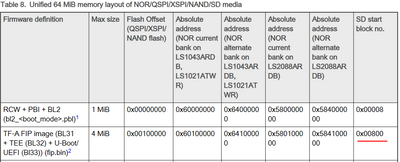
So, instead of using the suggested 204 offset shouldn't be the 800?
Still I have tried that out and doesn't work... I am missing something else? :'\
Regards,
imuguruza
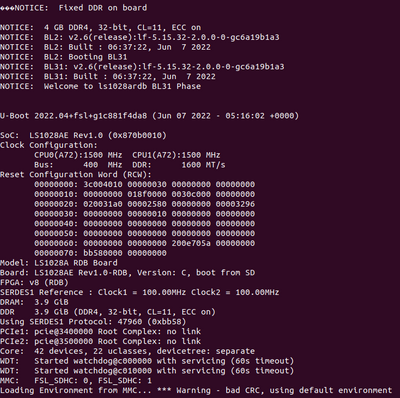
OK, I have been reviweing the doc.
Should I apply the offset suggested in the next table using dd for flashinf the different binaries?
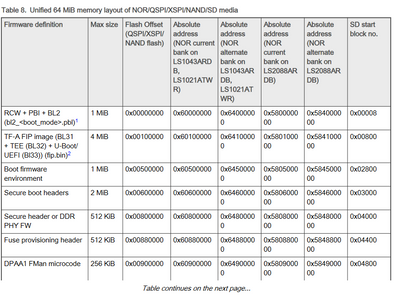
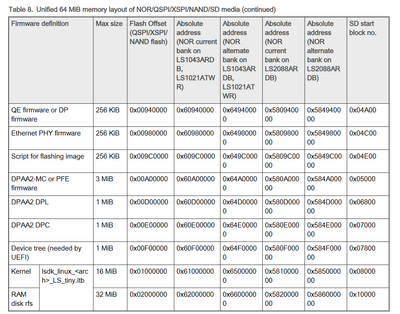
But, how can I generate the itb file? Using mkimage? Which command should I use?
That's a compressed rfs, how can I use an uncompressed rfs? Should I change the bootargs to point that out? How and where?
I am missing all that info...
Regards,
imuguruza
